
Introduction
If you have published twenty Shorts and watched the view counter crawl to a hundred each, this guide is for you. Not the recycled "use trending sounds and post consistently" advice you have already read in every other article. Real, current, working tactics that match how YouTube actually distributes Shorts in 2026.
Here is the truth nobody seems to mention: YouTube quietly changed the rules of the game on March 31, 2025, and most creators are still optimizing for a metric that no longer matters. By the time you finish this article, you will know exactly which lever to pull next, why your last upload underperformed, and how to set up a system that compounds week after week.
The Single Biggest Shift You Need to Understand: Engaged Views
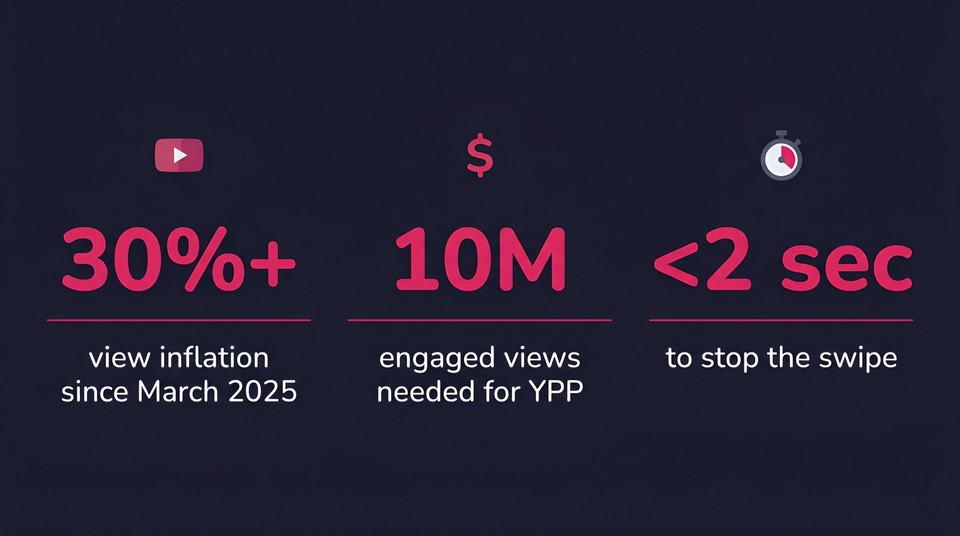
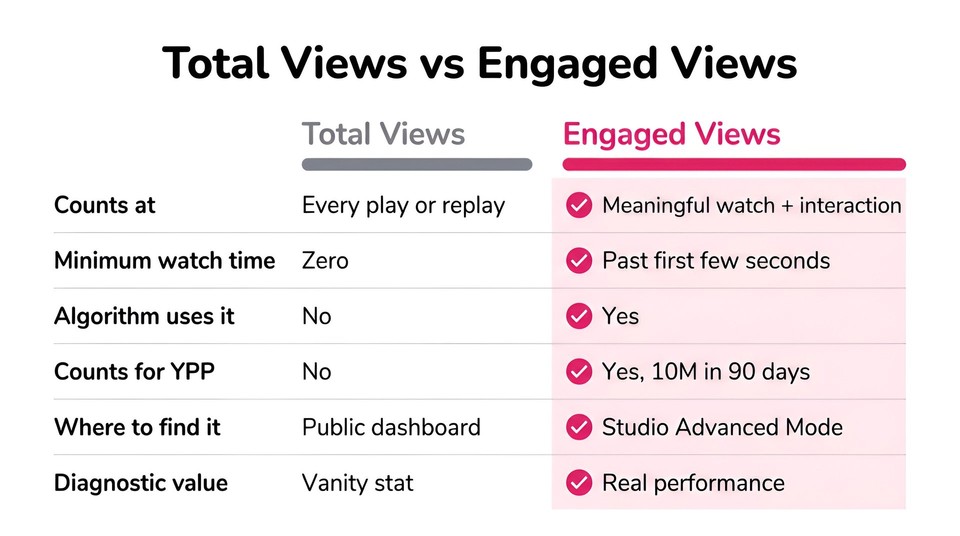
In March 2025, YouTube redefined what a "view" means on Shorts. The moment your Short starts playing or replays, the counter ticks. There is no minimum watch time. A viewer scrolling past in half a second now counts the same as someone who watched the full thing twice. You can read the change in YouTube's own announcement on Shorts metrics.
That sounds like good news. It is not. The metric that actually drives algorithmic promotion and monetization is now "engaged views," a separate number tracked inside YouTube Studio. An engaged view fires when a viewer watches meaningfully past the first few seconds, likes, comments, shares, or intentionally replays. To join the YouTube Partner Program through Shorts, you need 10 million engaged views in the last 90 days. The algorithm uses engaged views, not total views, to decide whether to push your Short to a wider audience.
So here is the reframe: the headline number on your dashboard is now a vanity stat. The hidden number is the real one.
Practical move: open YouTube Studio, go to Analytics, click Advanced Mode, and add the "Engaged Views" and "Viewed vs. Swiped Away" columns. The Swiped Away percentage is the single most diagnostic metric you can watch. If more than 70 percent of viewers swipe away in the first two seconds, your hook is broken before anything else matters.
Your First Three Seconds Are Everything
Here is what is happening in the brain of a Shorts viewer: they are bored, scrolling fast, and looking for any reason to keep moving. You have roughly 1.5 to 2 seconds to interrupt the swipe. If your Short opens with a logo, a slow zoom, or you saying "Hey guys, welcome back," you have already lost.
Three hook patterns that consistently stop the swipe in 2026:
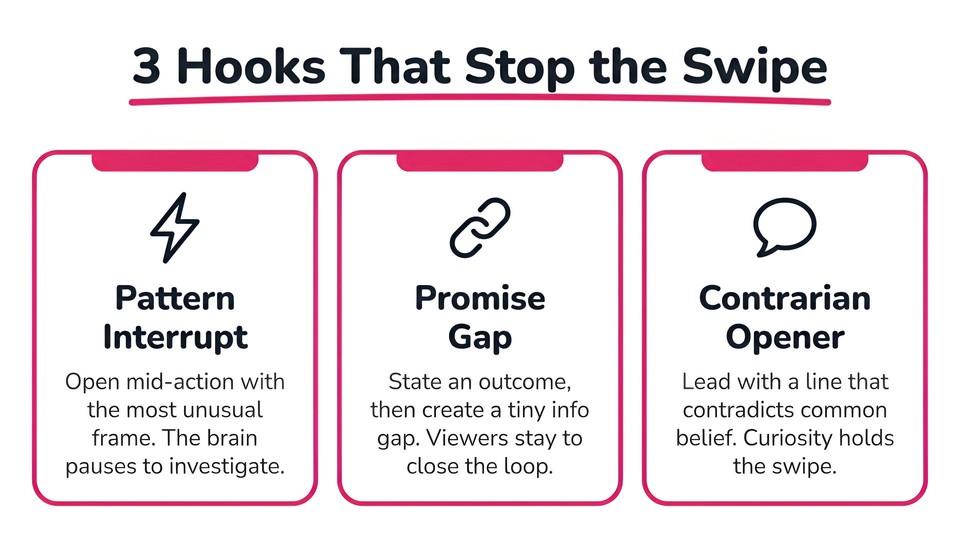
The pattern interrupt
Open mid-action. Jump-cut to the most visually unusual frame in your entire video. A face mid-reaction, a bright color flash, a hand entering frame. The viewer's brain registers "something is happening here" and waits one more beat.
The promise gap
State an outcome the viewer wants, then create a small information gap. "I tested 47 thumbnails so you don't have to." "The reason your shorts hit 200 views and stop." The brain hates an open loop, so it stays for the close.
The contrarian opener
Lead with a sentence that contradicts common belief. "Posting daily is killing your channel." "Trending sounds will not save your Short." Viewers stay to see if you can back it up.
Run this self-test: open your last ten Shorts, mute them, and watch only the first two seconds at thumb-distance. If you would swipe past your own Short, the audience is, too. Replace the opener and reupload as a new Short. You will sometimes see a 5 to 10x difference from the same body with a sharper hook.
Build the Loop Before You Write the Hook
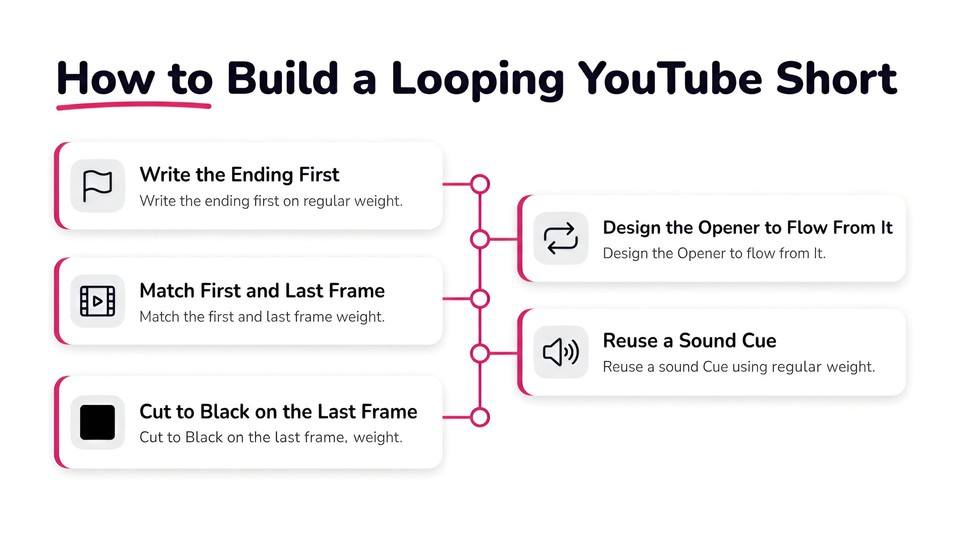
This is the move most creators miss. A looping structure means the final frame of your Short hands directly back to the first frame, so viewers rewatch without noticing. Every replay counts as another view under the new system, and YouTube's algorithm treats a high replay rate as one of its strongest "recommend wider" signals.
The counterintuitive workflow: write the ending first, then design the opening so it flows naturally out of that ending. If your Short ends on a surprising result, open with the problem that led to it. If it ends on a punchline, open with the setup. If it ends on a question, open with a tease of the answer.
You can also build mechanical loops on top of that. Match the first and last frame visually (same lighting, same camera angle, same subject position). Reuse a sound effect at second 0 and second 30. Cut to black for one frame at the end so the loop hides cleanly. Done well, a viewer can sit on your Short for three full plays before noticing they have already seen it.
Audio: The Underrated Algorithmic Signal
YouTube's free audio library inside Shorts is not just a copyright shortcut. Using a trending sound flags your video as part of an existing momentum wave. When a track is climbing, the algorithm tests Shorts that use it on viewers who have already engaged with the trend, giving you a temporary distribution tailwind.
You can find what is trending in two ways. The Shorts Trends Report inside YouTube Studio (under Analytics) surfaces currently surging sounds in your country. Or pay attention to which sounds repeat while you scroll the feed for fifteen minutes. If the same track hits you three times, it is trending in your audience cluster.
A caveat: original audio (your own voice, narration, or unique soundscape) outperforms trending music for educational, talking-head, and storytelling content. Trends help discovery, but the algorithm also rewards uniqueness. The sweet spot for talking-head Shorts is a clean original recording layered with a low-volume trending music bed under the voice. If you are not confident in your own audio, an AI voice generator can give you a consistent, professional narration in seconds without studio gear.
Design Every Frame Like a Thumbnail
Thumbnails are invisible in the main Shorts feed because the swipe interface autoplays full-screen, but they appear in YouTube search, your channel's Shorts tab, suggested feeds, embedded blog posts, and external shares. YouTube auto-selects a random frame for these placements unless you set one manually.
The fix is to shoot like every frame is a thumbnail. High contrast. Subject clearly centered. Bold on-screen text in the first three seconds that delivers value at a glance ("This hack saves HOURS"). For Shorts targeting search (tutorials, how-tos, recipes), set a custom thumbnail in YouTube Studio. A clean, intentional thumbnail can lift click-through by 10 to 20 percent on search-driven Shorts, according to data published by Backlinko's YouTube research.
While you are at it, add captions to every Short. Roughly 85 percent of mobile video is watched with sound off, and captions raise YouTube's accessibility signal. Auto-captions help, but they miss timing and punctuation. Spend two minutes editing them inside YouTube Studio or burn them into the video during editing.
Hashtags, Titles, and Shorts SEO
Hashtags are a small lever, not a magic one. Use #shorts every time, then layer three to five hashtags that describe the specific topic, not the format. Avoid hashtag spam. Twenty hashtags below a video reads as a low-quality signal to the algorithm.
Titles matter more than most creators think, especially for search-driven Shorts. If you are targeting a keyword like "how to wrap a burrito," that exact phrase belongs in the title, in the first line of the description, and in your spoken audio. YouTube transcribes audio and uses the transcript for ranking, so say the keyword out loud. For viral discovery Shorts that depend on the swipe feed rather than search, the title is a secondary hook. Write it like a tweet that lives under the video.
Post Often Enough for the Algorithm to Learn
An analysis of 35 billion Shorts views found that channels with 200 or more published Shorts see consistent view growth over time. This is not a "post daily or die" mandate. It is how YouTube's explore-and-exploit system actually works. Every Short is tested with a small initial audience, and performance signals scale it up or shelve it. The more uploads you have, the faster YouTube understands who your audience is and which Shorts to bring them.
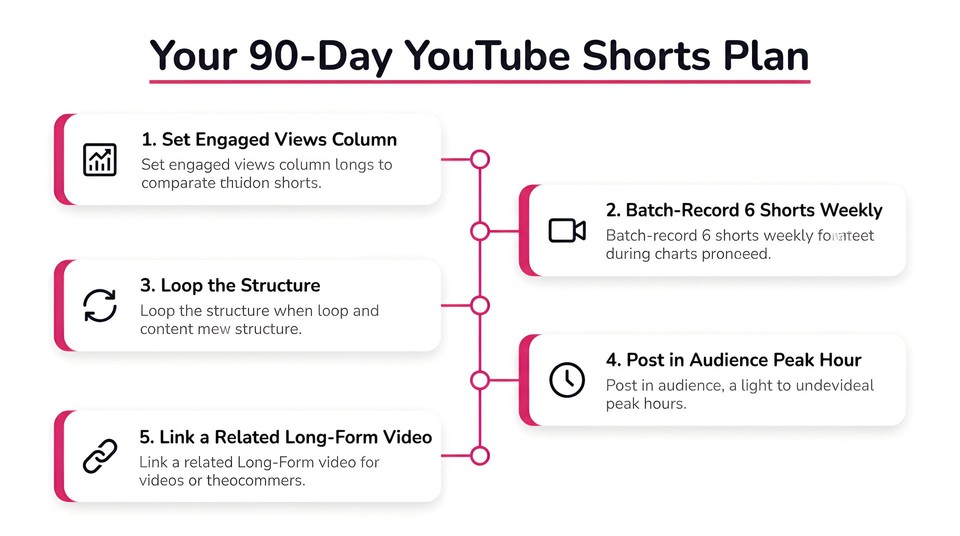
A realistic cadence for a beginner is three to five Shorts per week, every week, for ninety days. Pick a recording slot in your week, batch-shoot six Shorts in one session, edit on Sunday, and queue them up. Consistency beats virality every time during your first hundred uploads.
This is exactly the workflow AI video tools were built for. With Fliki, you can turn a script, a blog post, or even a podcast clip into a finished vertical short-form video in minutes. The point is not to replace your voice but to remove the editing friction so you can ship enough volume for the algorithm to find your audience. The same workflow lets Fliki double as an Instagram Reels maker and a TikTok pipeline, so a single script can become three native videos for three platforms.
Timing: Post When Your Specific Audience Is Online
Generic "best time to post" advice is noise. Open YouTube Studio, go to Analytics, click Audience, and look for "When your viewers are on YouTube." That heat map tells you exactly when your viewers are online, personalized to your channel.
Why timing matters this much: YouTube evaluates a Short's first few hours of performance to decide whether to scale distribution. If your viewers are asleep when you publish, your test audience is the wrong audience, the early engagement signal is weak, and your Short never gets pushed wider. Publishing inside the heat map's peak hour can meaningfully lift first-day views without changing the content at all.
Pro tip from the trenches: reply to recent comments on your older Shorts in the ten minutes before you publish a new one. Spiking channel activity at the exact moment YouTube is testing your new upload reinforces the early engagement signal and can trigger broader distribution.
Use Shorts as a Bridge, Not the Destination
Shorts are the top of your funnel. They put your face or your channel in front of people who have never heard of you. The real growth (subscribers, watch time, ad revenue, sponsorships) still comes from long-form videos, the Community tab, and live streams.
Inside YouTube Studio, every Short lets you attach a "Related Video" from your long-form catalog. Set it on every upload. A viewer who finished your Short, found it useful, and clicked through to a 10-minute deep dive is the kind of relationship that survives the next algorithm shift. Without that bridge, your Short audience evaporates the moment they swipe.
Common Mistakes That Are Quietly Killing Your Views
Three habits to drop this week:
Reusing watermarked content from TikTok or Reels
YouTube's system detects platform watermarks and suppresses distribution. Repurpose your content by all means, but re-export from the source file or strip the watermark before uploading.
Front-loading your channel branding
Your channel name and logo at second 0 is a death sentence. Save branding for the last beat or for the looping outro frame.
Treating every Short like a hit piece
Most of your Shorts will not go viral, and that is fine. The point is volume plus iteration. Read the Viewed vs. Swiped Away data on the ones that flopped and adjust the hook, not the entire concept.
Putting It Together
Getting more views on YouTube Shorts in 2026 is not a hack. It is a system. Track engaged views, not total views. Win the first three seconds. Loop the structure so replays compound. Layer trending audio over original voice. Design every frame like a thumbnail. Use search-aware titles. Publish consistently into the time your audience is actually online. Use Shorts as a bridge to your long-form catalog.
If you have been creating Shorts manually and the editing time is what keeps your cadence inconsistent, that is the bottleneck to fix first. Use a tool like Fliki to turn scripts, blog posts, or even podcast clips into vertical short-form videos for YouTube Shorts and Instagram Reels in minutes, so you stay in the creative seat instead of the editing chair. Pair that with the playbook above, and the next ninety days will look very different from your last.