Introduction
I just created a 30-second luxury brand video ad in 15 minutes. No videographers, no Premiere Pro, no FCPX - just me, some product photos, and an AI video tool called Fliki Pro.
The result? A polished Calvin Klein handbag commercial with cinematic shots, lifestyle scenes, sophisticated music, and smooth transitions that looks like it cost $5,000 to produce. Total actual cost? Less than a fancy coffee.
AI video generators have completely changed the game, and I'm going to show you exactly how I did it, step by step.
What You're Actually Getting Here
I'm walking you through the exact process I used to create a professional video AI with AI, including:
-
The specific prompt I wrote (you can copy it)
-
The product images I uploaded
-
Every step Fliki Pro's AI took to generate the video
-
Screenshots of the actual interface
-
What worked, what didn't, and what I'd do differently
By the end, you'll know how to create your own video ads for any product or service.
Why This Matters (Especially If You're Not a Big Brand)
Video ads convert better than anything else. But traditional video production is expensive and time-consuming. Getting a professional ad made typically means:
-
$2,000-$10,000+ for production
-
Weeks of back-and-forth
-
Hiring videographers, editors, and possibly actors
-
Renting equipment or studio space
AI tools flip this entire model. You can test multiple ad concepts in an afternoon, iterate based on what performs, and create custom content for different audiences - all without touching a camera.
The Tool: Fliki Pro
I used Fliki Pro for this project. It's an AI video editor with a "Copilot" feature that basically acts as your creative director, scriptwriter, and editor combined. You tell it what you want, it figures out how to make it happen.
The key difference from traditional editors: you're not manually placing every clip, transition, and text overlay. You're describing your vision, and the AI builds it.
How to Create Professional Video Ads With AI
I wanted to create a video advertisement for the Calvin Klein Women's Gabrianna Novelty Bucket Shoulder Bag. The goal was a sleek, visual-only ad (no voiceover) that screamed luxury and sophistication.
Think high-end Instagram ads or what you'd see during a fashion week livestream.
Step 1: Writing the Prompt (This Is 80% of Success)
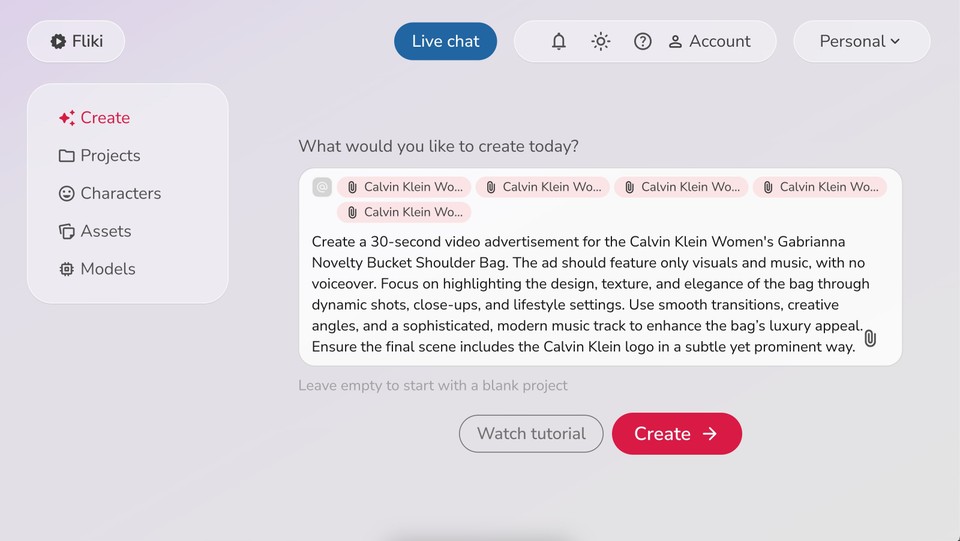
The prompt is everything. Garbage prompt = garbage video. Detailed, specific prompt = surprisingly good results.
Here's exactly what I wrote:
"Create a 30-second video advertisement for the Calvin Klein Women's Gabrianna Novelty Bucket Shoulder Bag. The ad should feature only visuals and music, with no voiceover. Focus on highlighting the design, texture, and elegance of the bag through dynamic shots, close-ups, and lifestyle settings. Use smooth transitions, creative angles, and a sophisticated, modern music track to enhance the bag's luxury appeal. Ensure the final scene includes the Calvin Klein logo in a subtle yet prominent way."
What makes this prompt work:
Duration: I specified 30 seconds. Without this, the AI might make a 2-minute video or a 10-second clip.
Style direction: "Only visuals and music, no voiceover" is crucial. Otherwise, you might get an AI narrator describing the bag, which kills the luxury vibe.
Shot types: "Dynamic shots, close-ups, and lifestyle settings" tells the AI exactly what kind of footage to generate.
Mood/tone: "Sophisticated, modern music track" and "luxury appeal" set the aesthetic direction.
Specific elements: "Calvin Klein logo in a subtle yet prominent way" ensures branding without being tacky.
Pro tip: Be as specific as you would be if you were briefing a human video editor. The AI isn't reading your mind.
Step 2: Upload Your Product Images
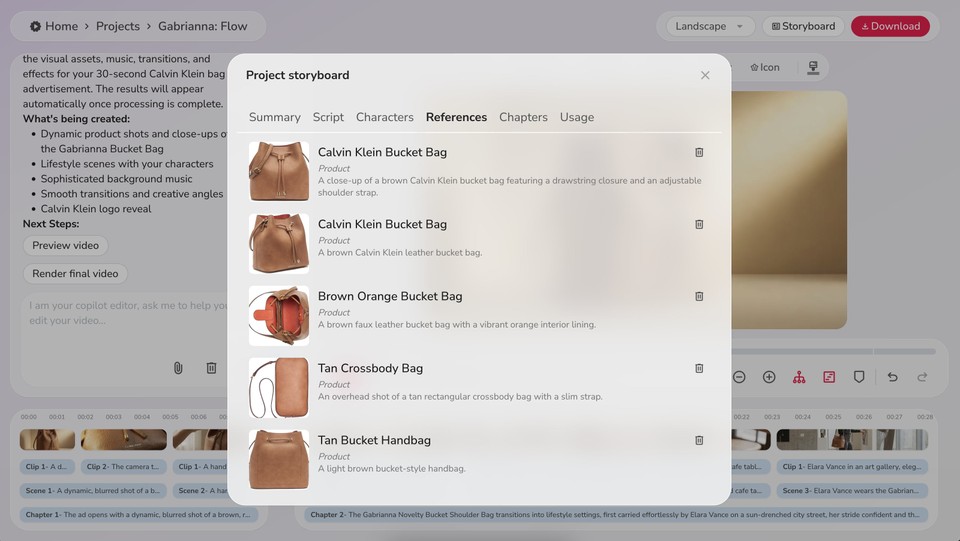
Along with the prompt, I uploaded 4-5 high-quality photos of the bag:
-
Top view
-
Bottom view
-
Back view
-
A shot showing the texture and hardware details
These reference images are critical. They help the AI understand exactly what the product looks like so it can generate accurate visuals or match stock footage properly.
Don't skip this step or use low-quality phone photos. The better your reference images, the better your final video.
Step 3: Summary Generation
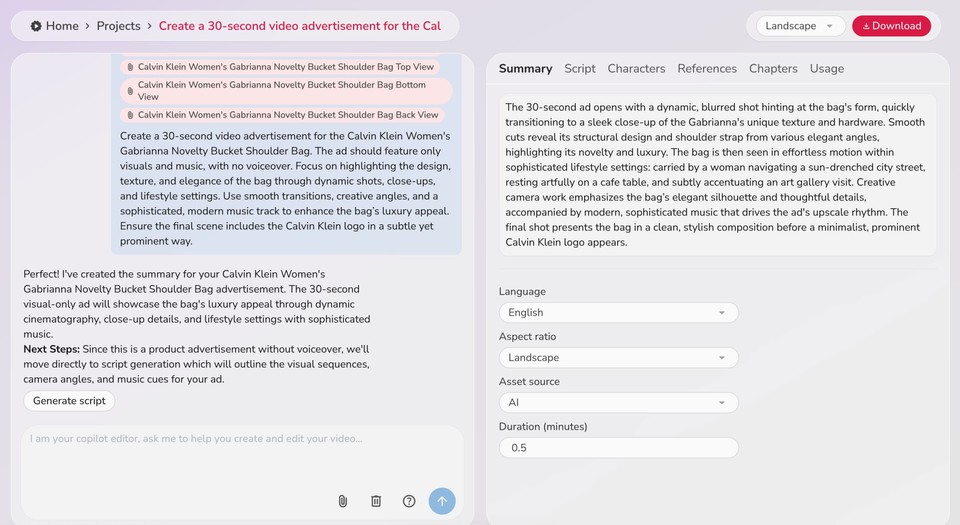
After submitting everything, Fliki Pro's AI Copilot creates a summary first. This is basically the creative brief for your video.
For my Calvin Klein ad, it generated something like: "The 30-second ad opens with a dynamic, blurred shot hinting at the bag's form, quickly transitioning to a sleek close-up of the Gabrianna's unique texture and hardware..."
You can edit this summary or adjust settings:
-
Aspect ratio: Landscape (YouTube), vertical (Instagram Stories/Reels), or square (most social feeds)
-
Asset source: AI-generated visuals vs. stock footage
-
Duration: Fine-tune the exact length
-
Language: For international markets
I chose landscape format, AI-generated assets for maximum customization, and kept it at 30 seconds.
Step 4: Script Breakdown
Based on the summary, the AI generates a detailed script with precise timing for each shot. Since my ad had no voiceover, this script was purely visual direction.
Here's what the AI created:
0-2 seconds: Dynamic, blurred opening transitioning to sharp focus on the bag
2-5 seconds: Camera gliding across the textured leather and metallic hardware
5-8 seconds: Cut to reveal the bag's structure and shoulder strap from an elegant angle
8-12 seconds: Low-angle shot emphasizing the sturdy base and adjustable strap
12-16 seconds: Lifestyle scene - woman carrying bag confidently on a sun-drenched city street
16-20 seconds: Bag resting artfully on a polished café table, overhead shot highlighting form
20-24 seconds: Art gallery scene, bag worn elegantly as woman admires artwork
24-30 seconds: Final clean composition with minimalist Calvin Klein logo reveal
This level of detail ensures every second has purpose. For a luxury brand, pacing matters - you can't rush the reveal.
Step 5: Characters (For Lifestyle Shots)
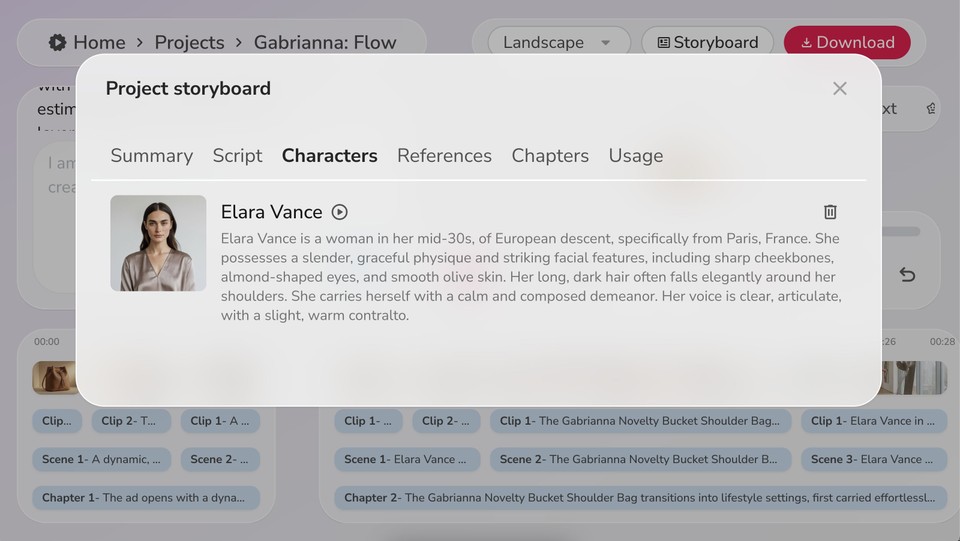
Since my ad included lifestyle scenes with a person carrying the bag, Fliki Pro created an AI character named "Elara Vance" who appeared consistently throughout those scenes.
If you're doing product-only ads, you can skip this. But for any ad showing people using your product, the AI generates realistic characters that maintain consistent appearance across all scenes.
You can also customize characters or even use a "digital twin" - upload footage of yourself to create an avatar with your actual voice and appearance. This is huge for personal brands or testimonial-style ads.
Step 6: Scene Structure
Fliki Pro organizes videos into chapters, scenes, and clips:
-
Chapters = major sections (for my ad: "Product Focus" and "Lifestyle Moments")
-
Scenes = sequences within chapters (different settings or shot types)
-
Clips = individual shots within scenes
The AI created two chapters automatically. Chapter 1 focused on product close-ups and details. Chapter 2 showed the bag in real-world contexts -café, street, gallery.
This hierarchical structure keeps everything organized and ensures smooth narrative flow.
Step 7: Developing the Layers (Where the Magic Happens)
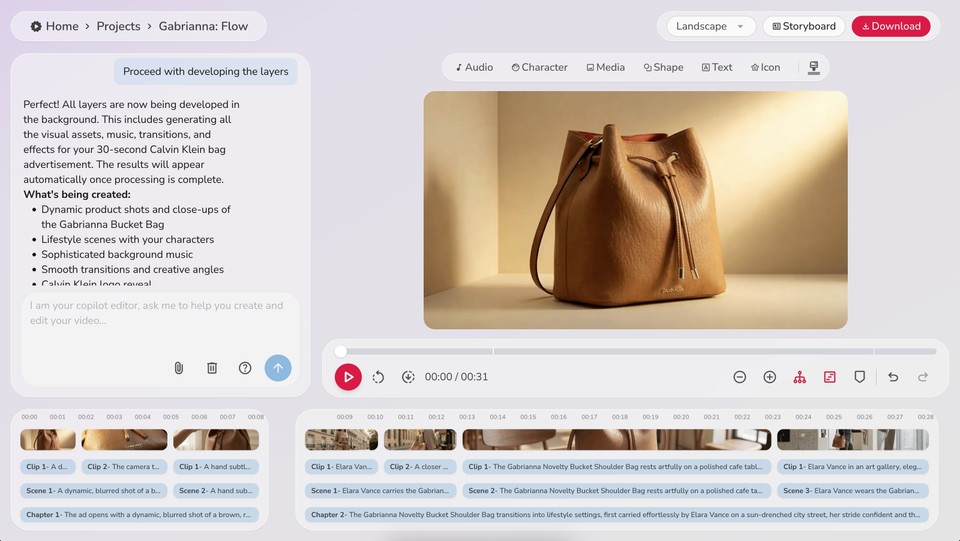
Now Fliki Pro generates all the actual assets:
-
AI-generated product shots matching your reference images
-
Lifestyle footage with your AI character
-
Background music (sophisticated electronic track for luxury feel)
-
Transitions (smooth fades and cuts)
-
Visual effects (subtle motion blur, depth of field)
The AI shows you estimated credit usage before generating. AI-generated assets cost more credits than stock footage, but they're customized specifically for your product.
For a luxury brand ad, I chose AI generation because stock footage of "generic brown handbag" wouldn't match the Calvin Klein aesthetic.
Step 8: Preview and Refine
Once generation completes (took about 5 minutes), I previewed the full video. The preview player lets you scrub through, checking:
-
Does the pacing feel right?
-
Do the visuals match the luxury aesthetic?
-
Is the music volume balanced?
-
Does the logo reveal feel natural?
If you see blank frames or silent audio, click "preload assets" to ensure smooth playback.
I made a few tweaks - extended one café scene by 2 seconds, adjusted a transition speed - then previewed again. You can edit at any level without regenerating the entire video.
Step 9: Render and Download

Happy with the preview? Click download to render the final MP4 file at full quality.
Rendering took about 2 minutes. The output is a broadcast-quality video file ready for any platform - Instagram, Facebook, YouTube, your website, or paid ad campaigns.
Total time from start to finished video: 15 minutes.
The Final Result
The completed Calvin Klein ad featured:
-
Cinematic opening with artistic blur effect
-
Close-ups showcasing the bag's premium leather texture
-
Multiple lifestyle scenes in upscale environments
-
Smooth, sophisticated transitions
-
Modern electronic music perfectly matching the luxury brand vibe
-
Clean logo reveal in the final seconds
It genuinely looks professional. Not "pretty good for AI" - actually good.
What This Would Cost Traditionally
To create this same video the traditional way:
-
Videographer: $500-$1,500/day
-
Location fees (café, art gallery): $200-$500
-
Model: $300-$800
-
Editor: $500-$2,000
-
Music licensing: $50-$300
-
Total: $2,550-$5,100 minimum
And that's assuming everything goes smoothly in one day of shooting.
With AI: under $10 in platform credits.
Best Practices I Learned
Write prompts like you're briefing a human: Don't be vague. Include shot types, mood, duration, specific elements.
Upload multiple reference angles: The more the AI understands your product, the better it represents it.
Choose aspect ratio strategically: Where will this ad actually run? Vertical for Stories/Reels, landscape for YouTube, square for Instagram feed.
AI generation vs. stock: For generic B-roll, stock is fine and cheaper. For product-specific shots, AI generation is worth the extra credits.
Preview multiple times: Catch issues before rendering. It's faster to tweak and preview again than to regenerate.
Monitor credit usage: Check the breakdown to optimize future projects and budget accordingly.
Beyond Product Ads
This same process works for any video ad:
-
Service explainers
-
Real estate property tours
-
Restaurant menu showcases
-
Software demos
-
Event promotions
-
Course marketing videos
-
Local business ads
The formula is the same: clear prompt + good reference materials + AI generation = professional result.
The Bottom Line
AI video creation isn't perfect. You won't match a $50,000 Super Bowl commercial. But for small businesses, solopreneurs, marketing teams with limited budgets, or anyone who needs to test multiple ad concepts quickly - this is a game-changer.
I created a luxury brand-quality video ad in 15 minutes without touching a camera. That was impossible two years ago.
The barrier to professional video advertising just collapsed. The question is: will you use it?