Introduction
You've probably heard it before. That flat, monotone AI voice that screams "I'm a robot reading words off a screen."
It's the kind of voice that makes viewers click away within seconds. The kind that turns a potentially engaging video into background noise.
Here's the thing: AI voices don't have to sound robotic anymore.
In fact, if you're still using AI voices that sound like they're announcing train delays at 3 AM, you're missing out on a massive shift that's already happened in the text-to-speech space.
The gap between human and AI voices has narrowed dramatically. But most people are still using these tools like it's 2020, typing in plain text and hoping for the best.
That approach doesn't work anymore. And it never really did.
Why Most AI Voices Sound Robotic (And Why Yours Doesn't Have To)
The problem isn't the technology. The latest AI voice models can laugh, whisper, sound sarcastic, or go completely deadpan. They can get breathless with excitement or deliver lines with perfect timing.
The problem is that most people don't know how to talk to them.
Think about it this way: if you handed a script to a human voice actor and just said "read this," you'd get a mediocre performance. But if you gave them context, emotion cues, and specific direction, they'd deliver something completely different.
AI voices work the same way now. They're waiting for direction. Most people just aren't giving it to them.
The Three Levers That Control Everything
After testing dozens of AI voice tools and creating hundreds of voiceovers, I've found there are three things that determine whether your AI voice sounds human or robotic.
Get all three right, and people won't even realize they're listening to AI. Get one wrong, and the whole thing falls apart.
First lever: Your style prompt
This is your director's note to the AI. "Speak in a friendly and helpful tone" will give you completely different results than "Narrate in the calm, authoritative tone of a nature documentary narrator."
The more specific you are here, the better your results. Don't just say "friendly." Say "enthusiastic and warm, like you're explaining something exciting to a close friend."
Second lever: Your actual text content
This is where most people mess up. They write neutral, corporate-speak text and then wonder why the AI sounds flat.
Your text needs to match your intended emotion. If you want a scared tone, "I think someone is in the house" will work. "The meeting is at 4 PM" won't, no matter how good your prompt is.
The words you choose matter. "I'm absolutely thrilled about this" will sound more enthusiastic than "This is good." The semantic meaning of your text is doing half the work.
Third lever: Markup tags
These are bracketed instructions like [laughing] or [whisper] that inject specific actions into your voiceover. But here's what most people don't understand: these aren't magic bullets. They work in concert with your prompt and text, not instead of them.
Use [laughing] with a generic prompt, and you might get a laugh of shock or confusion. Use it with "react with an amused laugh" and emotionally rich text, and you'll get exactly what you want.
The key insight here is that all three levers need to point in the same direction. Alignment is everything.
How Fliki Makes This Actually Work in Practice
Most AI voice tools give you a dropdown menu of emotions and hope you figure it out. That's not how real voice direction works.
Fliki's approach to multilingual expressive voices is different because it lets you describe exactly how something should sound using natural language. You're not picking from preset emotions. You're giving actual direction.
Here's how it works in practice.
When you start a project in Fliki, you pick either a video or audio workflow depending on what you're creating.
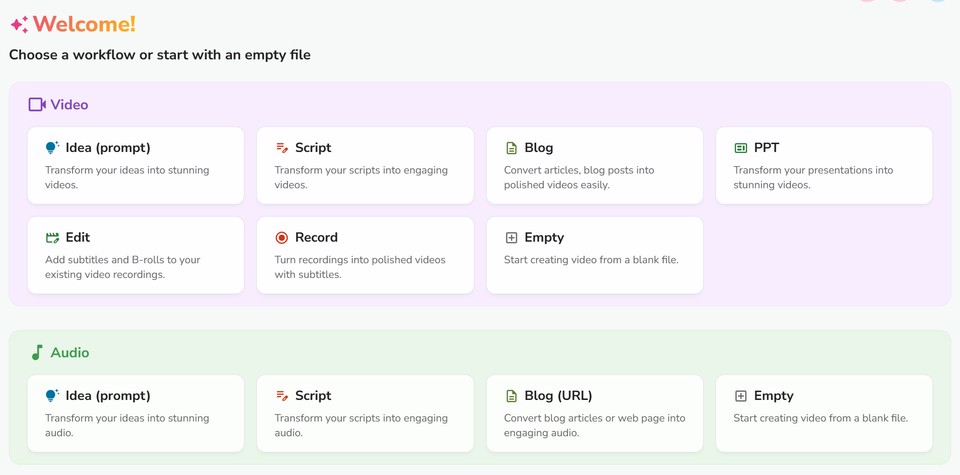
Both work the same way for voice control, so choose whatever fits your project.
In the customization step, you'll select your voice.
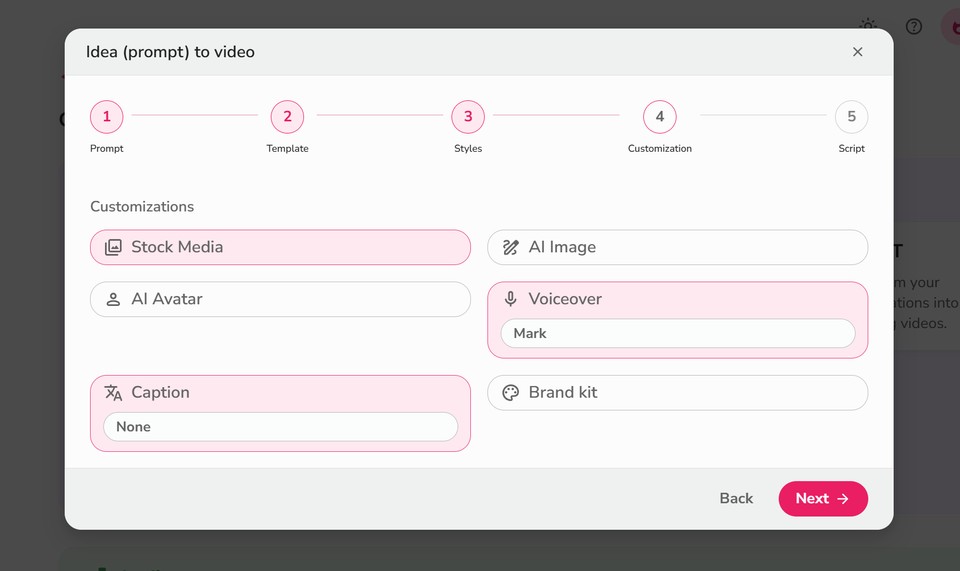
This is where the new multilingual voices come in.
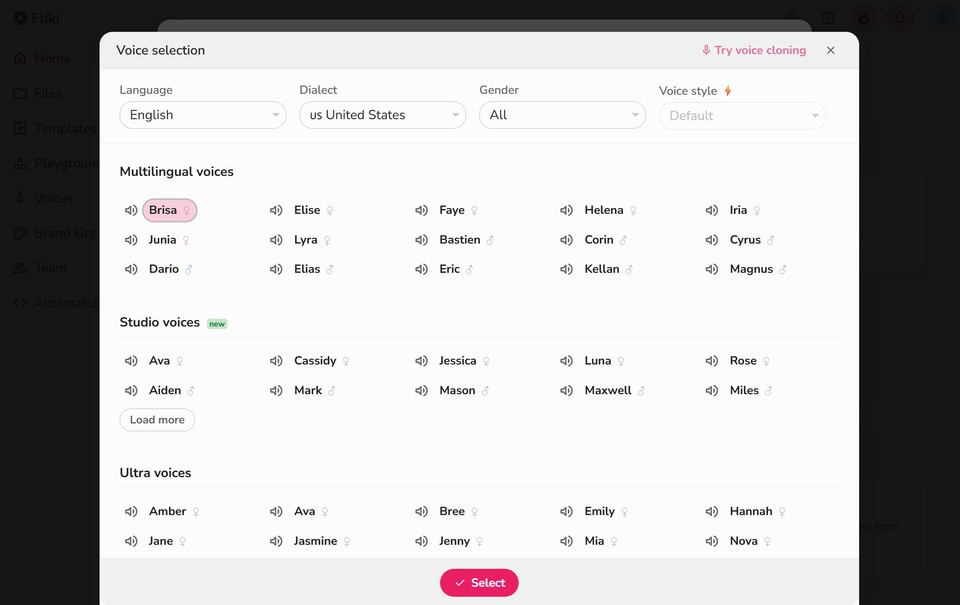
They're available in over 20 languages: English (both US and Indian accents), Arabic, Bengali, Dutch, French, German, Hindi, Indonesian, Italian, Japanese, Marathi, Polish, Portuguese, Romanian, Russian, Spanish, Tamil, Telugu, Thai, Turkish, Ukrainian, Vietnamese, and more rolling out regularly.
You can explore all available voices by language at fliki.ai/voices. If you need English specifically, check out the complete list of English voices.
Once you've generated your initial content, the real magic happens in the editing interface.
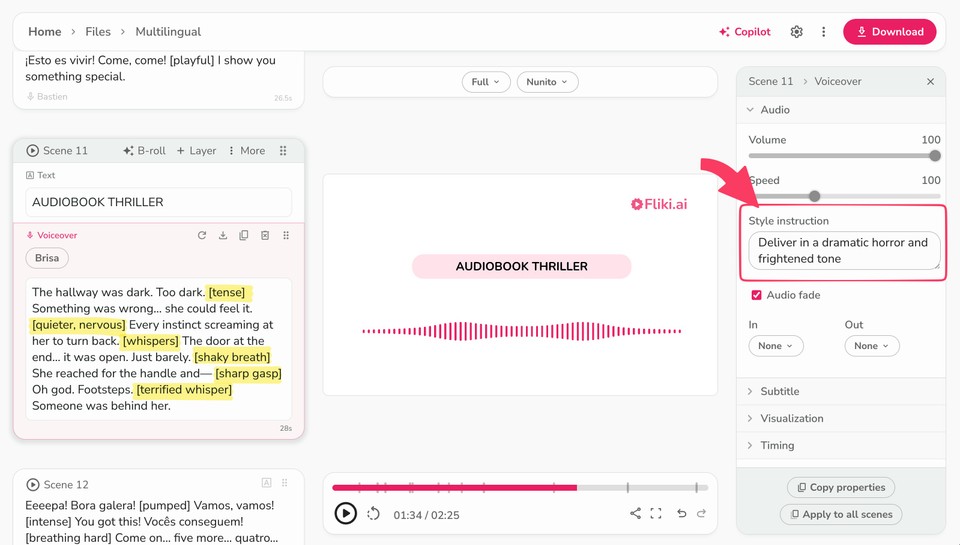
On the left panel, you'll see your scene-by-scene voiceover text. The center shows your video or audio preview. The right panel is where you control the voice style for each specific scene.
This scene-by-scene control is crucial. Your introduction might need an energetic, welcoming tone. Your explanation section might need calm authority. Your call-to-action might need urgency. You're not locked into one emotion for the entire piece.
Writing Voiceover Text That Actually Sounds Natural
Before you even touch the style instruction field, you need text that gives the AI something to work with.
1. Write like you talk
Not like you write. There's a massive difference. "We're going to discuss the benefits of this approach" sounds written. "Let me show you why this works" sounds spoken. One is a presentation. The other is a conversation.
Read your script out loud before you finalize it. If you stumble over phrases or it sounds weird coming out of your mouth, it'll sound worse coming from the AI.
2. Use contractions
Always. "I am going to show you" versus "I'm going to show you." The first one sounds formal and distant. The second one sounds human.
3. Include natural hesitations and verbal tics where appropriate
Depending on your tone, phrases like "you know," "I mean," or "honestly" can make your content sound more conversational. Don't overdo it, but don't strip out every bit of informal language either.
4. Write emotionally charged words that match your intended tone
If you want excitement, use words like "incredible," "amazing," "transformative." If you want urgency, use "now," "immediately," "critical." The semantic weight of your word choices primes the AI for the right emotional delivery.
5. Be specific about actions and sensations.
Instead of "the weather was bad," try "rain hammered the windows, and wind howled through the trees." The AI picks up on these vivid descriptions and adjusts its delivery accordingly.
Using the Style Instruction Field Like a Pro
Now we get to the part most people skip: the style instruction field in Fliki's customization panel.
This is where you describe exactly how you want that specific scene to sound.
Don't write "happy." That's too vague. The AI doesn't know what kind of happy you mean.
Instead, try: "Deliver in an excited and ecstatic tone".
See the difference?
The more context you provide, the better the AI understands what you're after. "Speak like a 1940s radio news announcer reporting on a major event" gives much more direction than "speak in an old-fashioned way."
Think about the relationship between the speaker and the listener. Are you:
Explaining something complex to a curious student?
Sharing insider knowledge with a peer?
Warning someone about an urgent danger?
Congratulating someone on an achievement?
Comforting someone going through difficulty?
Each of these scenarios produces different vocal qualities, even if the words are identical.
The specificity matters. Test different descriptions and see what works for your particular content.
Advanced Techniques: When to Use Markup Tags
Markup tags like [laughing], [whisper], or [sigh] can add incredible realism to your voiceovers when used correctly.
But they're not a replacement for good prompting and good writing. They're the final polish, not the foundation.
Here's when they actually work.
Non-speech sounds like [sigh], [laughing], or [uhm] insert actual vocalizations. The tag isn't spoken - it's replaced by the sound itself. These are perfect for adding human-like hesitations and reactions.
A strategic [sigh] before delivering bad news. An [uhm] when introducing a complex concept. A [laughing] when making a self-deprecating joke. These tiny moments of humanity make a massive difference.
Style modifiers like [sarcasm], [whispering], or [extremely fast] change how the subsequent speech is delivered. The tag itself isn't spoken, but it affects everything that follows.
[whispering] is fantastic for creating intimacy or secrecy.
[extremely fast] works perfectly for disclaimers or rapid-fire lists.
[sarcasm] is powerful when you want to highlight irony or make a point through contrast. For example, "Oh sure, [sarcasm] because checking your phone 50 times an hour is totally helping your productivity."
Pacing controls like [short pause], [medium pause], or [long pause] give you precise control over timing and rhythm.
Timing is everything in voice work. A well-placed pause creates anticipation, emphasis, or gives the listener time to process information.
"The results were clear [medium pause] we'd been completely wrong about everything."
"So what's the secret to success? [long pause] There isn't one."
These pauses do more work than you might think. They create dramatic effect, separate ideas, and give weight to important points. With combination of voice styles and markups, you can create human sounding AI voiceovers. Just checkout this example:
The Multilingual Advantage You're Not Using Yet
Here's something most people overlook: creating content in multiple languages isn't just about translation anymore.
With Fliki's multilingual expressive voices, you can maintain the same emotional tone and delivery quality across 20+ languages. That's massive if you're creating content for global audiences.
A training video doesn't need to sound corporate and stiff in Japanese just because the English version is conversational. A marketing video shouldn't lose its energy when translated to Spanish or French.
The voice translator capabilities mean you can create once and adapt everywhere, maintaining your brand voice across languages.
This opens up markets that were previously too expensive or time-consuming to address. You're not hiring different voice actors for each language. You're using the same emotional direction across all of them.
Combining Tools for Maximum Impact
Expressive voices work even better when combined with Fliki's other features.
The video editor gives you precise control over timing, so you can align your voiceover with visual elements for maximum impact. A [long pause] right before a key visual reveal creates anticipation. A laugh timed with a humorous image reinforces the moment.
The text-to-video workflow means you can see how your voice choices work with your visuals in real-time, making adjustments on the fly instead of rendering everything separately and hoping it works.
What This Means for You Right Now
The shift from robotic AI voices to genuinely expressive ones has already happened.
Your competition is probably still using old techniques: flat text, generic prompts, hoping for the best.
That's your advantage.
Understanding the three levers - style prompts, text content, and markup tags - puts you ahead of 90% of people using AI voices. Applying them consistently across your content makes the difference between mediocre results and professional-grade voiceovers.
The technology is there. The tools are accessible. What separates good results from great ones is understanding how to direct the AI, just like you'd direct a human voice actor.
Start with one piece of content. Write the script like you'd actually say it out loud. Create a specific, scenario-based style prompt. Test different emotional approaches. Use markup strategically, not as a crutch.
Then listen to what you've created. Really listen. Does it sound like a human speaking, or like a robot reading? If it's the latter, you know which lever needs adjustment.
The barrier to entry for professional voiceover content has dropped to near zero. Anyone can access the same tools. The difference now is in how you use them.
And that's entirely in your control.