Introducing Fliki v5
This is the biggest evolution of Fliki we’ve ever shipped.
Not a redesign. Not a feature update. A complete rethink of how AI video creation should work.
With Fliki v5, you don’t navigate workflows. You don’t wrestle with scripts. You don’t guess how templates will map or hope the visuals make sense. You simply describe your vision and the system handles the rest.
From an AI Copilot that routes your ideas automatically, to scene-by-scene script review, to fully consistent AI characters, expressive voices, built-in sound design, CTR-optimized thumbnails, direct YouTube publishing, and the ability to generate an entire month of content in one session - every core part of the product has been rebuilt.
The goal is simple:
Fewer decisions. More control. Better output. Faster.
This is Fliki v5.
A simpler, smarter starting point
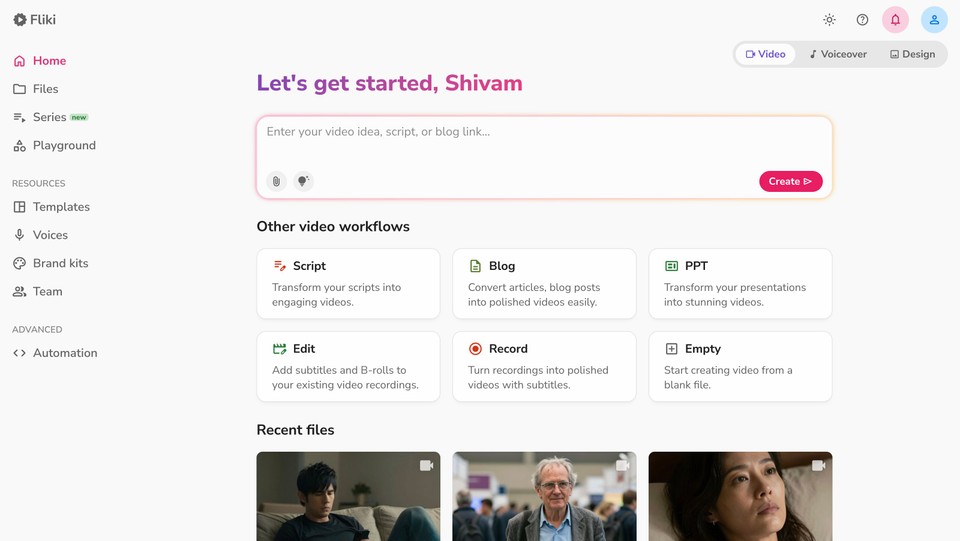
Let's start with what you see first.
The old Fliki dashboard dropped you into a grid of workflow cards. Video, Audio, Design - each with sub-options. You had to know what you wanted before you could start. It worked, but it made you think too much.
Fliki v5 replaces all of that with a single input field.
Type what you want to create. A video idea, a script, a blog URL, a vague thought - anything. Our new AI Copilot analyzes your input and automatically routes you to the right workflow. If you type a blog link, it goes to Blog-to-Video. If you describe a scene, it opens the AI Playground. If you paste a script, it enters the Script-to-Video flow.
You don't pick the workflow anymore. The AI picks it for you.
The rest of the dashboard is still there - Script, Blog, PPT, Edit, Record, Empty - for power users who want direct access. But for most people, most of the time, you just type and go.
This is the fastest path from "I have an idea" to "I have a video" we've ever built.
Script review
This one was long overdue. And it fixes one of the biggest pain points in Fliki's history.
The script problem
In previous versions of Fliki, the Script-to-Video workflow had a brutal flaw: whatever you pasted into the script tab was used as the voiceover. Every word. Including your notes. Your markdown formatting. Your visual directions. Stage cues. All of it - spoken out loud by the AI voice.
If your script said "[Cut to wide shot of city skyline at sunset]" - the voice would literally say those words.
It was a terrible experience. We know. We heard you.
Fliki v5 fixes this completely
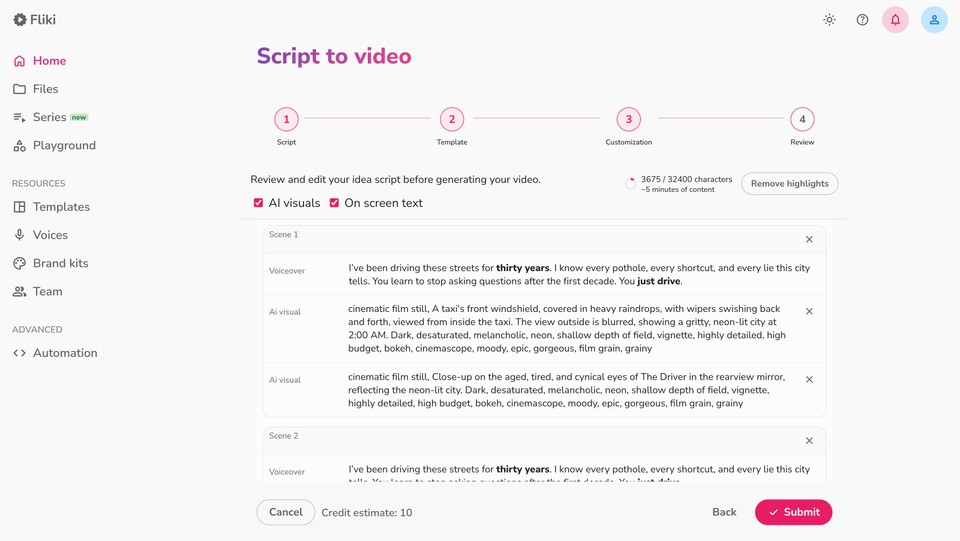
The system now intelligently analyzes your script input and separates it into layers: what should be spoken (voiceover), what should appear on screen (text overlays), and what should be shown visually (AI-generated images, video clips, or stock footage). It understands the difference between a direction and a line of dialogue.
Before your video is generated, you get a full review step where you can see and edit every layer - voiceover text, AI visual prompts, on-screen headlines, and subtitles - scene by scene. Nothing is a surprise anymore. You have complete control before a single frame is rendered.
Templates, demystified
The same review step now applies to template-based workflows too.
Previously, when you used a template, Fliki would auto-assign template scenes to your content behind the scenes. You'd hit generate and hope for the best. Sometimes the mapping was perfect. Sometimes it made no sense. You never knew until the video was done.
Now you see exactly which template scene is assigned to each part of your video script before you submit.
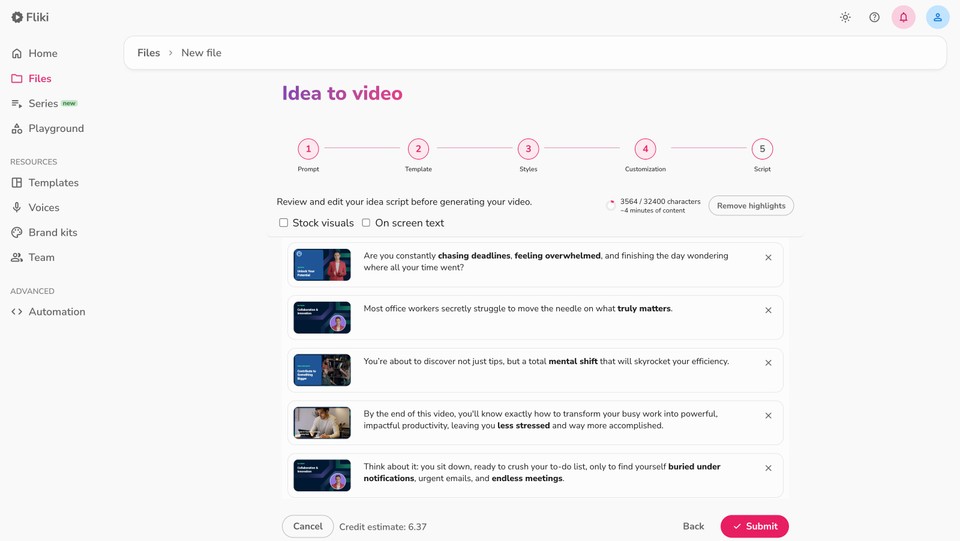
And if you don't like the assignment, you can change it. You can even specify in your script which template scene you want for a particular section.
No more guessing. No more re-generating because scene 3 got paired with the wrong content.
Smarter stock media, better AI visuals
Two improvements here that sound small but change the output quality dramatically.
Stock autopicking that actually follows the script
Users told us the old stock selection would sometimes ignore context. You'd write about a street market in Tokyo and get footage of a farmer's market in Portland. You'd describe a South Asian family and get a Northern European one.
We've significantly improved the relevance engine. It now pays much closer attention to location cues, ethnicity, cultural context, and visual tone described in your script. The footage you get actually matches the story you're telling.
More control over AI visuals
In the workflow customization step, you now have direct control over the balance of AI-generated images vs. AI video clips in your final output. Want more cinematic AI clips? Dial it up. Prefer still images with subtle motion? You can set that too.

AI-generated images are also far more character-consistent now - if a person appears in scene 1, they look like the same person in scene 5. (More on this below.)
AI asset library
Video workflows can now use your own media - not just AI or stock visuals.
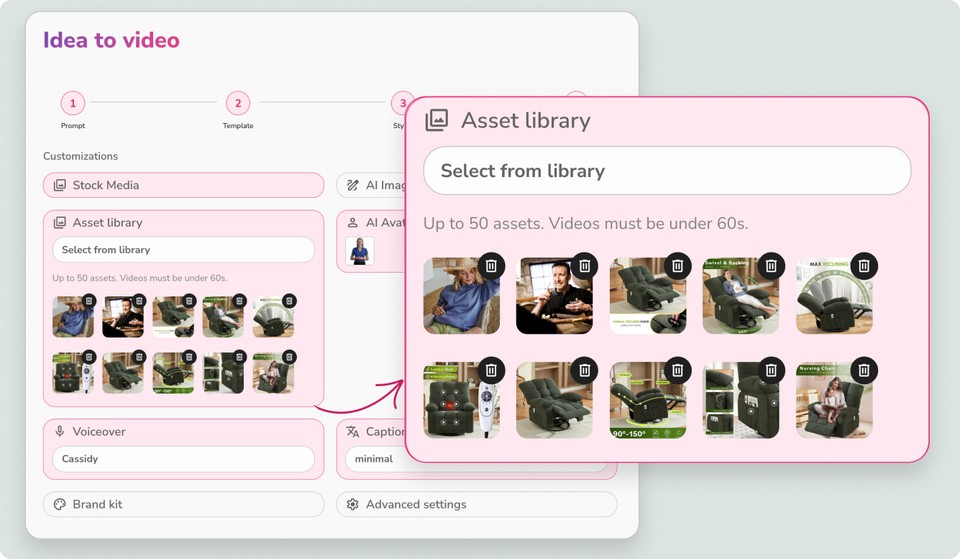
Previously, adding custom images or videos meant replacing scenes manually after generation. Now, you can select your assets upfront and let AI place them automatically.
How it works:
Go to any video workflow → Customization
Select Asset Library
Choose assets or a folder (up to 50 assets, videos under 60s)
Generate your video
AI will intelligently match and place your assets into relevant scenes. It works seamlessly with stock and AI visuals - your media is blended automatically based on context.
You’ll find the Asset Library in the sidebar under the resources toggle, with folder organization and a new Team Folder for easy sharing.
Automatic sound effects
Fliki v5 now automatically inserts contextually appropriate sound effects into your videos. A door closing, ambient crowd noise, a notification ping - the system reads your script and adds SFX where they naturally fit.
Previously, this didn't exist at all. You either added SFX manually or shipped without them. Now it just happens.
Series: Create a month of content in one session
This is the biggest new feature in v5.
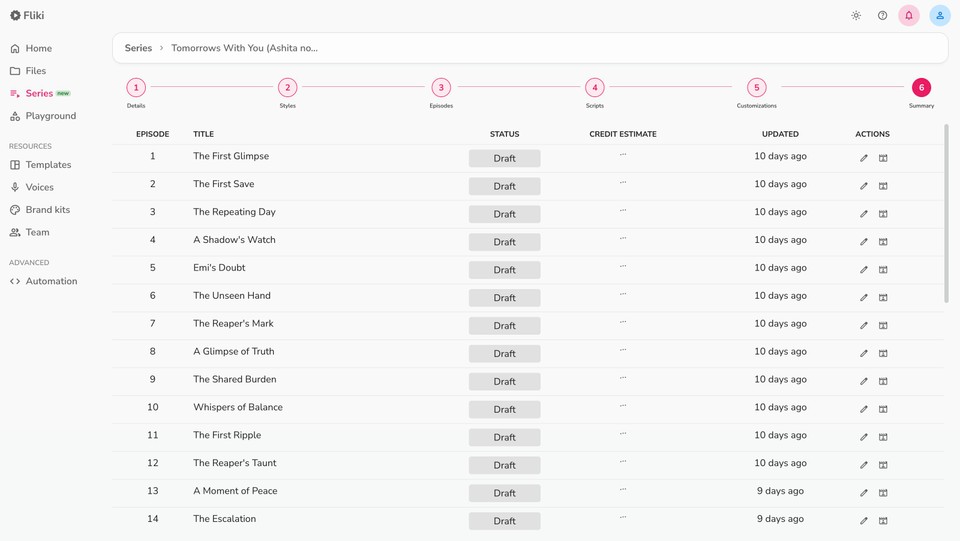
A Series is a structured collection of videos that share a common theme, consistent branding, and can be created, scheduled, and published in bulk.
Think of it this way: instead of making one video at a time, you define a Series - your niche, your platform, your style - and Fliki generates an entire content calendar. Episode outlines, scripts, visuals, thumbnails. All at once.
What a Series gives you:
A month (or more) of content planned and produced in a single sitting
Consistent characters, voice, visual style, and branding across every episode
Research-backed topic suggestions tailored to your niche and target platform
Auto-scheduling and auto-publishing at intervals you define
Analytics to track what's working
If you're a creator trying to stay consistent on YouTube, Instagram, or TikTok - or a business using video for lead generation - this changes the math entirely. You're not making videos anymore. You're running a content operation.
Series is available now from the left sidebar, marked with a "new" badge. Try it.
Character consistency at 50× lower cost
We rebuilt character consistency from the ground up.
Your AI character in Fliki now stays the same across every scene. Same face. Same outfit. Same person - from first frame to last.
If you choose a visual style - comic, anime, 3D, cinematic, watercolor, anything - it stays locked in too. No more style drift between scenes where scene 1 looks cinematic and scene 4 looks like a stock illustration.
This isn't an incremental improvement. We moved to a new model architecture that delivers this level of consistency at 50× lower cost than our previous approach using Nano Banana Pro.
That means character consistency is no longer a premium-only luxury. It's just how Fliki works now.
Voices that actually feel something
We rebuilt our voice engine from the ground up. Not for more languages. For more emotion.
Previous AI voices could read your script clearly. But they couldn't perform it. They couldn't convey excitement, or sarcasm, or the quiet intimacy of a whispered aside.
Fliki v5 voices can.
They can laugh mid-sentence. Whisper when the moment calls for it. Sound breathless with excitement. Go deadpan for comedic timing. Shift tone between paragraphs naturally.
You control this with simple descriptions: tell the voice to "sound excited," "be sarcastic," "speak softly" - and it delivers.
Now available in 20+ languages, including English (US/IN), Arabic, Bengali, Dutch, French, German, Hindi, Indonesian, Italian, Japanese, Marathi, Polish, Portuguese, Romanian, Russian, Spanish, Tamil, Telugu, Thai, Turkish, Ukrainian, and Vietnamese. More coming soon.
These aren't text-to-speech voices with emotion filters bolted on. They're a completely new generation of expressive, multilingual AI voices built for storytelling.
AI Thumbnails v2
Thumbnails are the reason people click - or scroll past. We completely rebuilt the thumbnail workflow to match what's actually working on YouTube, TikTok, and beyond right now.
How it works:
Go to your dashboard
Click Thumbnail under Design Workflow
Write your prompt
Choose from curated viral presets engineered for maximum CTR
Generate production-ready thumbnails in seconds
The presets aren't generic templates. They're modeled on the thumbnail patterns driving the highest click-through rates on major platforms right now. Bold text placement, face positioning, color contrast, emotional triggers - all baked in.
You describe the thumbnail you want. Fliki handles composition, style, and optimization.
Playground: Experiment with the best AI models
We've launched the Playground - a dedicated space for generating and experimenting with AI assets outside of your projects.
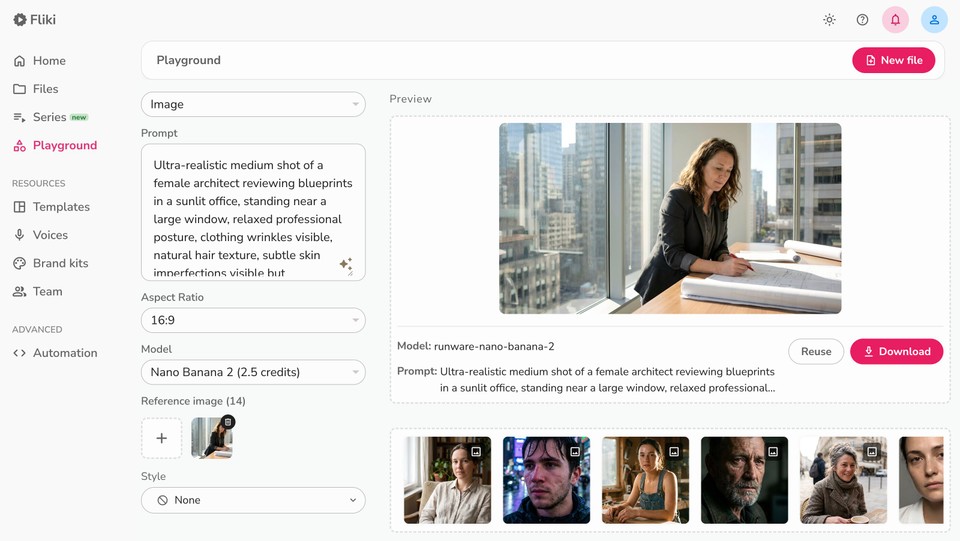
This is where you go to test ideas, try different models, and create standalone images or video clips without committing to a full project.
Video models now available:
Google Veo 3.1 Fast
Kling 2.5 Turbo
LTX-2 Pro & Fast
PixVerse v5 Fast
Seedance Pro Fast & Lite
Image models now available:
FLUX Pro & FLUX 2
Nano Banana 2
GPT Image 1.5
Qwen Image & Edit Plus
For supported premium models, we've added First Frame and Last Frame controls. This gives you precise control over how your video begins, how it ends, or how it transitions between two images. Specify a starting image and an ending image - the AI generates the motion between them.
This is the level of creative control that used to require After Effects and hours of manual work. Now it's a dropdown and two image uploads.
Direct YouTube publishing
One more thing.
You can now publish directly to YouTube from inside Fliki. No downloading, no re-uploading, no switching tabs.
Finish your video, hit publish, select your YouTube channel. Done.
Combined with the auto-scheduling in Series, this means you can plan, produce, and publish an entire month of YouTube content without ever leaving Fliki.
This is Fliki v5
Here's what changed, all in one place:
What | Before | Now |
|---|---|---|
Starting a video | Pick from a grid of workflows | Type anything → AI routes you automatically |
Script handling | Everything spoken as voiceover, including notes and directions | Smart separation into voiceover, visuals, and text layers |
Pre-generation review | None - results were a surprise | Full review step: edit every layer before rendering |
Template assignment | Automatic and hidden | Visible, editable, and user-controllable |
Stock media relevance | Sometimes off on ethnicity, location, context | Significantly improved contextual matching |
Custom Media | Replace scenes manually after generation | AI Asset Library auto-places your own media based on context |
AI visual control | Limited | Adjustable image vs. clip ratio, better consistency |
Sound effects | Manual or none | Automatic contextual SFX insertion |
Character consistency | Expensive, inconsistent | Same face/outfit/style across all scenes, 50× cheaper |
AI voices | Clear but flat | Expressive - laughing, whispering, sarcasm, 20+ languages |
Thumbnails | Basic generation | CTR-optimized presets, viral design patterns |
AI models | Limited selection | Veo 3.1, Kling 2.5, FLUX 2, and more in Playground |
Creative control | Standard prompts | First Frame / Last Frame for precise video generation |
Publishing | Download → re-upload | Direct YouTube integration |
Content at scale | One video at a time | Series - a month of content in one session |
Every piece of this was rebuilt because the old version wasn't good enough. Not because it was broken. Because "good enough" isn't the bar we're aiming for.
Fliki v5 is available now. Open your dashboard and you'll see it.
If you're new - sign up free and start with the AI Copilot. Just type what you want to create.
If you've been here a while - go try Series. Create a month of content in one sitting. We think it'll change how you think about video.
We're just getting started.