Introduction
Google just dropped something that caught me completely off guard. After the release of Gemini 3, they quietly launched Nano Banana Pro, and I've spent the last week putting it through its paces. This isn't just another AI image generator trying to keep up with the competition - this feels different.
I'm writing this review because there's a lot of hype around AI image tools right now, and honestly, most of it is just noise. What I wanted to know was simple: Can Nano Banana Pro actually deliver professional results, or is it just another experimental feature that looks good in demos but falls apart in real use?
So I tested it. A lot. And I'm going to show you exactly what this thing can do, where it excels, and where it still needs work.
What Is Nano Banana Pro?
Nano Banana Pro is Google DeepMind's newest AI image generation and editing model. It's built on top of Gemini 3 Pro image, which explains why it feels significantly more powerful than previous iterations.
What makes it different from other AI image generators? It's not just about creating images from scratch. Nano Banana Pro is designed as an all-in-one creative engine - you can generate images, edit them, blend multiple images together, transfer styles, and even convert rough sketches into polished visuals.
Inside the Gemini app, you'll see it labeled as Nano Banana Pro. But here's what really matters: Google took everything creators were already struggling with text rendering in images, multilingual support, product photography, brand mockups and said, "Let's actually make these things work properly."
Where Can You Access Nano Banana Pro?
Before we dive into testing, here's where you can actually use this tool:
-
Gemini App: Available under the thinking toggle with limited generations on the free tier
-
Google Workspace: Integrated into Slides and other productivity tools
-
Notebook LM: Expanding support for AI-assisted content creation
-
Vertex AI: For enterprise users and developers
-
Gemini API: Full developer access through AI Studio
For my testing, I used Fliki Pro, which has become my go-to platform for testing new AI models. What I love about Fliki Pro is that it gives you access to all the latest AI models in one place, so you can actually compare results and build complete content workflows without jumping between different platforms.
Testing Nano Banana Pro: The Real Results
Alright, let's get into the actual testing. I'm not going to waste your time; here's what happened when I threw real-world prompts at this thing.
Multilingual Text Rendering
This was the first thing I had to test because text rendering has historically been AI image generation's biggest weakness. Previous models would constantly botch text - random letters, weird spacing, complete gibberish.
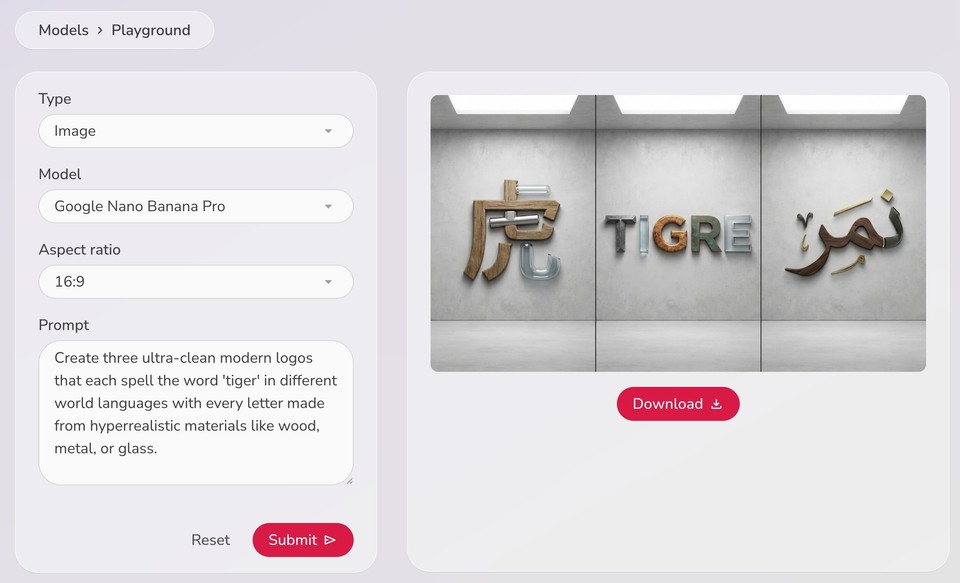
My first prompt: "Create three ultra-clean modern logos that each spell the word 'tiger' in different world languages with every letter made from hyperrealistic materials like wood, metal, or glass."
The result? It actually worked. I got three distinct logos with proper text in what appeared to be Chinese, Spanish, and Arabic - each with unique material textures. The metal looked metallic, the wood had grain, and the glass had proper transparency and reflections.
Next test: "Design a bilingual restaurant menu with English and Japanese in a minimalist style with perfectly spelled ingredient lists, prices, and illustrated icons made from clay."
This is where previous AI models would completely fall apart. But Nano Banana Pro delivered a clean, readable menu with both English and Japanese text (though I'll admit, I can't verify the Japanese accuracy - feel free to check the images yourself). The clay-style icons were a nice touch, and everything looked cohesive.
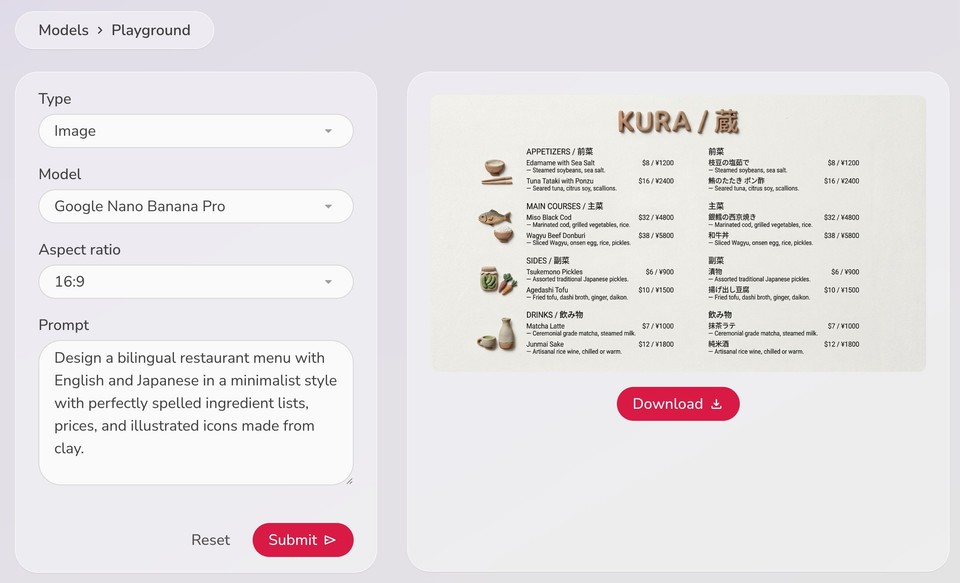
Is it perfect? No. Complex or very long text still produces occasional errors. But this is a massive leap forward from where we were even six months ago.
Product Photography
This is where most creators actually use AI image generation, so I pushed it hard on product shots.
Prompt: "Luxury bracelet on marble surface. Macro lens for sharp detail, soft diffused lighting from above, shallow depth of field."
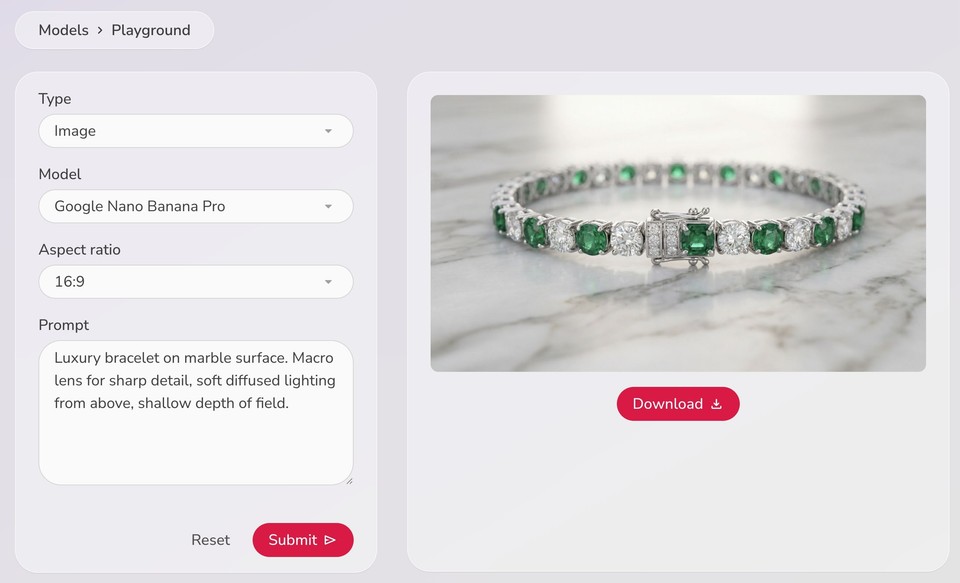
The lighting was professional, shadows added dimension without distraction, and you could see craftsmanship details in the bracelet.
Another test with wireless earbuds: "Minimalist product photography of white wireless earbuds on clean white surface, soft shadows, studio lighting, commercial grade, clean, professional, ready for e-commerce."
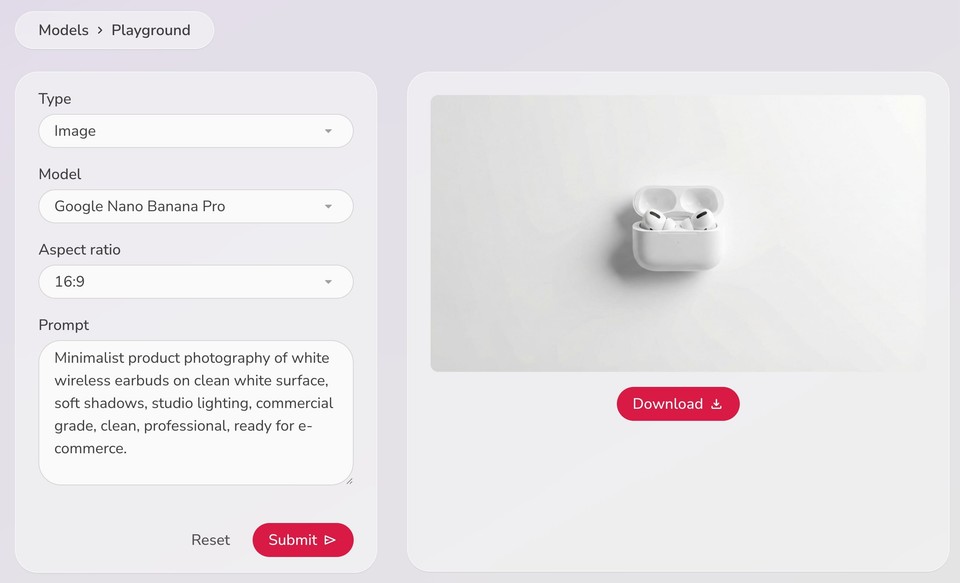
Zero weird artifacts. No distorted shapes. No background clutter. This is exactly what you'd want for a product listing on Amazon or Shopify.
If you're in the e-commerce space or creating marketing content, the product photography capabilities alone make Nano Banana Pro worth exploring. And if you want to take it further, Fliki's AI image animator can turn these static product shots into engaging videos.
Sketch to Image (Doodles to Edits)
This feature is genuinely fun. I drew a terrible sketch and I mean terrible, like something a five-year-old would draw of a landscape with mountain on one side and buildings on the other. Here it is:
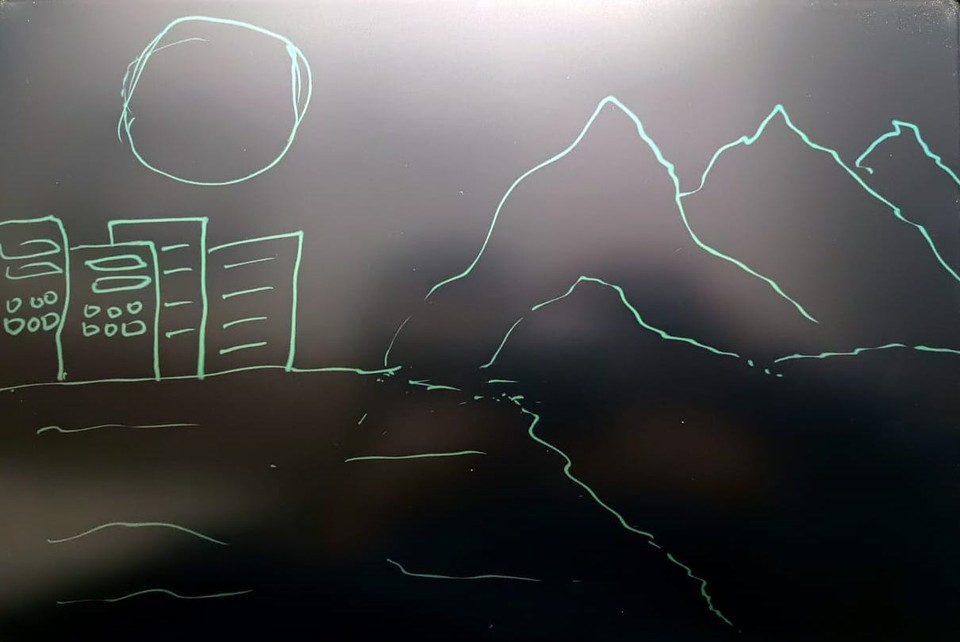
Then I uploaded it as reference image and gave Nano Banana Pro the following prompt: "Turn this sketch into a professional landscape showing buildings representing human civilization and mountains and lake (representing nature)."
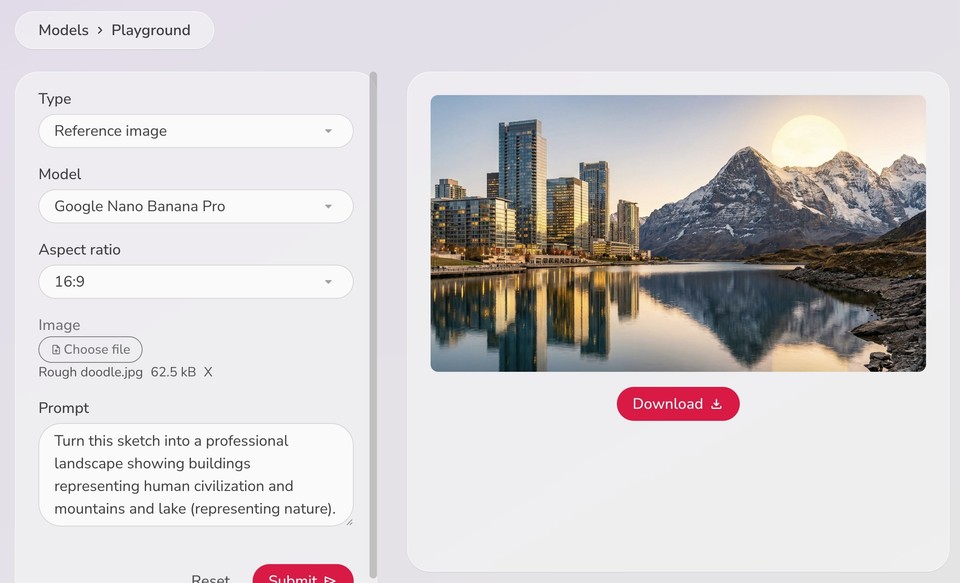
The result was a fully realized photograph that matched my sketch's composition exactly except the positioning of sun, well I can’t complaint much, mine didn’t even look like a sun.
On a serious note, I think this is incredibly powerful, especially for storyboarding, client presentations, or quickly visualizing ideas without needing design skills. You could even combine this with Fliki's image-to-video feature to create complete video storyboards.
Flexible Aspect Ratios
One frustration with previous image models was that changing aspect ratios often ruined the composition. You'd generate a perfect image in 16:9, then request it in 1:1 for Instagram, and suddenly the whole composition would be off.
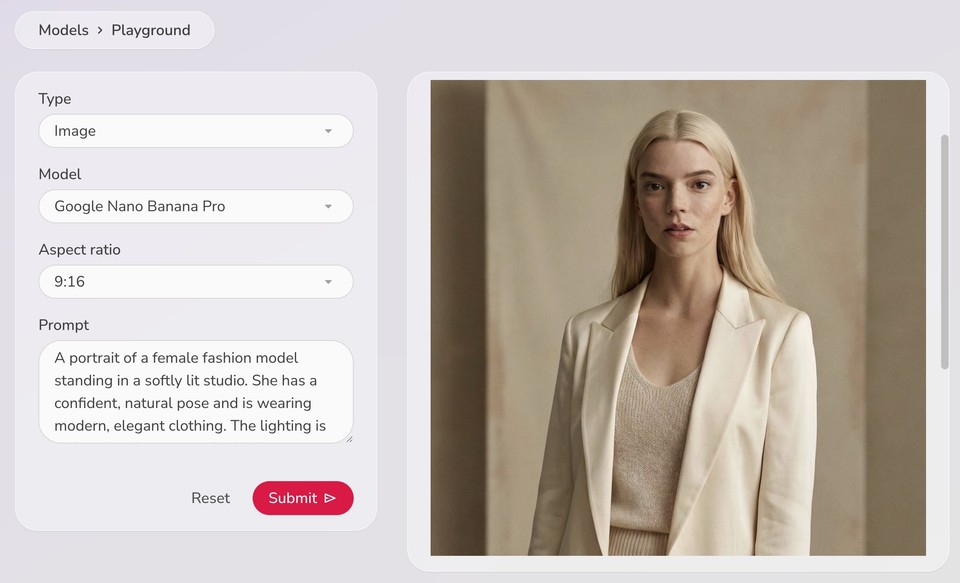
I generated a portrait image and requested it in four different aspect ratios: 16:9 for YouTube, 1:1 for Instagram, 9:16 for Stories, and 4:5 for print.
Nano Banana Pro preserved the composition across all four versions. It didn't just crop; it intelligently recomposed for each format. This saves hours of manual editing when you need the same visual across multiple platforms.
Where Nano Banana Pro Still Struggles
I promised you an honest review, so let's talk limitations.
Complex Human Anatomy: While human generation has improved, complex poses still produce errors. If you're generating images with multiple people interacting, hands touching, or group poses, you'll sometimes get weird finger counts or awkward limb positioning.
Text-Heavy Designs: It handles short text and logos well, but try to generate a full magazine page with multiple paragraphs of body copy, and you'll still get gibberish in some sections.
Photorealistic Faces: If you upload a reference photo and ask it to generate that specific person in a new scene, the likeness can drift. It gets close, but it's not always exact.
Specific Brand Elements: Need a perfect recreation of a trademarked logo or specific product with exact details? You're better off using real photos or manual design work.
These are real limitations. I'm not going to pretend this model is flawless. But for the vast majority of creative use cases and I'm talking 90%+ of what most creators actually need; it's a massive upgrade.
How Does It Compare to Competitors?
The biggest competitors are still Midjourney for pure aesthetic quality and DALL-E for ease of use. But Nano Banana Pro's strength is versatility. It's not just an image generator; it's an image editor, style transfer tool, text renderer, and composition engine all in one.
For a deeper dive into how Google's AI models compare, check out this comparison between Google Veo 3.1 and Sora 2 and this review of Gemini 3 Pro.
Where Nano Banana Pro wins:
-
Multilingual text rendering
-
Image blending capabilities
-
Style transfer quality
-
Aspect ratio flexibility
-
Integration across Google's ecosystem
Where it loses:
-
Extreme photorealism in faces
-
Complex human anatomy
-
Very specific brand recreations
Final Verdict: Is Nano Banana Pro Worth It?
If you're a content creator, designer, or marketer who regularly needs visual assets, this is a game-changer. The text rendering alone makes it worth using.
The free tier gives you limited generations, which is enough to test it out. If you're on Google One AI Pro or Ultra, you get more generations plus access in Search and Notebook LM.
For anyone serious about AI-powered content creation, I'd recommend testing Nano Banana Pro through Fliki Pro. You'll get access to this model alongside other cutting-edge AI tools, and you can create complete video projects that combine AI-generated images, voiceovers, and editing - all in one platform. Plus, features like the AI thumbnail maker work beautifully with Nano Banana Pro's output.
This is the first time Google's image model feels like a serious professional tool, not just an experimental feature. It's not perfect, but it's damn good.
Ready to test it yourself? Start with Fliki Pro to access Nano Banana Pro and build complete content workflows that actually deliver results.