What's new

We're always working to enhance your experience! Keep up with Fliki's latest updates and new features.

Contents

  1. ๐Ÿ”— Blog to video series
  2. ๐Ÿ’ก Explainer videos
  3. ๐Ÿ‘ฅ Workspaces
  4. ๐ŸŽจ Custom visual styles
  5. ๐ŸŒ Translate & dub in 30+ languages
  6. ๐ŸŽญ Realistic AI characters
  7. ๐ŸŽฌ The all-new Fliki
  8. ๐Ÿ“ฑ TikTok auto-publishing
  9. ๐Ÿ“ฝ๏ธ Stop-motion story video generator
  10. ๐Ÿ’ณ Top-up credits
  11. ๐Ÿช„ Playground v2
  12. ๐Ÿ“บ Video series
  13. โœจ AI asset library
  14. ๐Ÿ—ฃ๏ธ 130+ new voices
  15. ๐ŸŽต YouTube licensed music
  16. ๐Ÿ‘ฌ Character library
  17. ๐ŸŽญ Character consistency
  18. ๐Ÿ—ฃ๏ธ Expressive multilingual voices
  19. ๐ŸŽจ AI thumbnails v2
  20. โ‡๏ธ Playground & advanced models
  21. ๐ŸŽฅ New AI video models
  22. โœจ Fliki Pro
  23. ๐ŸŽจ New AI image models
  24. ๐ŸŽญ Personalized avatars
  25. ๐Ÿ‘€ Sneak peek - Fliki Pro
  26. ๐ŸŽฌ Custom video templates
  27. ๐Ÿ”„ Zapier and Make integration
  28. โœจ Editor Copilot
  29. ๐ŸŽฅ Video embeds
  30. ๐Ÿ“ฆ Bulk create
  31. ๐Ÿ› ๏ธ Editor toolbar
  32. ๐ŸŽฅ Revamped video templates
  33. ๐ŸŒ Web research
  34. ๐Ÿ“ Editable subtitles for recorded content
  35. ๐ŸŽฅ Workflow v4
  36. โœ๏ธ Custom fonts
  37. ๐Ÿ‘ฅ Team collaboration
  38. ๐Ÿ”ฎ Templates for workflows
  39. ๐ŸŽจ Smarter design workflows
  40. ๐ŸŽฅ Record & Edit
  41. ๐ŸŽ™๏ธ Studio voices
  42. ๐Ÿฆ„ย Magic edit
  43. โ†ฉ๏ธ 2024 Recap
  44. โœจ Enhanced workflows
  45. ๐Ÿ” Similar media
  46. ๐ŸŽค Custom voices
  47. โ˜‘๏ธ Manage files & folders
  48. โ†ฉ๏ธ Undo and Redo
  49. ๐ŸŽฅ AI video clips 2.0
  50. ๐Ÿ–ฅ๏ธ New dashboard
  51. ๐Ÿง Full-body avatars
  52. ๐Ÿ†• Editor updates
  53. ๐Ÿ”ฅ Media overlay effects
  54. ๐Ÿช„ Enhanced animations
  55. โœจ Image background remover
  56. ๐Ÿ”คย 50+ New fonts & letter spacing
  57. ๐ŸŽจ Enhanced AI image model
  58. ๐ŸŽฌ Audio, video & screen recording
  59. ๐Ÿ“ข New voices & languages
  60. ๐Ÿš€ System upgrades
  61. ๐ŸŽงย AI-generated sound effects
  62. ๐ŸŽจ Branding
  63. ๐Ÿž๏ธ Design v2
  64. ๐ŸŽฌย Scene transition effects
  65. ๐ŸŽž๏ธย B-rolls
  66. ๐Ÿ“ข New ultra-realistic voices
  67. ๐Ÿ”ค Subtitle files (SRT, VTT)
  68. ๐Ÿ“ฝ๏ธ Editor v3
  69. ๐Ÿ—ฏ๏ธ Subtitle effects
  70. ๐Ÿ”ฒ Shapes
  71. โœ๏ธ Script to video
  72. ๐Ÿ—‘๏ธ Trash bin
  73. ๐ŸŽจ Designs
  74. โšก๏ธ Faster exports
  75. โ†– Custom positioning
  76. ๐Ÿช„ Copy-paste scenes
  77. ๐Ÿ“ฝ๏ธ Video templates
  78. โš’๏ธ Simple tools
  79. ๐Ÿ“ฅ Download options
  80. ๐ŸŽฌ Product templates
  81. ๐Ÿ“บ Shareable previews
  82. ๐Ÿ’ฌ ChatGPT + Fliki AI video
  83. ๐Ÿชญ AI video clips
  84. ๐ŸŒŸ Favorites
  85. ๐Ÿ‘Œ Compact scenes
  86. ๐Ÿ’โ€โ™‚๏ธ Custom AI avatars
  87. ๐Ÿ“ฆ Product to video
  88. ๐Ÿช„ Magic create
  89. ๐Ÿ’โ€โ™€๏ธ AI avatars
  90. ๐Ÿฅ Sound effects
  91. ๐Ÿงžโ€โ™‚๏ธ Idea to video with AI art
  92. ๐Ÿฐ Stickers
  93. ๐Ÿ’จ Animations
  94. ๐Ÿ”Š Multi-lingual ultra-realistic voices and voice cloning
  95. ๐Ÿ”จ Server upgrades
  96. ๐Ÿ“ข New ultra-realistic voices
  97. ๐Ÿ’… New design
  98. ๐Ÿฆ„ AI art v2
  99. ๐Ÿงฉ Editor layout
  100. ๐Ÿ”ฅ Editor v2
  101. ๐Ÿ”Š Multi-lingual ultra-realistic voices!
  102. ๐ŸŽ™๏ธ Multi-lingual voice cloning
  103. ๐Ÿ”Š Ultra-realistic voices!
  104. ๐Ÿช„ PPT to video
  105. ๐ŸŒ  Premium stock assets
  106. ๐Ÿช„ Idea to video
  107. ๐ŸŽ™๏ธ Voice cloning
  108. โœ๏ธ Language-specific fonts
  109. ๐Ÿ‘ฅ Team billing
  110. โœ… Easy way to purchase subscription
  111. ๐ŸŽถ Premium music library
  112. ๐Ÿ’ƒ๐Ÿป Giphy integration
  113. ๐Ÿฃ Tweet to video
  114. ๐ŸŽš๏ธ Multi-level summarization
  115. ๐ŸŒ Translate
  116. ๐Ÿ’ฌ Interactive subtitles
  117. โœจ Auto-pick videos
  118. ๐Ÿ–ผ๏ธ AI Art v1.5
  119. ๐Ÿ“ Custom duration
  120. ๐Ÿ“‚ Move files & folders
  121. โ˜ƒ๏ธ More credits for everyone + new pricing plans!
  122. ๐Ÿ“ข New voices
  123. โณ Export progress
  124. ๐Ÿ“ข New voices
  125. ๐Ÿ“‘ Sub-sections
  126. โœ๏ธ New fonts
  127. ๐Ÿ“ข New voices
  128. ๐Ÿค– AI Art
  129. ๐Ÿคน Fancier editor
  130. ๐ŸŽฅ Video rendering engine
  131. ๐Ÿ”† Dark mode
  132. ๐Ÿ“ Blog to ๐ŸŽฅ video
  133. ๐Ÿ“ข New voices
  134. ๐ŸŽ› Fine tuning
  135. โœ๏ธ New fonts
  136. ๐Ÿ™Š Voice styles
  137. ๐ŸŽถ Music library
  138. ๐Ÿ’… Awedio is now Fliki
  139. ๐ŸŒ† Media library
  140. ๐Ÿ”Š New voices - Fliki now have over 700+ voices
  141. ๐Ÿ“ข New voices
  142. ๐ŸŽถ Background music
  143. ๐ŸŽฅ Now create Videos!
  144. ๐ŸŽ› Speech rate and pitch
  145. ๐Ÿ“ข Pronunciation editor
  146. ๐Ÿ“ข New voices
  147. ๐Ÿ“ข Upload your own audio files
  148. โญ๏ธ Public pages for Podcasts and Audiobooks
  149. ๐ŸŒ New languages and dialects
  150. ๐ŸŽฅ Fliki is alive!

๐ŸŽฌ The all-new Fliki

Jul 1, 2026

We've completely rebuilt Fliki from the ground up. This is our biggest update yet: a faster, cleaner, and far more flexible editing experience that gives you real creative control over every part of your video, right down to the smallest detail.

Here's what's new:

A simpler workflow, smarter toolbar

Weโ€™ve simplified the workflows and redesigned the toolbar to keep the tools you actually use within easy reach, without the clutter.

A rebuilt left panel, organized the way you think

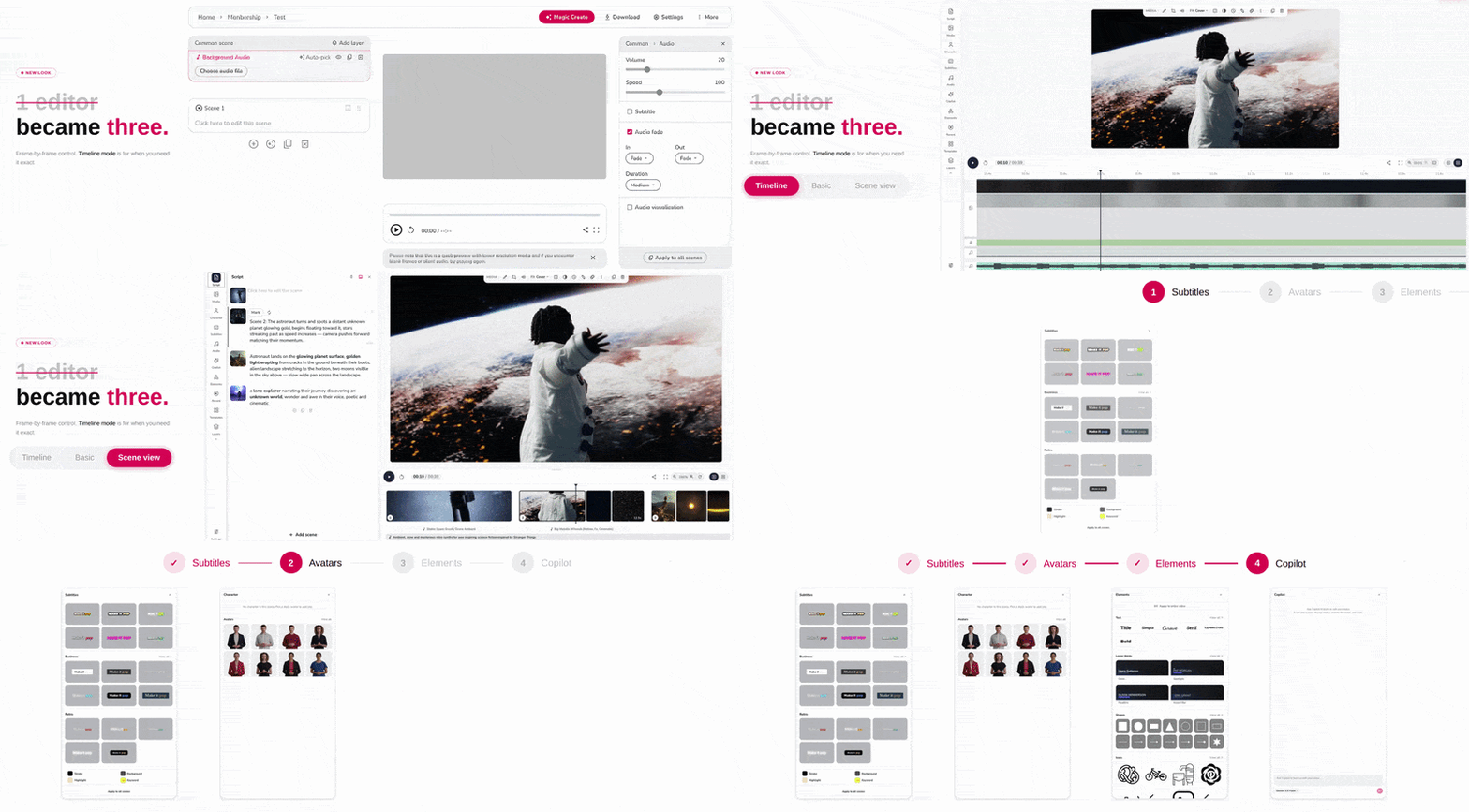
Every part of your video now has its own dedicated space. Instead of hunting through one crowded menu, you'll find purpose-built panels for media, subtitles, audio, script and voiceover, and other elements. Along with the reorganization, we've added a lot more to work with:

  • More shapes: Go beyond circles and rectangles with arrows, polygons, and more.

  • New caption styles: Fresh subtitle presets to match any look.

  • Lower-third bundles: Ready-made text packages to make your videos look polished and professional.

  • Better pickers: Smoother, faster browsing when choosing media and audio.

A brand-new timeline and scene rail

You now get two ways to build your video. The scene rail gives you a simple, at-a-glance view of your scenes laid out horizontally, while the full timeline offers the precise, professional control you'd expect from a modern content-creation tool, complete with snapping, zooming, and multi-select. Zoom in for fine adjustments or zoom out to see the whole picture.

Fully responsive on mobile

The editor is now fully responsive, so you can create and make edits on the go, right from your phone.

This is the biggest step forward the editor has ever taken, and it's just the beginning. Jump in and take the new editor for a spin.