🏞️ Design v2
Jun 3, 2024
We’re thrilled to announce Design v2 that take your design capabilities to the next level.
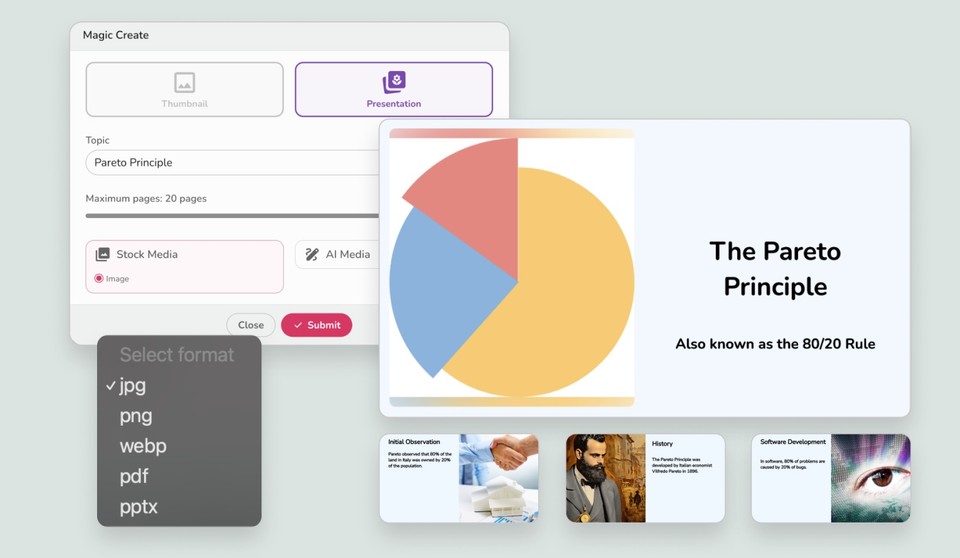
Multi-Page Designs: Now you can add multiple pages to your designs, perfect for creating presentations, social media carousels, and more.
Download Options: Easily download multiple pages as zip files in various formats—JPG, PNG, WEBP, PDF, and PPTX.
Full-Blown Presentations: Use our Magic Create workflow to craft stunning presentations with ease.
Thumbnail Creation: Just write your thumbnail idea and watch as Fliki brings it to life.
Leverage these new tools to enhance your social posts, create engaging content, and explore endless possibilities. Get started today and see the difference!
🎬 Scene transition effects
May 24, 2024
We’re excited to bring you a whole new way to add flair to your videos with our new scene transition effects. We have the following effects to choose from:
Blur, Clock, Fade, Flip, Slide, Wipe, Zoom
You can also make your transitions unique by adjusting:
Duration: Control how long the scene transition lasts.
Easing Effect: Smoothen your scene transitions with various easing options.
Direction: Choose the direction for your scene transitions to match your style.
Sound Effects: Up your sound design game by adding transition sound effects like click, bell, boom, pop, whoosh to make your videos even more engaging.
Try out the new scene transition effects and take your video projects to the next level with Fliki!
🎞️ B-rolls
May 21, 2024
We're thrilled to announce our new B-Rolls feature, designed to make your videos more engaging and dynamic. Here's how it works:
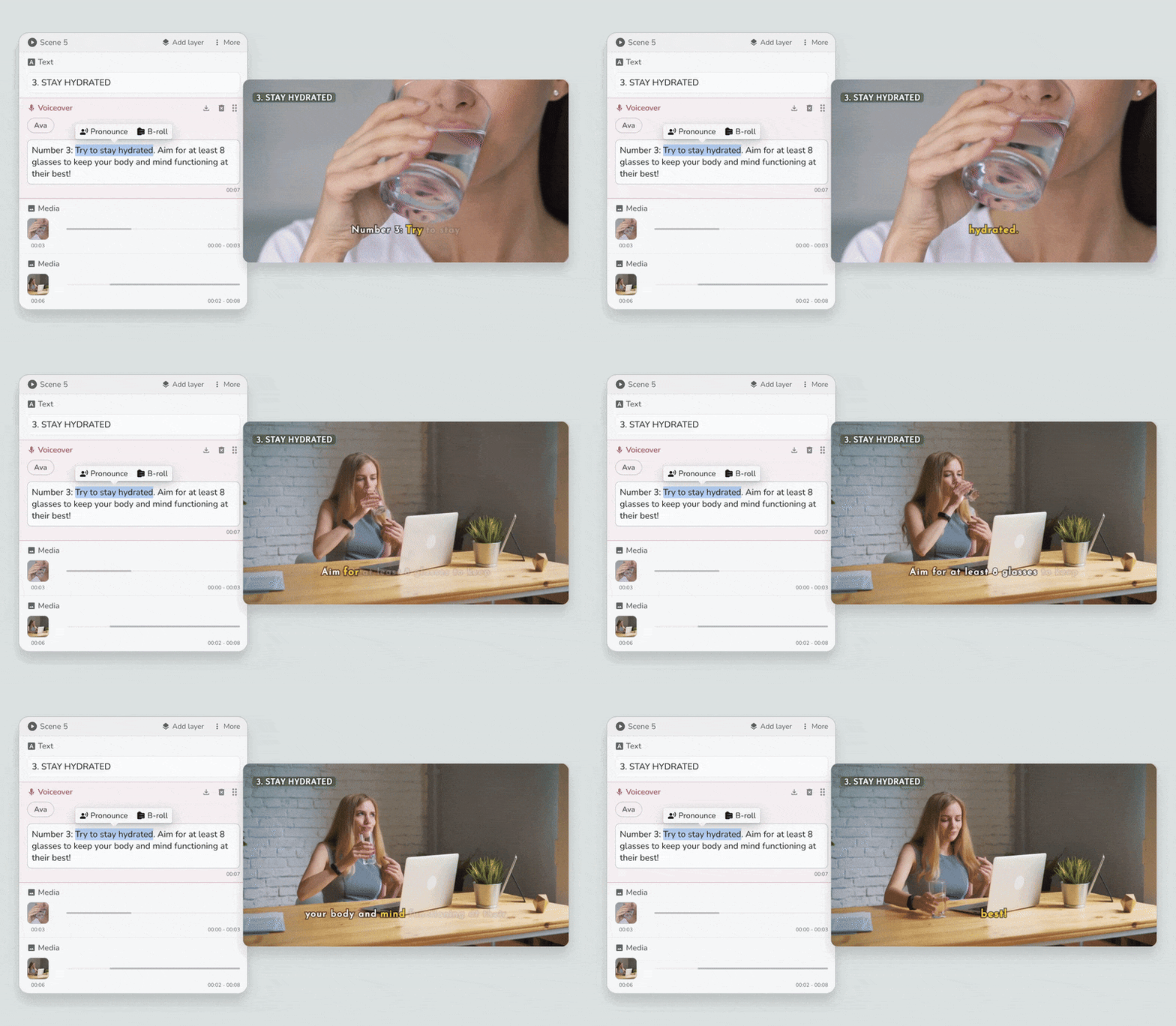
Add Multiple Media Sequentially: Enhance your scenes by adding multiple media elements that play sequentially, creating a rich, engaging experience.
Easy B-Roll Insertion: Simply highlight the text in the voiceover layer where you want to add the B-Roll and select 'B-roll'.
Customized Media Layers: A new media layer will be added that only shows when the selected text is spoken. You can fine-tune the scene timing from the customization panel on the right.
Gantt Chart Display: Visualize the media duration with a Gantt chart in the media layer, showing exactly how long each media element will appear.
📢 New ultra-realistic voices
May 13, 2024
We are thrilled to announce the addition of over 340 new ultra-realistic voices, available in 57 languages, including Afrikaans, Arabic, Armenian, Azerbaijani, Belarusian, Bosnian, Bulgarian, Catalan, Chinese, Croatian, Czech, Danish, Dutch, English, Estonian, Finnish, French, Galician, German, Greek, Hebrew, Hindi, Hungarian, Icelandic, Indonesian, Italian, Japanese, Kannada, Kazakh, Korean, Latvian, Lithuanian, Macedonian, Malay, Marathi, Maori, Nepali, Norwegian, Persian, Polish, Portuguese, Romanian, Russian, Serbian, Slovak, Slovenian, Spanish, Swahili, Swedish, Tagalog, Tamil, Thai, Turkish, Ukrainian, Urdu, Vietnamese, and Welsh.
We’ve added two new languages Belarusian and Maori, bringing total supported languages in Fliki to 79.
🔤 Subtitle files (SRT, VTT)
May 8, 2024
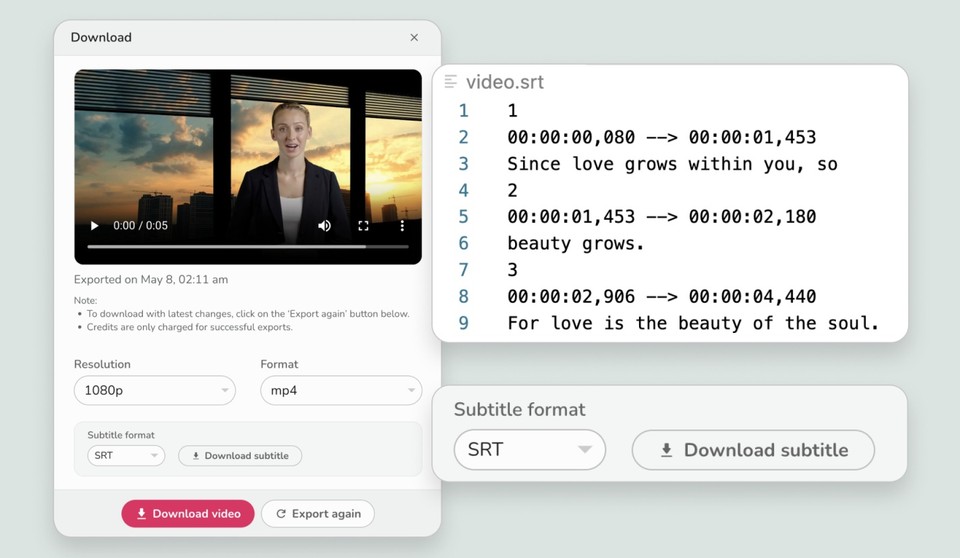
Exciting news! Now, after exporting your video, you'll have the option to download subtitles in both SRT and VTT file formats!
Here's how it works:
Export video: Export your video and look for the new option to download subtitles.
Download subtitles: Simply click on it, and choose whether you'd like to download the subtitles in SRT or VTT format.
With this new feature, you'll have greater flexibility in using your subtitles across different platforms.