🎬 Audio, video & screen recording
Jul 29, 2024
We're excited to introduce a powerful new feature in Fliki that allows you to record yourself, your screen, or both simultaneously! Here’s what’s new:
Record & Share: Capture your screen, record your webcam, and combine them for high-quality business presentations, explainer videos, or gaming walkthroughs.
Voice Recording: Prefer to use your own voice instead of AI voiceovers? Record your voice directly from the Fliki interface for a more personal touch.
Elevate your content creation game with these versatile recording options, perfect for educational videos, training videos, corporate videos and more.
📢 New voices & languages
Jul 29, 2024
We're excited to introduce 51 new ultra-realistic voices in Hungarian, Norwegian, and Vietnamese. Additionally, we've expanded our collection with 4 new standard voices for Oriya and Assamese, increasing our total to 2261 voices across 81 languages in Fliki.
🚀 System upgrades
Jul 24, 2024
In an effort to continually provide the best experience, we have upgraded our system and data servers. Now, you’ll see snappier experience across the whole app along with cleaner and refreshed look!
🎧 AI-generated sound effects
Jul 3, 2024
Struggling to get views on your videos? We've got you covered! Today's viewers expect more, and sound effects can make all the difference. That's why we're thrilled to announce our latest feature: AI-generated sound effects✨
How it works?
Add an audio layer and click on choose file.
Switch to the generate tab and describe the sound you want.
Select duration and hit generate to create your custom sound effect instantly.
Alternatively, click auto-generate, and Fliki will create the perfect sound effect based on your scene.
🎨 Branding
Jun 20, 2024
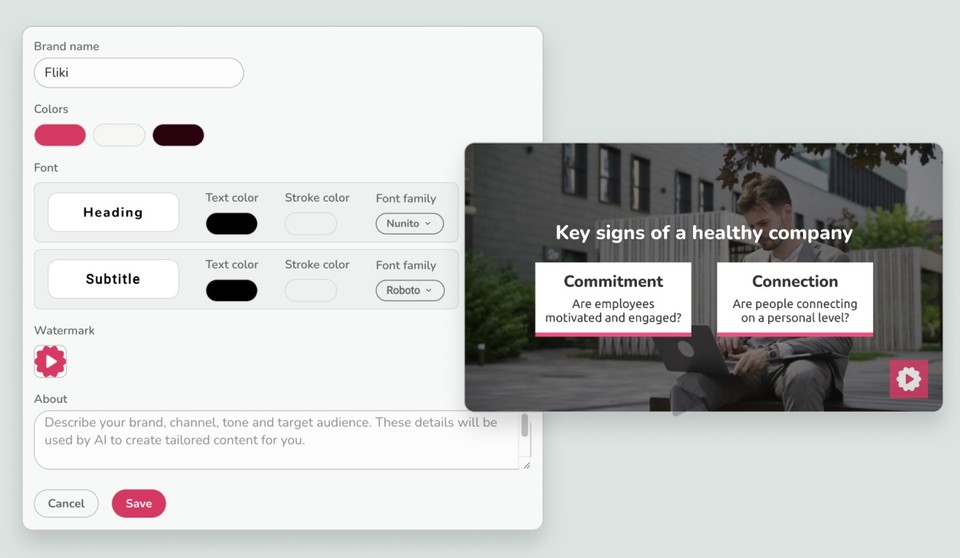
We are thrilled to announce branding customizations to Fliki, which can help you create on-brand videos with ease. Here's what you can do with our new branding feature:
Custom Colors and Fonts: Set your brand’s colors and fonts to maintain consistency across all your videos.
Watermark: Add a watermark to protect and promote your content.
Brand Guidelines: Define your brand tone and target audience, and let our AI create content tailored to your brand.
Multiple Channels: Ideal for content creators, you can manage multiple channels and create videos tailored to each channel's identity within a few clicks
This feature will seamlessly apply your selected brand settings during the Magic Create workflow, ensuring your videos stay on brand.
Set up your brand once and skip the hassle of customizing videos every time.