
Introduction
Short-form video now commands over 82% of all internet traffic, and Instagram Reels alone reaches more than 2 billion monthly users. If you're a content creator, marketer, or small business owner who's been watching from the sidelines, the barrier to entry just disappeared. AI reel generators let you turn a simple text prompt or script into a polished, share-ready reel - complete with voiceover, visuals, captions, and music - in the time it used to take just to brainstorm a concept.
This guide walks you through everything you need to know about making AI reels: why they matter, how the technology works, and a detailed step-by-step tutorial using Fliki's AI reel generator to create scroll-stopping content for Instagram, TikTok, and YouTube Shorts.
What Are AI Reels?
AI reels are short-form vertical videos created with the help of artificial intelligence. Instead of manually filming footage, recording voiceovers, syncing captions, and editing transitions, an AI reel generator handles all of these tasks automatically. You provide a script, an idea, or even just a topic, and the AI produces a finished video optimized for platforms like Instagram Reels, TikTok, and YouTube Shorts.
The technology behind AI reels combines several AI capabilities: natural language processing to understand your content, text-to-speech engines to generate realistic voiceovers, computer vision to match visuals with narration, and generative AI to create custom images and video clips. The result is a production workflow that used to take hours or days compressed into minutes.
Why AI Reels Are Dominating Social Media in 2026
The shift toward AI-generated short-form content isn't just a trend; it's a fundamental change in how video gets made. Here's why it matters.
The Numbers Tell the Story
Short-form video engagement continues to climb across every major platform. YouTube Shorts gets over 200 billion views daily. Instagram Reels accounts for 50% of all time spent on the app. TikTok's engagement rate leads social platforms at roughly 2.8%, while YouTube Shorts has surged to an average engagement rate of 5.91% - outperforming all competitors.
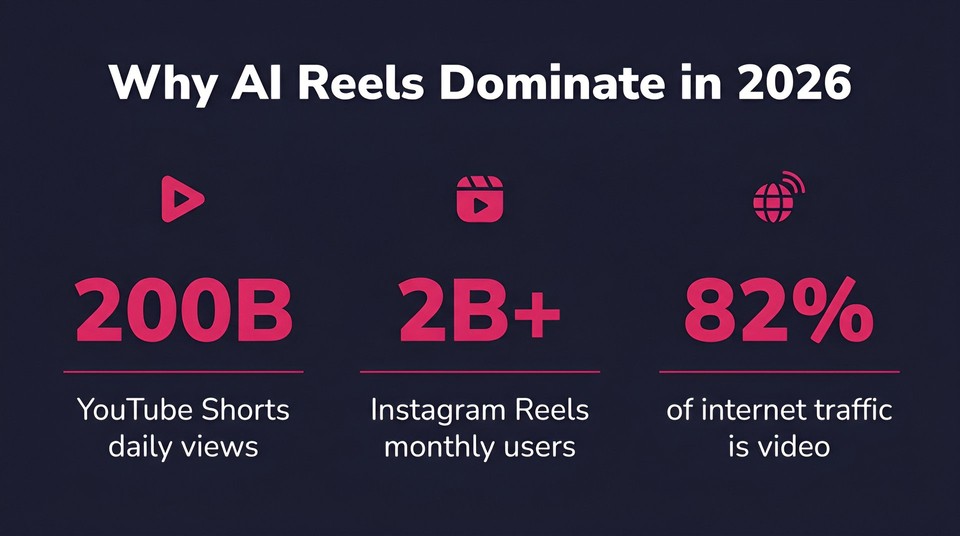
For marketers, 86% of businesses now use video as a marketing tool, and 91% of consumers say they want to see more video content from brands. The demand is enormous, but the traditional production pipeline simply can't keep up. AI reel generators bridge that gap by enabling anyone to produce high-quality video content at scale.
Speed and Consistency at Scale
Traditional video production for a single 30-second reel typically involves scriptwriting, filming or sourcing footage, voiceover recording, editing, captioning, and exporting. Even for experienced editors, that's a 2–4 hour process. An AI video generator like Fliki compresses this into under 10 minutes, delivering a 5x productivity improvement over traditional workflows.
That speed advantage compounds when you're producing content at volume. A brand that needs 20 reels per week across three platforms can now achieve that with a single creator and an AI tool, rather than a full production team.
How to Make AI Reels: Step-by-Step Tutorial with Fliki
Let's walk through the complete process of creating an AI reel using Fliki. Whether you're starting from a written script or just a rough idea, Fliki offers two workflows that cover both scenarios.
Method 1: Idea to AI Reel
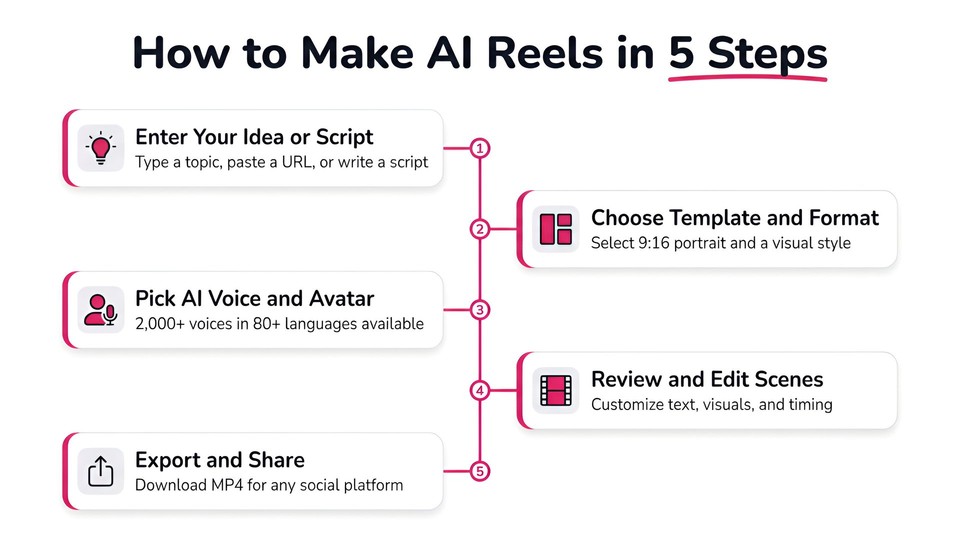
This is the fastest path from concept to finished video. It's ideal when you know the topic but haven't written a script yet.
Step 1 - Enter your idea
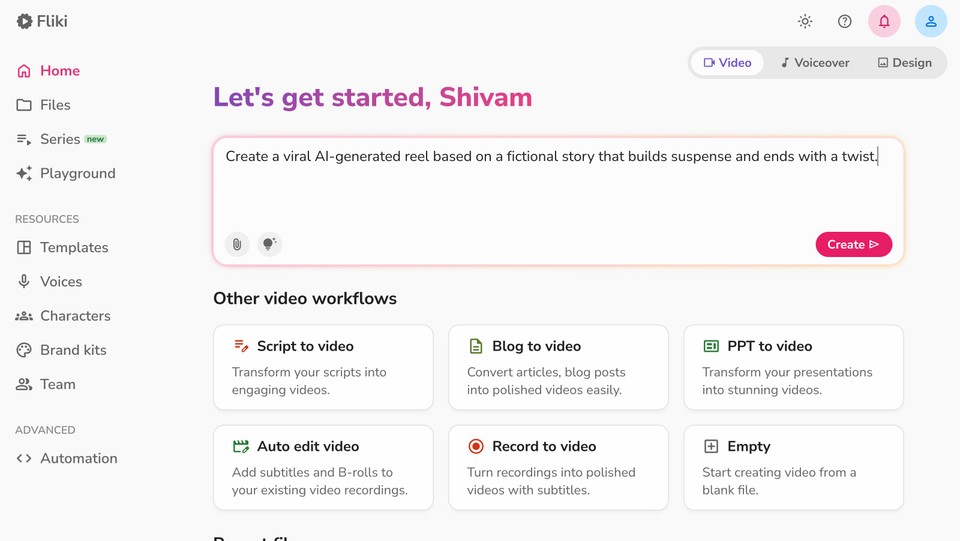
Start on the Fliki homepage and type your reel idea into the input field. This could be as simple as "5 productivity tips for remote workers" or as detailed as a multi-paragraph brief. You can also paste a URL or a blog post that you want to convert into reel format. Click Create and Fliki will automatically route you to the Idea-to-Video workflow.
Step 2 - Enhance your prompt and set video length
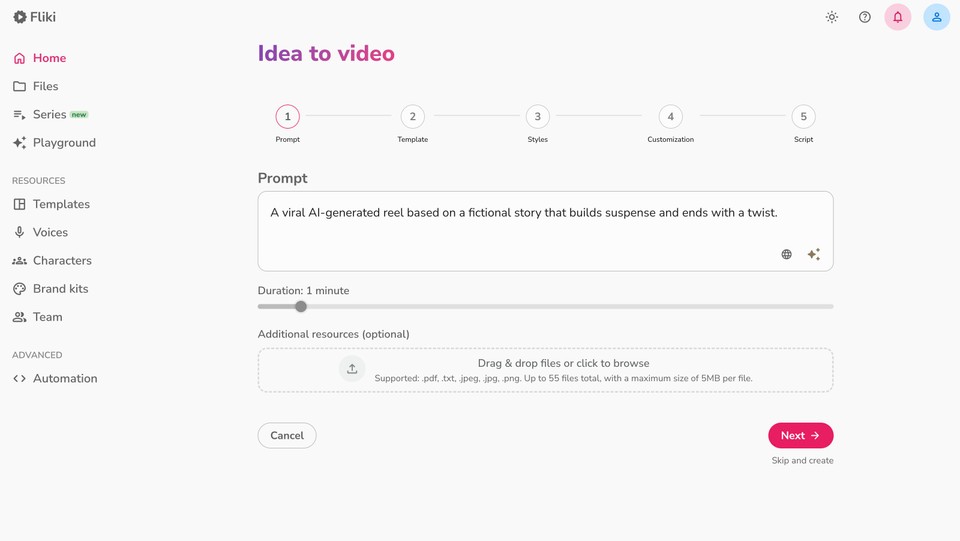
On the next screen, you can click Enhance Prompt to let Fliki's AI refine your initial idea into a more detailed creative brief. This step is optional but helpful - the more specific your prompt, the better the output.
Set your desired video length. For reels, shorter is generally better: the sweet spot is 15–60 seconds for most platforms, though Instagram Reels between 60 and 90 seconds have been shown to deliver the highest engagement rates.
You can also upload reference materials if you want the video to follow a specific visual direction or content structure.
Step 3 - Select aspect ratio and template
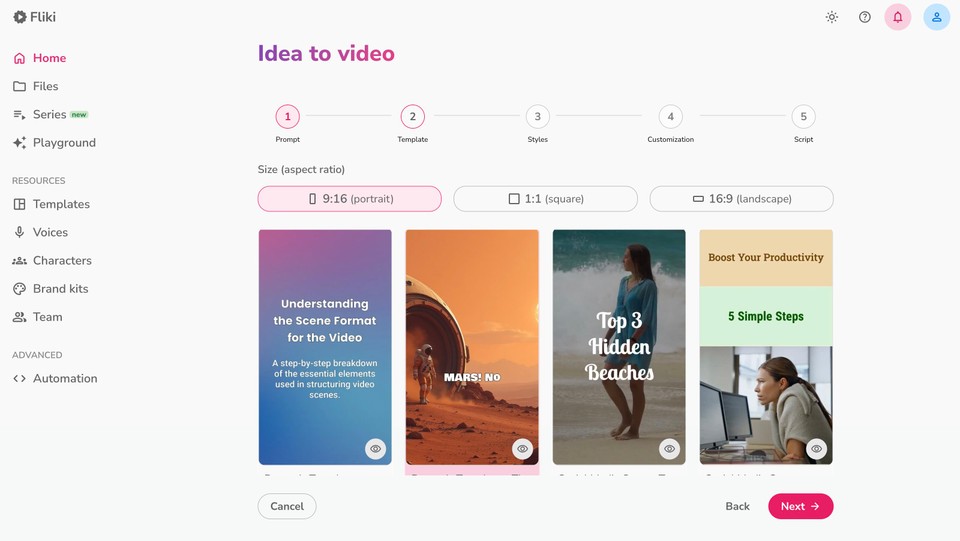
Choose the aspect ratio as per your target platform:
-
Portrait (9:16) - the standard for Instagram Reels, TikTok, and YouTube Shorts
-
Square (1:1) - works well for Facebook and LinkedIn feed posts
-
Landscape (16:9) - best for YouTube long-form or website embeds
Next, select a video template that matches your brand's visual style, or choose Auto Layout to let the AI generate a layout automatically.
Step 4 - Choose language and personalization options
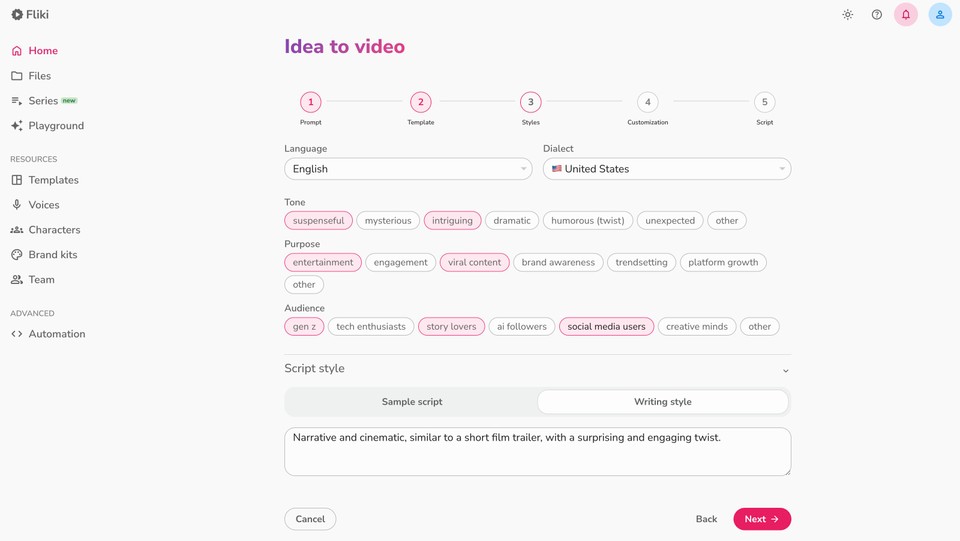
Select your preferred language and dialect. Fliki supports over 80 languages, making it straightforward to create reels for global audiences.
You can further personalize the reel by specifying the tone (casual, professional, energetic), purpose (educational, promotional, entertaining), and target audience. You can also adjust the script style to influence how the AI writes the narration.
Step 5 - Select media type
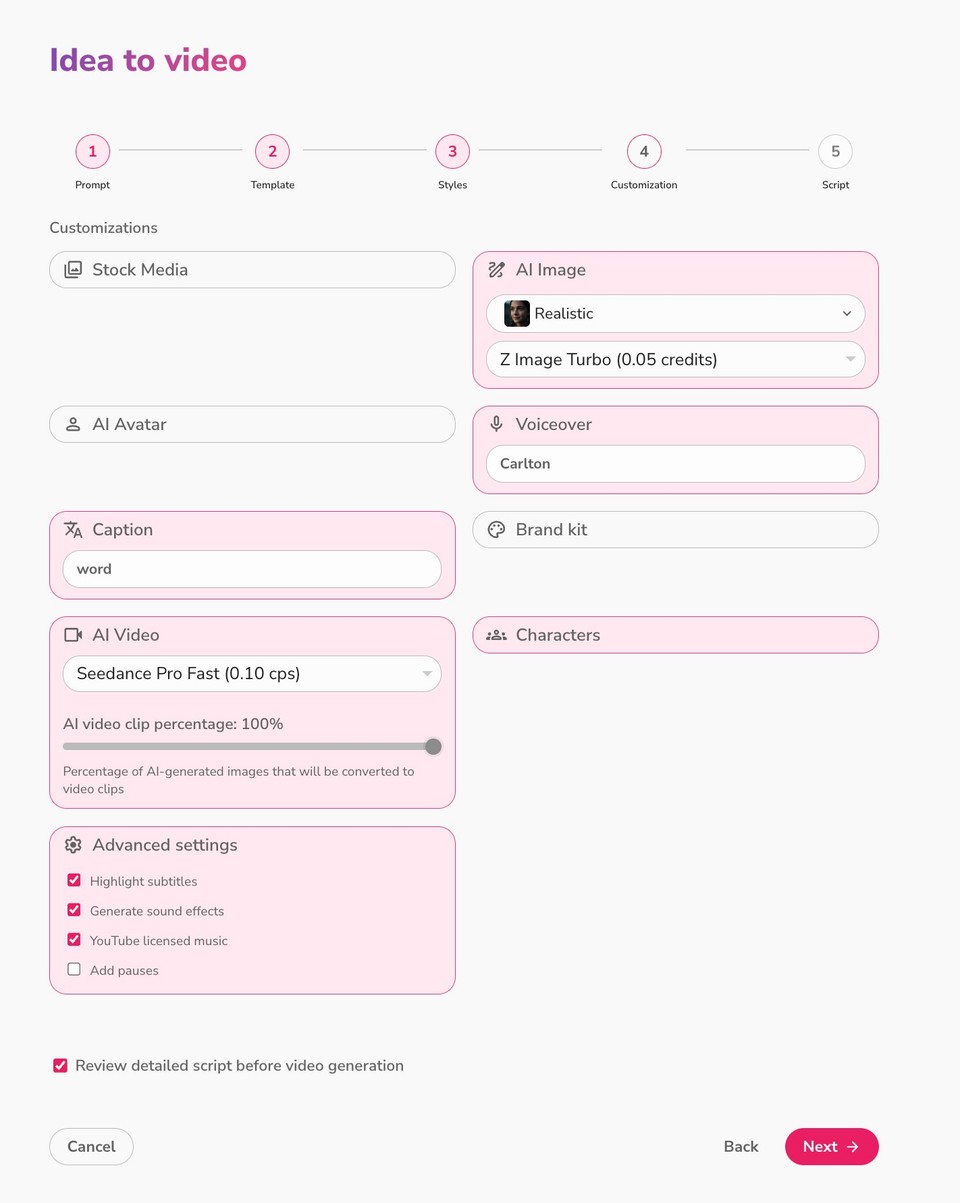
Choose between two visual approaches:
-
Stock media - Fliki pulls from a library of licensed video clips and images that contextually match your script.
-
AI media - Fliki generates custom visuals using AI. You can select from styles like Cinematic, Anime, Comic Book, Documentary, and 3D Model.
If you select AI media, you also get a caption style selector and an AI Video slider that controls what percentage of AI-generated images get converted into animated video clips rather than static images.
Step 6 - Customize AI avatar and voiceover
This is where your reel gets its personality. Fliki offers two powerful options:
AI Avatar: Choose from a gallery of realistic AI avatars that can deliver your script on camera with natural expressions and lip sync. This is especially useful for talking-head style reels where a human presenter adds credibility and connection.
AI Voiceover: Select from over 2,000 ultra-realistic voices in 80+ languages. Use the text-to-speech engine to preview different voices, filtering by language, dialect, or gender. If you want a truly unique voice, Fliki's voice cloning feature lets you create a digital copy of your own voice - so every reel sounds authentically yours.
Step 7 - Review and edit the generated script
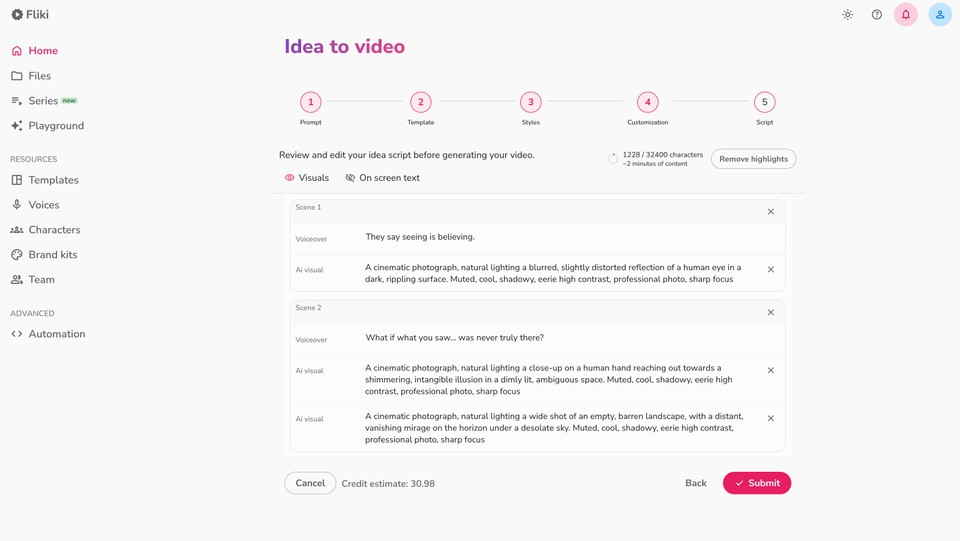
Before the final video is generated, Fliki displays a review screen where you can edit the script scene by scene. Each scene shows the on-screen text and the AI visual prompts that will be used to generate images.
The Credit Estimate section tells you exactly how many credits the video will use. Once you're satisfied, click Next to begin video generation.
Step 8 - Preview the video and edit as required
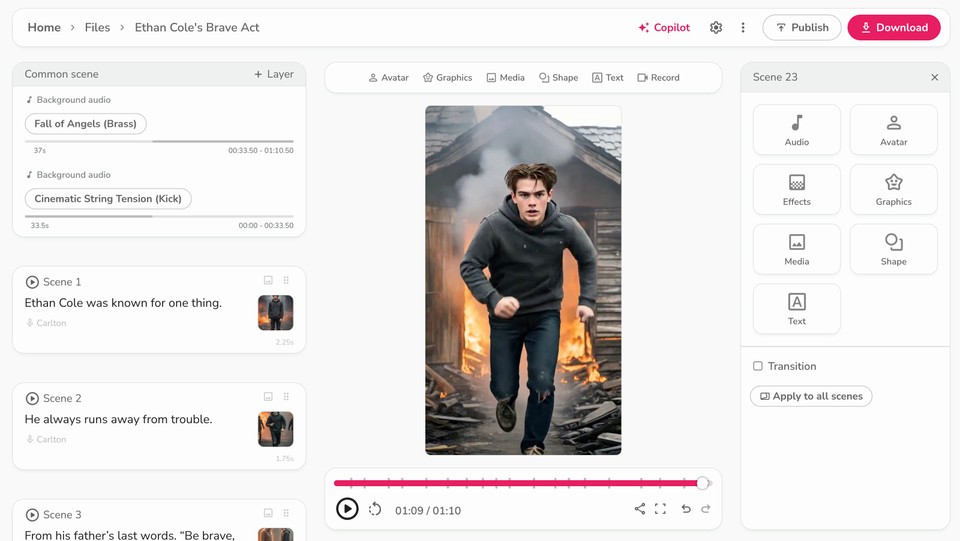
After the video is generated, you can preview the video and fine-tune the audio and branding:
-
Change the background music by clicking the music name in the Background Audio layer and selecting a new track. Adjust volume and speed to taste.
-
Add a watermark with your logo by going to Common Scene → Add Layer → Watermark. Upload your logo and adjust its size, position, and opacity.
Step 9 - Export and download
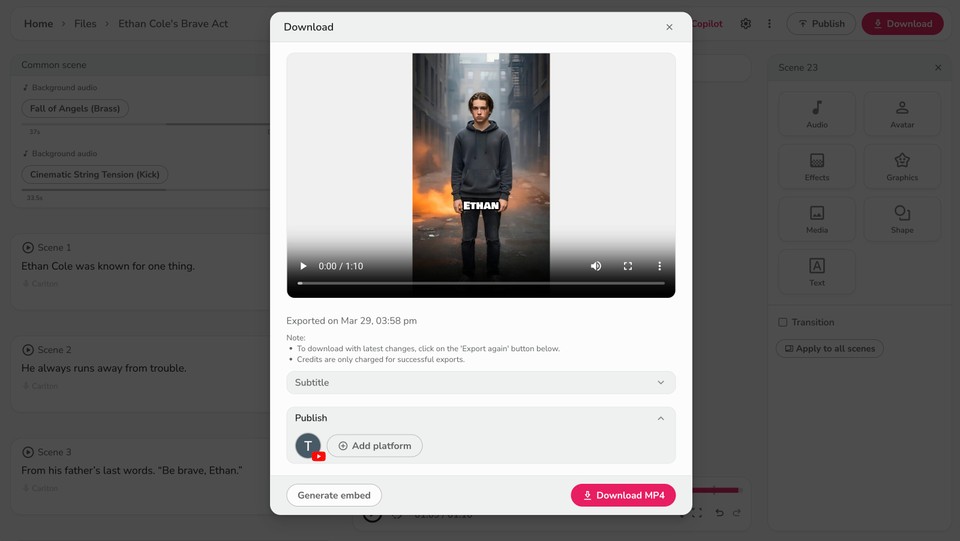
Click Download, then select Start Export to generate the final video in MP4 format. You can also download the subtitles in SRT or VTT format for accessibility and cross-posting.
Method 2: Script to AI Reel
If you already have a script written - or you've generated one using ChatGPT, Claude, or another AI writing tool - the Script-to-Video workflow gives you more control over the final output.
Step 1 - Add your script
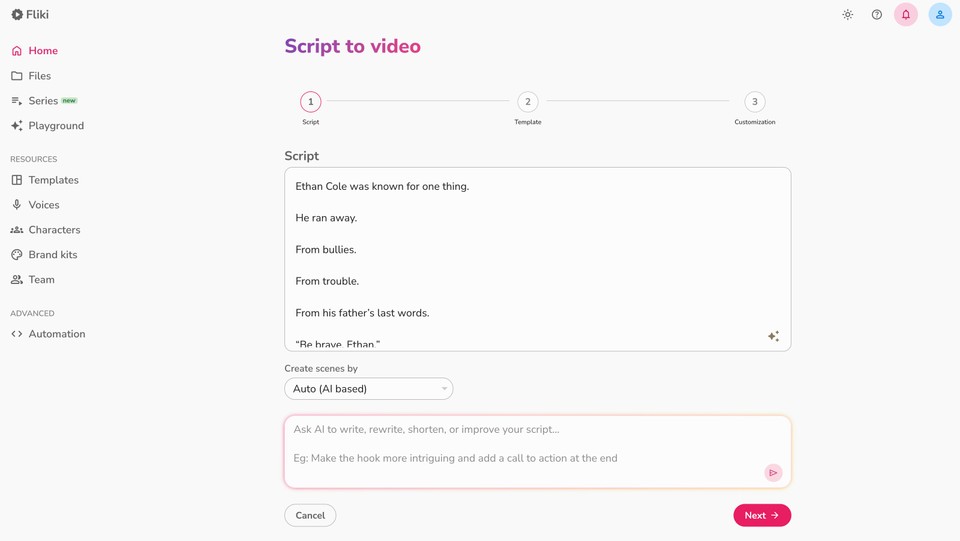
Click New File on the Fliki homepage, then select Script under the Video section and paste your script. Use the Create scenes by dropdown to control how the AI splits your text - the Auto (AI based) option works well for most use cases.
You can also use the Ask anything for your script field to refine your content using AI. Ask it to shorten the script, rewrite sections for a younger audience, or improve the pacing.
Step 2 - Select aspect ratio and template
Same as the Idea-to-Video workflow: choose 9:16 for reels, select a template like ‘The Martian Frontier’ or go with Auto Layout, and click Next.
Step 3 - Choose language and media preferences
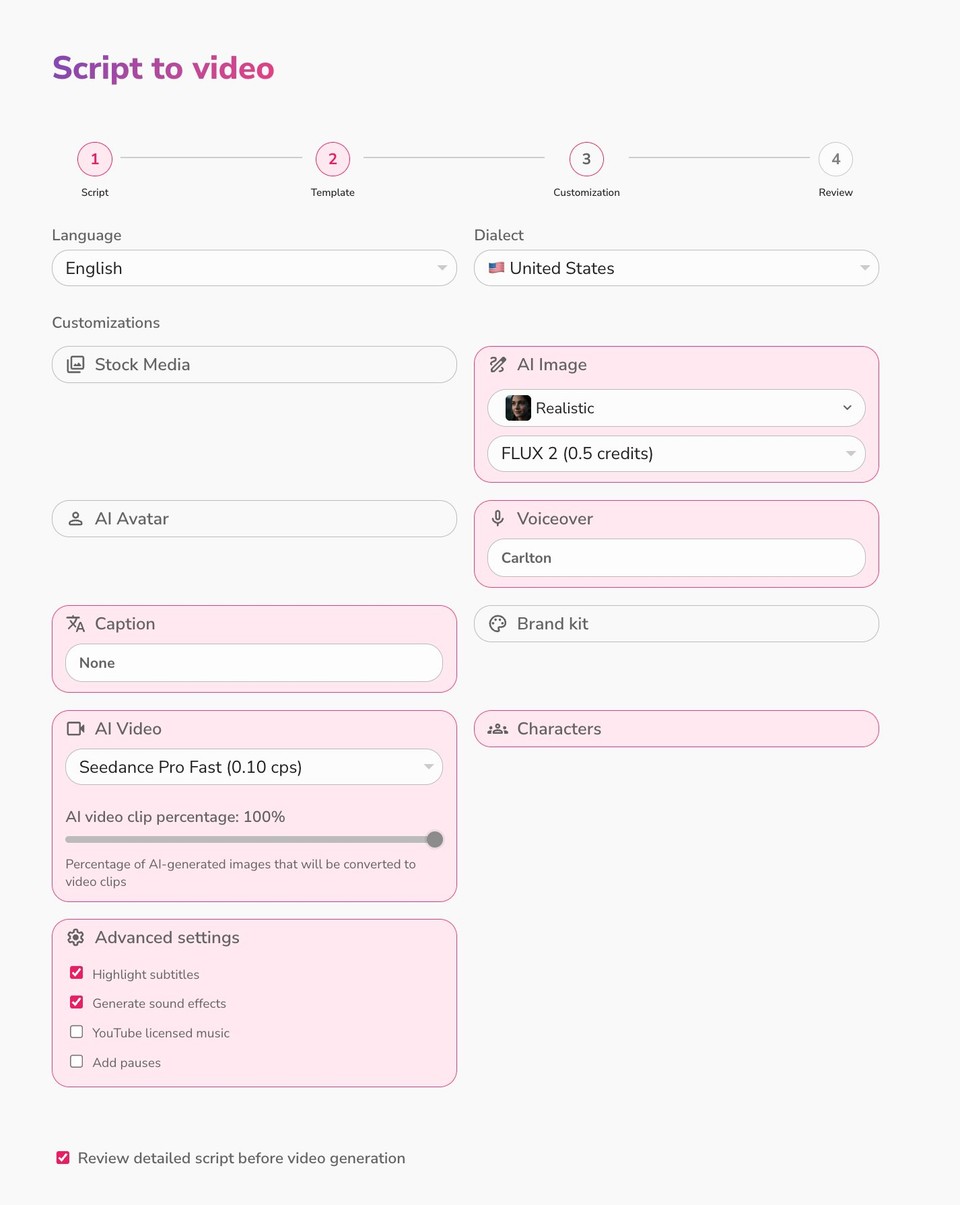
Select your language, dialect, and media type (stock or AI-generated). Configure the AI Video slider and caption style if you're using AI media.
Step 4 - Customize characters and voiceover
Review your characters and voice using the same process described in Method 1. The Script-to-Video workflow also lets you enable Review detailed script before video generation - this adds a review step where you can edit the visual prompts and on-screen text for each scene before the video is rendered.
Step 5 - Review and customize scenes
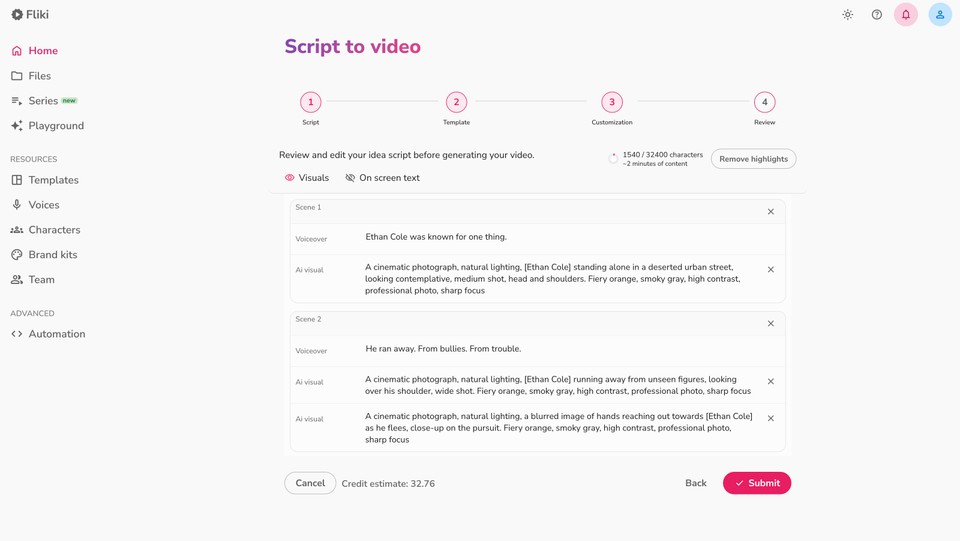
Fliki automatically generates scenes from your script. Each scene shows the on-screen text and a preview of the AI visuals. You can edit the text, replace visuals, rearrange scenes, and adjust voice settings. Click Submit when you're ready to generate the final video.
Step 6 - Customize and export
Add background music, branding, and watermarks, then export your finished reel in MP4 format. Here is a sample AI reel created with the help of Fliki:
7 Tips for Making AI Reels That Actually Go Viral
Creating a reel is one thing. Creating one that gets shared, saved, and pushed by the algorithm is another. Here are proven strategies for maximizing the reach of your AI-generated reels.
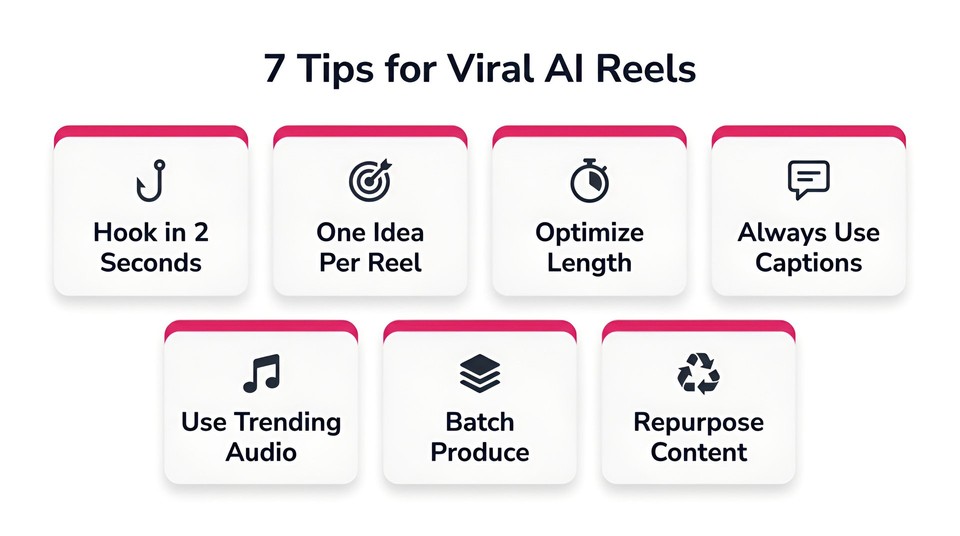
1. Hook Viewers Fast (in First 2 Seconds)
The algorithm measures watch time, and the first two seconds determine whether someone keeps scrolling or stops to watch. Start with a bold statement, a surprising statistic, or a visual that creates curiosity. Avoid slow and boring intros - get to the point immediately.
2. Keep It Focused on One Idea
The best-performing reels focus on a single concept: one product benefit, one relatable problem, one tip, or one transformation. Trying to cram multiple ideas into a 30-second reel dilutes the message and confuses viewers.
3. Optimize Length for Your Platform
While Instagram supports reels up to 90 seconds, reels between 60 and 90 seconds tend to get the highest engagement on Instagram, while TikTok and YouTube Shorts audiences often prefer content in the 15–30 second range for quick-hit content. Try out different lengths to see what works well with your audience.
4. Use Captions - Always
An estimated 85% of social media videos are watched without sound. Fliki automatically generates captions for your reels, and you can customize the style, font, and placement. This is both an accessibility best practice and an engagement booster.
5. Leverage Trending Audio and Topics
Pay attention to trending sounds on Instagram and TikTok. While Fliki lets you add custom background music, combining your AI-generated content with trending audio tracks can significantly boost discoverability.
6. Batch-Produce Content with AI
One of the biggest advantages of using an AI reel maker is the ability to create content at scale. Instead of making one reel at a time, plan a week's worth of content in a single sitting. Use Fliki's bulk video creator to produce multiple variations of the same concept for A/B testing across platforms.
7. Repurpose Existing Content
Your blog posts, podcast episodes, and long-form videos are goldmines for reel content. Fliki's blog-to-video feature can transform any article URL into a reel-ready video, while the PPT-to-video tool converts presentations into engaging short-form content.
Best Use Cases for AI Reels
AI reels aren't limited to influencer content. Here's how different types of creators and businesses are using them.
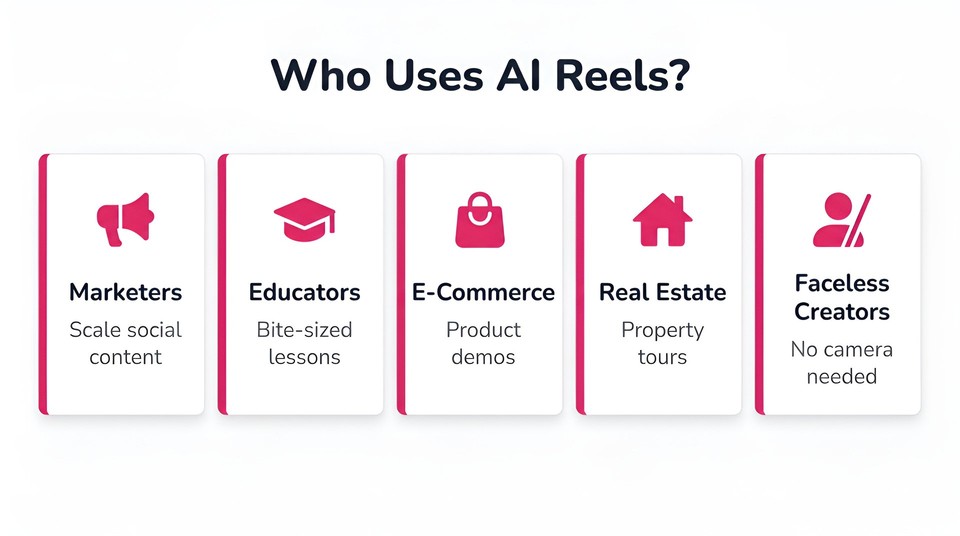
Social Media Marketers
Brands use AI reels to maintain a consistent posting schedule without burning out their creative teams. Product launches, customer testimonials, behind-the-scenes content, and promotional announcements all translate well to the reel format. Fliki's AI video ad generator is specifically built for creating promotional reels that convert.
Educators and Course Creators
Educational content thrives in short-form video. Break complex topics into bite-sized reel series, create quick explainers, or tease your course content to drive enrollments. The AI-generated visuals and clear voiceover make even technical subjects accessible and engaging.
E-Commerce and Product-Based Businesses
Product demos, feature highlights, customer review compilations, and seasonal promotions all perform exceptionally well as reels. Use Fliki to generate AI sales videos that showcase your products with professional-quality visuals and narration.
Real Estate Professionals
Virtual property tours, neighborhood guides, and market update reels help agents stand out in a competitive market. Fliki's real estate video maker is tailored for exactly this type of content.
Faceless Content Creators
The rise of faceless reels AI content is one of the biggest trends of 2026. Faceless YouTube channels, Instagram pages, and TikTok accounts are generating significant revenue without the creator ever appearing on camera. With AI avatars, text-to-speech narration, and AI-generated visuals, you can build an entire content brand using tools like Fliki's AI video generator. The AI handles everything from scriptwriting to voiceover to visual creation - making faceless content more polished and professional than ever.
AI Reels vs. Traditional Video Production: A Head-to-Head Comparison
To put the advantage in perspective, here's how AI reel creation stacks up against the traditional approach:
|
Factor |
Traditional Production |
AI Reel Generator |
|---|---|---|
|
Time per reel |
2–4 hours |
Under 10 minutes |
|
Cost |
$500–$5,000+ per video |
Starting at $0 (free tier available) |
|
Skills required |
Filming, editing, scripting |
Type your script or idea |
|
Voiceover |
Hire talent, book studio |
2,000+ AI voices, 80+ languages |
|
Revisions |
Days per round |
Instant regeneration |
|
Scalability |
Linear cost increase |
Unlimited videos |
For most creators and small businesses, AI reel generation isn't just faster - it's the only realistic way to maintain the content volume that social media algorithms reward.
How to Make AI Reels for Free
Getting started doesn't require a budget. Fliki offers a free tier that lets you explore the AI reel generator without entering a credit card. The free plan includes access to AI voices, templates, and the core video generation engine - enough to create your first batch of reels and see the results before committing to a paid plan.
For those ready to scale, Fliki's pricing plans offer additional credits, premium voices, higher export resolutions, and features like voice cloning and custom branding.
Start Making AI Reels Today
The gap between creators who use AI tools and those who don't is widening every month. Short-form video isn't slowing down - YouTube Shorts' 200 billion daily views and Instagram Reels' 2 billion monthly reach make that clear. The creators and brands who win are the ones who can produce high-quality content consistently, and AI reel generators make that possible for everyone.
Ready to create your first AI reel? Try Fliki's AI reel generator for free and turn your next idea into a scroll-stopping video in minutes.
FAQs
Fliki is one of the most comprehensive AI reel makers available, offering text-to-video conversion, 2,000+ AI voices in 80+ languages, AI avatars, custom branding, and a template library - all in one platform. With over 10 million users and a 4.8/5 satisfaction rating from 5,500+ reviews, it's a proven choice for creators and businesses alike.
Yes. Fliki offers a free tier that includes access to its AI reel generator, AI voices, and video templates. You can create and export reels without entering credit card information.
The optimal length depends on your platform and content type. Instagram Reels between 60 and 90 seconds tend to get the highest engagement, while shorter reels (15–30 seconds) often perform better on TikTok and YouTube Shorts. Start with 30–60 seconds and test from there.
Absolutely. Fliki's voice cloning feature lets you create a digital replica of your voice. Once cloned, you can generate voiceovers in your own voice for every reel without recording a single take.
AI reels created with Fliki are optimized for Instagram Reels, TikTok, YouTube Shorts, Facebook Reels, and LinkedIn. You can export in 9:16 portrait format (standard for all short-form platforms), 1:1 square, or 16:9 landscape depending on your needs.
Modern AI reel generators like Fliki produce output that's virtually indistinguishable from traditionally produced content. With ultra-realistic AI voices, cinematic-quality AI visuals, and professional templates, the quality bar has risen dramatically. The AI avatars feature natural lip sync and expressions that viewers find engaging and trustworthy.