The smartest first video for any song
If you have a song, whether you wrote it, recorded it, or generated it with an AI music tool, a lyric video is almost always the smartest first video to make. It is far cheaper than an official music video, it gives your track a home on YouTube the day it drops, and it quietly captures one of the most common searches in music: people typing "[song name] lyrics." A lyric video is how a song gets found, sung along to, and shared.
The old way to make one meant hours in After Effects, hand-placing every word to the beat. The new way is dramatically faster: AI transcribes your track, builds a word-level timeline from the actual audio, and syncs the lyrics for you, so the timing is measured rather than dragged into place by hand. This guide walks through exactly how to do that, the styles to choose from, the craft that separates a great lyric video from an amateur one, and the copyright rules you genuinely need to understand before you hit publish, because that is the part that gets people demonetized.
Let us start with what a lyric video actually is.
What is a lyric video (and how it differs from the rest)
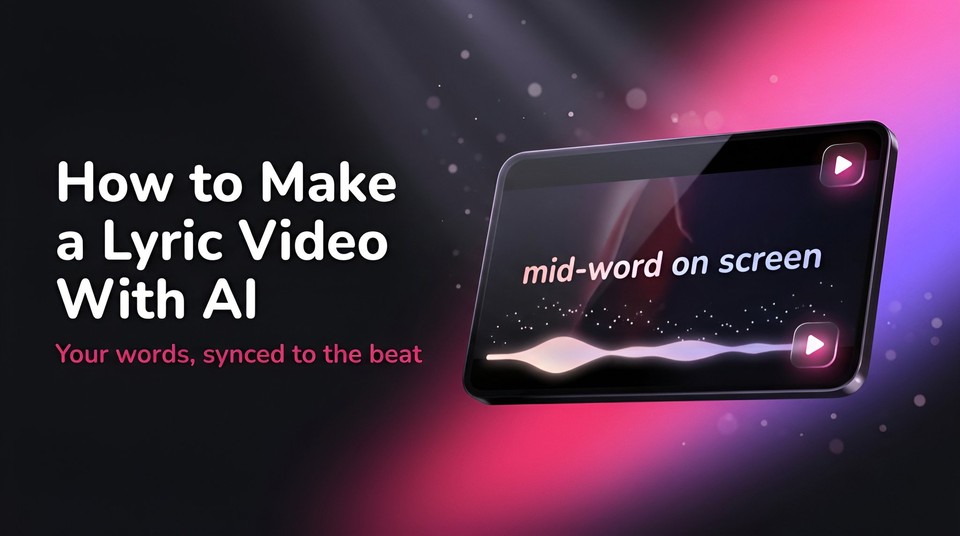
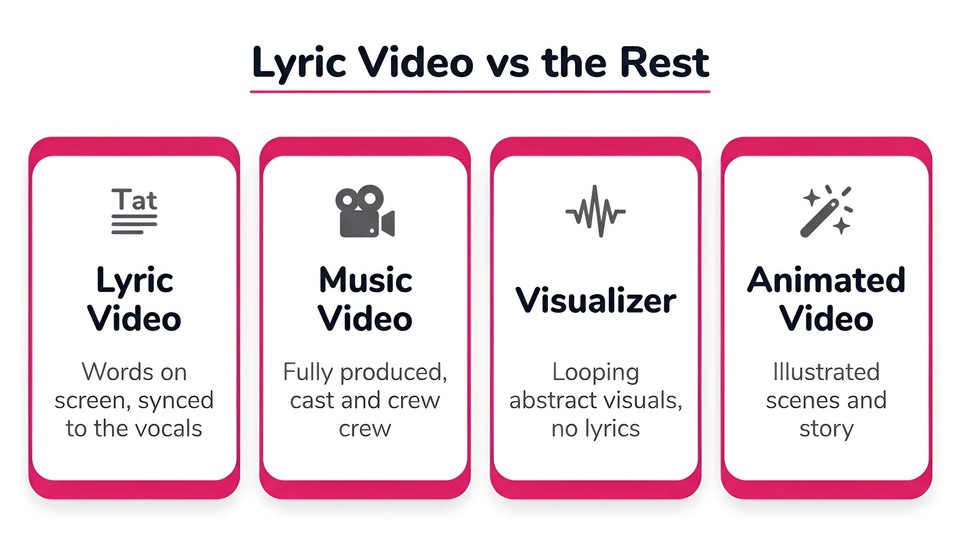
A lyric video displays a song's words on screen, synced to the vocals, over some visual treatment, typography, footage, or AI-generated scenes. The words are the point. It is one of four common music-video formats, and knowing the difference helps you pick the right one.
|
Format |
What it is |
Best when |
|---|---|---|
|
Lyric video |
On-screen words synced to the vocals, over typography or visuals |
You want release-day content, search traffic, and singalong appeal on a budget |
|
Official music video |
Fully produced visual storytelling with cast, crew, and a shoot |
You have real budget and a narrative to tell |
|
Visualizer |
Audio-reactive or looping abstract visuals, usually no lyrics |
The track is instrumental or vocal-light and you want a fast, cheap loop |
|
Animated music video |
Character or scene animation telling a story |
Brand and story matter and you have time to produce it |
Lyric videos punch above their weight for three reasons. They are cheap, since there is no film crew or location. They are search magnets, because the lyrics appear on screen and in the title, catching the enormous "song plus lyrics" search demand. And they are release-day ready, which is why major artists now routinely put out an official lyric video before, or instead of, the full music video. The format has come a long way since Bob Dylan flipped lyric cards in the 1965 clip for "Subterranean Homesick Blues," widely cited as the first lyric video, but the core appeal is unchanged: give the audience the words.
The main lyric video styles
Pick a style that matches your song's energy and your brand.
-
Kinetic typography, where the animated text itself is the star, letters snapping, stacking, and moving in 3D. Best for high-energy pop, hip-hop, and EDM, and when you want a premium designed feel with no footage.
-
Text over footage or b-roll, lyrics laid over live-action or stock clips. Best when you have mood footage or want a cinematic look.
-
Text over AI-generated visuals, words over custom AI scenes. Best for atmospheric or story-driven songs where you want bespoke imagery without a shoot, and the natural fit for the AI workflow below.
-
Karaoke or bouncing-ball, highlighting each word as it is sung. Best for singalongs, kids' songs, and covers.
-
Minimal or aesthetic, simple type on a solid or gently moving background. Best for ballads and indie, and the most readable and fastest.
-
Animated or character, illustrated scenes with lyrics woven in. Best when story and brand justify the extra effort.
The one thing that makes or breaks a lyric video
Everything about a lyric video comes down to two things: sync and readability. Get these right and even a simple video feels professional. Get them wrong and no amount of pretty visuals will save it.
Sync is everything. Each line and, ideally, each word should land exactly with the vocal. Lyrics that appear a beat early or late instantly break the spell. This is precisely the tedious part that AI now handles, by building the timeline from the audio itself rather than guessing on a grid.
Readability is the rest. Keep only a few words on screen at once, use a bold and legible font, and make sure there is strong contrast between the text and the background, adding a shadow or outline so the words survive over busy footage. The honest test: watch it muted, and if you cannot comfortably read every line in time, fix it.
Two more craft rules. Match the visuals to the song's mood, since frantic animation under a ballad fights the music. And choose the right aspect ratio for where the video will live: 16:9 for a YouTube upload, and 9:16 for Shorts, TikTok, and Reels, with the text kept inside safe margins so platform buttons do not cover your words on vertical.
How to make a lyric video with AI, step by step
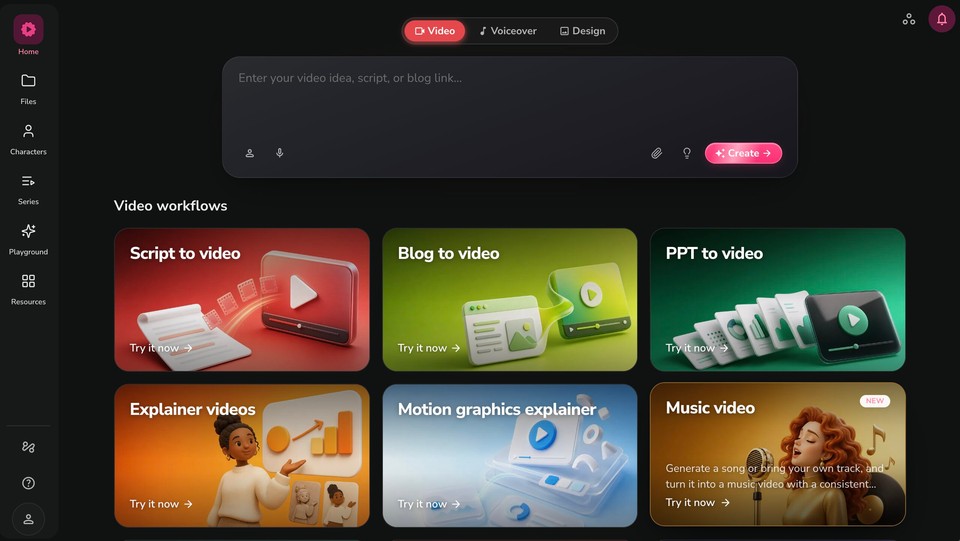
Here is the fast path. Fliki has a dedicated lyric video maker that listens to your track, times the words to the audio, and cuts the whole video to the beat, and you can open the music workflow directly at app.fliki.ai. The whole setup takes a few minutes, and the output is a fully editable project.
Step 1: Bring your track (or have Fliki write one)
Upload your song, up to three minutes, whether it is your own recording, a mix, or a track you generated in an AI music tool like Suno or Udio. If you do not have a track yet, describe the song and Fliki's AI music generator composes one with lyrics and builds the video around it. You can also paste your lyrics and choose whether the song is sung with lip-sync or instrumental.
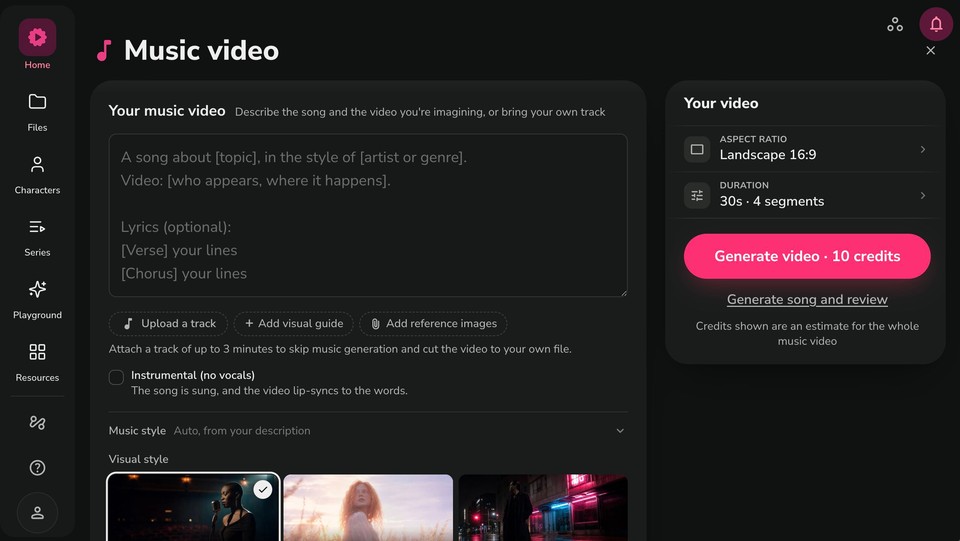
Step 2: Let Fliki listen and sync the words
Once your track is in, Fliki transcribes it to a word-level clock and tracks the beats. That clock becomes the timing the whole video runs on: every shot boundary, every lip-sync, and every on-screen lyric is measured against it, so cuts land on beats and lyric lines rather than on an arbitrary grid. The words are burned in and timed to the audio in the caption style you choose, from word-by-word highlights to phrase reveals to emphasis on the hook.
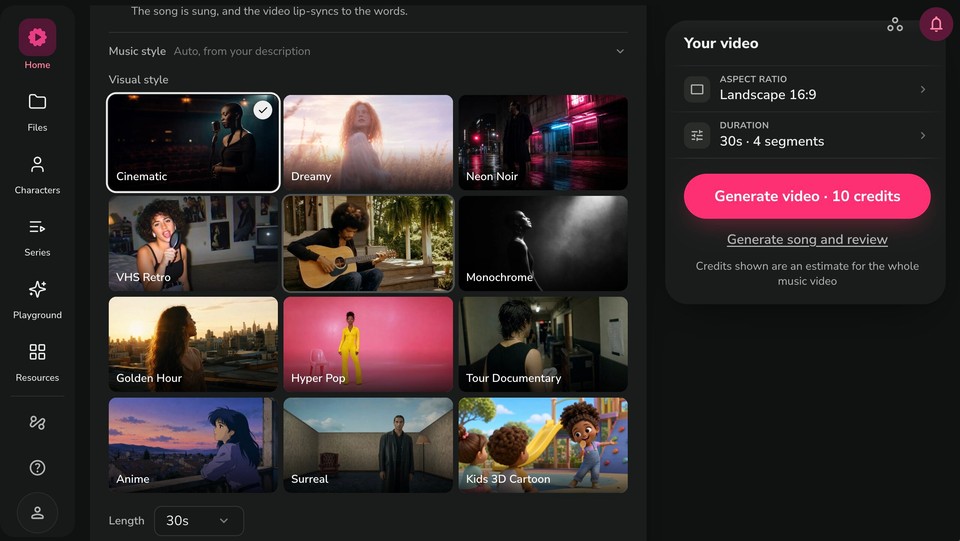
Step 3: Pick your look and settings
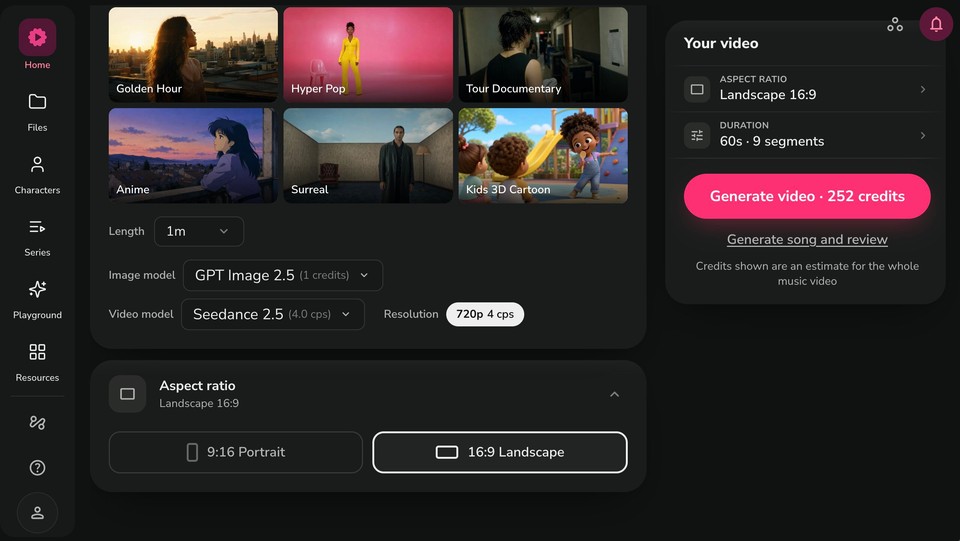
Choose from the visual styles, Cinematic, Dreamy, Neon Noir, VHS Retro, 35mm Film, Monochrome, Golden Hour, Hyper Pop, Tour Documentary, Anime, Surreal, and a Kids 3D Cartoon look. Each one locks the grade and cutting rhythm for the whole video so a release reads as one piece. Add reference images for the artist, the wardrobe, or the world so they carry through every shot, then set your length, aspect ratio, and models.
Step 4: Edit, then export for every platform
You land in a full editor, not a one-shot generator. Swap a shot, retime a section, fix a misheard word, or re-render a single clip. Then export 16:9 for YouTube, 9:16 for Reels, TikTok, and Shorts, and 1:1 for the feed, all from the same project, so a release rollout is one project instead of three.
The copyright part you cannot skip
This is the section most tutorials skip, and it is the one that will save you from a takedown or a demonetized upload. Read it.
Every song contains two separate copyrights: the composition (the underlying song, melody and lyrics, controlled by the songwriter and publisher) and the master (the specific recording, controlled by the artist or label). A lyric video touches both, and it also creates a third work, the video itself. Here is what that means in practice.
If it is your own song and you control both the recording and the writing, you can make, post, and monetize a lyric video freely. No permission needed. This is the clean case.
If it is someone else's song, you generally need a sync license to pair the composition with visuals, plus rights to the master if you use their recording. And there is a detail people miss: displaying the lyrics is itself a use of the copyrighted work, so even a words-only karaoke-style video of a song you do not own needs permission from the composition owner. Posting without clearance commonly triggers a YouTube Content ID claim, which can route your revenue to the rights holder or lead to a takedown. Worth understanding: a Content ID claim is not a license and not a legal ruling, it is an automated match, and YouTube treats it separately from its other policies. Not getting claimed does not mean you are cleared.
If your song was generated by an AI music tool, you can generally make a lyric video of it, but subject to that tool's terms, which vary and change, so check them. Two nuances to know. The US Copyright Office has stated that works generated purely from prompts, with the machine determining the expressive elements, are not copyrightable, so a purely AI-generated song may have no copyright of its own, which means you can use it but may not be able to stop others from using it. And AI music tools grant commercial rights differently by plan, so read the fine print before you monetize.
The practical takeaway is simple. Build your lyric video on a song you actually control: your own track, a properly licensed one, royalty-free music that grants sync rights, or an AI-generated song you are cleared to use. Do not build one on a commercial hit you do not own and expect to keep the ad revenue. Fliki says it plainly on its own tool: you need the rights to any audio you upload.
AI lyric videos and YouTube's rules
Because these videos are AI-assisted, a fair question is whether that risks your channel. It does not, as long as the work is genuinely yours. YouTube's monetization policy explicitly allows AI-assisted content that adds original value, such as using AI to generate a unique visual for your song. Its July 2025 update renamed the old repetitious-content rule to "inauthentic content" to clarify that what is not allowed is mass-produced, templated, near-identical spam, which was never monetizable anyway. A thoughtful, original lyric video is fine. Churning out fifty interchangeable ones is not. We cover this fully in our guide on the YouTube monetization requirements.
On disclosure, YouTube only requires the AI label for realistic synthetic media that a viewer could mistake for a real person or event. A typical lyric video, with typography, stylized or clearly AI visuals, and an AI-generated song, generally does not need the label, unless it shows a real, identifiable person doing something they did not do.
Common mistakes to avoid
-
Lyrics out of sync with the vocals. The single biggest immersion-killer. This is exactly why automatic, audio-based timing matters.
-
Too much text on screen at once. Keep it to a line or two so viewers can read it in time.
-
Unreadable fonts or low contrast. Bold, legible type with a shadow or outline over busy footage.
-
The wrong aspect ratio. Do not dump a 16:9 video onto TikTok, and keep text inside safe margins on vertical.
-
Using a song you do not have the rights to. The fastest route to a Content ID claim or takedown.
-
Visuals that fight the song. Match the energy and mood to the track.
-
Mass-producing near-identical videos. That trips YouTube's inauthentic-content policy.
The bottom line
A lyric video is the highest-return first video you can make for a song: cheap, search-friendly, and ready on release day. The craft comes down to two things, tight sync and clean readability, and both are exactly what AI now handles by building the timeline from your audio. Pick a style that matches the song, keep the words readable, choose the right aspect ratio, and, most importantly, make sure you have the rights to the track.
If you want to make one now, you can create your lyric video with Fliki for free, upload your song or generate one, pick a look, and get a video cut to the beat and the lyric line in minutes.
FAQs
Bring your song into a lyric video tool, let it transcribe the audio and sync the words to the beat, choose a visual style, and adjust readability and timing. With an AI tool like Fliki you upload the track (or generate one), pick a look, and export for YouTube or vertical platforms, and the words are timed to the audio automatically.
The reliable way is to let the tool build the timing from the audio itself. AI transcribes your track to a word-level timeline and places each lyric against the actual vocal and beat, then you fix any misheard word in the editor and the timing holds, which is far faster and tighter than dragging keyframes by hand.
Technically yes, but legally only if you have the rights. Your own song is free to use. For someone else's song you need sync and master rights, and displaying the lyrics needs permission too. An AI-generated song you are cleared to use, or royalty-free music with sync rights, is the safe path.
Make it in 16:9 (1920 by 1080), keep the lyrics readable and synced, and put the song name and "lyrics" in the title to capture search. You can monetize it if you own or have licensed the music, since a lyric video of a song you do not control will usually be claimed by the rights holder.
Yes, several tools including Fliki have free tiers, though they may add a watermark or cap length. A free plan is enough to make your first lyric video and see the automatic sync before you decide to upgrade.
Yes. Export in 9:16, pull the hook into a 15 to 30 second cut where short-form engagement is highest, and keep the words inside the safe margins so platform buttons do not cover them. A good tool lets you resize from the same project rather than rebuilding.