Introduction
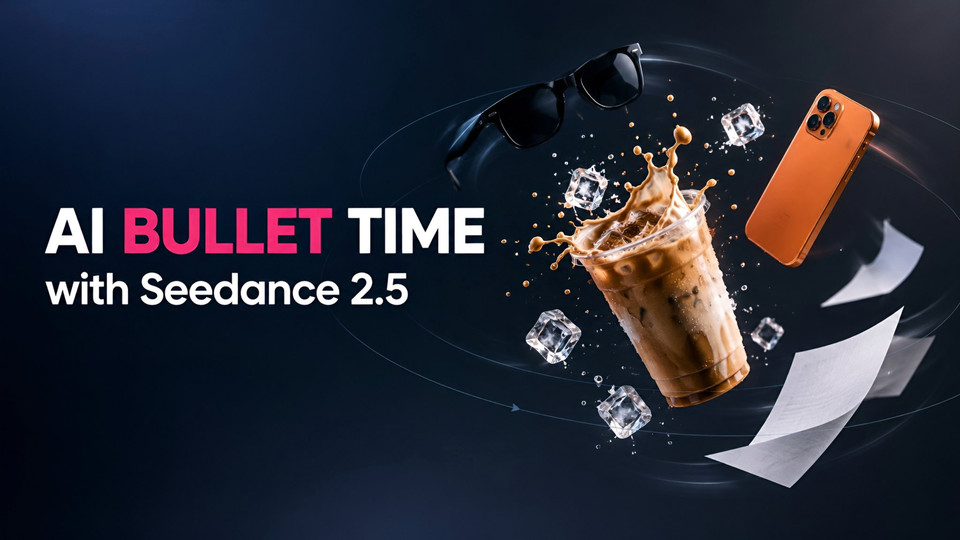
You have seen the clip. Someone walks down a street on a phone call, a stranger slams into them, and suddenly the world stops. Sunglasses hang in mid-air, coffee splashes in a frozen crown, papers float like confetti, and the camera glides around the scene before time snaps back and everything crashes to the ground. It is the bullet time effect, and in 2026 it is one of the most copied AI video formats on Instagram and TikTok.
The short answer to "how do I make one?" is this: build a character sheet of yourself, gather three or four prop images, and give an AI video model a prompt with timestamped beats that tells it exactly when to slow time, which frozen objects the camera should visit, and when to let gravity return. Seedance 2.5 handles this well because it accepts up to 30 reference images and renders a single continuous shot of up to 30 seconds.
In this guide I walk through the exact workflow I used in the Fliki playground, with the copy-paste prompts for every reference image and the video, real frames from three attempts, and exactly what I changed to go from a stock-looking clip with broken physics to one continuous, believable take. You also get one-click links that open the playground with every setting already filled in.
What is the bullet time effect?
Bullet time is a visual effect where the action on screen slows down to almost nothing, or stops completely, while the camera keeps moving at normal speed around it. That split is the whole trick. Ordinary slow motion slows everything, the camera included. Bullet time freezes the subject and lets the viewer travel through a moment that would normally last a fraction of a second.
The idea is older than most people think. Photographer Tim Macmillan started building circular arrays of cameras for what he called "time-slice" shots in 1980, and Eadweard Muybridge's line of cameras in 1878 is often cited as an early ancestor (Wikipedia). The effect went mainstream with The Matrix in 1999, where a ring of cameras around Keanu Reeves captured the famous rooftop dodge. Guinness lists the rig at 120 specially modified cameras, and the film won the Oscar for Best Visual Effects. Two years later, Remedy's Max Payne turned "Bullet Time" into a game mechanic players could trigger themselves (Time Extension).
For decades, that look needed a camera array, a VFX team and a lot of compositing. What changed in 2026 is that video models can now fake the whole rig from a text prompt and a few photos.
Why the AI bullet time trend went viral
The current wave took off in early September 2026, when creators started posting the "frozen moment" format with a comment-for-the-prompt hook. Kapwing called it the AI bullet-time coffee trend, and the structure is nearly always the same: a walk-in, a collision, a freeze, a camera tour of the suspended objects, and a snap back to real time.
It works on short-form feeds for three reasons:
-
The payoff lands in the first three seconds. The bump happens almost immediately, so viewers see something surprising before they can swipe.
-
It rewards a rewatch. The frozen tour has more detail than anyone can take in on one pass, which pushes replays.
-
It is a natural product shot. Every frozen object gets its own close-up, so brands can drop in a drink, a phone or a pair of sunglasses and get a hero shot for free.
Many of the viral examples credit Seedance 2.5, often run through platforms like Higgsfield. You do not need a specific platform, though. You need the model, good references and a prompt that is structured like a shot list.
When I studied one of the best-performing versions frame by frame, a scene-cut detector found no cuts at all. It is one continuous take, and that is the secret. A woman walking her dog crosses his path and they collide head-on. The props separate only a few centimetres from where he was holding them, and time ramps down to a crawl instead of hard-freezing. Then one camera physically travels from the sunglasses at his face, down to the drink at his hip and up to the phone at his ear, with his blurred body always behind each product. Add golden-hour backlight and real branded products and you have the whole recipe. My first attempts broke most of these rules, and you will see exactly what that looked like below.
What you need before you start
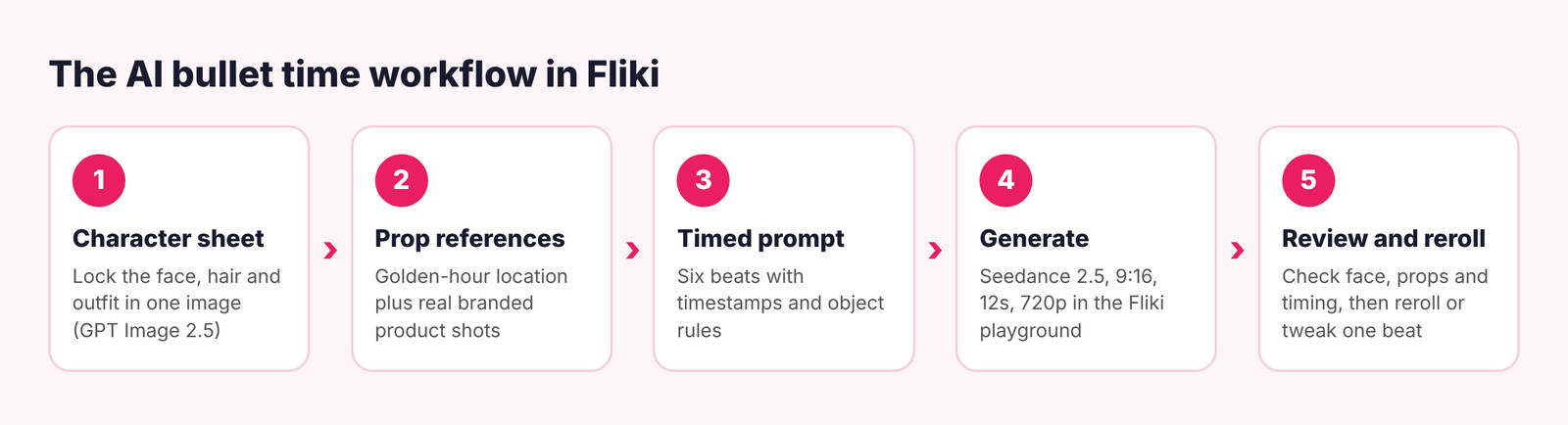
Here is the full kit. Everything except your selfie can be generated in Fliki.
|
Item |
What it does |
Where it comes from |
|---|---|---|
|
Character sheet |
Locks the face, hair and outfit so the person stays consistent through the whole shot |
A selfie plus an outfit photo, turned into a sheet with GPT Image 2.5 in the Fliki playground |
|
Location image |
Sets the place, the light and the colour grade of the whole clip |
A golden-hour photo, or a generation with GPT Image 2.5 |
|
3 prop images |
The objects that freeze in the air: sunglasses, a phone, a drink |
Real branded product shots on white, photographed or generated |
|
Timed prompt |
Tells the model when to slow, hold and release time |
The template below |
|
Seedance 2.5 |
Renders the shot with the references, physics and native audio |
Fliki AI video generator playground |
In Fliki, Seedance 2.5 renders at 720p for 4 credits per second, in 9:16, 16:9 or 1:1, at any length from 4 to 30 seconds. My final 12-second clip cost 48 credits, and the four reference images cost 1 credit each with GPT Image 2.5.
Step 1: Build a character sheet
This is the step most people skip, and it is the main reason their AI bullet time clips end up with a different face halfway through. Video models keep identity much better when they get one image that shows the person from several angles in the same outfit and lighting. A selfie alone gives the model one angle. When the camera orbits to the side or behind, it has to guess.
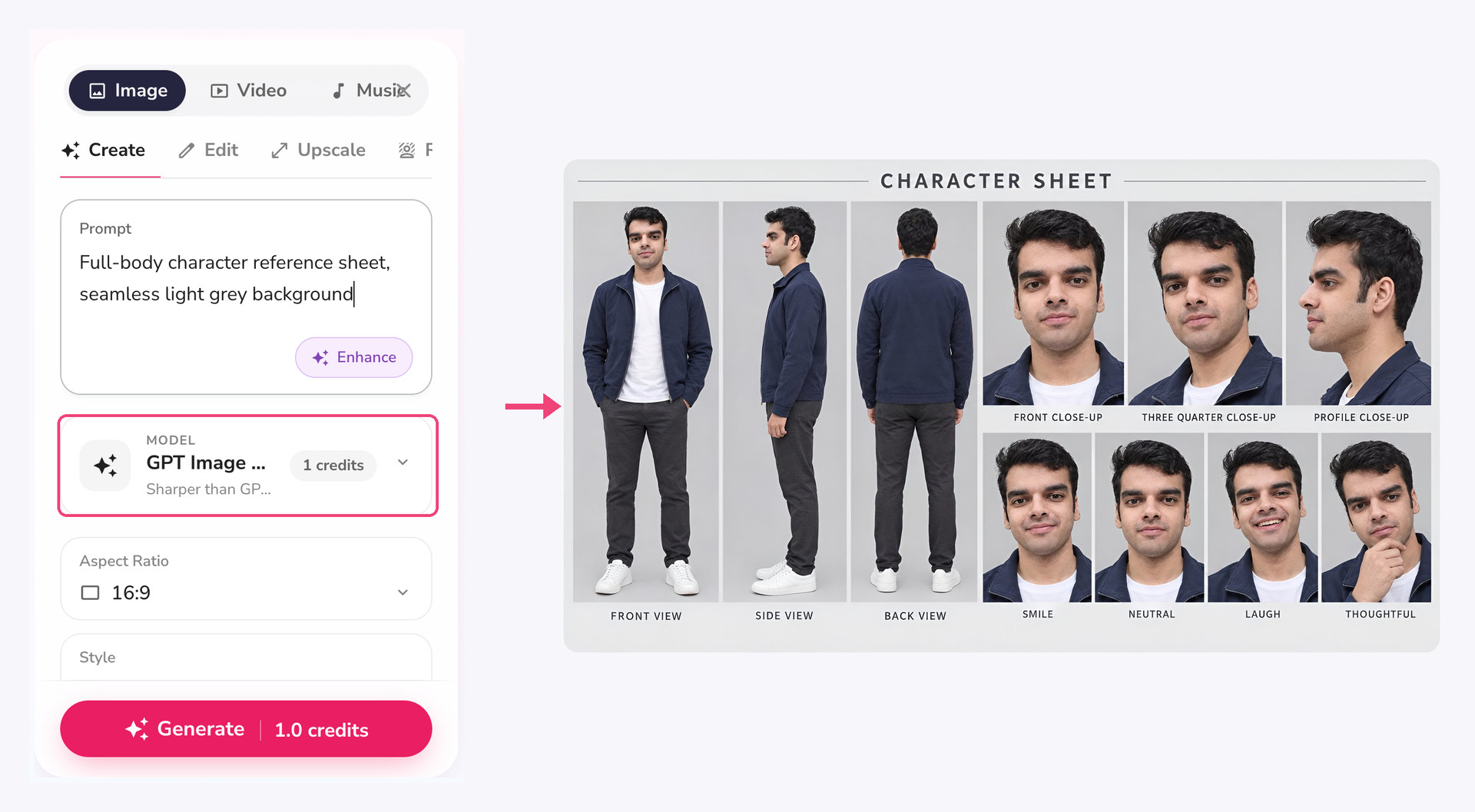
Open the Image tab in the playground, keep the default GPT Image 2.5 model (1 credit per image), upload your selfie and outfit photo as references, and use this prompt. The link below opens the playground with the prompt and the 16:9 ratio already filled in, so you only need to add your photos.
Photorealistic character reference sheet on a seamless light grey studio background, soft even lighting, same person in every panel. Use my reference selfie for the face and hair: identical facial structure, skin tone, eyebrows and hairstyle in all panels. Outfit from my outfit photo: navy cotton zip jacket over a plain white t-shirt, charcoal slim trousers, white leather sneakers, same fabric and fit.
Layout, left to right: full-body front view, full-body side profile, full-body back view, then a grid of face close-ups (front, three-quarter, profile) and four expressions (smile, neutral, laugh, thoughtful). Neutral standing pose, hands relaxed, head to toe visible in the full-body panels. Small clean labels under each panel. No costumes, no props, no extra people, no text other than the labels.
Open this character sheet prompt in Fliki
Here is the sheet I used for the test, next to the Image tab settings:
A few things make a sheet work better as a video reference:
-
Plain background. Light grey or white, so the model does not mix the backdrop into the scene.
-
Head to toe in the full-body panels. Shoes and trousers show up in bullet time shots, often in the very first frame.
-
The exact outfit you want in the video. Do not plan to swap clothes in the video prompt. Fix it in the sheet.
-
Use your own face, or one you have permission to use. Making a bullet time clip of a real person who did not agree to it is not a gray area.
Step 2: Prepare your prop references
The frozen objects are the stars of a bullet time shot, so give the model a clean, high-quality picture of each one. This is where my first attempt went wrong. I used cheap generic product shots (an unbranded cup, a phone that looked several generations old) and an overcast business street, and the clip came out flat and stock-looking. Seedance 2.5 copies the quality of what you give it, so the references set the ceiling for the whole video.
For the second attempt I regenerated every reference with GPT Image 2.5 (1 credit each) and used real, recognisable products, the same way the viral clips do:
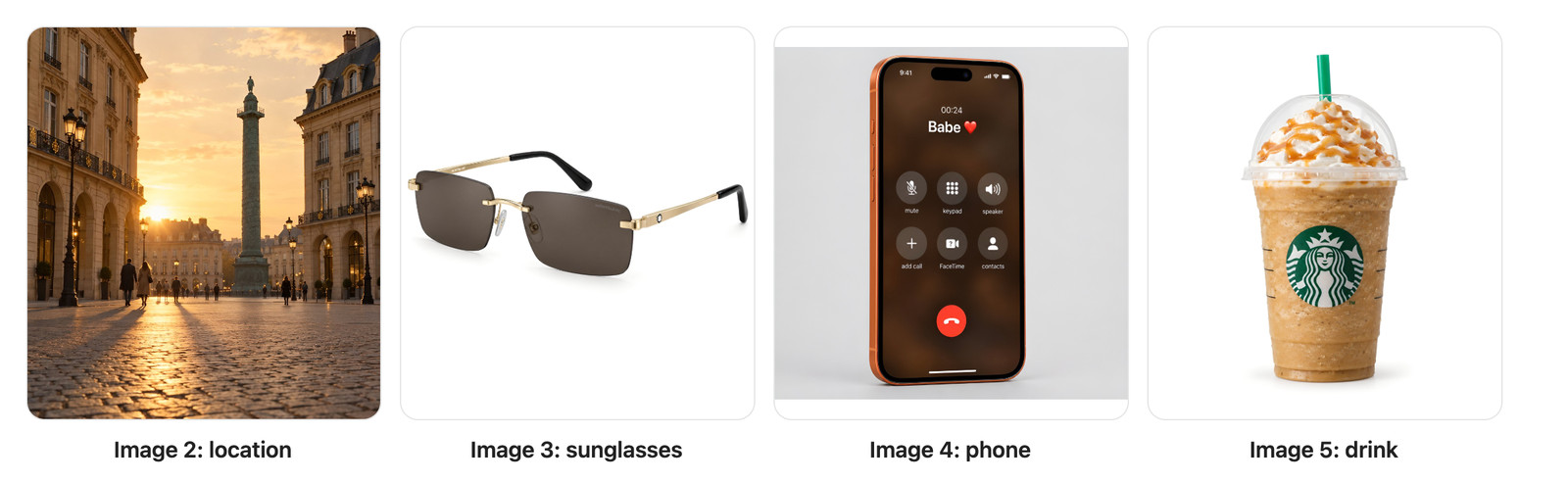
These are the exact prompts. Paste each into the Image tab of the playground with a 1:1 ratio (9:16 for the location):
Location: Cinematic vertical film still of a wide Parisian square like Place Vendôme at golden hour: grey cobblestone plaza in the foreground, elegant cream limestone Haussmann facades with arched arcades and wrought-iron balconies on both sides, a low warm sun backlighting the scene with long shadows and soft haze, a few distant pedestrians. Camera at knee height looking slightly up, 24mm wide lens, shallow depth of field, warm Kodak film colour grade, gentle grain. No text, no signs.
Sunglasses: Luxury e-commerce product photo of Montblanc rimless rectangular sunglasses: two dark smoky brown-grey tinted lenses with no frame around them, a thin polished gold metal bridge and gold hinges, slim gold temples ending in black acetate tips, a small white Montblanc snowcap emblem on the temple and a subtle "MONTBLANC" engraving in the lens corner. Three-quarter front view, floating, on a pure seamless white background, soft even studio lighting with a gentle shadow, ultra sharp, photorealistic.
Phone: Photorealistic product photo of an Apple iPhone 17 Pro in cosmic orange aluminium, front view, slightly angled, on a seamless light grey background, soft studio light. The screen is on and shows the iOS in-call screen: a warm dark brown blurred background, a small call timer "00:24" and below it the caller name "Babe ❤️" in large bold white text, then a grid of round grey buttons (mute, keypad, speaker, add, FaceTime, contacts) and a large red end-call button at the bottom. Dynamic Island at the top. Clean, sharp, every letter legible and correctly spelled.
Drink: Photorealistic product photo of a Starbucks Caramel Frappuccino: clear plastic cup with the green Starbucks siren logo printed on the front, light caramel-coffee blended drink with visible ice texture, a clear dome lid filled with whipped cream and a caramel drizzle, a green Starbucks straw, light condensation on the cup. Front view, centred, on a pure seamless white background, soft studio lighting with a gentle shadow, ultra sharp.
What made the difference:
-
Light the location the way you want the video lit. A golden-hour, low-angle location photo pulled the whole clip into warm, backlit, cinematic territory. The overcast street gave me overcast video.
-
Use real products, not lookalikes. Known shapes such as rimless gold sunglasses, a current iPhone and a branded cup give the close-ups instant recognition, which is what makes the freeze feel like an ad.
-
Make screen text big. A short caller name in large type survived the motion. The tiny text on my first phone reference turned to gibberish.
If you are making this for your own brand, use your real packshot and swap it into the drink or phone slot. Using other companies' logos is fine for a personal test, but check the rules before you run branded content as an ad.
Step 3: Write a timed bullet time prompt
This is where a good AI bullet time effect is won or lost. A vague prompt like "man gets bumped, bullet time, camera orbits" gives you a generic slow-motion clip. Seedance 2.5 follows timing written in seconds, so the best results come from writing the prompt like a shot list: one line per beat, each with a timestamp, a camera move and what the objects are doing.
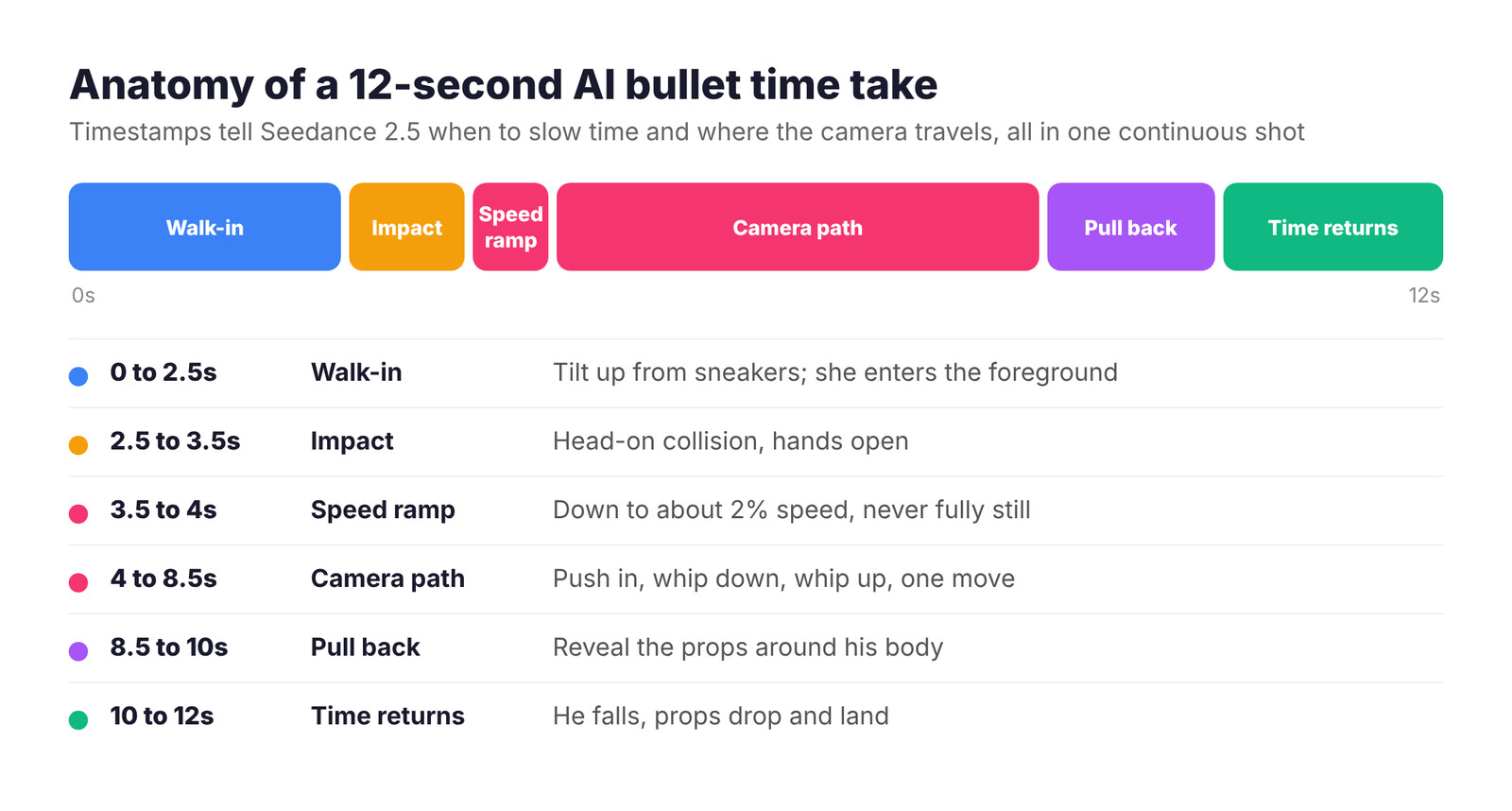
A strong bullet time prompt has six beats, and every one of them happens inside the same unbroken shot:
-
Walk-in (0 to 2.5s): introduce the character and every prop on their body. Bring the cause into frame early too: the woman with the dog is visible in the foreground from about 1.5 seconds.
-
Impact (2.5 to 3.5s): a head-on collision that the camera can see clearly. His hands open and each prop separates only a few centimetres in the direction the hit pushed it.
-
Speed ramp (3.5 to 4s): time slows to about 2 percent speed, not a dead stop. Liquid creeps, hair drifts, he keeps tipping backward very slowly.
-
Camera path (4 to 8.5s): the camera keeps moving at normal speed. It dollies in to the sunglasses, whips down to the drink at his hip, then whips back up to the phone at his ear, all as one move.
-
Pull back (8.5 to 10s): the camera eases back to reveal the props still hanging around his body.
-
Time returns (10 to 12s): he falls, and the props drop the short distance to the ground and land around him.
Three phrases did more for realism than anything else. "One single continuous take with no cuts" at the top stops Seedance 2.5 from treating each close-up as a new shot. "Continuing the same move" before every camera beat, plus "motion-blurred swing" between products, makes the model travel instead of jump. And spelling out the physics, that his hands are empty after the hit, the props stay within a few centimetres of his body and they are never thrown high, fixes the floating-objects look that gives most AI bullet time clips away. The cinematography line at the top (24mm lens, golden hour, warm backlight, film grade) sets the look of every frame.
The full Seedance 2.5 bullet time prompt
This is the exact prompt behind the final clip. It assumes five references uploaded in this order: 1 character sheet, 2 location, 3 sunglasses, 4 phone, 5 drink. Swap the product names and outfit details for your own.
One single continuous take, a real camera moving through one real space, with no cuts, no edits and no jumps anywhere. Vertical 9:16, photorealistic, real-world physics, premium fashion film. 24mm lens, golden hour sun low behind him, warm backlight, soft haze, warm film grade.
References: image 1 is the man (keep his face, hair, navy zip jacket, white t-shirt, charcoal trousers and white sneakers identical). Image 2 is the cobblestone Parisian square. Image 3 is his Montblanc rimless gold sunglasses, worn on his face. Image 4 is his orange iPhone 17 Pro, held to his left ear on a call with "Babe ❤️". Image 5 is his Starbucks Caramel Frappuccino, held in his right hand at hip height.
0-2.5s: He walks toward the camera across the square of image 2, talking on the phone, sunglasses on, Frappuccino in his right hand. The camera dollies backward ahead of him, starting low at his sneakers and tilting up into a medium shot from the knees up. From about 1.5s a woman in a beige trench coat walking a golden retriever is visible at the right edge of frame in the foreground, closer to the camera than he is, walking diagonally across his path.
2.5-3.5s: The woman steps across directly in front of him, between him and the camera, looking down at her dog, while he looks away, distracted by his call. Neither sees the other, and they collide front to front: her shoulder slams into the middle of his chest. The camera clearly sees the contact. The blow pushes his upper body straight backward, away from the camera, and twists him slightly, his arms flying open. His right hand opens and lets go of the Frappuccino, the phone slips out of his left hand, and the sunglasses pop forward off his nose. She stumbles one step and continues past him out of frame to the left, the dog trotting after her.
3.5-4s: Time ramps smoothly down to extreme slow motion, about 2 percent speed. He hangs leaning backward with both hands open and empty. The three objects float free just a few centimetres from where they left him: the sunglasses just in front of his face, the cup just beyond the fingertips of his open right hand with the lid lifting and coffee starting to spill, the phone just beside his left ear. Nothing is ever fully still, everything creeps.
4-5.5s: The camera keeps moving at normal speed in one smooth, unbroken dolly forward from the medium shot, gradually closing in on his face until the floating sunglasses fill the frame, his shocked face out of focus right behind them.
5.5-7s: Continuing the same move, the camera tilts and drops down past his chest to his right hip in one fast motion-blurred swing, arriving on the floating Frappuccino with his open empty hand blurred behind it, the lid lifting off and a frozen arc of whipped cream and coffee spilling out.
7-8.5s: Continuing the same move, the camera swings back up past his chest in one fast motion-blurred move to the phone floating beside his ear, screen facing the lens showing the call with "Babe ❤️", his blurred cheek behind it.
8.5-10s: Continuing the same move, the camera slowly pulls back and lowers to knee height, revealing him still leaning backward mid-fall with the three objects floating within arm's reach around his head and hip. None of them are in his hands.
10-12s: Time ramps back to real speed. He falls backward onto the cobblestones, legs kicking up. The sunglasses, the phone and the cup drop straight down from where they were floating and land on the stones beside him, coffee splashing across the cobbles. Off to the left, the woman turns back with her hand over her mouth.
Rules: the whole video is one camera move, so his body is always visible behind every object. After the impact, his hands are empty, he never holds the objects again. Objects only move the short distance the impact gives them, never thrown high above his head. Keep each product identical to its reference image, including logos and the phone screen. No extra props, no duplicates, no teleporting, nothing flies into the lens. Sound: footsteps on stone, light city ambience, his muffled phone voice, a thump at the impact, a deep slowing whoosh into slow motion, a low hum during slow motion, then the thud of him landing and the clatter of the phone and sunglasses.
Open this bullet time prompt in Fliki with Seedance 2.5 (9:16, 12s, 720p)
The link fills in the prompt, the model, the aspect ratio, the duration and the resolution. You add the five reference images and click Generate.
Step 4: Generate it in the Fliki playground
With the prompt loaded, scroll down the settings panel to References. Seedance 2.5 in Fliki accepts up to 30 images, 10 videos and 10 audio clips. Upload your images in the same order your prompt numbers them, since "image 1" in the prompt maps to the first reference you add.
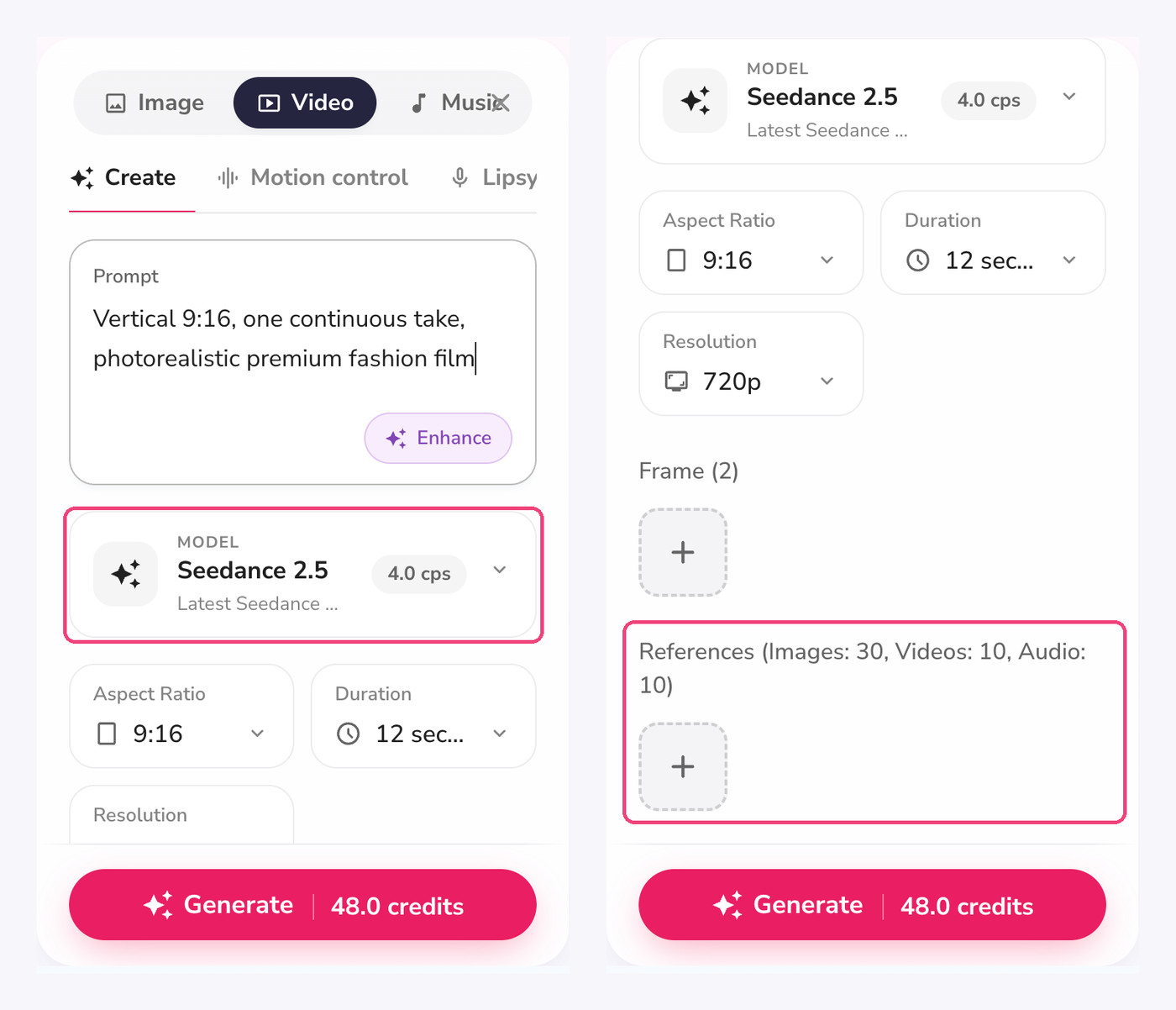
Check these settings before you click Generate:
-
Model: Seedance 2.5 (4.0 credits per second).
-
Aspect ratio: 9:16 for Reels, TikTok and Shorts.
-
Duration: 12 seconds (48 credits) fits six beats. Shorter than 10 seconds and the camera path between products feels rushed.
-
Resolution: 720p.
-
Frame: leave it empty. A start frame locks the opening composition and can fight the tilt-up opener.
My render took a few minutes and came back with native sound: footsteps on stone, a whoosh into the slow motion and the thud and clatter of the landing. No extra audio work was needed for a first post.
What Seedance 2.5 actually produced
It took me several renders to get here, and the failures teach more than the final clip, so here are all three stages side by side. Same character sheet, same model, different prompts.
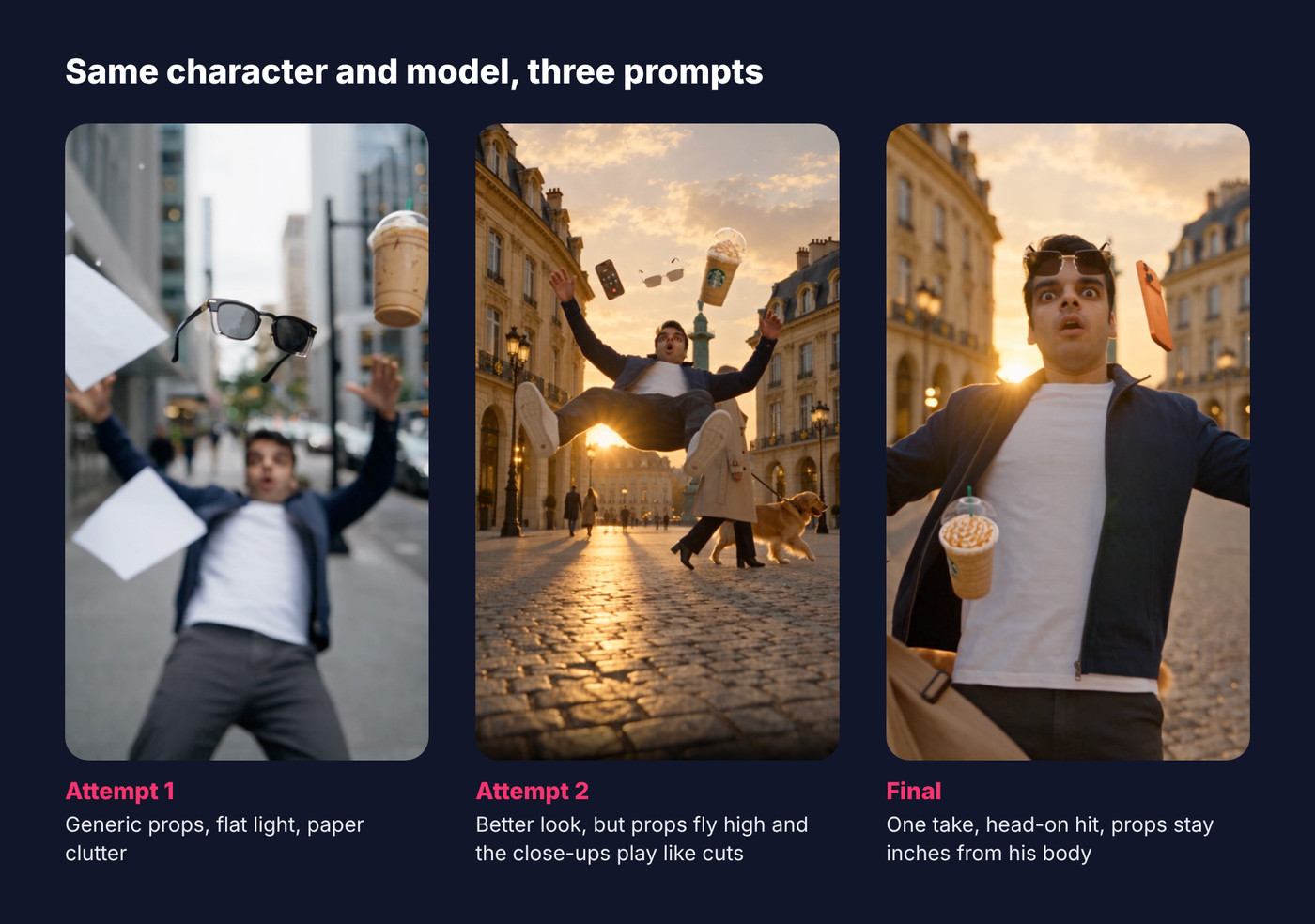
-
Attempt 1 used generic props, an overcast office street and a man with an armful of papers as the cause. It followed the beats, but it looked like stock footage.
-
Attempt 2 added the golden-hour location, the branded references and a cinematography line. It looked far better, but the props were flung high above his head, and every product close-up played like a separate shot with an unrelated background, cut together like a montage. The woman also brushed past him from behind, which makes no physical sense.
-
The final prompt rewrote the whole thing as one continuous take with a head-on collision, a speed ramp and props that stay within a few centimetres of his body.
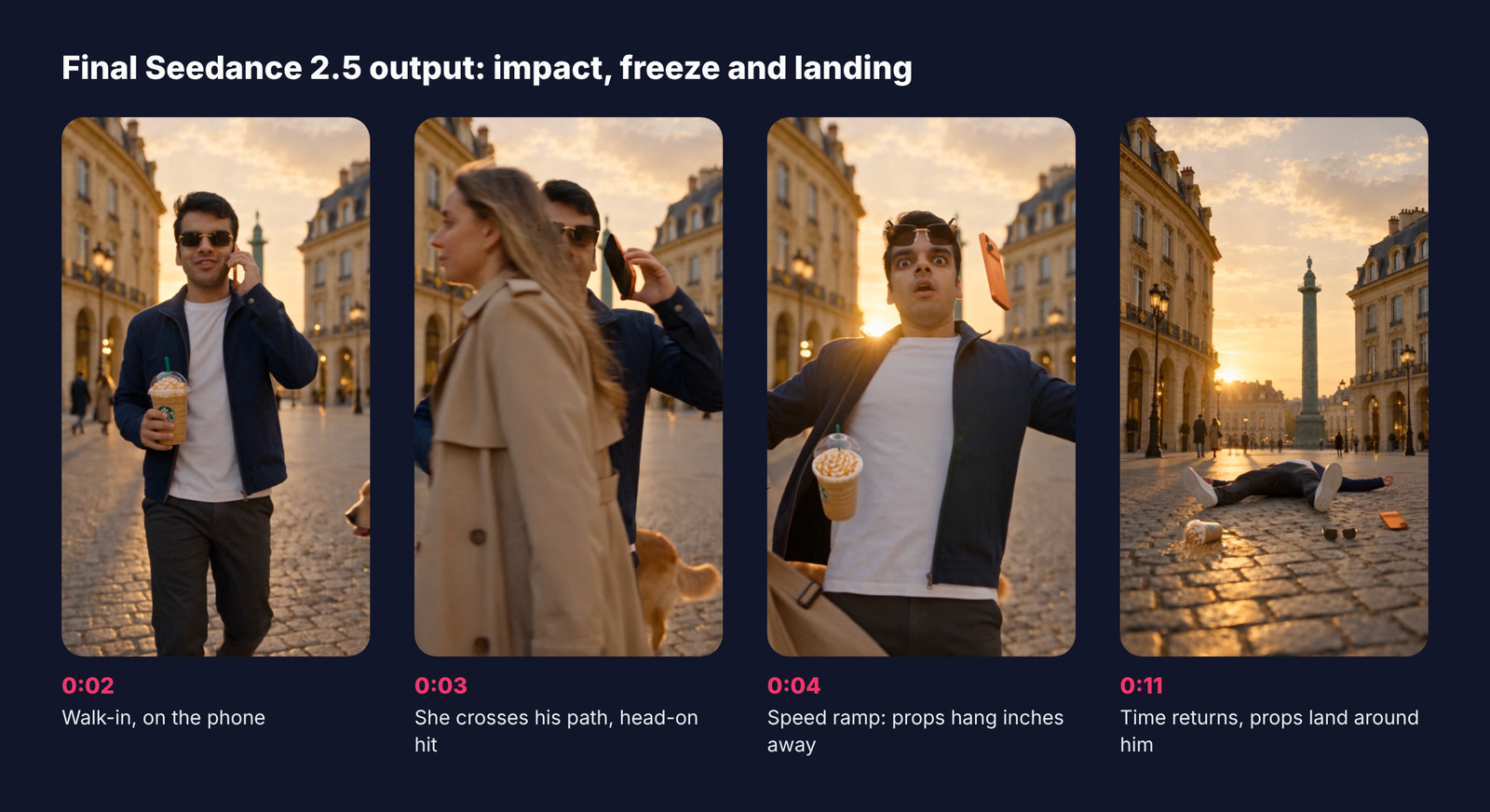
Here is the final take. She is visible in the foreground before the hit, the contact happens head-on, his hands open, and the props hang just off his face, hip and ear. When time returns, everything drops the short distance to the cobblestones and lands around him.
The middle of the clip is where the continuous camera pays off. The camera pushes in until the Montblanc sunglasses fill the frame with his shocked face soft behind them. It whips down his body to the Frappuccino at his hip, lid lifting and caramel spilling, then whips back up to the iPhone beside his ear with "Babe ❤️" readable on screen. The motion blur between products is what sells it as one real camera in one real space.
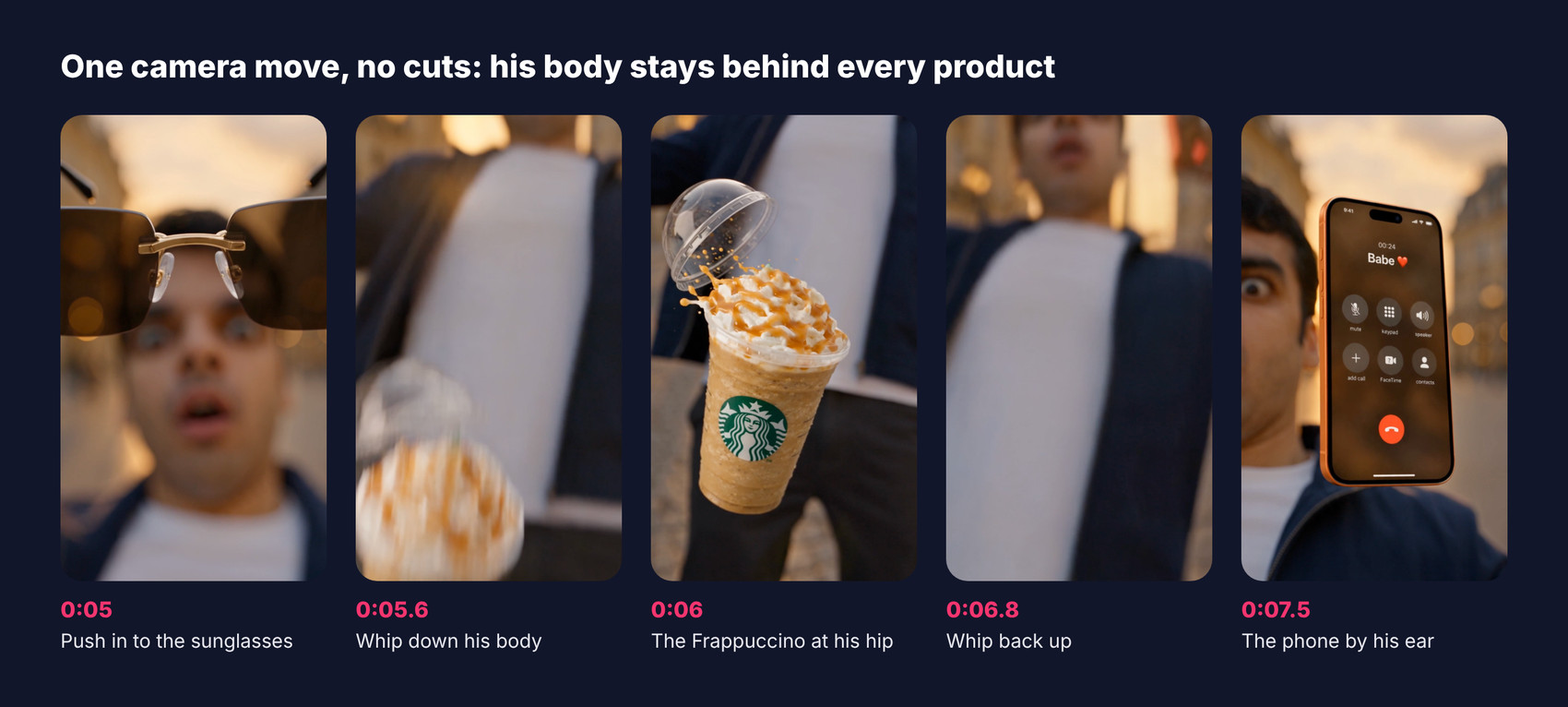
It is still not perfect. During the pull-back at around 8.5 seconds, the sunglasses and phone drift a little higher than where they started, and he looks more upright than mid-fall. At full speed on a phone it reads fine, and a reroll or a stricter line about object heights can tighten it. Each render cost 48 credits, so budget for two or three takes when you are learning the format.
How to fix common AI bullet time problems
|
Problem |
Why it happens |
Fix |
|---|---|---|
|
Face or outfit changes during the orbit |
The model only saw one angle of the person |
Use a full character sheet with side and back views, and repeat "keep his face and outfit identical to image 1" |
|
It looks flat, like stock footage |
Plain location reference and no camera or light direction |
Use a golden-hour or otherwise dramatic location image and add a cinematography line: camera, lens, height, light, grade |
|
It looks like plain slow motion |
The camera slowed down with the action |
State that the camera keeps moving at normal speed while the subject is frozen |
|
Objects appear from nowhere or duplicate |
The prompt never tied them to the character |
Show every prop on the body in beat 1 and add "no duplicates, no teleporting" |
|
A close-up beat gets skipped or blurred |
Too many objects in too little time |
Give each close-up at least 1.5 seconds, or drop to two frozen objects |
|
Garbled text on screens or labels |
Small text rarely survives motion |
Keep only one or two large words on the reference (a caller name, a logo) and accept that tiny labels may slip |
|
Product close-ups feel like separate cuts |
Each beat reads as a new shot to the model |
Open with "one single continuous take with no cuts", start each camera beat with "continuing the same move" and ask for motion-blurred swings between products |
|
Props float high above the head |
The prompt let objects "fly" with no limit |
Say they separate only a few centimetres from where they were held and are never thrown high, and name a height for each (face, hip, ear) |
|
The character still holds the props in the freeze |
The release was never stated |
Say his hands open at the impact and stay empty, and describe each prop as just beyond his fingertips |
|
The collision looks fake |
The other person comes from behind or just brushes past |
Show her in the foreground before the hit and make the contact head-on, clearly visible to the camera |
|
Cluttered, confusing freeze |
Too many flying objects, such as papers |
Use one clean cause and exactly three hero props, and add "no extra props" |
|
The freeze feels flat |
The subject froze in a static pose |
Freeze at the peak of motion: mid-fall, mid-jump, mid-splash |
One more piece of advice from Picsart's bullet time tutorial that matches my experience: reroll before you rewrite. The same prompt and references often give a noticeably different take, and the second or third version may nail the beat the first one missed. Change one beat at a time when you do edit, so you know what actually helped.
Bullet time prompt variations to try
Once the structure works, you can swap the scene and objects while keeping the six beats. Replace the beat lines in the full prompt with one of these, keep the "one single continuous take" opening, the cinematography line and the rules paragraph, and set the duration to 13 seconds since these run slightly longer. Remember to swap the location and product references too.
1. Gym drop
0-2.5s: Front tracking shot as the character from image 1 jogs across a sunlit gym holding a water bottle and wearing wireless earbuds. 2.5-4s: He trips over a resistance band, the bottle slips from his hand and both earbuds pop out of his ears, water bursting from the open cap. 4-5s: Time freezes into bullet time, a ribbon of water hanging in mid-air. 5-9.5s: The camera, at normal speed, glides to each frozen earbud, then through the suspended water to the bottle. 9.5-11s: Pull back to the full frozen scene. 11-13s: Time resumes, he lands on a mat, water splashes the floor.
2. Cafe product reveal
0-2.5s: The character from image 1 carries a tray with a latte and a croissant through a busy cafe. 2.5-4s: A chair leg catches her foot, the tray tips and the cup, saucer and croissant slide off its edge. 4-5s: Bullet time, milk foam and coffee frozen in a splash crown. 5-9.5s: The camera orbits 180 degrees around the frozen cup, label facing the lens, then pushes in on the croissant flakes. 9.5-11s: Wide reveal of the frozen cafe. 11-13s: Time resumes and a customer catches the cup just before it hits the floor.
3. Rainy street with umbrella
0-2.5s: Low shot of the character from image 1 walking on a wet street at night, holding an umbrella and a paper shopping bag. 2.5-4s: A gust of wind rips the umbrella inside out, the bag tears and its contents spill. 4-5s: Time freezes, raindrops hang in the air like glass beads. 5-9.5s: The camera moves through the frozen rain to the umbrella, then to the falling items lit by neon reflections. 9.5-11s: Pull back to the full frozen street. 11-13s: Time resumes, rain falls and he laughs as he catches the bag.
For brand content, the cafe version is the easiest to adapt. Replace the latte with your product, upload its packshot as a reference and give it the longest close-up in the object tour.
Turn the clip into a finished Reel
A raw 13-second render is already postable, but a few small edits help it perform. Add a short hook in the first second ("Wait for the freeze"), add captions if you include any dialogue, and end on the aftermath beat rather than cutting early, since the landing is what makes people rewatch.
Fliki is built for this part too. You can bring the clip into a video with the AI Reel generator, add a voiceover or on-screen text, and export versions for TikTok and YouTube Shorts. If you are using the effect in ads, the AI video ad generator can build variants around the same product shot. For still assets like thumbnails or the character sheet itself, use the AI image generator.
Fliki vs other ways to make the bullet time effect
There are three common routes, and they suit different people.
-
A physical rig or 360 camera. Insta360 sells a bullet time accessory for its 360 cameras, and pro studios still use camera arrays. Real footage looks real, but you need the gear and the moment has to actually happen.
-
Template apps and motion transfer. Higgsfield, Kling and several image-to-video sites offer one-tap bullet time presets, and Higgsfield's Genjutsu feature lets you upload someone else's viral clip and swap in your own person and products while keeping the motion. They are fast, but you get less control over the beats, and some of them run Seedance 2.5 underneath anyway.
-
Prompting Seedance 2.5 directly, as in this guide. More setup, much more control. In Fliki, the same account covers the character sheet, the props, the video, and the editing, so you are not juggling four tools.
To be fair to the alternatives: if you want a single fun clip and do not care about the exact story, a preset app is quicker. If you want your own character, your own product and a shot you can repeat and improve, a timed prompt is the better path. You can compare other models in our roundup of the best AI video generators, or read more about Seedance 2.5 in Fliki.
Bottom line
The viral AI bullet time effect looks like a VFX shot, but it comes down to things you control: a character sheet that locks the person, high-quality references for the location and the frozen products, and a prompt written as a timed shot list with clear camera and light direction. In my tests, upgrading the references fixed the look, and rewriting the prompt as one continuous take with believable physics fixed the motion. The final 12-second clip cost 48 credits.
Start with the prompt above, swap in your own face and props, and reroll until the beats land. You can open the full bullet time prompt in the Fliki playground, and you can sign up for Fliki free. If you are new to AI video, our guide on how to make AI videos covers the basics, and the pricing page shows how many credits each plan includes.
Written by Shivam Aggarwal, who works on content and marketing at Fliki and ran every prompt in this guide in the Fliki playground. Model details and credit costs were current as of October 2026. Verify current pricing before you rely on it.
FAQs
Bullet time is a visual effect where the action slows down to almost nothing or freezes completely while the camera keeps moving at normal speed around it. It was made famous by The Matrix in 1999, which used a ring of around 120 cameras. Today AI video models like Seedance 2.5 can create the same look from a prompt and a few reference images.
Create a character sheet of the person, gather clean images of the props that will freeze in the air, and write a prompt with timestamped beats: walk-in, impact, freeze, object tour, reveal and snap back. Upload the references in order to Seedance 2.5 in the Fliki playground, set 9:16 and about 12 seconds, and generate.
Seedance 2.5 is the model credited in many of the 2026 bullet time clips. It accepts up to 30 reference images, follows timing written in seconds, keeps characters consistent and renders up to 30 seconds in one continuous shot with native audio. Kling and preset apps such as Higgsfield can also produce the effect with less control.
In Fliki, Seedance 2.5 costs 4 credits per second at 720p, so a 12-second bullet time clip uses 48 credits. The character sheet with GPT Image 2.5 costs 1 credit, and each reference image costs about 1 credit. Check the Fliki pricing page for current plan credits.
No. In slow motion the whole shot slows down, including the camera. In bullet time the subject and objects freeze or nearly freeze while the camera continues to move at normal speed, so the viewer can travel around a single moment. Saying this explicitly in your prompt is the biggest difference between a real bullet time shot and a generic slow-motion clip.
Face drift usually means the model only saw one angle of the person. Use a character sheet with front, side, back and close-up views in the same outfit, upload it as the first reference, and tell the prompt to keep the face and outfit identical to image 1. Rerolling with the same inputs also often fixes it.