Introduction
Your iPhone already shoots video that looks great, so the real question is what to edit it with. The catch with most "free" video editor apps is not the price on the App Store, it is what happens at export: a watermark in the corner, ads between every step, or a 1080p cap that only disappears after a subscription.
The best free video editor apps for iPhone in 2026 are Fliki for the easiest idea-to-video workflow, iMovie for simple, polished edits, Adobe Premiere on iPhone and VN for multitrack control, CapCut for social-first templates and captions, and Edits by Instagram for Reels. Each has a genuinely usable free tier, and the differences come down to watermarks, ads, export quality and how new your iOS version has to be.
This guide compares ten options on exactly those points. I read each App Store listing and the vendor's own help pages on November 3, 2026, and for Fliki I used screenshots from its iPhone app. For every other app I show the official App Store listing screenshots and say so, and I flag every claim that comes from the vendor rather than from something I could confirm myself. Where a free-tier rule could not be confirmed, I say so and tell you what to check in the app.
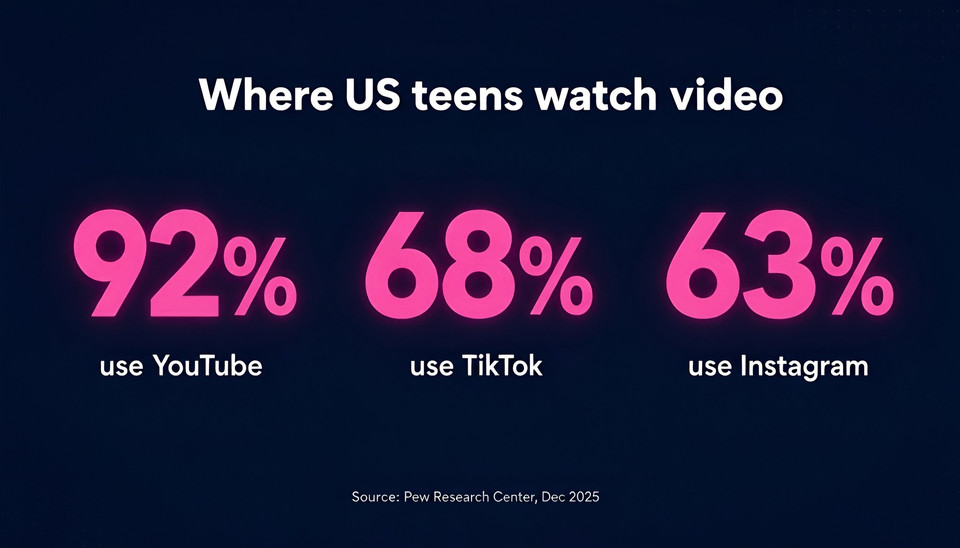
Short-form video is where most of this editing ends up. Pew Research Center's survey of US teens, fielded in late 2025, found that 92% use YouTube, 68% use TikTok and 63% use Instagram, which is why every app below is built around vertical, social-ready exports.
How I evaluated these apps
I judged each app on five things that decide whether "free" is really free. First, whether free exports carry a watermark. Second, whether the free tier shows ads. Third, the export resolution and frame rate the listing promises. Fourth, what you pay to unlock the paid tier, using US App Store prices. Fifth, the minimum iOS version, because several of the newest apps need a recent iPhone software release.
One honest limit: App Store pages describe features, but they rarely spell out watermark rules. When a rule came from the vendor's marketing copy, I label it as a vendor claim. When I could not confirm it at all, I mark it "check in app" instead of guessing. Prices, ratings and iOS requirements change often, so confirm them on the listing before you commit.
Quick picks
Easiest to use: Fliki, which builds a narrated, captioned video from a script, blog link or idea and lets you tweak it scene by scene.
Best free clip editor for beginners: iMovie. Free, no in-app purchases listed, and exports up to 4K at 60 fps.
Best for pro-style multitrack editing: Adobe Premiere on iPhone. Launched September 30, 2025, with core editing tools free.
Best for social templates and captions: CapCut, with one important watermark rule explained below.
Best for Reels: Edits by Instagram, which advertises 4K export with no watermark.
The 10 best free video editor apps for iPhone
1. Fliki
Most iPhone editors start you in front of a timeline and ask you to build a video from clips. The Fliki iPhone app starts with one box that says "Enter your video idea, script, or blog link". Type or paste, choose Video, Voiceover or Design, and Fliki builds the project for you with text to video, narration, visuals and captions. There are also ready-made starting points for Script to video, Avatar video, Blog to video and Explainer video, so you are never staring at a blank screen.
What makes the editor easy is how little it asks you to learn. Every project is split into scenes, and you edit one scene at a time. The bottom bar has seven plain-language tabs (Copilot, Script, Layers, Media, Character, Subtitles and Audio), and there is one pink Export button in the corner. The Script tab shows each scene's narration with its duration and voice, and "Edit with AI" rewrites a line for you. The Layers tab shows text, shapes and media on a simple timeline for that scene. The screenshots below are from the Fliki iPhone app (build 1.8.0), showing the home screen, the Script tab and the Layers tab on a real project.
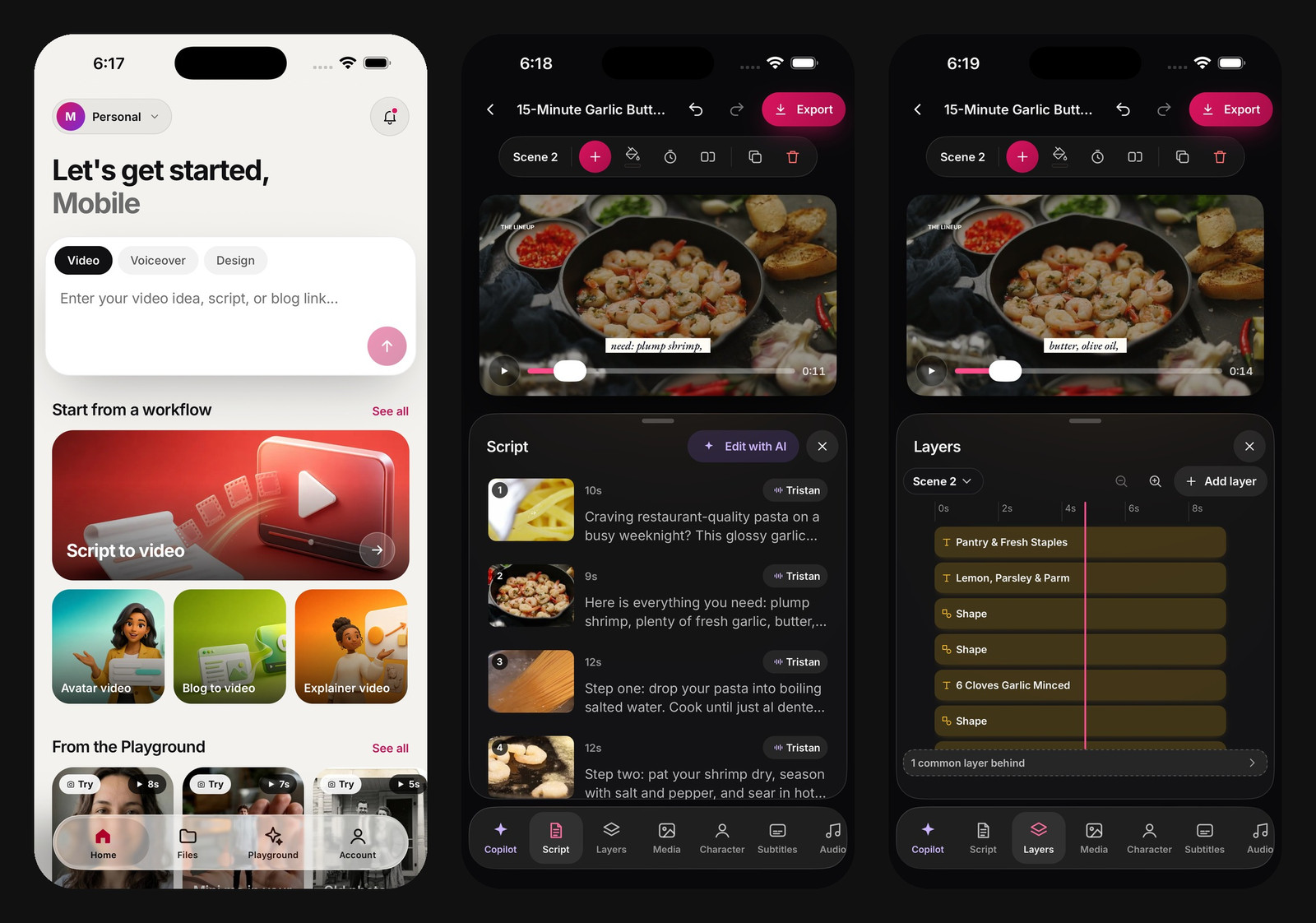
Fliki iPhone app (build 1.8.0): the home prompt box, the scene-by-scene Script tab and the Layers timeline.
The same app has an AI Playground for generating images, short video clips and music from a prompt. You pick the model, aspect ratio and length, and the generate button shows the credit cost before you spend anything, for example 1.5 credits for an image with Nano Banana 2 or 5 credits for a five-second clip with Seedance 2.0 Mini in the build shown. It also covers AI voiceovers, auto captions and AI video generation without leaving the app.
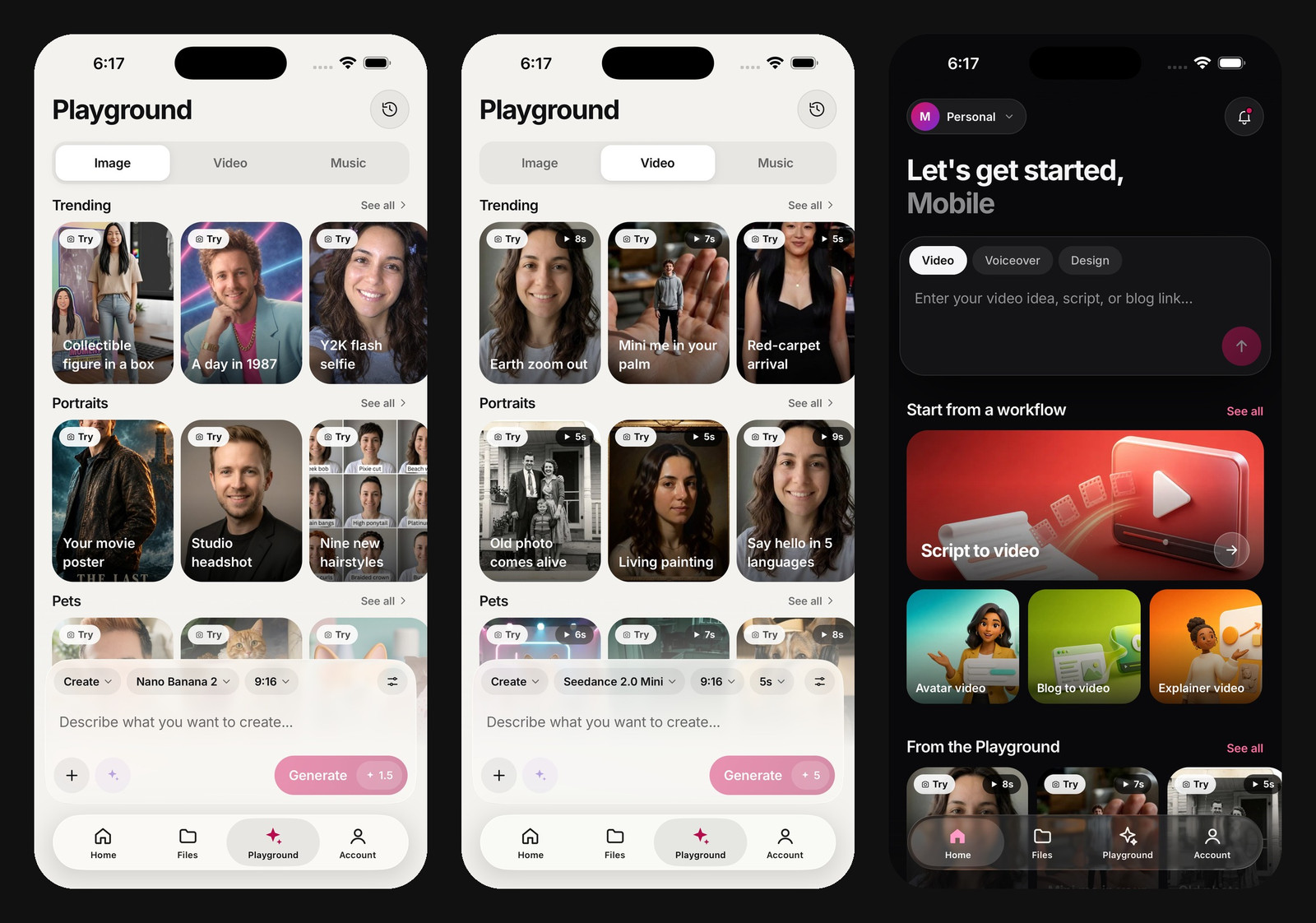
Fliki iPhone app (build 1.8.0): the Playground, with model, aspect ratio and credit cost visible before you generate.
What "free" means here: the app is free to download and try. Fliki's pricing page lists a free plan with 3 credits per month, 720p videos and a Fliki watermark, while paid plans add more credits, 1080p export and longer videos. On the App Store the plans are subscriptions, with Basic at $9.99 monthly or $79 yearly and Standard at $33 monthly or $289 yearly. Prices on the web may differ, so check before you subscribe.
Where it loses: if you want to cut and trim footage you already shot, iMovie, VN or CapCut give you more manual control, and Fliki's free tier is the most limited on this list. It requires iOS 16.4 or later, and its App Store rating of 4.9 rests on only 14 ratings, so treat that number lightly.
Why it is #1: it is the simplest route from an idea to a finished, captioned video, and you never have to build a timeline unless you want to. For raw clip editing, scroll down. For a wider comparison, see the best video editing apps.
2. iMovie
iMovie is Apple's own editor, and for most people it is still the safest starting point. The App Store listing shows it as free with no in-app purchases, with export up to 4K at 60 fps, Magic Movie, 20 storyboards, 14 trailer templates and more than 130 soundtracks. Projects move to a Mac through AirDrop or iCloud if you want to keep editing there.
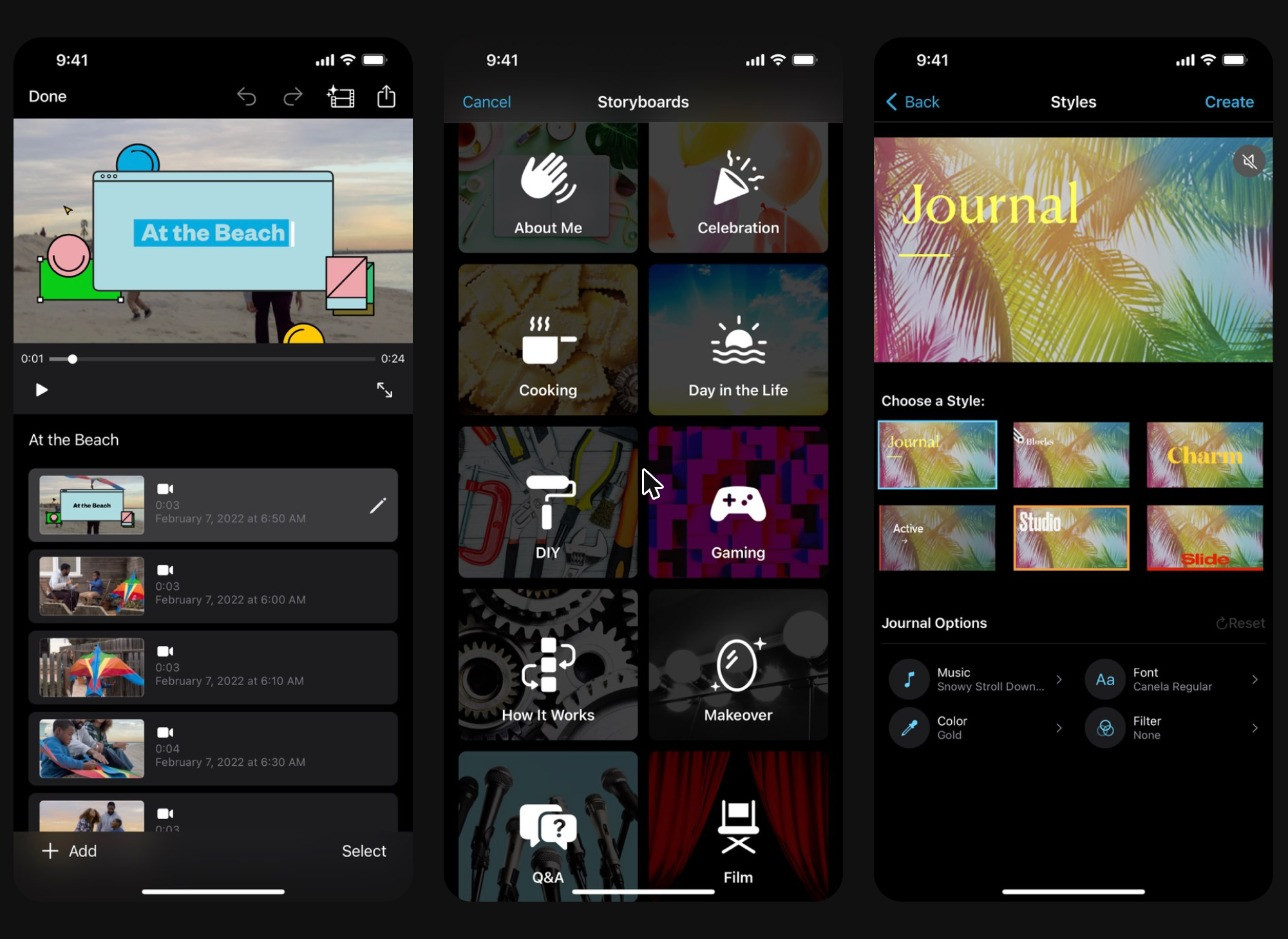
Official App Store listing screenshots for iMovie. These are the developer's marketing images, not my own captures.
Best for: simple, clean edits, trailers and family videos.
Watch out: the listing I read on November 3, 2026 said it requires iOS 27.0 or later, so check that your iPhone can run it. It also has no AI captions in its feature list. It holds a 4.4 rating from 318K ratings.
Verdict: the best no-surprises free editor if your iPhone runs a recent iOS. Nothing to unlock, nothing to cancel.
3. Adobe Premiere on iPhone
Adobe launched Premiere on iPhone on September 30, 2025 and positions it as a free, multitrack editor. The App Store page says everything you need to create great videos is free, including core editing tools, a free asset library and royalty-free music. Adobe's launch post lists the multitrack timeline, animated captions, background removal and AI sound tools as free.
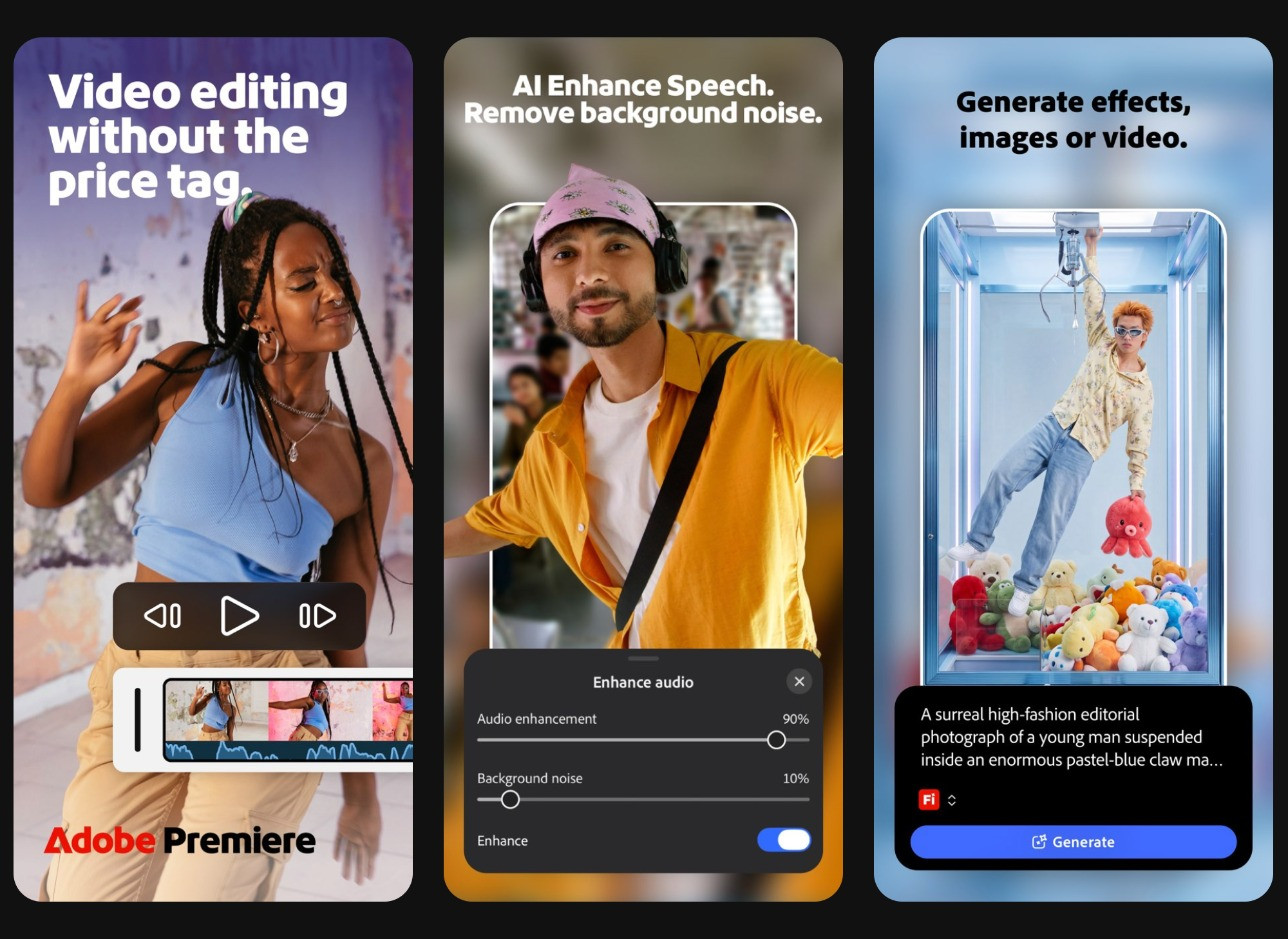
Official App Store listing screenshots for Adobe Premiere. These are the developer's marketing images, not my own captures.
The paid option is an in-app purchase called Premiere Mobile at $7.99 monthly or $69.99 yearly, and the listing says you only pay when you need Firefly generative AI credits. Adobe's own export help page lists exports up to 4K at 24 to 60 fps, but it does not say whether free accounts get 4K, so test that on your own account.
Best for: creators who want layers and a real timeline without paying up front.
Watch out: it requires iOS 18.0 or later, and the "no watermark, no pop-up ads" description is Adobe's own wording. Do not confuse it with Premiere Rush, which is a different app. It holds a 4.8 rating from 12K ratings.
Verdict: the most capable free editor on this list, assuming your iPhone can run iOS 18.
4. CapCut
CapCut is the social-first favorite: templates, auto captions, effects and trending-style edits in one place. It holds a 4.6 rating from about 1.1M ratings, and the listing says it contains advertising. The App Store shows several subscription tiers, including a $89.99 yearly option, but the listing does not label which monthly price belongs to which plan, so check the paywall in the app instead of trusting any single number.
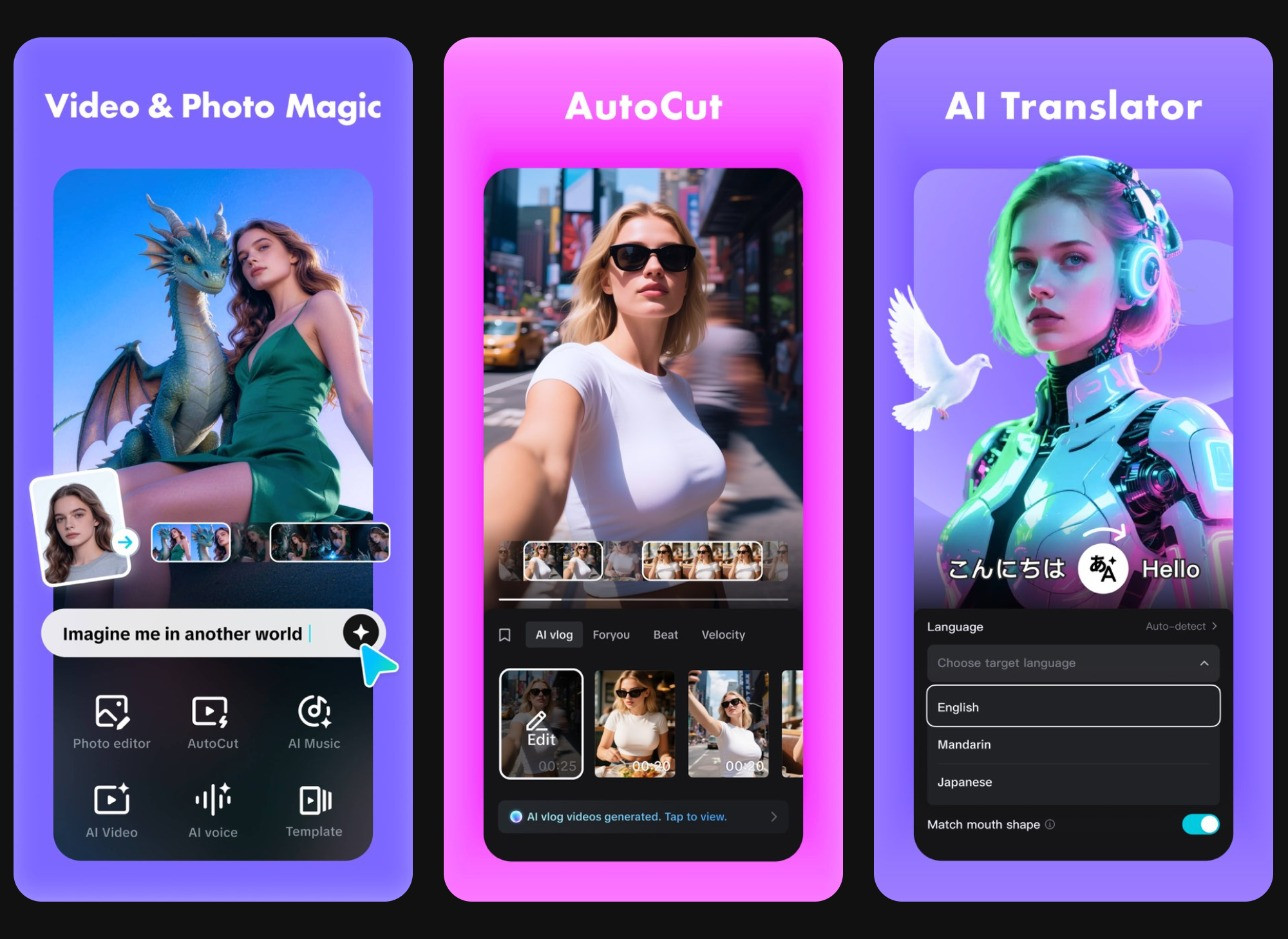
Official App Store listing screenshots for CapCut. These are the developer's marketing images, not my own captures.
The rule that matters most is in CapCut's own help center. Free users can preview Pro features, but exporting a project that uses them needs a subscription, and if you decline the prompt on mobile you can still export with a CapCut watermark, even at 1080p. In plain terms, a free export is watermark-free only when you avoid Pro elements.
On availability, TikTok's US joint venture closed on January 23, 2026, and Engadget reported that its safeguards also cover CapCut. The app remains available in the US.
Verdict: unbeatable for quick social edits, as long as you watch which effects are marked Pro before you export.
5. VN Video Editor
VN is a multitrack editor that markets itself as free with no watermark, which is the reason it keeps showing up in "best free" lists. The description says exports go up to 4K at 60 fps, and the listing carries a 4.8 rating from 323K ratings and a requirement of iOS 16.0 or later.
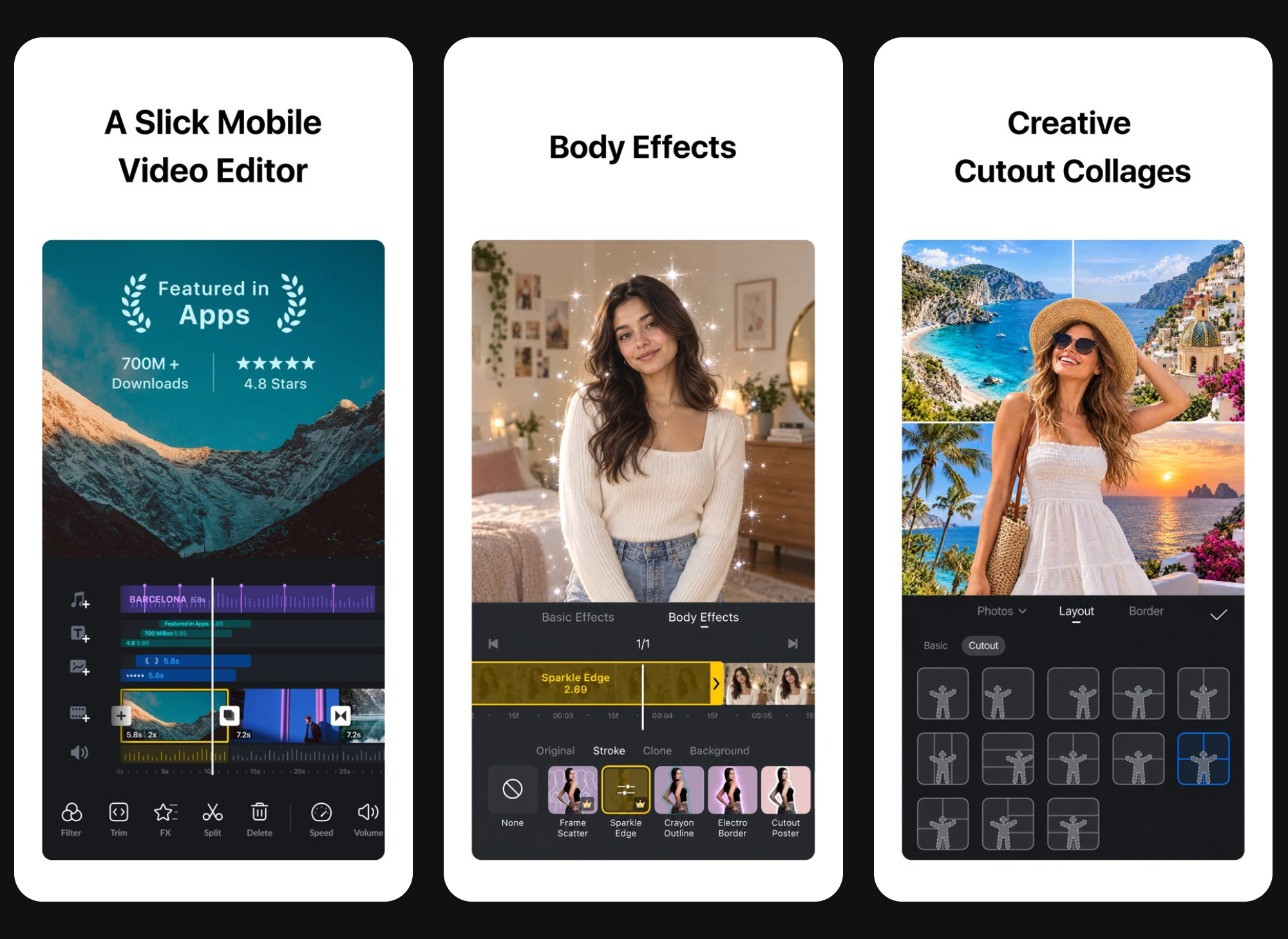
Official App Store listing screenshots for VN. These are the developer's marketing images, not my own captures.
Best for: keyframes, multiple tracks and auto captions without a subscription.
Watch out: the no-watermark claim is the developer's own wording, the listing says the app contains advertising, and VN Pro is sold at $7.99 and $69.99 (the page does not label monthly versus yearly). Which features are Pro only was not clear from the listing.
Verdict: the best alternative if your iPhone cannot run the newest iOS versions that iMovie and Premiere ask for.
6. Edits by Instagram
Edits is Instagram's own video editor, built for creators who publish Reels. Its description says you can export in 4K with no watermark, with clips up to 10 minutes, plus AI animation, green screen, cutout and auto captions. It is iPhone only, requires iOS 16.3 or later, and holds a 4.8 rating from 100K ratings.
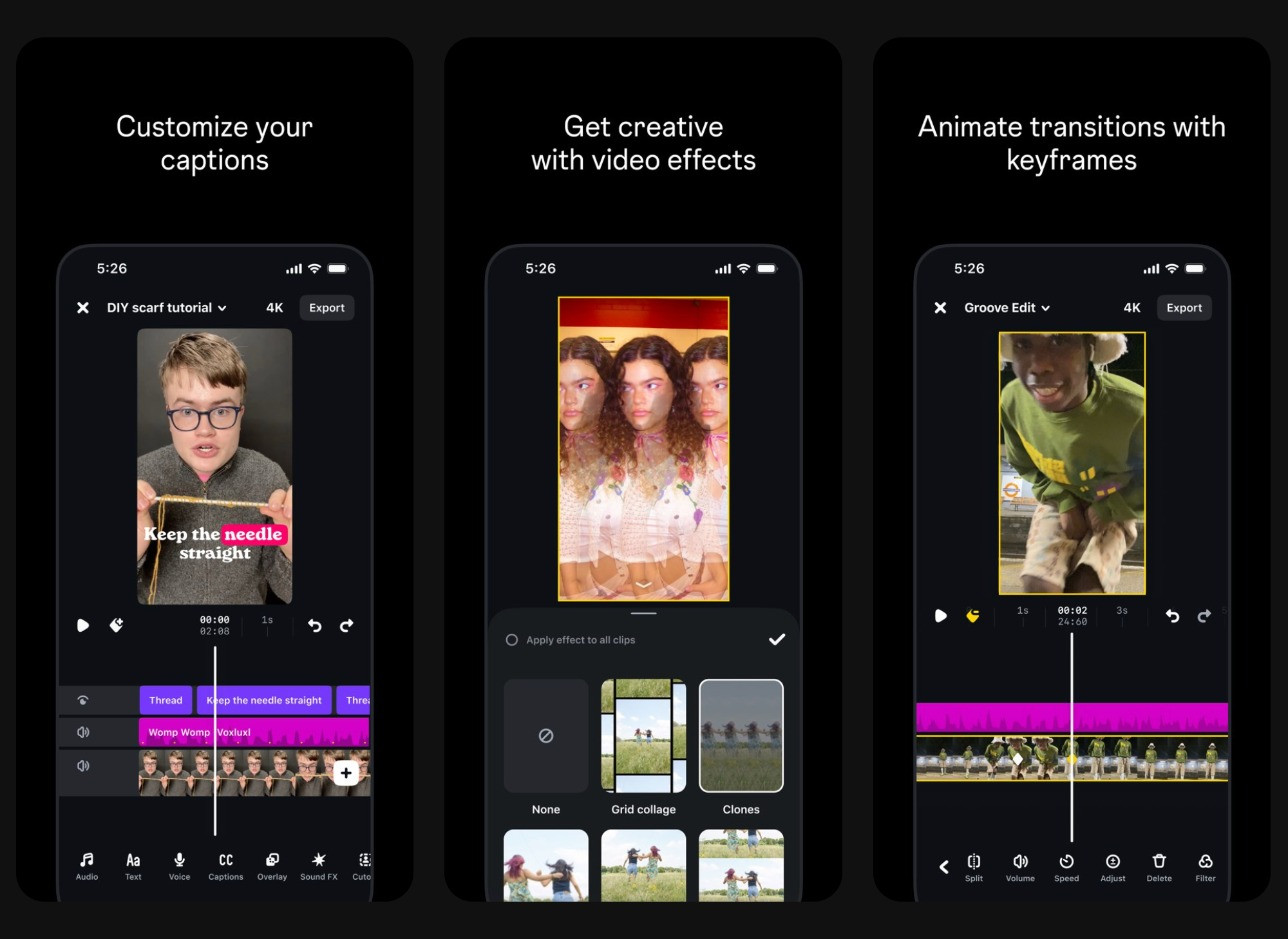
Official App Store listing screenshots for Edits. These are the developer's marketing images, not my own captures.
Watch out: the app is listed as "Free with In-App Purchases", but the page does not show prices or say what those purchases unlock. The no-watermark line is vendor copy.
Verdict: the natural pick if Instagram is where your videos end up.
7. InShot
InShot is the classic quick-edit app for trimming, resizing for different aspect ratios and adding music and text. It holds a 4.8 rating from 2.5M ratings and requires iOS 15.0 or later. The listing says it contains advertising and sells a "Remove ads" purchase at $3.99. InShot Pro is listed at $4.99 monthly, $19.99 yearly and $49.99 lifetime.
Watch out: the listing does not mention watermark rules or free export resolution, and I could not confirm them from an official source, so check an export in the app before relying on it for client work.
Verdict: a great fast tool with the cheapest lifetime upgrade here, but expect ads on the free tier.
8. Splice
Splice is built around music-synced edits, and its listing highlights more than 6,000 royalty-free tracks from Artlist and Shutterstock. It holds a 4.6 rating from 429K ratings and requires iOS 14.0 or later, which makes it friendly to older iPhones.
Watch out: the in-app purchases are all shown at $9.99, including a weekly plan with a free trial, and the listing does not make clear the monthly or yearly split. I could not confirm free-tier watermark or resolution rules, so run a test export first.
Verdict: good for beat-matched edits and for older devices, as long as you check the export before you commit.
9. Captions
Captions focuses on talking-head videos: AI captions in 91 or more languages, dubbing into 29 languages and avatars, per its App Store page. It holds a 4.7 rating from 32K ratings and requires iOS 16.0 or later.
Watch out: Captions' help page says that if you use certain Max features on a Basic plan, your export includes a watermark. The page does not say whether the free tier is watermarked in other cases, so treat that as unconfirmed. Pro is listed at $9.99 monthly, $5.99 weekly or $64.99 yearly.
Verdict: the right choice for creators who talk to camera and need captions fast, with more paywall caveats than the others.
10. Apple Photos (built-in editing)
The Photos app you already have can trim, rotate, add filters, adjust and change speed, according to Apple's support page. You can save the result as a new clip, so the original stays untouched. It does not do multi-clip timelines or captions, but for a ten-second fix it is the fastest option and needs no download.
Verdict: use it for quick trims, then move to a full editor when the project grows.
A note on Apple Clips: MacRumors reported on October 11, 2025 that Apple discontinued Clips. Existing users can keep using it, but it is no longer updated, so I left it off the ranking.
Free tier comparison
App | Best for | Free tier notes | Upgrade price (US App Store) | Minimum iOS |
|---|---|---|---|---|
Fliki | Text to video | Free plan: 720p, watermark, 3 credits per month | From $9.99 month or $79 year | 16.4 |
iMovie | Beginners | Free, no in-app purchases listed, 4K/60 | None | 27.0 |
Adobe Premiere | Multitrack editing | Core tools free (vendor claim); free 4K not confirmed | $7.99 month, $69.99 year | 18.0 |
CapCut | Social templates | Ads; watermark if you export with Pro elements | Several tiers, $89.99 year listed | 15.0 |
VN | Multitrack, no watermark | No watermark (vendor claim); ads | $7.99 and $69.99 | 16.0 |
Edits | Reels | 4K, no watermark (vendor claim) | Not listed | 16.3 |
InShot | Quick edits | Ads; watermark rules not confirmed | $4.99 month, $19.99 year, $49.99 lifetime | 15.0 |
Splice | Music-synced edits | Watermark rules not confirmed | $9.99 entries, periods unclear | 14.0 |
Captions | Talking heads | Watermark with Max features on Basic | $9.99 month, $64.99 year | 16.0 |
Photos | Quick trims | Built in, free | None | Not listed |
How to choose the right free editor
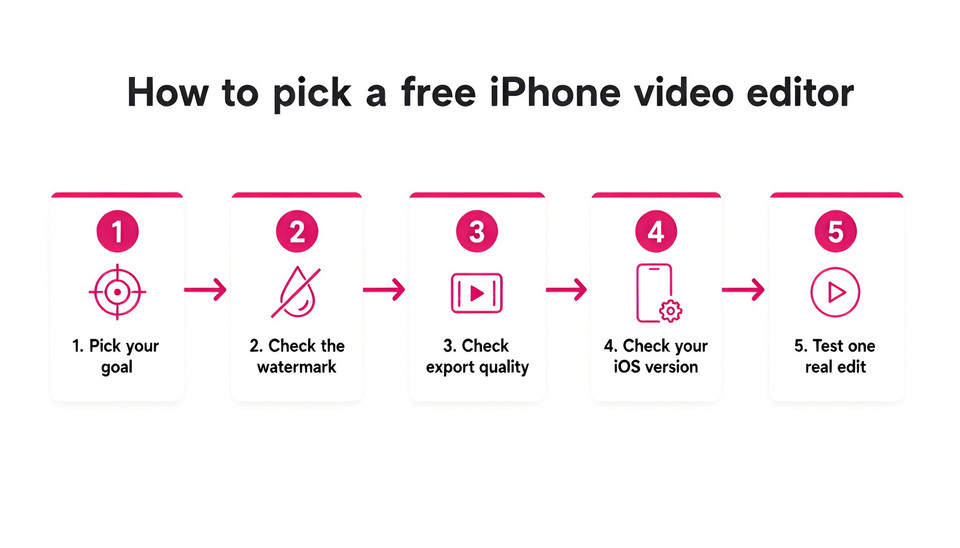
Start with your goal. If you shoot clips and want a polished cut, pick iMovie, VN or Premiere. If you publish to TikTok or Reels, CapCut or Edits will save time with templates and captions. If you have an idea or a script but no footage, or you just want the fewest steps, Fliki is the shortcut.
Then check the watermark rule before you invest an hour. Run a ten-second test export, look at the corner, and confirm the resolution. Next, check the iOS requirement, because iMovie (27.0) and Premiere (18.0) both ask for recent software while Splice runs back to iOS 14.0. Finally, do one real edit with your own footage. A good app should let you trim, add captions and export in under ten minutes.
Common mistakes to avoid
Trusting "no watermark" in the description: it is usually vendor copy. Test an export first.
Using Pro effects by accident: in CapCut, a single Pro element can trigger a watermark or a paywall at export.
Starting a weekly trial and forgetting it: several apps sell weekly subscriptions, so cancel in your Apple ID settings if you do not plan to continue.
Ignoring your iOS version: a great app is useless if your iPhone cannot install it.
Bottom line
If you only install one app, make it Fliki if you want the quickest path to a finished video, iMovie when you are cutting your own clips and your iPhone supports it, or VN or Premiere when you want more control. Add CapCut or Edits for social-first workflows. And if your video starts as a script or a blog post rather than a camera clip, you can try Fliki free and see how far an idea gets you before you ever open a timeline.
For more ways to make videos with AI, see how to make AI videos and our guide to AI YouTube Shorts, or compare plans on the pricing page.
FAQs
iMovie is free with no in-app purchases listed and no watermark mentioned on its listing. Adobe Premiere on iPhone, VN and Edits by Instagram all describe watermark-free exports, but that wording comes from the vendors, so run a short test export before relying on it.
Yes. iMovie is free on the App Store with no in-app purchases listed, and it exports up to 4K at 60 fps. As of November 2026 the listing says it requires iOS 27.0 or later, so check that your iPhone can install it.
Yes. TikTok's US joint venture closed on January 23, 2026, and CapCut remains available on the US App Store. CapCut's help center also notes that exporting a project with Pro elements needs a subscription or adds a watermark.
Edits by Instagram is built for Reels and advertises 4K export with no watermark. CapCut is a strong alternative if you want templates and auto captions, but watch for Pro effects that can trigger a watermark at export.
Fliki is free to download and turns a script, blog link or idea into a narrated video with AI voices and captions. Its free plan includes 3 credits per month with 720p exports and a watermark, while paid plans add 1080p and longer videos.
Many do. The App Store listings for CapCut, VN and InShot say they contain advertising, and InShot sells a Remove ads purchase at $3.99. iMovie lists no in-app purchases, and Adobe describes Premiere on iPhone as free of pop-up ads.