The animation is not why your explainer fails. The script is.
Here is the uncomfortable truth about explainer videos: people spend weeks agonizing over the animation style and about twenty minutes on the script, then wonder why nobody watches to the end. It is backwards. The visuals are the outfit. The script is the person. A brilliant script read over plain slides will out-convert a gorgeous animation built on a weak script every single time.
The good news is that a converting explainer script is not a creative mystery. It follows a structure so reliable you can fill it in like a form. So that is exactly what this article gives you: a copy-paste master template, six proven fill-in-the-blank formulas for different situations, the word-count math so your script actually fits your runtime, a swipe file of hooks you can steal, real breakdowns of legendary explainers (and one famous "result" that is actually a myth), and a fully written example so you can see it all come together.
Grab what you need, fill in the brackets, and you will have a script better than most agencies ship. Let us build it.
Why the script carries everything
Explainers work because people genuinely use them to decide what to buy. In Wyzowl's 2026 survey, 96 percent of people said they have watched an explainer video to understand about a product, and 63 percent said a short video is their single most-preferred way to learn about something, far ahead of reading an article. But that attention is fragile. Real viewing data from Vidyard shows videos under a minute get the highest completion, and Wistia finds viewers drift away around the halfway mark. Translation: you have seconds to earn the next seconds, and the only thing doing that work is your words. The script decides whether the click was worth it.
The anatomy of a converting explainer script
Almost every high-performing explainer, whatever the brand or style, moves through the same six beats. Learn these once and you can write for any product. Here is the structure with a rough time budget for a 60 to 90 second video.
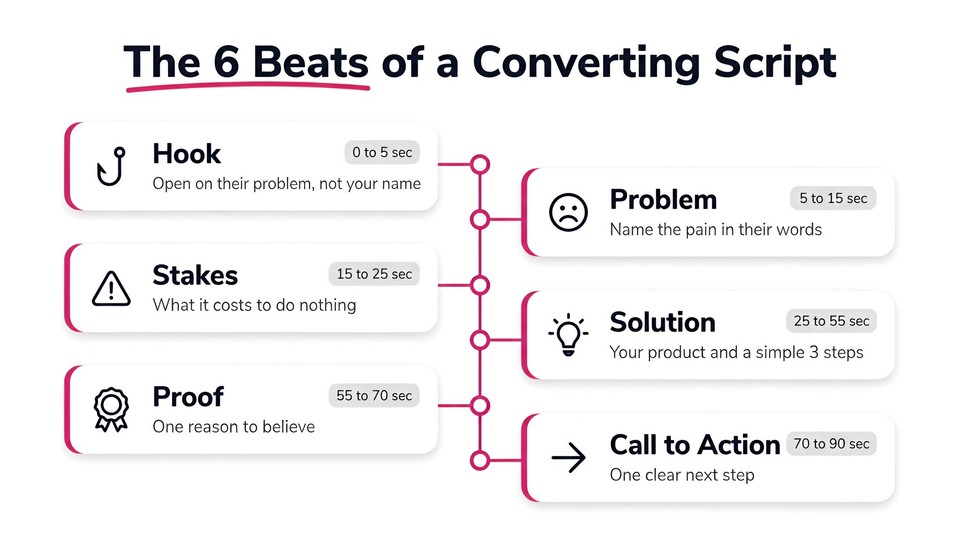
Hook (0 to 5 seconds). Open on the viewer's problem or a sharp question. Never open with "Hi, we are [Company]."
Problem (5 to 15 seconds). Name the pain in the viewer's own words so they feel understood.
Stakes (15 to 25 seconds). Briefly amplify the cost of leaving it unsolved. This is the beat most amateurs skip, and it is what creates desire.
Solution and how it works (25 to 55 seconds). Introduce your product and show the simple path from problem to result, usually in three steps.
Proof (55 to 70 seconds). One concrete reason to believe: a number, a name, a result.
Call to action (70 to 90 seconds). One single next step, stated plainly.
That is the skeleton. Now here is the template that puts words on it.
The master template (copy, paste, fill in)
This is the one to start with. It is a 60 to 90 second, benefit-led explainer that works for most software, apps, and services. Copy it, replace every bracket, then read it out loud and cut anything that sounds like an ad.
[HOOK] Still [frustrating thing your audience does the hard way]?

[PROBLEM] If you are like most [audience], you [describe the daily struggle],
and it costs you [time / money / stress]. You have probably tried
[common workaround], but it [why it falls short].

[STAKES] And every [day / week] it stays broken, you [lose X / miss Y].

[SOLUTION] Meet [Product]. It is the [simple category] that helps you
[core outcome] without [the thing they hate].

[HOW IT WORKS] Here is how simple it is:
First, [step one].
Then, [step two].
And that is it, you [get the result], in [timeframe].

[PROOF] [Number] of [audience] already use [Product] to [result].
[Optional: "It is how [recognizable name] [achieved outcome]."]

[CTA] [Do the one thing] at [where], and [get the specific benefit] today.
Two rules make this template sing. Write the whole thing addressing one person as "you," and make the product the guide, not the hero. The viewer is the hero of the story. Your job is to be the trusted guide who hands them a simple plan, a framing that copywriter Donald Miller built his whole StoryBrand method around. Once the script is final, turn the finished script into a video in minutes.
Six proven formulas (pick the one that fits your situation)
The master template above is really the PAS formula in disguise. But different products and audiences call for different angles. Here are six battle-tested formulas as fill-in-the-blank micro-templates. Each one is a legitimate way to structure the same six beats.
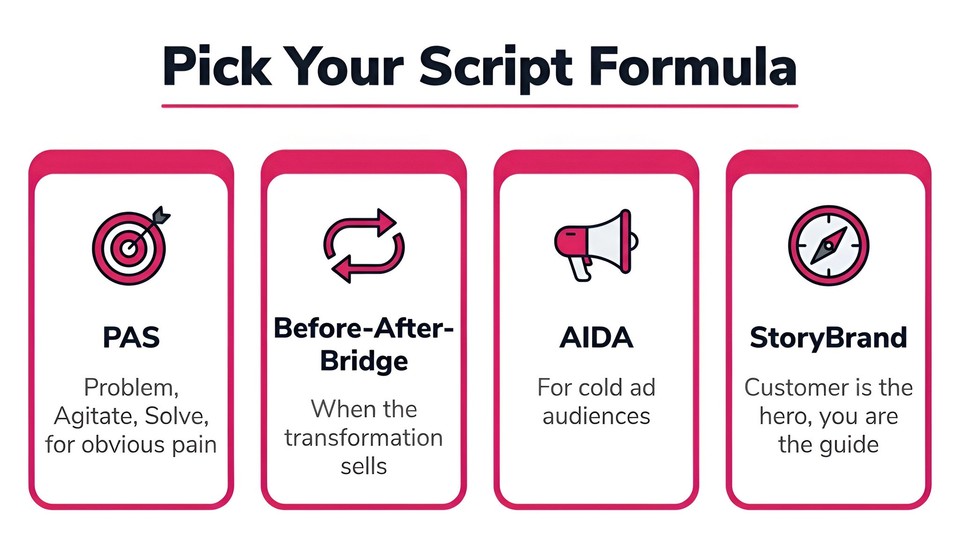
1. PAS (Problem, Agitate, Solve). The workhorse, popularized by Copyblogger. Best when the pain is obvious and emotional.
[Problem] You [struggle]. [Agitate] And it keeps [getting worse / costing you].
[Solve] [Product] fixes it by [how], so you finally [outcome].
2. Before-After-Bridge (BAB). A direct-response staple. Best when the transformation is the selling point.
[Before] Right now, [painful current reality].
[After] Imagine [the better world where the problem is gone].
[Bridge] [Product] is how you get there, by [mechanism].
3. AIDA (Attention, Interest, Desire, Action). The oldest formula in advertising, traced to E. St. Elmo Lewis around 1898. Best for ads and cold audiences.
[Attention] [Bold hook or question].
[Interest] Here is why it matters: [relevant insight].
[Desire] [Product] gives you [the thing they now want], because [proof/benefit].
[Action] [Clear CTA].
4. StoryBrand / Hero's Journey. Best for brand and mission-led explainers where you want an emotional arc.
A [customer] wanted [goal], but faced [problem] that made them feel [emotion].
Then they found [Product], the guide with a plan: [3-step plan].
Now they [success], and avoided [the failure they feared].
5. Problem-Solution (the classic). Best for straightforward B2B and utility products.
The problem: [clear problem].
The solution: [Product], which [does the job] so you [benefit].
How: [step, step, step]. The result: [outcome].
6. FAB (Feature, Advantage, Benefit). Best for feature-rich products, used sparingly so you stay benefit-led.
[Product] has [feature], which means [advantage], so you [benefit that the
viewer actually cares about].
A quick honesty note on credit: AIDA and StoryBrand have clear named origins (Lewis and Miller). PAS, BAB, FAB, and the "4 Ps" come out of the broader direct-response tradition and get attributed loosely, so do not trust any single "so-and-so invented this" claim you see for them. What matters is that they work.
The word-count math (so your script actually fits)
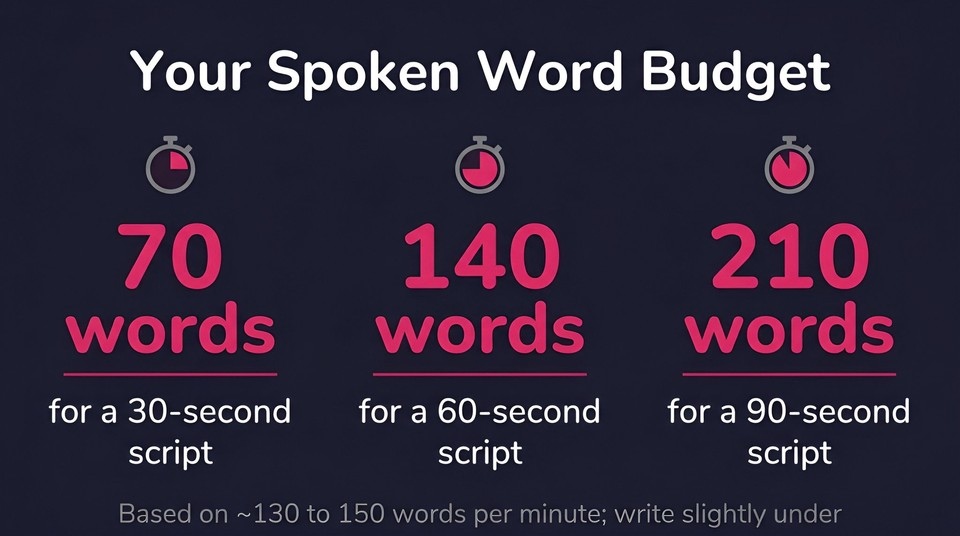
This is where most scripts break. People write a 300-word script for a 60-second slot, then either speed-read it or blow past the runtime. Conversational narration runs about 130 to 150 words per minute (the National Center for Voice and Speech puts average conversational speech near 150 wpm), so your word budget is fixed. Use this table and the free Voices.com words-to-time tool to check.
Runtime | Spoken word budget |
|---|---|
30 seconds | 65 to 75 words |
60 seconds | 130 to 150 words |
90 seconds | 195 to 220 words |
2 minutes | 260 to 300 words |
One caveat worth respecting: those are words read aloud with no pauses. Real explainers have breathing room, product beats, and moments where a visual does the talking, all of which eat into the budget. So write slightly under the maximum, then read it aloud with a stopwatch. If you run over, cut, do not rush.
A hook swipe file (steal these openings)
The first line is the whole ballgame. If the hook is weak, the rest of your perfect script never gets heard. Here are proven hook patterns as fill-in-the-blanks. Write three or four and pick the sharpest.
"Still [doing the painful thing the hard way]?"
"What if [dream outcome] took just [surprisingly short time]?"
"[Audience], you are [losing X] and you probably do not even know it."
"Stop [common mistake]. Here is what to do instead."
"There is a reason [smart group] switched to [category]. Let me show you."
"[Surprising stat or fact], and it is costing you [consequence]."
"You have been told [common belief]. It is wrong."
"Making [task] used to take [long time]. Now it takes [short time]."
"Meet the [audience] who [achieved impressive result]. Here is how."
"If you have ever [relatable frustration], this is for you."
"The problem was never [what they blame]. It was [real cause]."
"Watch what happens when you [do the thing your product enables]."
Call-to-action templates
End with exactly one action. A split CTA ("subscribe, or visit our site, or book a call") is a decision the viewer will resolve by doing nothing. Match the ask to how warm the audience is.
Soft (top of funnel): "See how it works, free, at [URL]."
Trial: "Start your free trial at [URL], no card needed."
Direct: "Get [Product] today at [URL] and [specific benefit]."
Booking: "Book a 15-minute demo at [URL]."
Social: "Follow for more, and grab the free [lead magnet] in the description."
Real explainers, broken down (and one myth)
Templates click faster when you see them in the wild. Here are three legendary examples, analyzed for their structure.
Dollar Shave Club, "Our Blades Are F*ing Great" (2012).** This is the gold standard, and it is a textbook PAS-plus-personality script. Founder Michael Dubin opens with a blunt hook, names the problem (overpriced razors with features you do not need), presents the dead-simple solution (quality blades delivered monthly for a few dollars), and closes with one clear CTA, all carried by a comedic voice that never breaks. The results are well documented: it reportedly drove around 12,000 orders in the first 48 hours, and Unilever acquired the company for about 1 billion dollars in 2016. The lesson: a clear structure plus a strong, consistent voice beats a big budget. The video reportedly cost around 4,500 dollars.
Dropbox (2008 to 2009), the myth versus the reality. You have probably read that "Dropbox's explainer video made 48 million dollars." That number is agency lore that mutates every time it is retold (sometimes 24 million, sometimes 10 million customers), which is the tell that it is not real. The documented version, which founder Drew Houston has told and which appears in Eric Ries's The Lean Startup, is better and more useful: a simple narrated demo screencast took Dropbox's beta waitlist from around 5,000 to 75,000 people overnight. The takeaway for your script is not the fake dollar figure, it is that a plain, clear walkthrough of a real problem being solved can move people at scale. Clarity beat production value.
Crazy Egg (by Demo Duck). This one is often cited as lifting conversions around 64 percent and adding roughly 21,000 dollars a month. Worth knowing: that figure is a first-party testimonial on the production studio's own case-study page, not an independently audited result. Use it as inspiration, not as a benchmark. The script craft, leading with the visitor's confusion about their own website and positioning the tool as the fix, is the part actually worth copying.
A fully written example (watch the template become a script)
Templates are abstract until you fill one in, so here is the master template written out for a fictional carpooling app, at roughly 130 words for a 60-second explainer.
Still sitting in traffic alone while three empty seats go to waste?
If you commute in a city, you know the drill: the same jammed route, the same solo drive, gas money burning for no reason. You have tried ride-shares, but the price adds up fast.
And every week it stays this way, that is money and an hour of your life, gone.
Meet Routemate. It is the carpooling app that pairs you with a verified driver heading your exact way, and splits the fare automatically.
Here is how simple it is. Set your route once. Routemate matches you with someone going the same direction. You ride, and the cost splits itself. That is it.
Thousands of commuters already ride for half the cost.
Set your route free at routemate.app, and turn your commute into your cheapest ride today.
Notice what it does: hooks on the pain, names it, raises the stakes, introduces the guide, shows a three-step path, adds proof, and ends with one action. That is the whole method.
Common mistakes that kill an explainer script
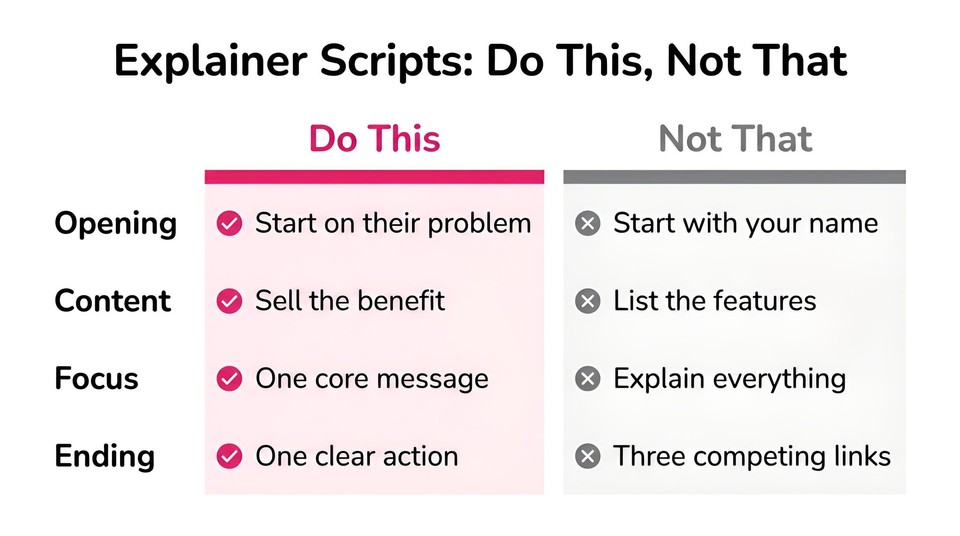
Opening with your company name. Open on the viewer's problem. Nobody cares who you are until they know why they should.
Listing features instead of benefits. Translate every feature into what the viewer gets. FAB exists for exactly this.
Cramming in everything. One core message per video. If you are explaining three things, you need three videos.
A weak or missing stakes beat. Without a little agitation, there is no desire, and no reason to act now.
Writing for the eye, not the ear. Read it aloud. If it does not sound like something a person would say, rewrite it.
A split or buried CTA. One clear action, stated plainly, at the end.
From script to finished video
Once your script is tight, the production is the easy part now, and this is where the script-first approach really pays off. Because tools built around a script can turn your finished words into a narrated, captioned, animated explainer in minutes, the quality of the video rides almost entirely on the quality of the script you just wrote. You can paste your script straight into Fliki's text to video or its dedicated explainer video maker, pick an AI voice and an animation style, and get a first cut fast, then refine it. If you want the full production walkthrough, our guide on how to make animated explainer videos with AI covers it end to end, and if you are still choosing a tool, we compare the options in the best explainer video software roundup.
A quick word on the stats you will see while researching. Ignore the famous ones that are not real: the "viewers retain 95 percent of video versus 10 percent of text" line comes from an old vendor survey, not science, and the "eight-second attention span shorter than a goldfish" claim has been thoroughly debunked. Your script does not need myths. A clear structure and a real benefit are enough.
The bottom line
A converting explainer script is not a stroke of genius, it is a structure you fill in: hook, problem, stakes, solution, proof, one CTA, written for the ear and cut to fit the clock. Start from the master template, pick the formula that fits your product, steal a hook, and write your worked example the way we did above. That is the part that actually moves people.
When your script is ready, you can turn it into a finished explainer with Fliki for free, and because you started with a strong script, the video will do exactly what you built it to do.
FAQs
Follow the six-beat structure: hook, problem, stakes, solution with a simple how-it-works, proof, and one clear call to action. Start from the master template in this article, fill in the brackets for your product, keep it to the word budget for your runtime, then read it aloud and cut anything that sounds like an ad.
Match the words to the runtime at about 130 to 150 spoken words per minute. That is roughly 65 to 75 words for 30 seconds, 130 to 150 words for 60 seconds, and 195 to 220 words for 90 seconds. Write slightly under the maximum to leave room for pauses and visuals.
For most products, the PAS format (problem, agitate, solve) inside the six-beat structure works best. Use Before-After-Bridge when the transformation is the selling point, AIDA for cold ad audiences, and a StoryBrand hero-and-guide arc for brand-led videos.
A good hook, in the first five seconds, names the viewer's problem or asks a sharp question rather than introducing your company. Use the swipe-file patterns in this article, write three or four options, and pick the one that would stop you from scrolling.
AI can draft a solid first version from a good brief, using a tool like an AI video script generator, and it is a fast way to get past the blank page. Treat it as a first draft: apply the structure here, fact-check every claim, and rewrite anything that sounds generic so it carries your real voice and offer.
Yes. A 30-second version keeps only the hook, the core problem, the solution, and the CTA, at around 70 words. The 90-second version has room for the stakes and proof beats. Write the full version first, then cut it down rather than padding a short one up.