The tool you pick decides the style, the speed, and the cost
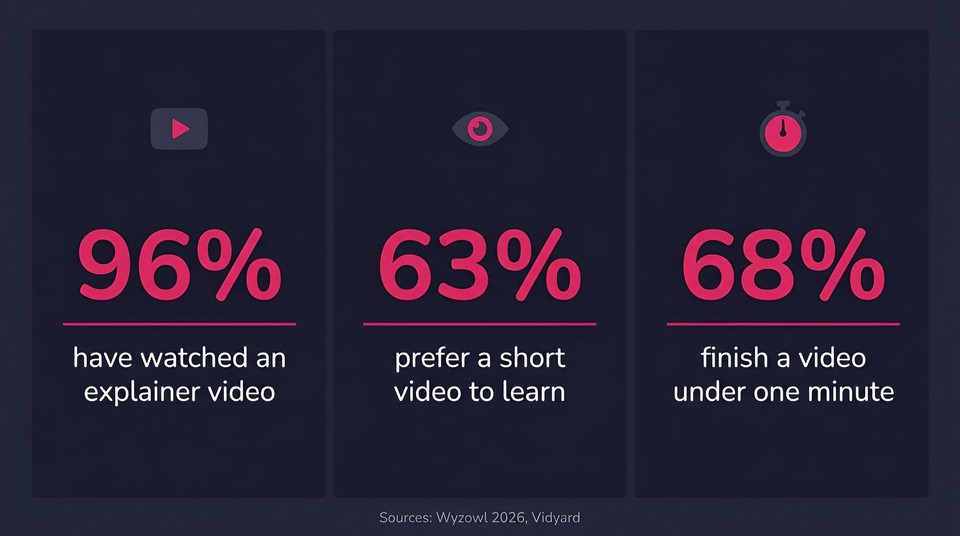
An explainer video is one of the most persuasive assets a business can own, and the numbers back that up. According to Wyzowl's 2026 State of Video Marketing report, 96 percent of people have watched an explainer video to understand about a service or product, and 63 percent say a short video is their single most-preferred way to learn about a product, far ahead of a text article at 12 percent. Real viewing data agrees on keeping it short: Vidyard's benchmarks found that 68 percent of viewers finish a video when it is under a minute, with completion falling sharply as length grows.
(One myth to ignore while you shop: the popular "viewers retain 95 percent of a message from video versus 10 percent from text" line is not real. It traces to a single informal vendor survey from the 2000s and has no peer-reviewed basis. The sourced figures above are more than enough.)
So the case for making explainers is settled. The real decision is which software to make them in, and that choice matters more than most buyers realize, because these tools are not interchangeable. Some are hand-built 2D animation studios, some are whiteboard specialists, some generate the whole video from a script with AI, and some are avatar tools wearing an "explainer" label. Pick the wrong category and you will fight the tool forever.
I have used or tested the tools below, and this guide ranks the best explainer video software of 2026 with honest pros, cons, and pricing, plus a buyer's framework so you can match the tool to the video you actually need. If you want the full how-to once you have picked one, our companion guide on making animated explainer videos with AI walks through the process end to end, and our roundup of the best AI video generators covers the wider category.
Quick picks
Best all-around and best value (AI, script-to-video): Fliki
Best for 2D character animation and enterprise L&D: Vyond
Best for non-designers and templates: Powtoon
Best versatile DIY on a budget: Animaker
Best whiteboard animation: VideoScribe
Best avatar-led explainer: Synthesia
Best for marketing teams already doing design: Visme
Best screencast and software-demo explainer: Camtasia
How I evaluated these tools
An explainer tool is only "best" relative to the video you are making, so I weighed each on the criteria that actually decide the outcome: the animation style it produces natively, ease of use versus manual control, whether it is AI-generated or hand-built, voiceover and caption quality, brand-kit support, output quality on real exports (not cherry-picked reels), and honest price including watermarks, resolution caps, and metered credits. All pricing and free-tier details below were checked against each vendor's own page in 2026, and these change often, so confirm before you buy. Where a vendor hides prices behind client-side rendering, I have flagged it.
The best explainer video software in 2026
1. Fliki - best all-around and best value
Fliki takes the top spot because it turns the slowest, most expensive part of an explainer, the animation and production, into a few minutes of work, and it does it cheaply. You write or paste a script (or start from a one-line idea), pick from more than a dozen animation and illustration styles, and it generates the scenes, narration, captions, and music, then hands you an editor to refine. Its dedicated Explainer workflow is built for exactly this.
What makes it the best value is the breadth in one place: 2,000-plus AI voices across 80-plus languages with voice cloning, AI avatars if you want a presenter, auto captions, and one-click translation into dozens of languages, so you are not stitching four subscriptions together. There is a genuine free plan, and paid plans are watermark-free with commercial rights.
Best for: creators, marketers, and educators who want a fast, script-first explainer with strong voices and localization.
Watch-outs: it is narration-first, so for pixel-perfect hand-rigged 2D character animation a manual tool like Vyond still wins, and heavy AI-video use spends credits quickly.
Pricing: free forever plan; Standard around $28/mo (about $21 billed annually). Confirm current pricing on Fliki's pricing page.
2. Vyond - best for 2D character animation
Vyond is the most serious "true animation" studio on this list. It gives you deep control over 2D characters, custom actions, lip-sync, and multiple art styles, plus enterprise collaboration and brand management, which is why L&D and corporate teams rely on it. Its Vyond Go AI can also draft a video from a prompt.
The trade-offs are cost and a learning curve. It is the priciest mainstream option, and getting a polished custom animation takes real time to learn.
Best for: enterprise and L&D teams that need custom character-driven animation.
Pricing: no free tier (14-day trial); Starter $58/user/mo billed annually, or $99/mo month-to-month.
3. Powtoon - best for non-designers
Powtoon is a friendly, template-driven animation and presentation maker aimed squarely at people who are not designers. A big library of templates, characters, and scenes, plus AI generation and screen recording, gets you to a decent animated explainer without design skills.
Output can look template-y if you do not customize it, AI features are metered by credits, and real brand and character control sits on higher tiers.
Best for: beginners and teams who want quick animated explainers from templates.
Pricing: free plan (watermarked, no MP4 download); Lite $15/mo billed yearly.
4. Animaker - best versatile DIY on a budget
Animaker is the most stylistically versatile DIY tool here, covering 2D character, infographic, whiteboard, and typography styles with a large character builder and stock library, at a low entry price.
The catch is strict metered export caps, even on paid tiers, where extra downloads cost more, and the interface can lag on big projects.
Best for: solo creators and small teams who want style flexibility cheaply.
Pricing: free plan (watermark, ~2-minute cap); Basic around $10/mo billed annually.
5. VideoScribe - best whiteboard animation
If the hand-drawing-on-a-whiteboard effect is the point, VideoScribe is the specialist. It offers the signature drawing-hand style with millions of images, plus AI image and script generation and voiceover, which makes it a natural fit for education and training explainers.
It is a one-style tool by design, so it is the wrong choice if you want anything other than whiteboard, and its trial caps downloads.
Best for: hand-drawn, educational, step-by-step explainers.
Pricing: 7-day trial only; Lite $12.50/mo billed annually.
6. Synthesia - best avatar-led explainer
Synthesia turns a script into a realistic talking-head presenter in 140-plus languages, with a large library of stock and custom avatars. For an explainer where a human presenter should deliver the message (training, corporate comms), it is excellent.
Be clear about what it is, though: it produces avatar videos, not classic animated or whiteboard explainers, so it is the wrong tool if you want animated scenes.
Best for: presenter-led training and corporate explainers.
Pricing: free tier (about 10 minutes per month); Starter $29/mo monthly, or $18/mo billed yearly.
7. Visme - best for marketing teams already doing design
Visme is an all-in-one visual content platform (presentations, infographics, documents) whose template video and animation timeline make it a strong fit for marketing and business teams that want on-brand content at scale, with solid brand governance and analytics.
It is a generalist, so video is one output among many with template-and-timeline animation only (no character rigging or avatars), and video export is gated to the Pro plan.
Best for: marketing teams producing on-brand videos alongside decks and infographics.
Pricing: free plan (no video export); Starter $12.25/mo billed annually.
8. Renderforest - best all-in-one template and branding suite
Renderforest bundles a huge template video library with heavy 2026 AI (text-to-video, avatars, access to leading models) plus a logo maker and website builder. It is a fast path to template or AI promo and explainer videos if you also want branding tools in one place.
Watch the credit "gotchas," since premium templates, stock, and AI consume credits that often require extra purchases, and templates limit deep customization.
Best for: small businesses wanting quick branded videos plus a wider creative suite.
Pricing: free plan (360p, watermark); paid entry roughly $10-$15/mo (vendor page served in local currency, so confirm your region's price).
9. Steve.ai - best cheap AI text-to-animation
Steve.ai generates animated or live-style videos from a script, built on Animaker's animation engine, and it is inexpensive for fast, simple animated explainers and social clips.
Template selection is thin, users report render lag, and output polish trails the premium tools, with low export caps and paid overages.
Best for: budget creators who want quick AI-animated explainers from text.
Pricing: free tier (watermarked); Basic roughly $15-$20/mo depending on billing (confirm on site).
10. Camtasia - best screencast and software-demo explainer
Not every explainer is animated. If yours is a software demo or tutorial, Camtasia is the standard: a powerful screen recorder and editor with cursor effects, annotations, quizzes, and newer AI editing. It is the right "explainer" tool when you need to show a real screen.
Two honest notes: it is now subscription-only (the old perpetual license is gone), and the cheapest tier watermarks the editor, so full editing effectively starts around $180 per year. It is also a screencast tool, not an animation studio.
Best for: screen-recorded product demos, tutorials, and training.
Pricing: no permanent free plan; Starter $39/yr (watermarked), Essentials $179.88/yr for the full editor.
Also worth knowing
Doodly is a whiteboard/doodle tool now sold by subscription inside the Voomly bundle (from about $49/mo), worth a look if you want that sketch style and Animaker or VideoScribe do not fit.
Canva makes template-based explainer and social videos inside its wider design suite, ideal if your team already lives in Canva (Pro is about $180/yr).
Biteable, mysimpleshow, and Wideo are solid template or whiteboard options if the tools above do not click; note Biteable dropped its free plan and now offers a trial only.
Comparison table
Tool | Best for | Animation style | Free tier | Entry price (verify) |
|---|---|---|---|---|
Fliki | All-around, best value | AI-generated + avatar + animated scenes | Yes | ~$28/mo (Standard) |
Vyond | 2D character animation, L&D | 2D character + motion graphics + whiteboard | No (trial) | $58/mo annual (Starter) |
Powtoon | Non-designers, templates | Template + 2D + AI | Yes | $15/mo yearly (Lite) |
Animaker | Versatile DIY, budget | 2D + infographic + whiteboard | Yes | ~$10/mo annual (Basic) |
VideoScribe | Whiteboard animation | Whiteboard | Trial only | $12.50/mo annual (Lite) |
Synthesia | Avatar-led explainers | AI avatar (talking head) | Yes | $18/mo yearly (Starter) |
Visme | Marketing/design teams | Template + motion graphics | Yes (no video export) | $12.25/mo annual (Starter) |
Renderforest | Template + branding suite | Template + AI + avatar | Yes | ~$10-15/mo |
Steve.ai | Cheap AI text-to-animation | AI-generated + 2D | Yes | ~$15-20/mo |
Camtasia | Screencast demos | Screen recording + editing | No (trial) | $179.88/yr (full editor) |
Pricing and free tiers verified in 2026 and subject to change. A couple of figures (Fliki, Renderforest, Steve.ai) come from vendor tables or region-served pages, so confirm on the official site before buying.
How to choose the best explainer video software
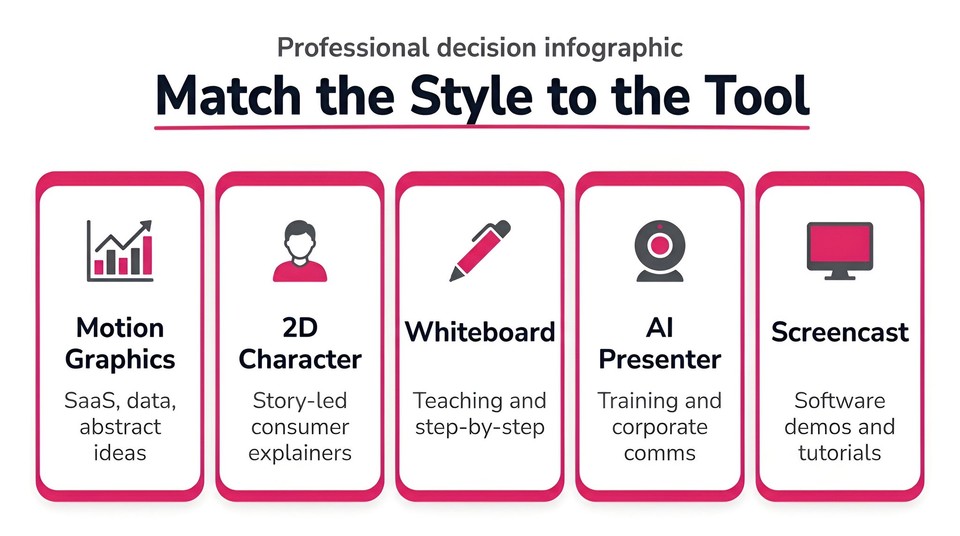
The single most useful move is to decide your style first, then shortlist tools that ship it natively.
Motion graphics or clean 2D for SaaS, data, and abstract concepts. Fliki, Powtoon, Animaker, Visme.
2D character animation for emotional, consumer, story-led explainers. Vyond, Animaker.
Whiteboard for teaching and step-by-step. VideoScribe, Doodly.
A real presenter for training and corporate comms. Synthesia, or Fliki's avatar mode.
A screen recording for software demos and tutorials. Camtasia.
After style, weigh three things. First, AI versus manual: AI tools like Fliki give you a full first cut in minutes and are ideal for volume, iteration, and localization, while manual tools give pixel-level control at the cost of time. Second, the real price, which means watching for watermarks, resolution caps, metered credits, and commercial rights, not just the sticker figure. Third, the learning curve, which the free trial is the honest test of. My practical advice: pick the style, shortlist two or three tools, run the same short script through each free tier, and compare the finished exports on voice, captions, and how on-brand they look.
Software vs an agency: the cost reality
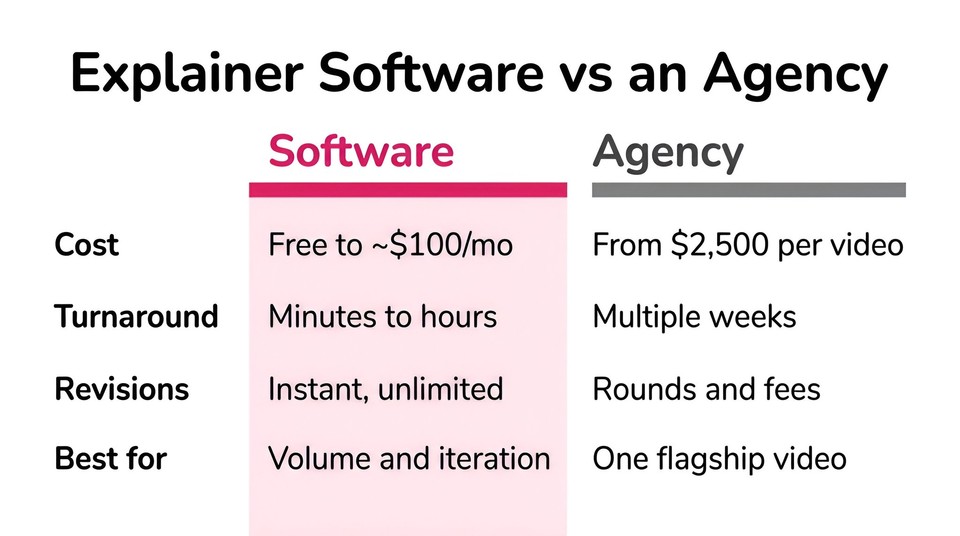
Hiring a studio still buys the highest craft ceiling, and for one flagship brand film it can be worth it. But it is not cheap or fast. Wyzowl currently lists animated explainer videos starting from about 2,500 dollars, with mid-market studio work commonly landing in the 5,000-to-15,000-dollar range for a polished 60-second piece, over a multi-week timeline. Every tool in this guide runs between free and about 100 dollars a month and produces a first cut in minutes. For most teams, the smart play is software for the day-to-day volume and, if you have one hero video that must be perfect, an agency (or a hybrid where AI handles the draft and a human polishes).
The bottom line
There is no universal best explainer video software, only the best fit for the style you need, the skills you have, and the budget you are working with. If you want one AI tool that covers the widest range of explainer work fast and affordably, start with Fliki. If your need is narrower, hand-built 2D animation, whiteboard, a presenter, or a screen demo, the ranked picks above point you to the specialist that fits.
Whichever you choose, run the same short script through the free tier first, and judge the finished export, not the marketing reel. You can make your first explainer with Fliki for free and see how close to publish-ready one pass gets you.
FAQs
For most people, Fliki is the best all-around choice because it turns a script into a finished, narrated, captioned explainer in minutes across many styles and 80-plus languages, on a free-to-start plan. For hand-built 2D character animation, Vyond leads; for whiteboard, VideoScribe; for a presenter-led explainer, Synthesia; and for software demos, Camtasia.
Yes. Fliki, Powtoon, Animaker, Visme, Synthesia, Renderforest, and Canva all have genuine free tiers, though they usually add a watermark and cap length, resolution, or commercial rights. VideoScribe, Vyond, Biteable, and Camtasia offer trials rather than permanent free plans.
It depends on the style. Studios and L&D teams use Vyond for custom 2D animation and Camtasia for software demos, while a fast-growing number of creators and marketers use AI tools like Fliki to produce explainers at speed and scale. Many teams combine an AI tool for volume with an agency for one flagship video.
Most tools run between free and about 100 dollars a month, with common entry tiers around 10 to 29 dollars a month. That compares to roughly 2,500 dollars and up for a single agency-made explainer.
No. Template tools (Powtoon, Visme, Canva) and AI tools (Fliki, Steve.ai) are built for non-designers. AI script-to-video tools in particular require no animation skill at all, since you describe the video and edit the result rather than animating it yourself.