
Introduction
Most comparison articles, including some good ones, are written from the outside: pricing pages, review scores, and marketing copy. That is useful, but it does not tell you what the tool actually feels like when you sit down to make something. So for this one I did the obvious thing. I logged into HeyGen, Veed, and Fliki, gave each the exact same brief, and built the video.
The brief was deliberately simple and the kind of thing a real creator makes every week: "a short explainer on the benefits of drinking more water every day." Same idea, same length target, three tools. What came back told me more about who each product is for than any spec sheet could. This guide walks through that hands-on test, with screenshots from each step, an honest look at where each tool stumbled, and a clear recommendation based on the videos you actually need to make. If you also want the review-data angle across the category, our companion piece on HeyGen vs Synthesia vs Fliki covers that.
The 30-second verdict
If you only have a moment, here is the shape of it, and it held up in testing.
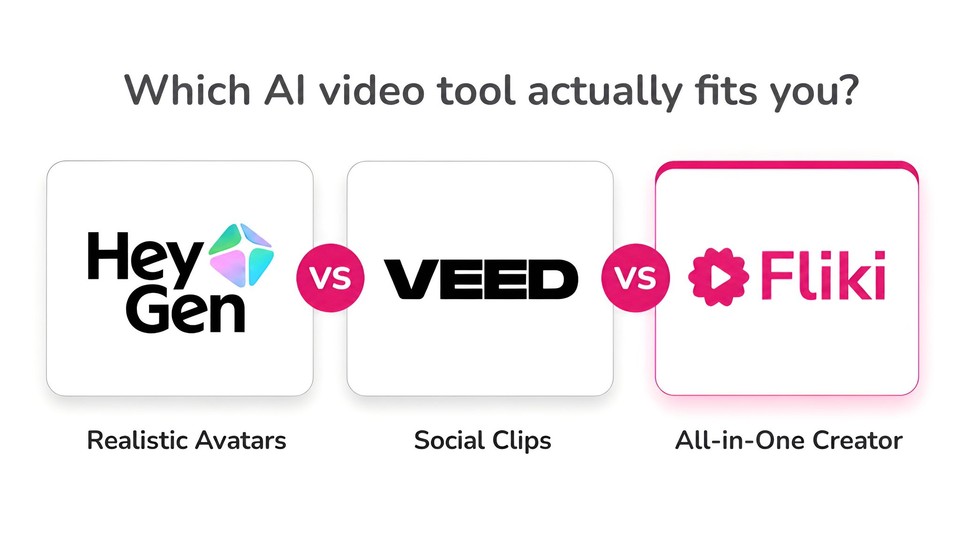
Choose HeyGen if the video is a realistic talking presenter, and that presenter is the whole point, think sales outreach, personalized video, and polished spokesperson clips. Choose Veed if you want the fastest path from a one-line idea to a vertical, social-ready talking-head clip, and you value a real in-browser editor plus screen recording and subtitles. Choose Fliki if you publish across formats and want one content-first tool that turns a script, blog post, idea, or slide deck into a finished, narrated, captioned video, with an avatar only when you want one.
None of them is "the best." They are built around three different starting points: an avatar, an editor, and your content. The rest of this article shows what that meant in practice.
How I tested
I gave every tool the identical prompt, and chose the most obvious "make a video from this idea" path each one offered. I captured the first-run experience, the setup choices, the generation step, and the finished editor. I did not cherry-pick a tool's best template or spend an hour tuning each result, because the honest question most people have is "what do I get when I just try it." Pricing and credits were noted from each account and each official pricing page, and both shift often, so treat the numbers as directional and confirm before you buy.
One fair caveat up front that applies to all three: every one of these tools runs on a credit or minute system, and the AI-written scripts all needed a human editing pass. More on both below.
HeyGen: avatar-first, and it wants you to build a presenter
The moment you land in HeyGen, its priorities are clear. The home screen is an onboarding checklist that starts with "Create Digital Twin," followed by "Polish your Voice," "Create a Look," and only then "Make your first video." This is a tool built around a realistic on-screen human, ideally you.
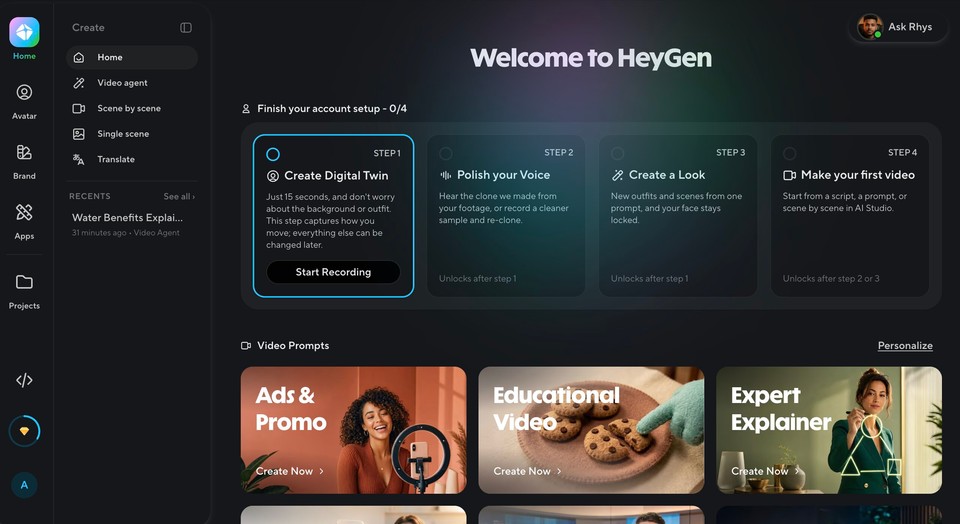
Its AI Studio is organized as Scene by scene, Single scene, and Translate, with a deep template library sorted by use case (Training, Corporate, Marketing, Sales, Tutorials and Explainers, Real Estate, Finance). You build a video the way you would build a slide deck: create a scene, place an avatar, write the lines it will speak.
The avatar tooling is genuinely the most serious of the three. You can clone a real person from video footage (its newest "Avatar V" generation) or create a virtual character, and the realism and lip-sync are what HeyGen is famous for.
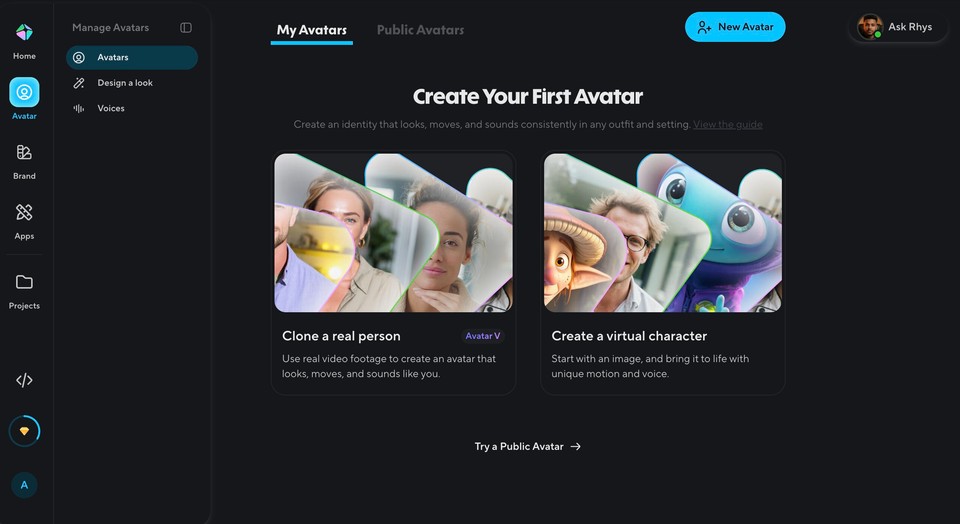
What it is not is a fast idea-to-explainer pipeline. There is no "paste a topic and get a narrated video with B-roll" path here, because a talking presenter is the product. If that presenter is what you need, HeyGen is excellent and the polish is real. If you wanted a faceless explainer with stock or AI visuals, you are in the wrong tool.
I selected explainer video and typed this idea: “A 30-second explainer on the benefits of drinking more water every day“ and got a few options in terms of selecting avatar, voice duration, aspect ratio, brand system and any additional attachments.
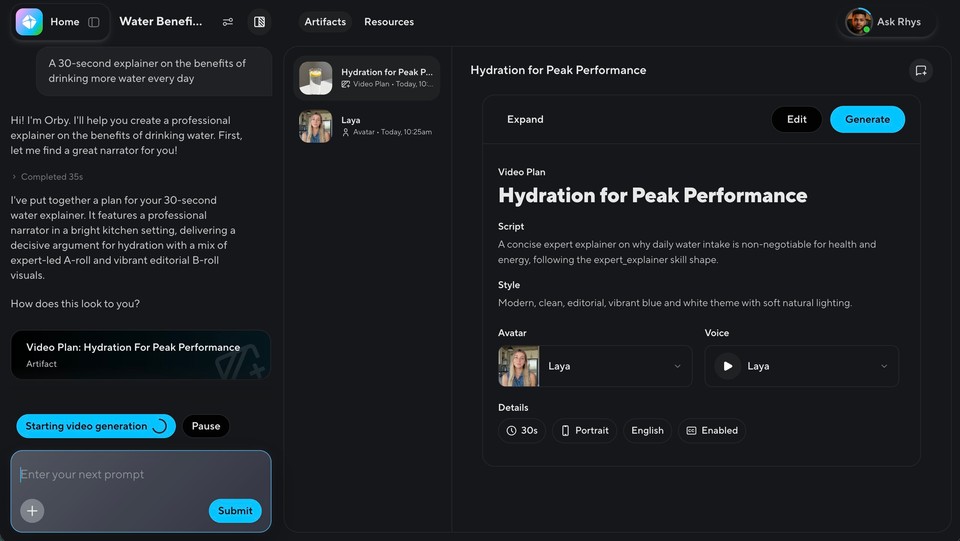
I went ahead with Auto settings on most of the options and hit continue. It took me to the editor where on the left side I observed the copilot creating the script and other assets, it asked me once to generate the video and I did grant the permission.
One observation I had with Heygen is that it took a lot of time in generating the video and even after the video was generated as mentioned by the AI agent, the left side didn’t display any video and kept showing that it is still creating.
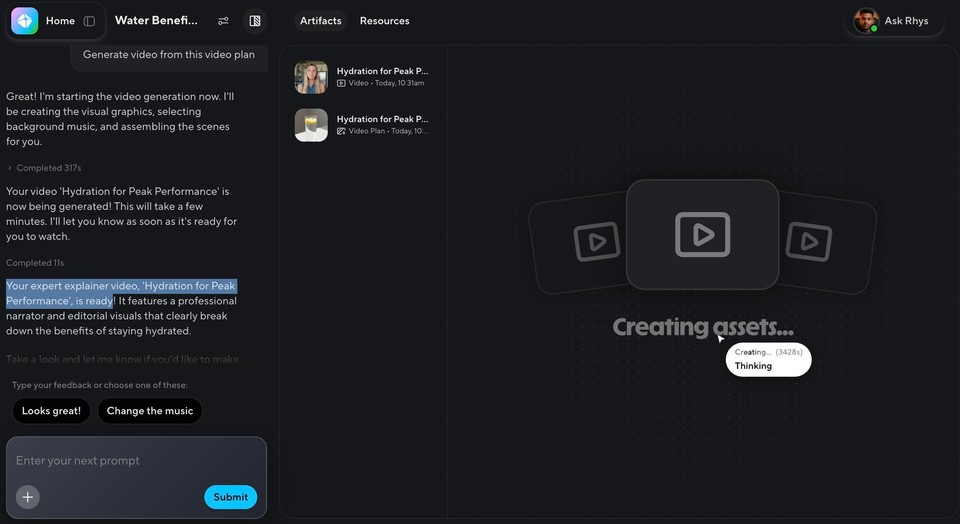
I eventually had to refresh the page after which it displayed the final video which was actually good. Checkout the final video I got:
Best for: sales teams, personalized outreach, and anyone whose video is a believable digital presenter. Watch-outs: the onboarding pushes hard toward building a digital twin before you can do much else, and its best avatar features consume premium credits quickly.
Veed: editor-first, and startlingly fast to a social clip
Veed feels different immediately: a light, clean interface built around a real video editor, with AI bolted on top rather than the other way around. Its Create hub offers four clear entry points: Generate Talking Head Videos, Generate Assets, Edit Video with AI, and Record.
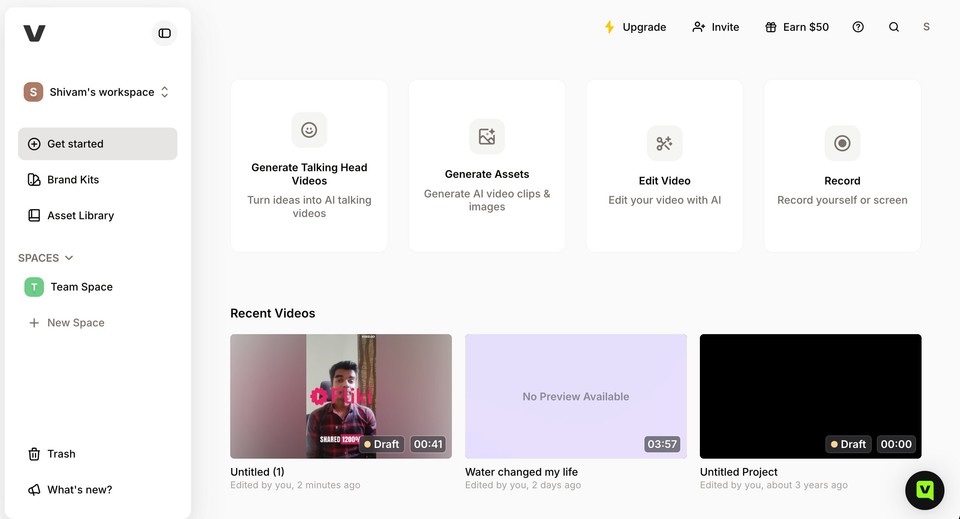
I chose "Generate Talking Head Videos," which opens a Gen-AI Studio pitched squarely at social and UGC: "Create viral talking head videos in one click," with quick prompts for Success story, Tutorial, Sales outreach, and Product spotlight.
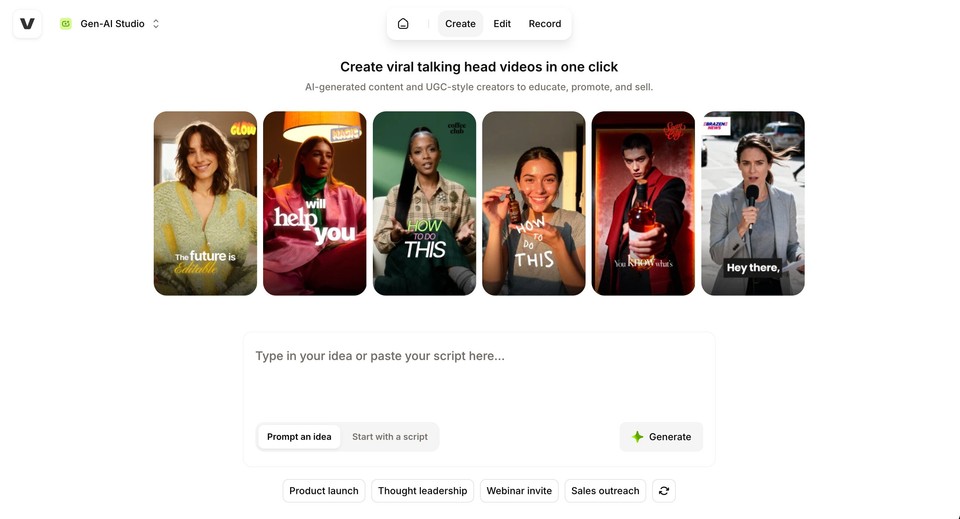
I typed my water-explainer idea, hit Generate, and Veed did something the others did not: it went straight to work. It auto-wrote a punchy, UGC-style script (broken into scene lines like "My energy crashes basically disappeared" and "I just kept a bottle on my desk and refilled it twice before lunch") and started generating without asking me a single follow-up question.
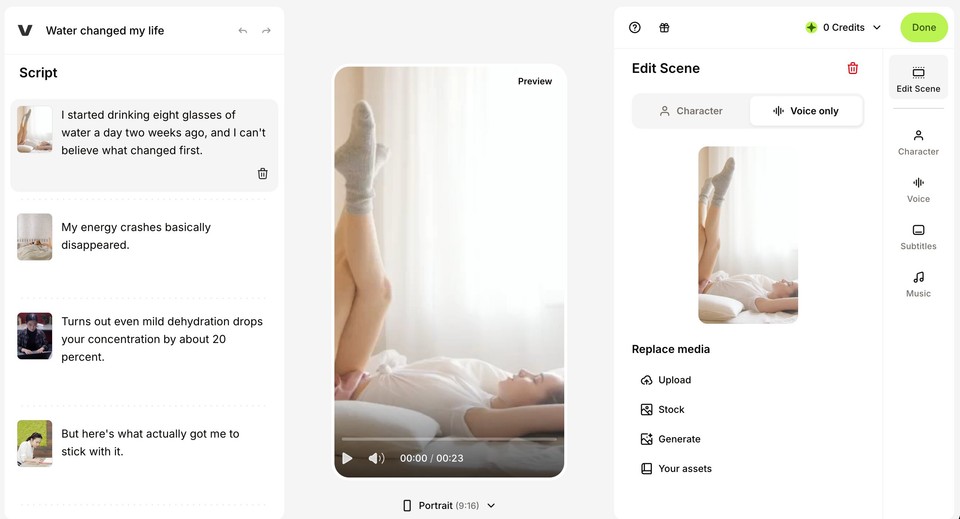
A minute or two later I had a finished 31-second vertical clip in a proper editor, with each scene given its own visual, a voice, subtitles, and music. The right panel let me edit each scene's Character, Voice, Subtitles, and Music, and swap any visual via Upload, Stock, Generate, or my own assets. Checkout the final video:
The trade-off for that speed is control. Veed made a lot of decisions for me up front, which is great when you trust it and frustrating when you do not. It is also where Veed's real identity shows: it is an online video editor first, so its strengths beyond AI generation are editing, auto-subtitles, and screen recording. One practical note from my run, the account's generation credits depleted quickly, so heavy testing will hit limits fast.
Best for: creators who want a fast, vertical, social-ready clip and a genuine editor with subtitles and screen recording in the same place. Watch-outs: it jumps to generation with little up-front control, and AI generation is credit-gated.
Fliki: content-first, with the most control and range
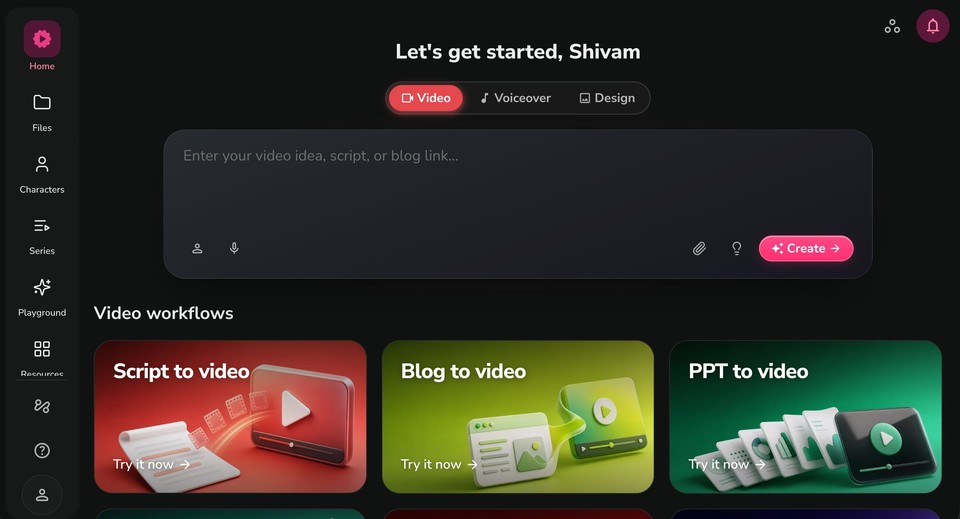
Fliki starts from a different question than the other two. Instead of "which avatar" or "which scene," its home screen asks for your content: a big input box reading "Enter your video idea, script, or blog link," a Video, Voiceover, and Design toggle, and six workflows laid out immediately, Script to video, Blog to video, PPT to video, Auto edit video, Screen recording, and Translate video.
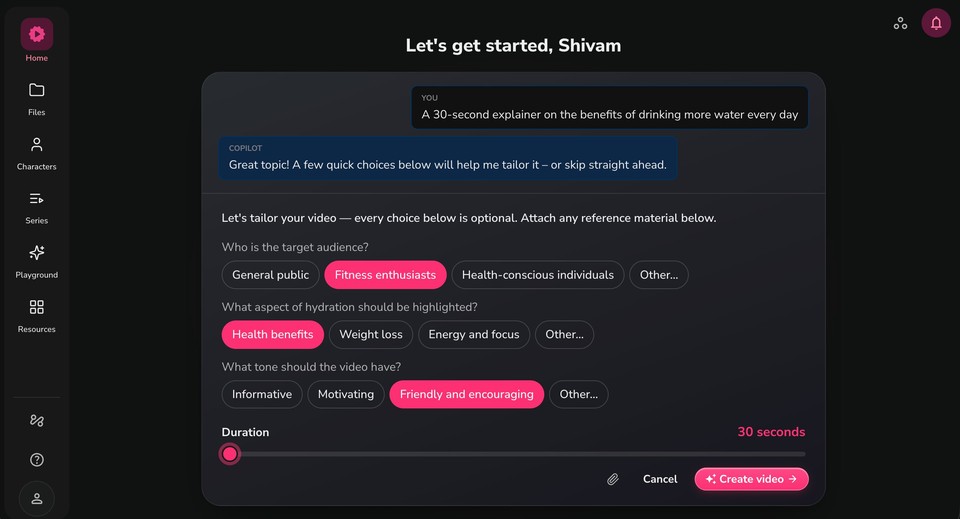
I typed the same water-explainer idea and hit Create. Rather than generating blindly, Fliki's Copilot asked a few quick, optional tailoring questions, what aspect to focus on (health benefits, tips, debunking myths), who the audience is, and a duration slider. It is a small thing that makes a real difference: I got to steer before it spent a credit.
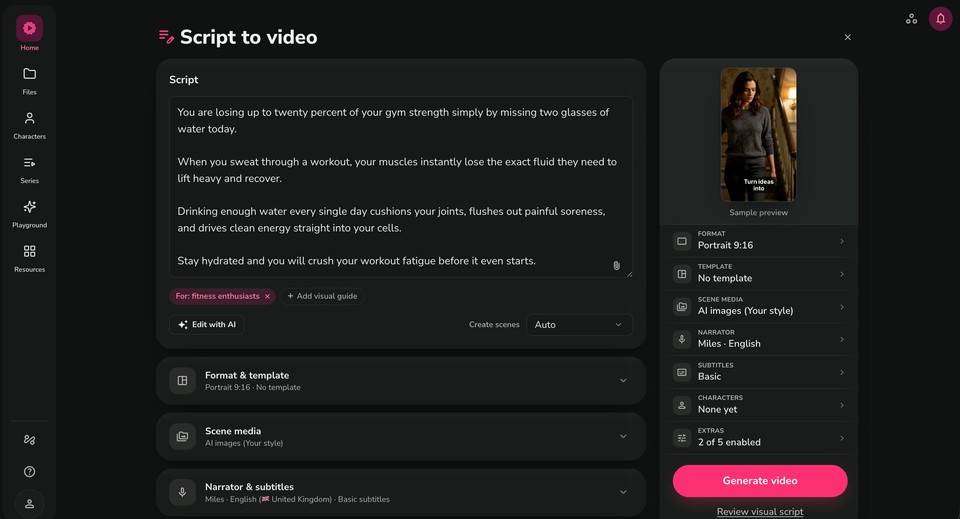
It then dropped me into a single-page setup with the most granular control of the three. On one screen I could see and change the auto-written script, the Format, a Template, the Scene media (AI images in a chosen style, or stock), the Narrator voice, Subtitles, optional Characters (an avatar, if I wanted one), and Extras. Crucially, the avatar is optional here, not the center of gravity.
Generation runs through clear stages (Preparing, Analyzing the script, Building the scenes, Generating the visuals, Adding voice and music, Finalizing).
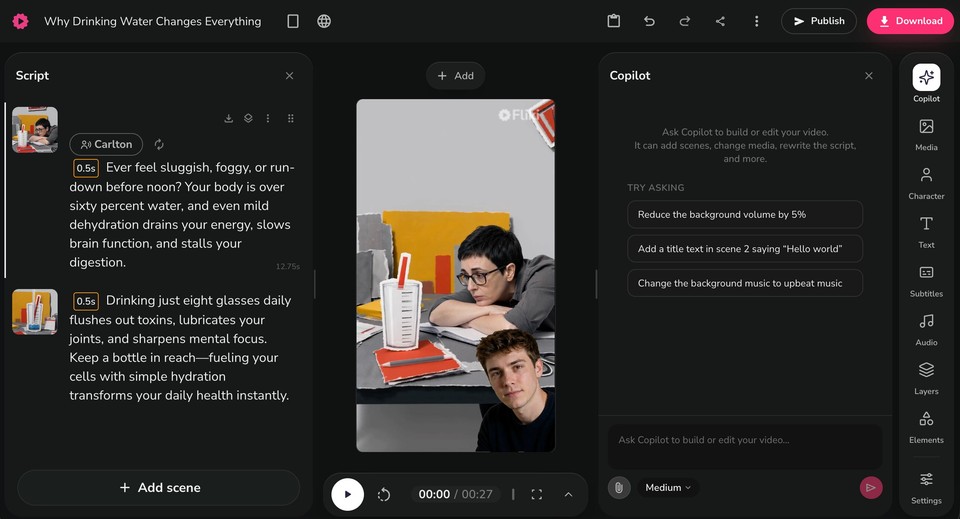
What came back was a 30-second portrait explainer with narration, auto-matched cinematic visuals, burned-in captions, and a music bed, opened in by far the deepest editor of the three, with panels for Copilot, Media, Character, Text, Subtitles, Audio, Layers, and Elements. Checkout the output:
Now the honest part, because pretending Fliki was flawless would be silly and you would spot it anyway. Its auto-selected AI visuals were uneven: some shots were genuinely beautiful (a cinematic glass of water), while others were oddly stylized and clearly needed swapping. That is the nature of auto-generated B-roll, and the fix is to replace a few clips in the editor, which the tool makes easy. But you should expect to do it.
Where Fliki clearly pulled ahead in my test was range and control without complexity. It was the only tool that turned a plain idea into a fully narrated, captioned, voiced explainer with B-roll, gave me a say before generating, and did not assume an avatar had to carry the video. For someone making explainers, faceless content, voiceovers, and localized versions rather than one talking-head format, that breadth is the point.
Best for: creators, marketers, and educators who publish across formats and want a content-first pipeline with deep voice options and an avatar only when needed. Watch-outs: auto-selected AI visuals can be hit or miss and often need a swap, and like the others it runs on credits during iteration.
Head to head, from actually using them
First impression and starting point
This is the whole story in one line. HeyGen opens on "create your digital twin," Veed opens on "record or edit," and Fliki opens on "paste your idea, script, or blog." Avatar-first, editor-first, content-first. Everything else follows from that.
Speed to a first video
Veed was the fastest to a finished clip, going from one sentence to a rendered vertical video with the fewest clicks. Fliki was close behind but inserted a helpful tailoring step and a control panel, so it traded a few seconds for a lot more say over the result. HeyGen was the slowest to a first "just give me a video," because it is designed for deliberate scene-by-scene construction rather than one-shot generation.
Control versus simplicity
Fliki struck the best balance here. Veed is simplest but makes the most decisions for you. HeyGen gives fine control over a presenter and scene but not over an end-to-end content pipeline. Fliki lets you tweak script, voice, visuals, format, captions, and avatar on one screen before committing.
The AI-written scripts (an honest tie)
Both Veed and Fliki auto-wrote engaging scripts, and both took the same liberty: a little hype and a couple of dubious claims (one described your brain "shrinking slightly away from your skull"). This is a category-wide truth worth stating plainly. AI scripts are a strong first draft, not a fact-checked final. Read every line before you publish, especially for anything educational or medical.
Output and visuals
Different by design. Veed produced a vertical, captioned, UGC-style talking clip ready for TikTok or Reels. Fliki produced a landscape narrated explainer with B-roll, captions, and music, closer to a YouTube or course video. HeyGen's output is the polished talking presenter. Match the shape of the output to where your video is going.
Editing depth
Fliki had the deepest editor of the three (Copilot, Media, Character, Text, Subtitles, Audio, Layers, Elements), which makes sense given it is content-first and expects you to refine. Veed's editor is genuinely strong too and is arguably the best pure video editor of the group, since that is Veed's origin. HeyGen's editor is capable but centered on the avatar scene.
Avatars and voices
HeyGen wins avatars, clearly, and it is not close on raw realism and lip-sync. On voices and languages, Fliki leads, with a much deeper voice library and dedicated voiceover, translation, and dubbing tools built in. Veed sits in the middle, competent at both without leading either.
The credit reality (all three)
Every one of these tools meters usage, and it is easy to hit a wall mid-experiment. My Veed account's generation credits ran down fast during testing, HeyGen's best avatar features burn premium credits, and Fliki spends credits while you iterate. This is not a knock on any one of them, it is the category. Estimate your real monthly output and test on a free plan before paying for a year.
Pricing at a glance
Prices change often, so confirm on each official page before buying.
HeyGen | Veed | Fliki | |
|---|---|---|---|
Free plan | Yes, watermarked | Yes, watermarked | Yes, watermarked |
Entry paid plan | ~$29/mo (Creator) | ~$18-30/mo | ~$9-28 (Basic/Standard) |
Starting point | Avatar / digital twin | Editor + AI | Idea, script, blog, or deck |
Superpower | Photoreal avatars | Fast social clips + editor | Content-to-video range + voices |
Output tested | Talking presenter | 31s vertical UGC clip | 26s narrated explainer + B-roll |
Best for | Presenter-led video | Social clips + editing | All-in-one creator content |
So which one should you actually pick?
You make social clips and want speed. Short vertical videos, UGC-style content, and you value a real editor plus subtitles and screen recording. Veed is a strong pick, and it was the fastest to a finished clip in my test.
Your video is a realistic presenter. Sales outreach, personalized video, spokesperson content where a believable face carries the message. HeyGen earns its reputation, just budget for the credits its best avatars consume.
You publish across formats and want one tool. Explainers, faceless YouTube, voiceovers, blog-to-video, slide-to-video, and localized versions, without three subscriptions. This is where a content-first tool quietly saves the most, and it is the strongest case for Fliki. Starting from a script or idea, turning a slide deck into a lesson, or translating a video into other languages are the workflows the avatar-first and editor-first tools simply do not center, and the marketing and social use case is built around exactly that range.
The bottom line
After building the same video three times, the divide was clearer than any feature table. HeyGen is the avatar studio: unmatched presenters, but it wants you to build one. Veed is the fast editor: quickest to a social clip, strongest as a pure editor, lightest on up-front control. Fliki is the content engine: the one that turned a plain idea into a finished, narrated, captioned video with the most control and the widest set of starting points, avatar optional.
There is no universal winner, only the right fit for the videos you make, and the only review that counts as your own is the one you run. If you publish often, across formats and languages, and you would rather start from your content than from an avatar or a timeline, try the full Fliki workflow free, make one real video, and let the result decide it.