Introduction
You typed a prompt into Suno, hit generate, and 30 seconds later you had a song that genuinely slaps. Then reality set in. A song is an MP3, and an MP3 has nowhere to go. You cannot post it to YouTube without a picture. TikTok and Reels want vertical video. Even Spotify wants a looping visual now. Your track is stuck.
Here is the good news: turning that Suno song into an actual music video, one with scenes, a mood, cuts that land on the beat, is now something you can do yourself in a few minutes, without a camera, a director, or a motion-graphics degree. I work on content at Fliki, I have built dozens of these from AI-generated tracks, and this guide is the complete version: the workflow, what makes an AI music video look expensive instead of cheap, the tools worth knowing, and the copyright and monetization rules that most articles skip and that actually matter once you want to publish. Let's get into it.
First, the thing nobody tells you: Suno does not make videos
This trips up almost everyone. Suno is an audio engine. As of this writing it generates songs, vocals and instrumentation, and nothing else. On the paid tiers you can export an MP4, but that "video" is a single static cover image sitting on top of your audio. There are no moving scenes, no lyric sync, no cuts. It is a picture with sound.
So if you want a real music video, the video part happens somewhere else. Your Suno song becomes the input, and a separate AI video tool builds the visuals around it. That is the whole job, and once you see it framed that way, the rest is just choosing how you want it to look.
Why an audio-only song is a dead end in 2026
It is worth being clear-eyed about why this matters, because the case for video is strong and does not need the inflated stats you see floating around (no, people do not have an "8-second attention span," and no, viewers do not "retain 95% of video versus 10% of text"; both are myths). Here is the real picture.
Video is now the front door to music. According to MIDiA Research data reported by Billboard, YouTube is the single most popular place people discover new music, and YouTube is a video platform, so your audio needs a container to live there at all. On the virality side, TikTok reports that the overwhelming majority of songs breaking onto its global charts had a TikTok moment first, and TikTok is vertical video. And on Spotify, the platform's own Canvas data shows tracks with a short looping video get 145% more shares, 20% more playlist adds, and 9% more visits to the artist profile than the same tracks without one.
The pattern is consistent: discovery, virality, and on-platform engagement all run through video now. A song without visuals is a song that most of the internet will never see.
Your four options for adding visuals
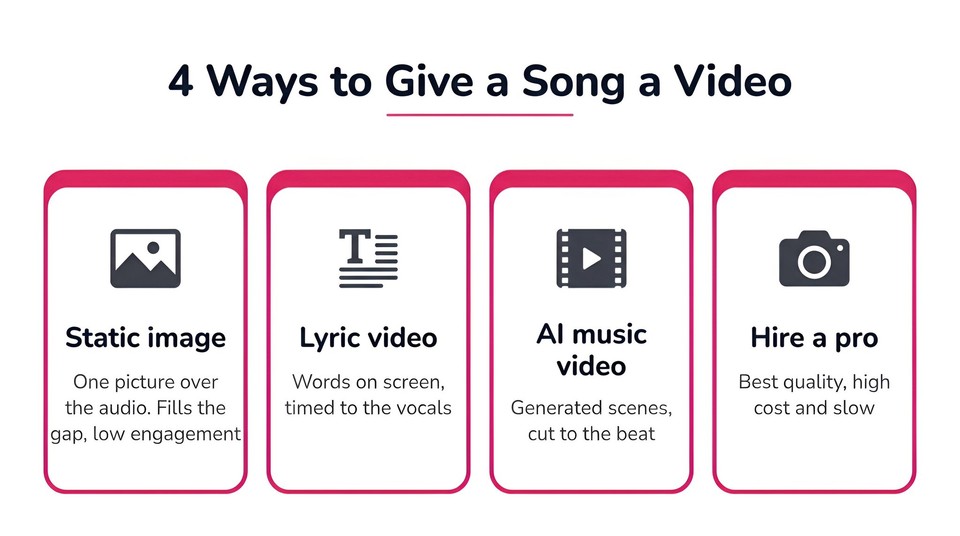
Once you have the song, there are really four ways to give it something to look at. They are not equal.
Option | What it is | Effort | Result |
|---|---|---|---|
Static image or waveform | One picture, or a bouncing audio spectrum, over the song | Minimal | Fills the gap, low engagement |
Lyric video | Your words on screen, timed to the vocals | Low | Great for singalong and clarity |
AI music video | Generated scenes, a look, cuts on the beat | Low to medium | The closest thing to a real MV |
Hire a videographer | A human shoots and edits it | High cost, slow | Best quality, out of reach for most |
A static image is fine as a placeholder and nothing more. A lyric video is a genuinely good choice when the words are the point, and we have a full guide to making one if that is the direction you want. This article focuses on the third option, the full AI music video with actual scenes, because that is what most people picture when they imagine "a music video," and it is the one that felt out of reach until recently.
The decisions that make or break it
Before you generate anything, three choices determine whether the result looks intentional or like AI slop. Get these right and everything downstream is easier.
Pick your aspect ratio for the destination, first. 16:9 landscape for YouTube. 9:16 vertical for TikTok, Reels, Shorts, and Spotify Canvas. Decide before you generate, because cropping AI-generated footage after the fact throws away resolution and reframes shots badly.
Choose the type of video. A performance or narrative video puts a character on screen, often lip-syncing the vocals, and suits pop, hip-hop, and singer-songwriter material. An abstract or mood video strings atmospheric scenes and suits electronic and instrumental tracks. Match the format to the genre rather than forcing one look onto every song.
Plan to cut on the beat. This is the single biggest lever between "looks professional" and "looks cheap." Scene changes that land on the beat and follow the song's structure (intro, verse, chorus, drop) read as deliberate. Random cuts on a timer read as a screensaver. Good tools handle this for you by listening to the track; if yours does not, you will be marking beats by hand.
How to turn your Suno song into a video with Fliki, step by step
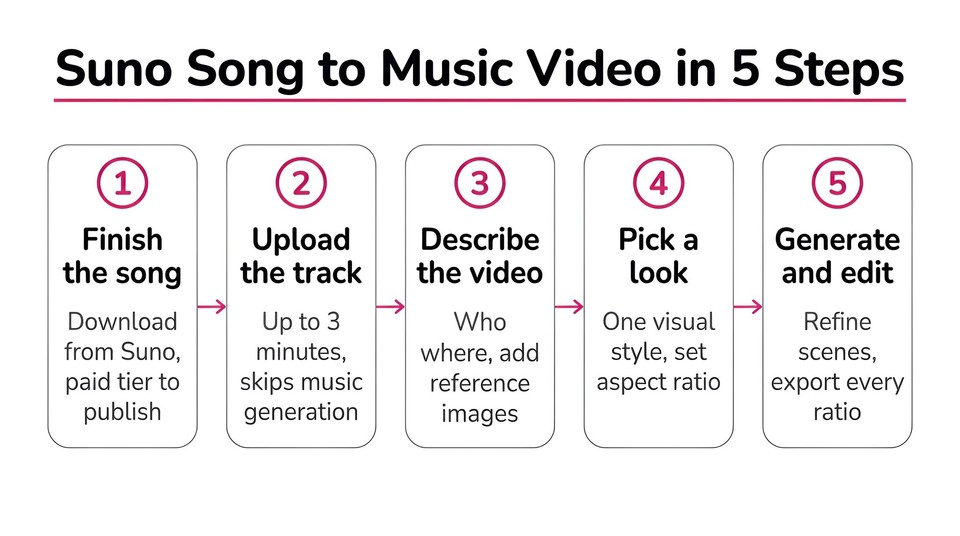
There are several tools that do this, and I will cover the landscape below. But let me walk through the full workflow in Fliki first, since it is the one I know best and it takes an uploaded track directly, which is exactly the Suno use case. The whole thing lives in the Music video workflow.
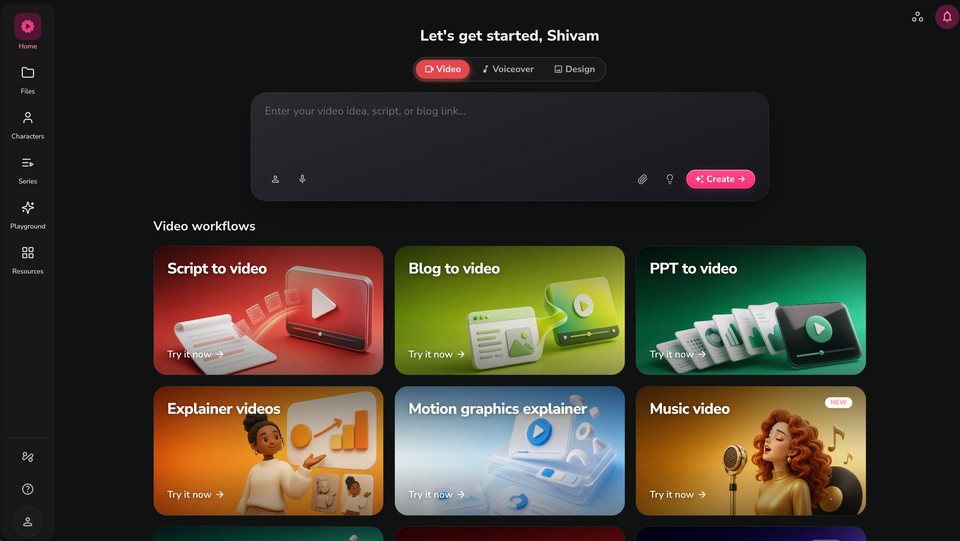
Step 1: Finish and download your song from Suno
Generate your track in Suno, get it the way you want it, and download the audio file. One important note that we will come back to in detail: if you plan to publish or monetize, download on a paid Suno tier, because Suno's free tier is for personal, non-commercial use only. Keep the file under three minutes if you can, since that is the track length the Fliki Music workflow accepts.
Step 2: Open the Music video workflow and upload your track.
In Fliki, choose the Music video workflow and click Upload a track. The interface says it plainly: attaching a track of up to three minutes skips music generation entirely and cuts the video to your own file. This is the step that turns "AI song" into "AI music video," your Suno audio becomes the backbone the visuals are built on.
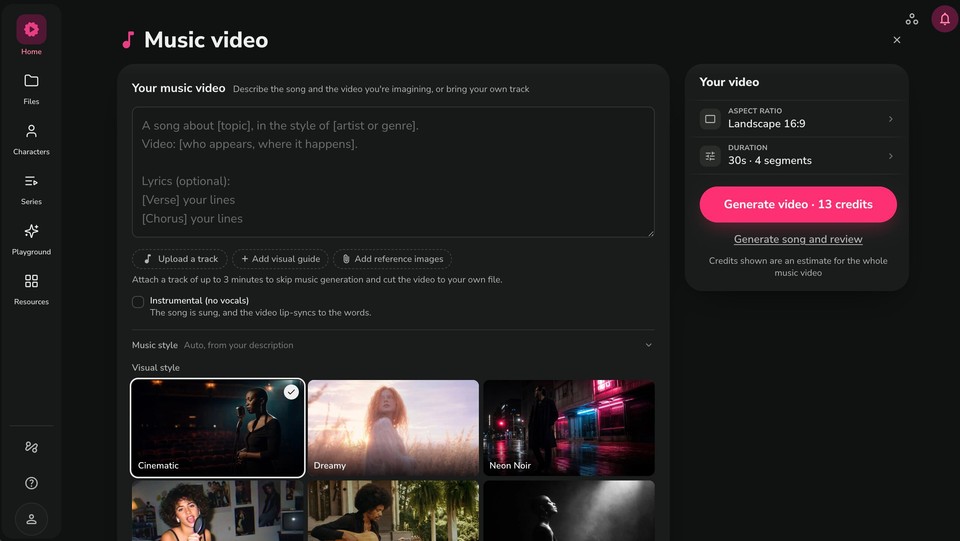
Step 3: Describe the video you want
In the description box you tell Fliki who appears and where it happens, for example "a lone singer in a rain-soaked neon alley at night." You can Add reference images to lock a specific face, wardrobe, or world, and Add a visual guide to steer the look. If you want a character to appear singing your lyrics, leave the Instrumental (no vocals) box unchecked; the note under it explains that the song is sung and the video lip-syncs to the words. Check it only if your track has no vocals to sync to.
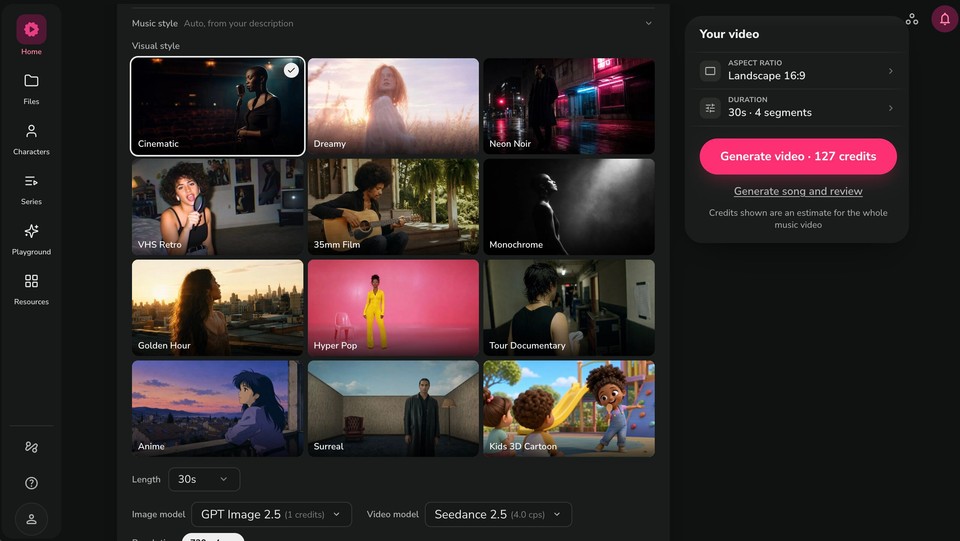
Step 4: Pick a visual style and your settings
Fliki gives you a grid of visual worlds, Cinematic, Dreamy, Neon Noir, VHS Retro, 35mm Film, Monochrome, Golden Hour, Hyper Pop, Tour Documentary, Anime, Surreal, and Kids 3D Cartoon among them. Picking one locks the grade and cutting style across the whole video, which is how you avoid the shot-to-shot style whiplash that screams "AI." Then set your aspect ratio (16:9 or 9:16), length, and the image and video models. The Your video panel shows a live credit estimate for the whole music video as you go.
Step 5: Generate, then refine in the editor
Hit Generate video and Fliki builds the scenes cut to your track. What matters as much as the generation is what happens next: the video opens in a full editor with a Copilot you can just talk to. You can tell it to "reduce the background volume," "change the media in scene three," or "add a title in the intro," and it makes the edit. You also get manual control over script, media, characters, text, subtitles, and audio per scene. When it looks right, export 16:9 for YouTube, 9:16 for Reels, TikTok, and Shorts, and 1:1 for the feed, all from the same project.
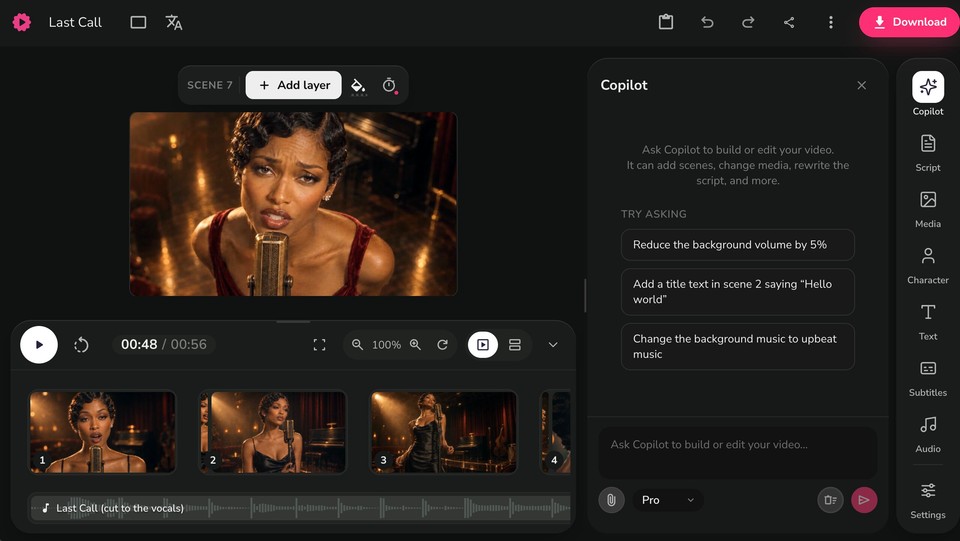
That is the core loop: upload the song, describe the world, pick a look, generate, refine. A first version takes minutes, and because every shot is cut to your actual audio, it lands like a video that was made for the song rather than slapped behind it.
What separates a good AI music video from a cheap one
Having watched a lot of these get made, the difference almost always comes down to restraint and consistency, not fancier settings.
Lock one visual style and one character for the whole video. The fastest way to look amateur is to let the singer's face or the art style change every shot. Match the energy of the visuals to the energy of the track, a slow ballad does not want frantic cuts. Let the scene changes follow the song's structure so the chorus feels like the chorus. And resist the urge to cram in twenty different ideas; a few strong, coherent scenes beat a chaotic montage every time. If you remember nothing else: consistency and beat-synced cuts are 90% of the "professional" feeling.
The copyright question you need to answer before you publish
Here is the part most guides gloss over, and it is the part that can get your video taken down or demonetized. AI music sits in genuinely unsettled legal territory, so let me give you the honest, sourced version rather than a comforting oversimplification.
Do you own your Suno song?
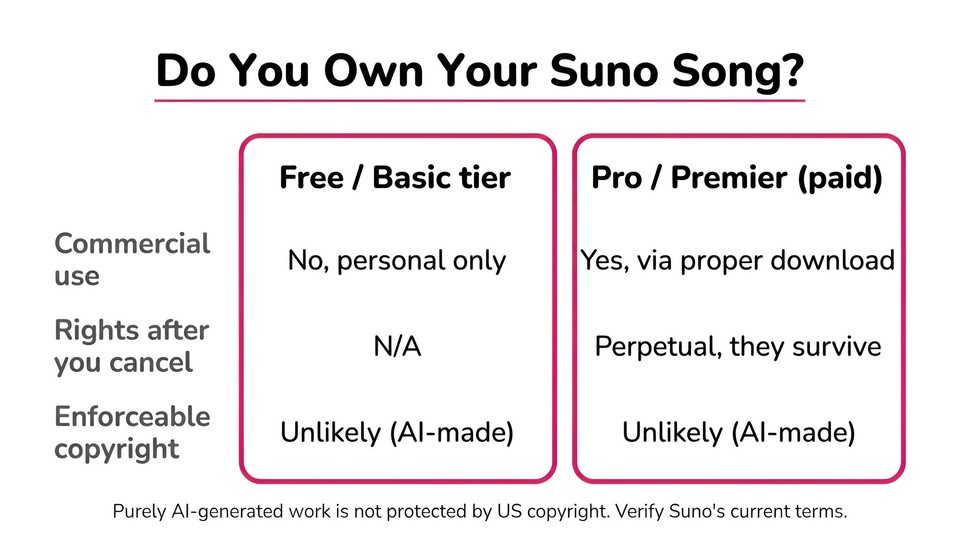
It depends on your tier. Per Suno's Terms of Service, free and basic accounts may use their songs only for "lawful, personal and non-commercial purposes." On the Pro and Premier paid tiers, Suno assigns you its rights in the output and permits commercial use through a proper download, and, notably, those commercial rights are perpetual and survive cancellation of your subscription. So if you want to publish or monetize, you need a paid tier, and you need to download the track properly rather than screen-recording it.
But "owning" it is not the same as holding a copyright
Suno itself warns that it "makes no representation or warranty that any copyright will vest" in the output, and here is why. The US Copyright Office, in its January 2025 report on AI, reaffirmed that copyright requires human authorship and that works generated purely by AI are not protectable, adding that "the mere selection of prompts, even if detailed," does not create authorship. Courts have backed this up: the registration for the AI image "Theatre D'opera Spatial" was denied despite hundreds of prompt revisions, and in 2025 the DC Circuit upheld the human-authorship requirement in Thaler v. Perlmutter, with the Supreme Court declining to hear the appeal in 2026. The practical upshot: a purely AI-generated song, and a purely AI-generated video, likely has no copyright you can enforce against someone who reuses it. What you can protect is your genuine human contribution, your original lyrics, your creative editing and sequencing, any footage you actually shot.
The lawsuits are still live, so stay aware
In 2024 the major labels sued Suno and Udio for training on copyrighted recordings. Since then the picture has shifted fast: Udio settled with Universal in late 2025, and Warner settled with Suno, but Sony and Universal are still litigating against Suno as of this writing, with the fair-use question unresolved. None of this stops you making videos from your own Suno tracks, but it is a moving situation worth checking before you build a whole channel on it.
Can you monetize an AI music video on YouTube?
Yes, with a caveat. YouTube welcomes AI-assisted content, but its July 2025 policy update renamed the old "repetitious content" rule to "inauthentic content" and targets mass-produced, templated uploads. A channel spamming dozens of near-identical AI songs risks demonetization; a channel making distinct, original music videos does not. Separately, if your Suno track happens to resemble an existing recording, it can trigger a Content ID claim, so lean toward original, non-derivative songs.
The clean path: use music you actually own
All of this ownership uncertainty applies to the AI-generated song, not to the visuals and not to human-made music. If you upload your own original recording, the music rights are simply yours. And if you want AI music without the Suno legal cloud, note that Fliki can generate the song for you using commercially licensed engines that ship with a full commercial license on paid plans, which sidesteps the whole question. Either way, know which bucket your song is in before you hit publish.
Other tools that turn a song into a video
Fliki is not the only option, and an honest guide should point you to the alternatives. Pricing on every one of these changes constantly, so treat these as a map and verify current pricing on the vendor's own page before you buy.
A few tools are purpose-built to take an uploaded track and auto-generate visuals. Freebeat is designed around Suno and Udio, accepts an audio file or a link, and plans scenes to the beat with lip sync; a common tip is to upload MP3 rather than WAV for reliability. Neural Frames leans into audio-reactive, trippy visualizer output and is popular for electronic music. PlazmaPunk is a quick upload-and-go option with a free tier for short clips. Revid AI focuses on fast, social-native vertical music videos.
Another group gives you more control at the cost of doing the syncing yourself. Kling and Pika are strong on human motion and lip-sync but work shot by shot from prompts, so you generate clips and assemble them. Kaiber and OpenArt offer canvas-style workflows for the more hands-on. And CapCut, while not a music-video generator, is the free editor many creators use to stitch AI clips together and mark beats. The tradeoff across all of these is the usual one: the auto tools are faster and more coherent out of the box, the prompt-driven models give you finer control if you are willing to edit.
Common mistakes to avoid
The recurring ones are easy to sidestep once you know them. Do not let the visual style or the character change from scene to scene; consistency is everything. Do not pile in random scenes that ignore what the song is actually about; the visuals should echo the lyrics and mood. Do not generate in the wrong aspect ratio for where the video is going and crop later. Do not skip the beat, cuts on a timer look lifeless next to cuts on the beat. And do not ignore the copyright basics: publishing from a free Suno tier, or building on a track that sounds like an existing hit, is how videos get pulled.
The bottom line
A Suno song trapped as an MP3 is a missed opportunity, because in 2026 the video is how the music gets found. The workflow to fix it is genuinely simple now: finish the song, upload it to an AI video tool, describe the world, pick one consistent look, and let it cut the scenes to your beat. Spend your effort on the things that actually separate good from cheap, one style, one character, cuts on the beat, and sort out the ownership question before you publish rather than after a takedown.
If you want the fastest path from a finished track to a real music video, you can upload your song to Fliki and have a first version in a few minutes, then refine it scene by scene. Free to try, no credit card needed.
FAQs
Not really. Suno generates audio, and its paid MP4 export is just a single static cover image over the song, with no moving scenes or synced cuts. To get an actual music video you take the Suno song into a separate AI video tool that builds visuals around it.
Download your finished track from Suno (on a paid tier if you plan to publish), then upload it to an AI music video tool. In Fliki, open the Music video workflow, click Upload a track, describe the video you want, pick a visual style and aspect ratio, and generate. You can then refine every scene in the editor and export for any platform.
On paid Pro or Premier tiers, Suno assigns you commercial rights to your songs and those rights survive cancellation. On the free tier, use is personal and non-commercial only. Note that "owning" the file is different from holding an enforceable copyright, since the US Copyright Office does not protect purely AI-generated work. Check Suno's current terms before relying on this.
Yes, as long as it is original and adds real value. YouTube's inauthentic-content policy targets mass-produced, repetitive uploads, not AI-assisted creativity. Avoid spamming near-identical videos, and prefer original songs to reduce the risk of Content ID claims.
Use 16:9 landscape for YouTube and 9:16 vertical for TikTok, Reels, Shorts, and Spotify Canvas. Decide before you generate, because cropping AI footage afterward reduces quality. Good tools let you export multiple ratios from one project.
Yes. Any tool that accepts an uploaded track works with a Suno song, a Udio track, a recording of your own band, or any MP3 you have the rights to use. If you upload your own original music, the rights are simply yours, which is the cleanest option.