Introduction
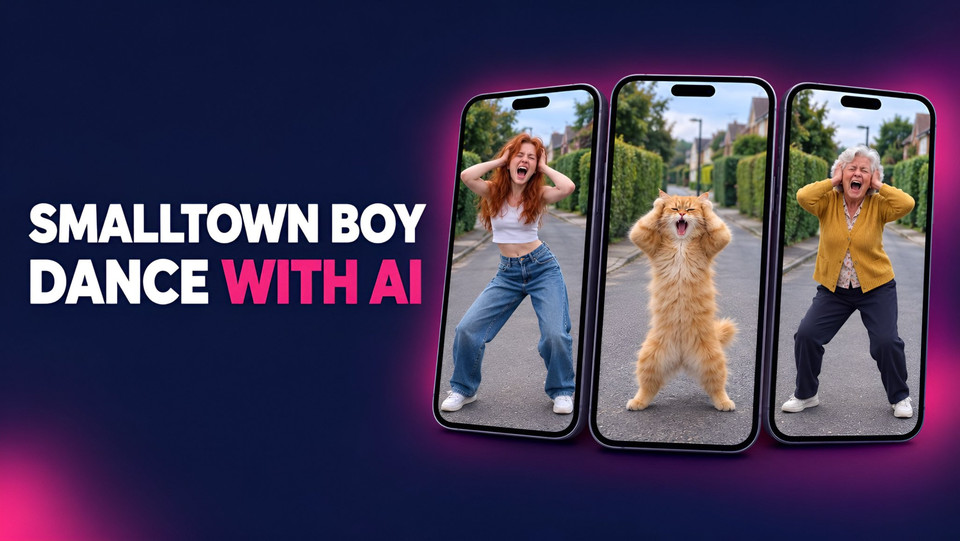
If you have opened Reels or TikTok lately, you have seen it: one person screams into the phone with their hands on their head while a friend dances behind them, then they swap places, then they finish side by side. That is the Smalltown Boy dance trend, set to the opening of Bronski Beat's 1984 track. The best versions right now are not real people at all. They are cats, grandparents and cartoon squads doing the exact same moves.
The short answer to how they are made: take a clip of the trend, then use an AI dance video tool that keeps the motion and swaps the cast. In Fliki that is Swap Studio's Motion mode. You upload the clip, pick a photo for each person in it, and it re-renders the whole thing with your characters, same moves, same camera.
I made three versions of the trend for this guide, all from one source clip: a photoreal AI couple, two cats and a pair of stylish grandparents. Below are the exact steps, the prompts I typed, the settings, what it cost, and the two mistakes that wasted my first renders.
What is the Smalltown Boy dance trend?
The audio is the intro of "Smalltown Boy" by Bronski Beat. The song already had a TikTok moment in 2024, when people asked their parents to "dance like it's the 80s" over it. Stereogum covered that wave when the song turned 40, and Know Your Meme logged it as the "Dance Like It's the 80s" trend.
The 2026 version is different. It is a two-person format with a fixed shape that makes it easy to remake:
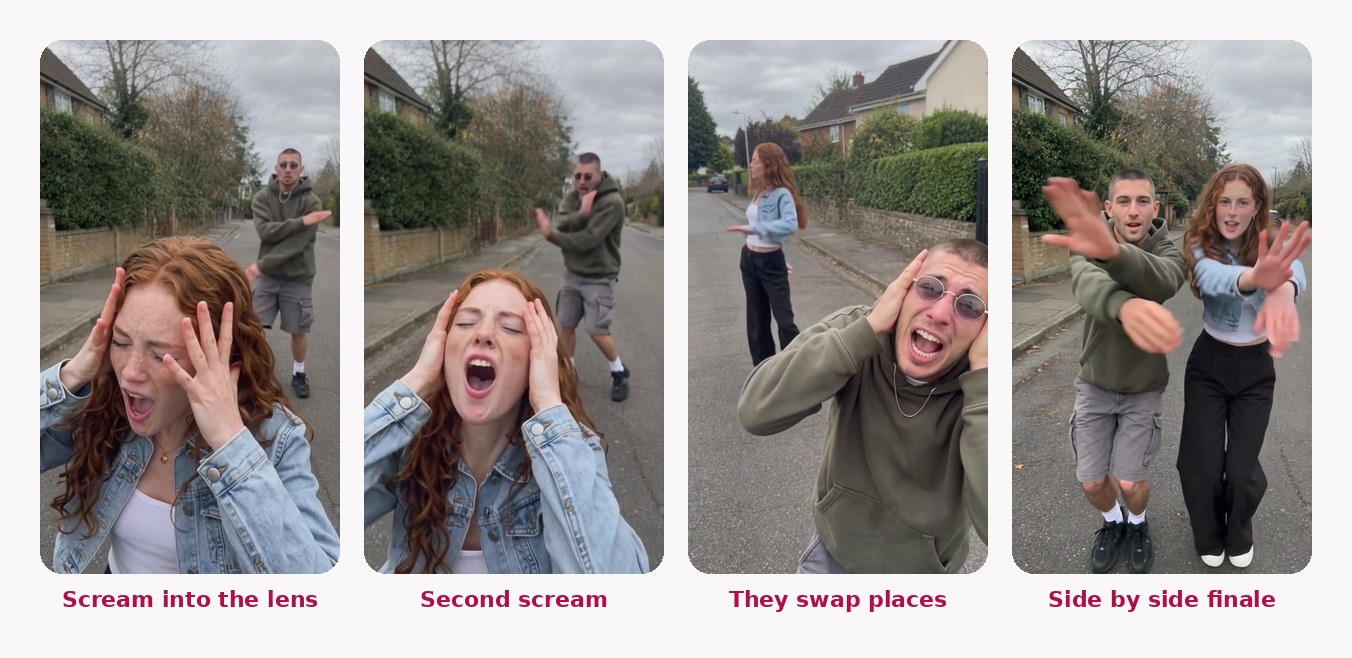
The scream (0 to 7 seconds): person one screams into the lens, hands on their head, then reaches toward the camera, while person two dances in the background.
The swap (7 to 14 seconds): they switch. Person two screams, person one dances behind.
The finale (14 seconds to the end): both dance side by side, ending with arms thrown at the camera.
Because the structure never changes, the joke is entirely in who is doing it. That is why the AI remakes travel so well: viewers already know the beats, so a cat or a 75-year-old hitting them perfectly is the punchline.
What you need before you start
What | Why | Where I made it |
|---|---|---|
A clip of the trend (about 20 seconds) | Gives the moves and the camera | Your own recording, or a version you have permission to use |
One photo per person in the clip | Tells the AI who to put in each spot | GPT Image 2.5 in the Fliki playground, or your own photos |
Swap Studio, Motion mode | Keeps the motion, swaps the cast | |
A paid Fliki plan | Swap Studio is not on the free plan |
A quick note on the source clip. Do not download someone else's viral video and repost a swapped copy as your own. Film the trend yourself with a friend (it takes ten minutes), or do what I did: swap the original people out first so the base video you work from is entirely AI characters. More on that in step 3.
Step 1: Make your characters
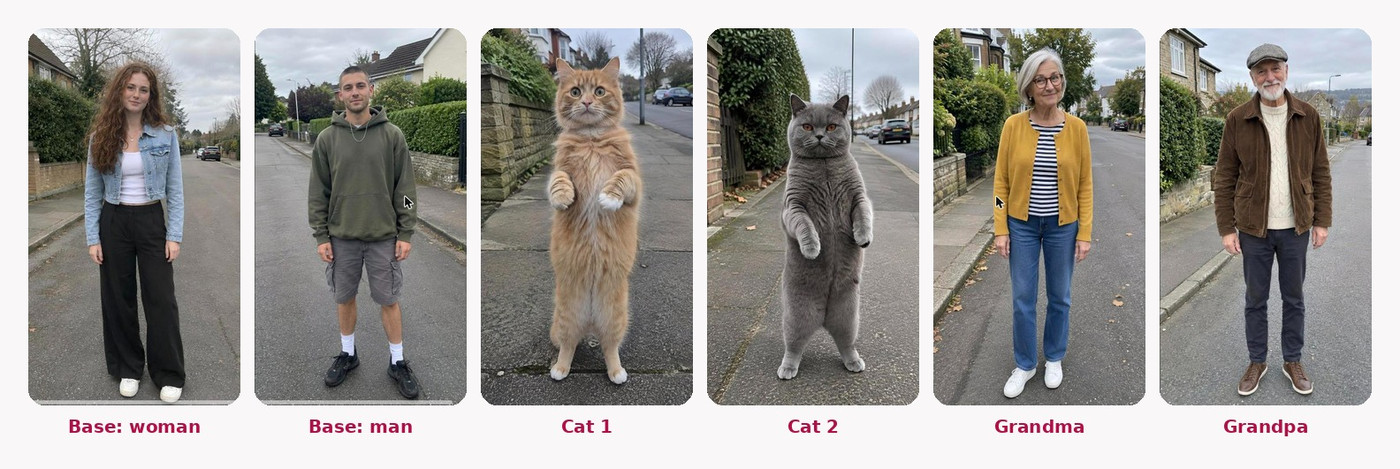
Swap Studio needs a photo for each person you want in the video. Full-body photos work best, because the dance shows legs and shoes. I generated all six of mine with GPT Image 2.5 in the Fliki playground, which costs 1 credit per image.
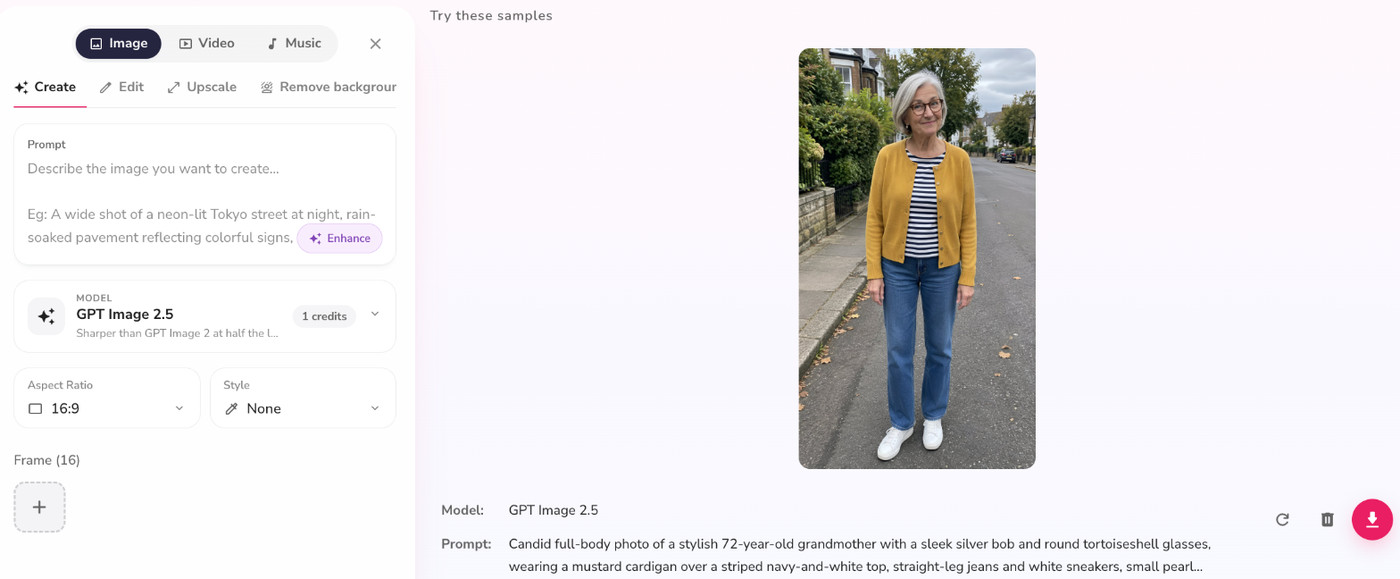
The trick to photos that survive a swap is to make them look like phone photos, not studio shots. The swap model copies lighting and texture from your reference, so a glossy studio portrait gives you a glossy, fake-looking dancer. This is the prompt I used for the grandmother:
Candid full-body photo of a stylish 72-year-old grandmother with a sleek silver bob and round tortoiseshell glasses, wearing a mustard cardigan over a striped navy-and-white top, straight-leg jeans and white sneakers, small pearl earrings. She stands on a quiet residential street on an overcast afternoon, facing the camera with a cheeky grin, arms by her sides.
Shot on an iPhone at eye level, natural daylight, real skin with wrinkles, age spots and fine texture, true-to-life colours, subtle grain. Looks like an unedited camera-roll photo, not a studio shoot. Whole body visible from head to shoes. No text, no logos, no watermark.
For the cats, the only change that matters is the pose. Ask for the cat standing upright on its hind legs. A cat on four legs gives the model nothing to map human arms onto, and you get stiff, floating paws.
Candid full-body photo of a fluffy orange tabby cat standing upright on its hind legs on a sidewalk, front paws raised, looking straight at the camera with a funny surprised expression. Overcast afternoon on a quiet residential street. Shot on an iPhone at the cat's eye level, natural daylight, real fur detail with individual hairs, true-to-life colours, slight grain. Whole cat visible from ears to back paws. No text, no logos, no watermark.
Keep the setting the same across all your photos (I used the same overcast suburban street for every character). It makes the swap blend into the background instead of fighting it.
Step 2: Prepare the clip
Swap Studio accepts videos from 2 to 15 seconds. The trend runs about 21 seconds, so you need to split it. Here is the part I learned the hard way: split at the hard cuts, not at the 15-second mark.
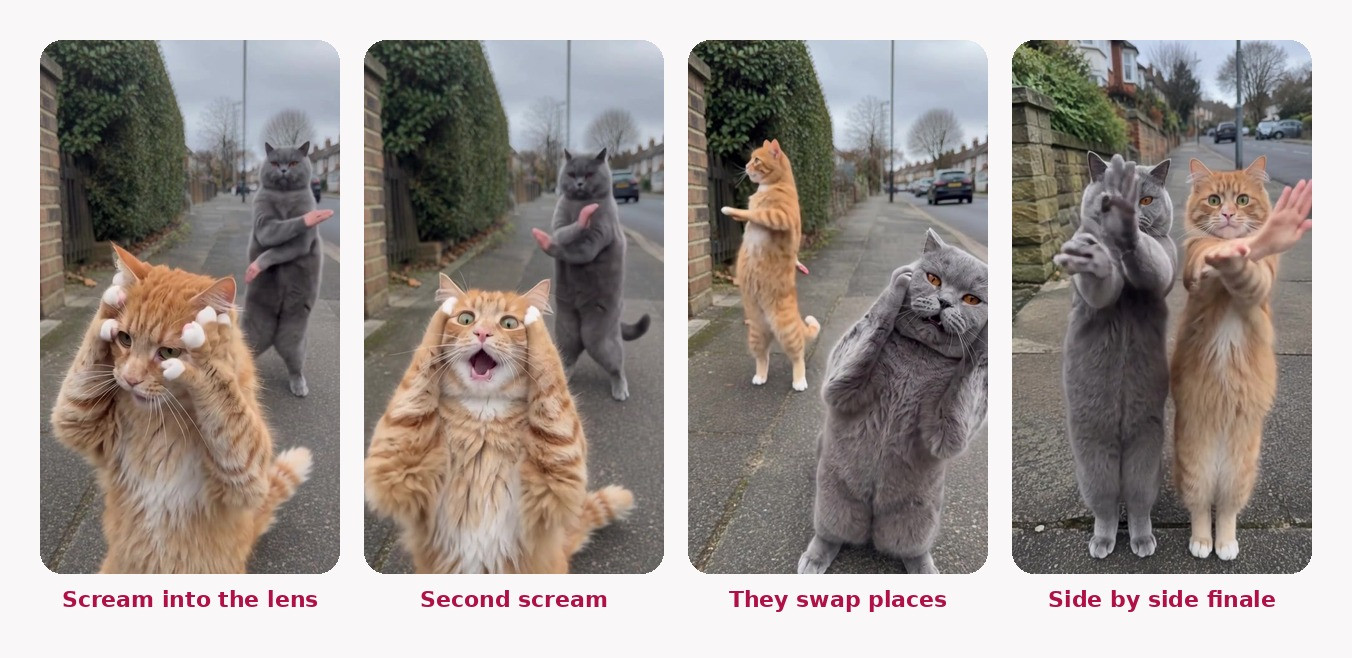
My first cat render used one 14-second chunk that contained two different camera shots. In the second shot, the swap kept the man's human body and only gave him a cat head. When I re-ran the same scene split exactly at the cut, so each clip held one continuous shot, the cats came out as cats from ears to tail.
For this trend, the natural cuts are at roughly 7 seconds (the swap) and 14 seconds (the finale). Three clips of about 7 seconds each is the sweet spot. Any free editor can do the cut. If you are comfortable with the command line, this splits a clip at the 7-second cut:
ffmpeg -i trend.mp4 -t 6.9 shot1.mp4
ffmpeg -ss 6.95 -i trend.mp4 -t 7 shot2.mp4
Step 3: Open Swap Studio in Motion mode
Open Swap Studio from the Fliki home screen, choose Video Swap, then the Motion tab. Motion keeps only the moves and the camera, while your characters and setting take over. The other two tabs do different jobs: Swap replaces one person and leaves everything else untouched, and Restyle changes the look of the whole video.
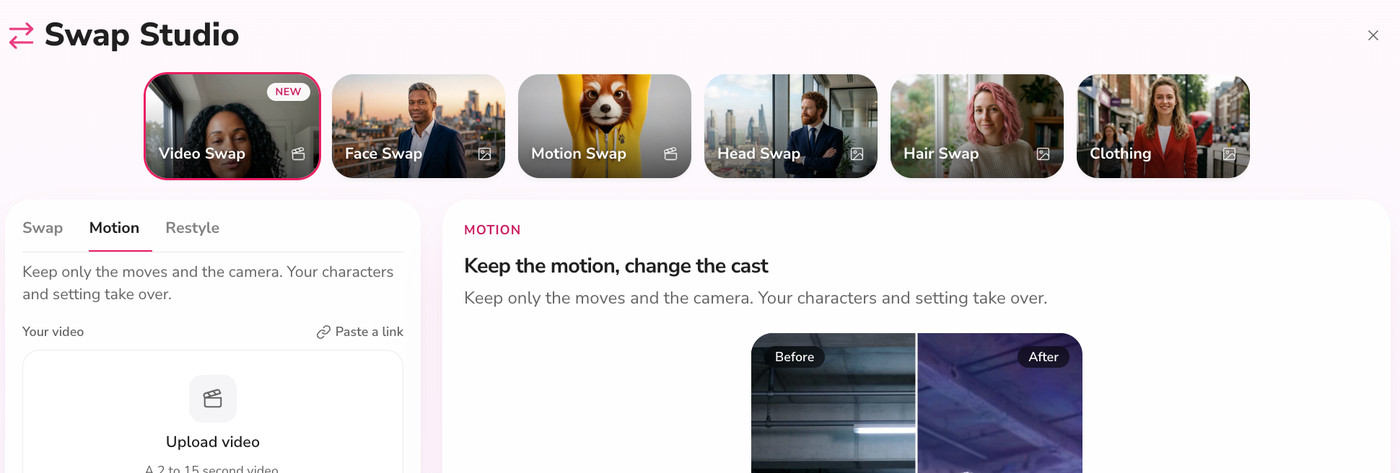
Upload your first clip. After a few seconds Fliki detects every person in it and lists them under People in your video with a short description, like "Woman in denim jacket" and "Man in olive hoodie".
This is also where the two-pass trick comes in. For this guide I ran the original trend clip through Motion first, casting the photoreal couple from step 1. That gave me a base video that contains none of the original creators. Every version after that, the cats and the grandparents, was swapped from my base video, not from someone else's footage. If you shot the trend yourself, you can skip this pass.
Step 4: Cast each person and write the change
Click the + next to each person and pick their replacement photo from your library. Each row turns pink and says Replaced. If a clip has a third person in the background, cast them too, or they stay human.
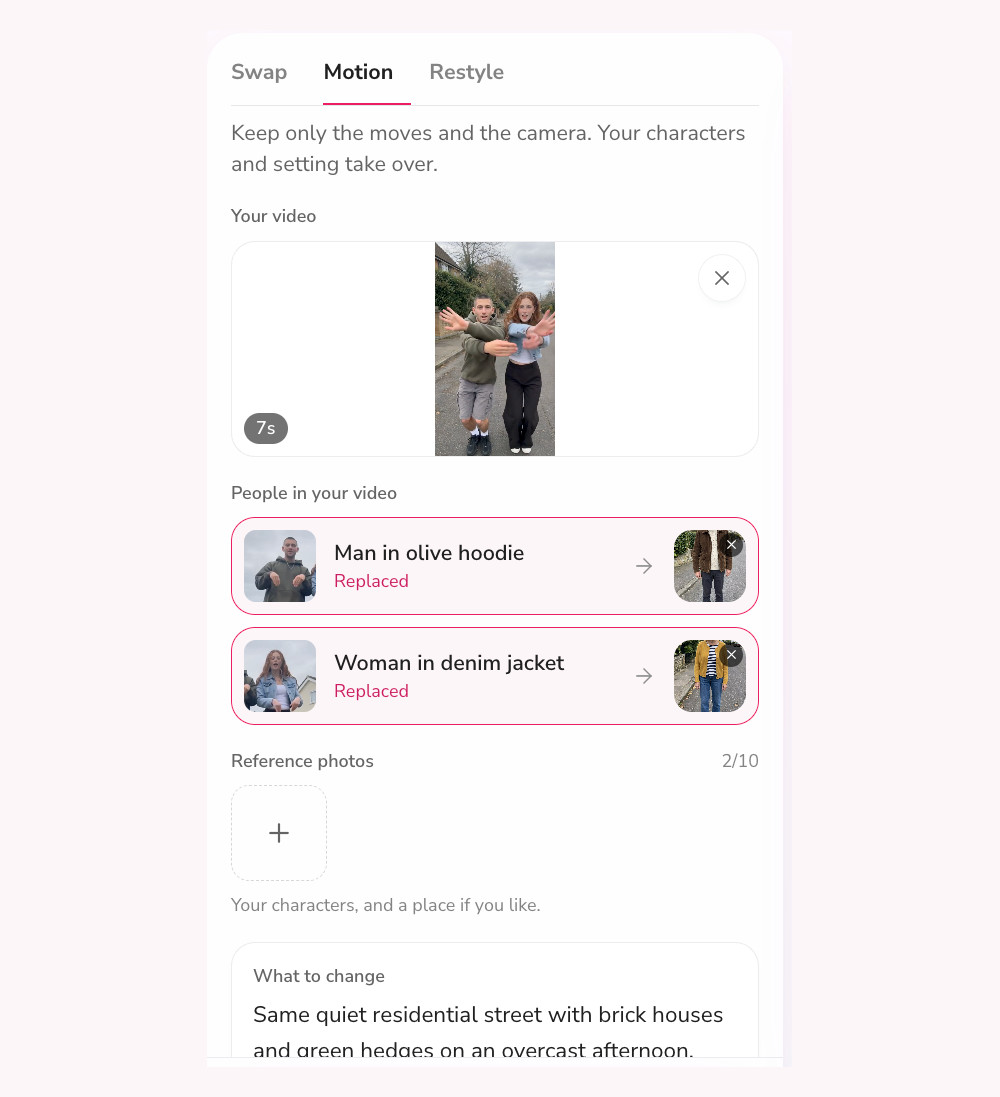
Then fill in What to change. Because you have already cast everyone, this box only needs the setting and one instruction to stick to the original. For the people versions, this was my whole prompt:
Same quiet residential street with brick houses and green hedges on an overcast afternoon. Keep every move, expression and camera angle from the original video.
For animals, spell out the body. Without it, the model sometimes keeps human legs and clothes and only swaps the head. This is the prompt that fixed my cats:
Replace each person with a real cat: full cat body covered in fur, four paws, a tail, no human body and no clothes. The cats stand on their hind legs and copy every move. Same quiet residential street with brick houses and green hedges on an overcast afternoon. Keep the camera exactly as in the original video.
If you are using reference photos instead of casting (the Reference photos box takes up to 10), you name them in the prompt as @Image1, @Image2 and so on, for example "The woman in the striped shirt becomes @Image1 and the man in the grey tank becomes @Image2." Casting per person is more reliable for a two-person trend, so I used it for everything after my first test.
Step 5: Pick the model and generate
Leave the model on Wan 3.0 and the resolution on 480p. At those settings a swap costs 1 credit per second of video, so a 7-second clip is 7 credits and the full 21-second trend is about 21 credits per version. Each clip took a few minutes to render. Fliki shows the result as a before and after slider, and saves it to your Playground.
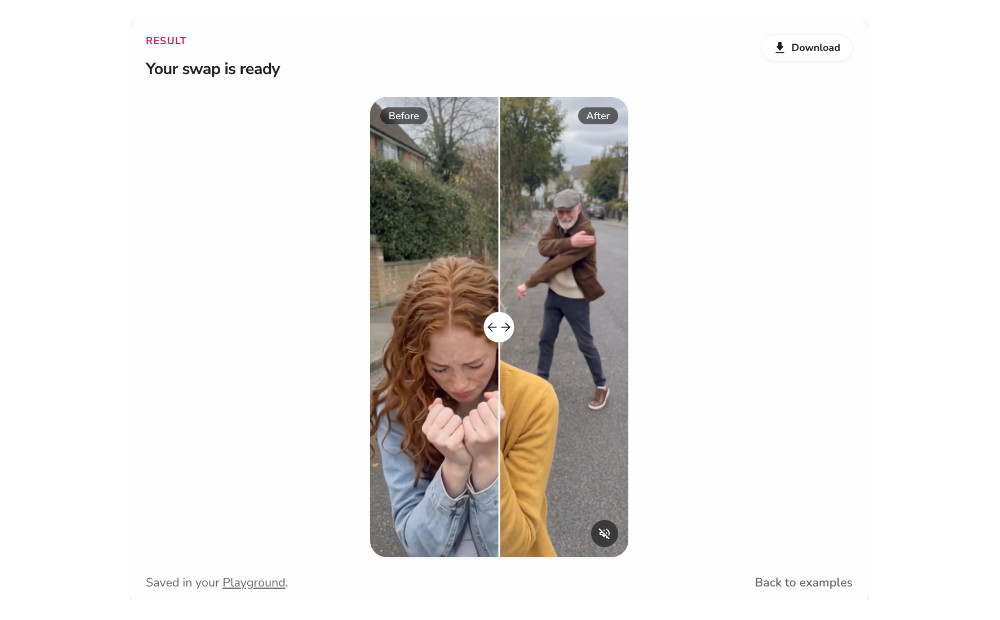
480p sounds low, but this trend is filmed as shaky, handheld phone footage. At phone size in a feed, nobody can tell, and the cheaper renders let you try three casts for the price of one high-resolution attempt.
Step 6: Stitch the clips and add the audio
Download each swapped clip and put them back in order in any editor, CapCut, Fliki's own video editor or the phone editor you already use. Then add the sound inside Instagram or TikTok, by picking the trending "Smalltown Boy" audio in the app. Using the in-app sound is what links your post to the trend page, and it keeps you on the licensed version of the track.
The results: three versions from one clip
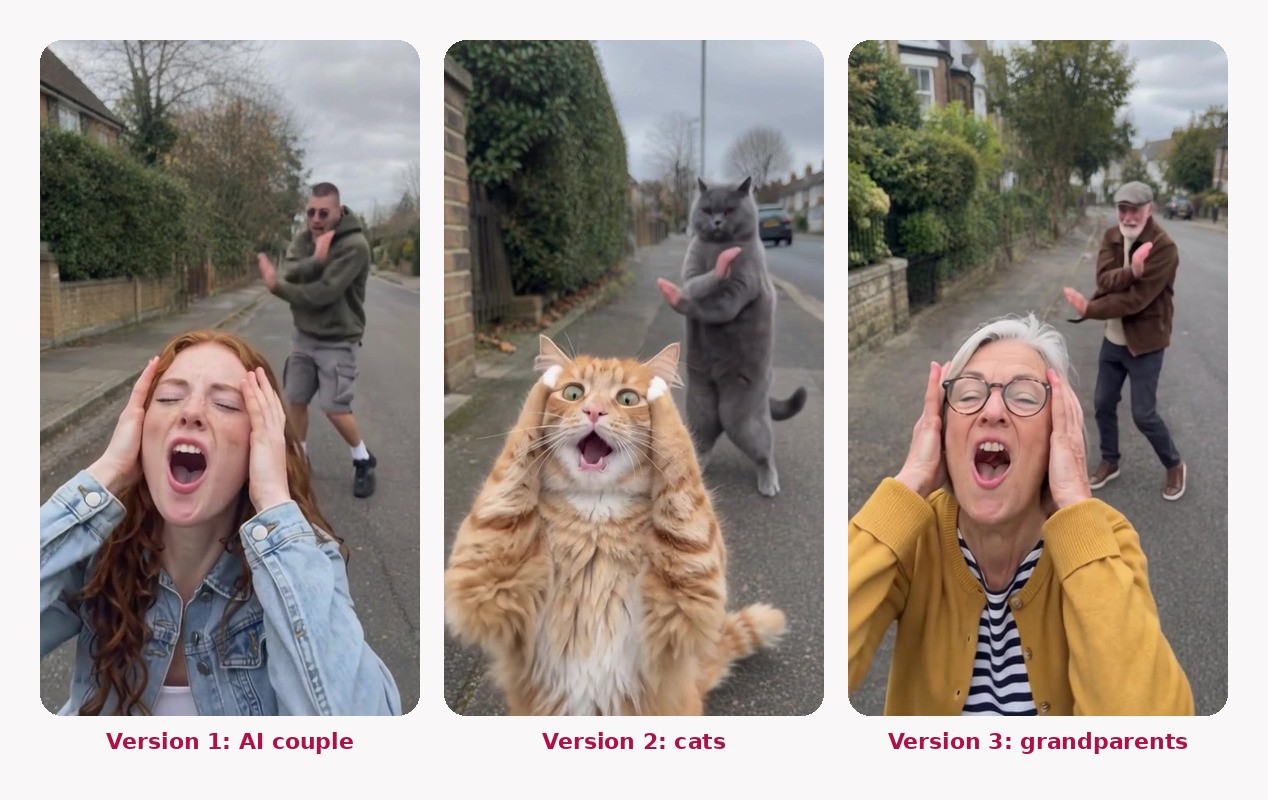
Here is what came out of each cast, frame by frame through the trend's four beats.
Version 1: the photoreal AI couple
This is the base video every other version was made from. Two GPT Image 2.5 characters, cast in one pass per clip.
Version 2: the cats
An orange tabby and a grey British Shorthair. After the fix in step 2, both stay fully feline through the whole routine, including the scream close-ups.
Version 3: the grandparents
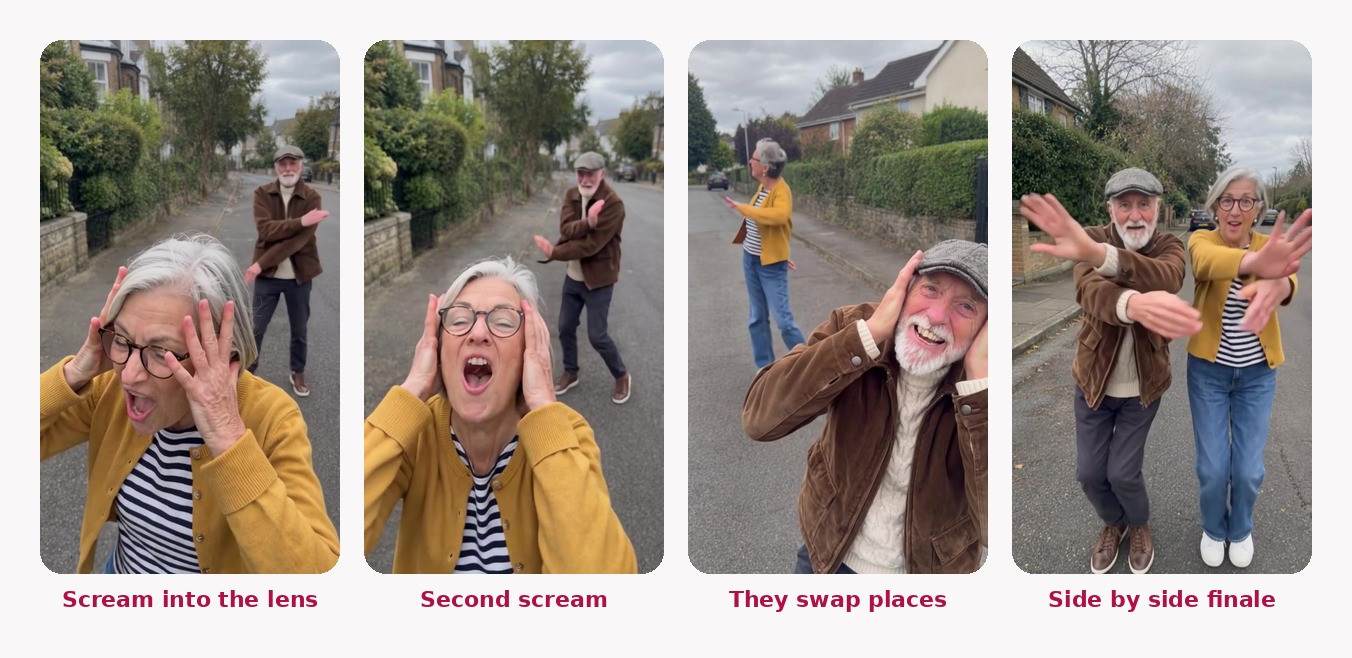
The grandparents were the cleanest of the three. Human-to-human swaps are the easiest thing for the model, and the age gap is the whole joke.
Tips that made the difference
One shot per clip. Split at every hard cut before you swap. It is the single biggest quality fix.
Cast every person you can see. Background people you skip stay as they were.
Match the reference to the scene. Same light, same kind of street, full body in frame.
Describe bodies for animals. "Full cat body, four paws, a tail, no clothes" stops half-human results.
Keep the camera instruction. "Keep every move and camera angle from the original" holds the handheld shake that sells the trend.
Post it like the trend, not like an ad. Use the trending audio, a short caption, and the result as the hook. If you want people asking how you made it, end with "Comment SWAP and I will send you the steps."
Common mistakes
What went wrong | Why | Fix |
|---|---|---|
Cat head on a human body | The clip had two camera shots, and the prompt did not describe the animal body | Split at the cut, and say "full cat body, four paws, a tail, no clothes" |
One person did not change | They were not cast | Cast every person listed under People in your video |
The upload was rejected | The clip was longer than 15 seconds | Split the trend into clips of about 7 seconds |
The character looks pasted in | A studio-lit reference on an outdoor clip | Regenerate the photo as a candid phone shot in a similar setting |
Is it OK to post AI versions of a trend?
Yes, with three rules. First, only put real people in a swap if they have agreed to it, and leave celebrities out entirely. Second, do not repost another creator's footage as your own. Film the base yourself, or swap the original people out before you build on it, as I did here. Third, label it. TikTok asks creators to label realistic AI content, and Meta adds "AI info" labels on Instagram. With cats and grandparents doing a dance trend, the label costs you nothing because the joke is obvious anyway.
Where Fliki fits
You can make this trend in any tool that does motion transfer, and if you only want a single cat clip, plenty of one-tap apps will get you there. Where Fliki is useful is that the whole chain lives in one place: you generate the characters with GPT Image 2.5, swap them in with Swap Studio, and keep everything in the same Playground library. It also handles more than one person per clip, which this trend needs and many single-subject dance apps do not. The trade-offs are honest ones: Swap Studio needs a paid plan, and clips cap at 15 seconds, so longer trends need splitting.
If you liked this, the same approach works for other formats. The AI bullet time effect uses the same character-sheet idea with Seedance 2.5, and our AI face swap guide covers swapping just a face. For more general video tools, see the best AI video generators or Fliki's AI reel generator and TikTok video generator.
Bottom line
The Smalltown Boy dance trend is perfect for AI because the moves never change and the cast is the whole joke. Make full-body characters that look like phone photos, split the clip at every cut, cast each person in Swap Studio's Motion mode, and keep the prompt short: the setting plus "keep every move and camera angle." At Wan 3.0 and 480p, a full version costs about 21 credits, so you can try cats, grandparents and yourself in one afternoon. You can open Swap Studio here and start with your first clip.
Written by Shivam Aggarwal, who works on content and marketing at Fliki and made every swap in this guide himself. Credit costs were current as of October 2026, verify current pricing before you rely on it.
FAQs
It is a short two-person video set to the intro of Bronski Beat's 1984 song Smalltown Boy. One person screams into the camera with their hands on their head while the other dances behind them, then they swap places, then they finish dancing side by side. AI remakes with cats, grandparents and cartoon characters are a big part of the trend.
Start with a clip of the trend, ideally one you filmed. Generate a full-body photo for each character, then open Fliki Swap Studio, choose Video Swap and the Motion tab, upload the clip, cast a photo for each person it detects, write a short setting prompt and generate with Wan 3.0 at 480p. Split the clip at each hard cut first.
Yes. Use a full-body photo of your cat standing on its hind legs, cast it in place of a person in Swap Studio's Motion mode, and describe the body in the prompt: full cat body covered in fur, four paws, a tail, no human body and no clothes. Splitting the clip at every camera cut keeps the cat a cat in every shot.
In Swap Studio with Wan 3.0 at 480p, a swap costs 1 credit per second of video, so a full 21-second version of this trend costs about 21 credits. Character photos made with GPT Image 2.5 cost 1 credit each. Swap Studio needs a paid Fliki plan. These costs were current as of October 2026.
It usually happens when one clip contains two different camera shots, or when the prompt does not describe the animal's body. Split the video at the hard cut so each clip holds one continuous shot, cast every person in it, and spell out the body in What to change, for example full cat body, four paws, a tail, no clothes.
It is good practice and platforms ask for it. TikTok asks creators to label realistic AI-generated content, and Instagram can show an AI info label. Only swap real people who have agreed to it, leave celebrities out, and do not repost another creator's footage as your own.