Introduction
Claude animation prompts are short creative briefs that get Claude to write animation code, which is then rendered into an MP4. Claude does not generate video pixels. It writes a program that draws every frame, so the best prompts read like a shot list: canvas size, length, exact on-screen text, colours, motion, and how it ends.
That one idea explains why some prompts produce a clean 15-second launch film and others produce centred white text on a purple gradient. In this guide I give you 25 original copy-paste prompts, a six-part formula for writing your own, the three ways to run them (Claude Motion, Claude Design, and Claude Code), and a real test where I rendered a prompt myself, broke it, and fixed it.
I also cover what almost every other guide skips: the finishing step. A silent animation is half a video. Near the end I show how to add voiceover, captions and music, including with the Fliki plugin for Claude, so the whole thing happens in one conversation.
How Claude makes motion graphics (it writes code, not pixels)
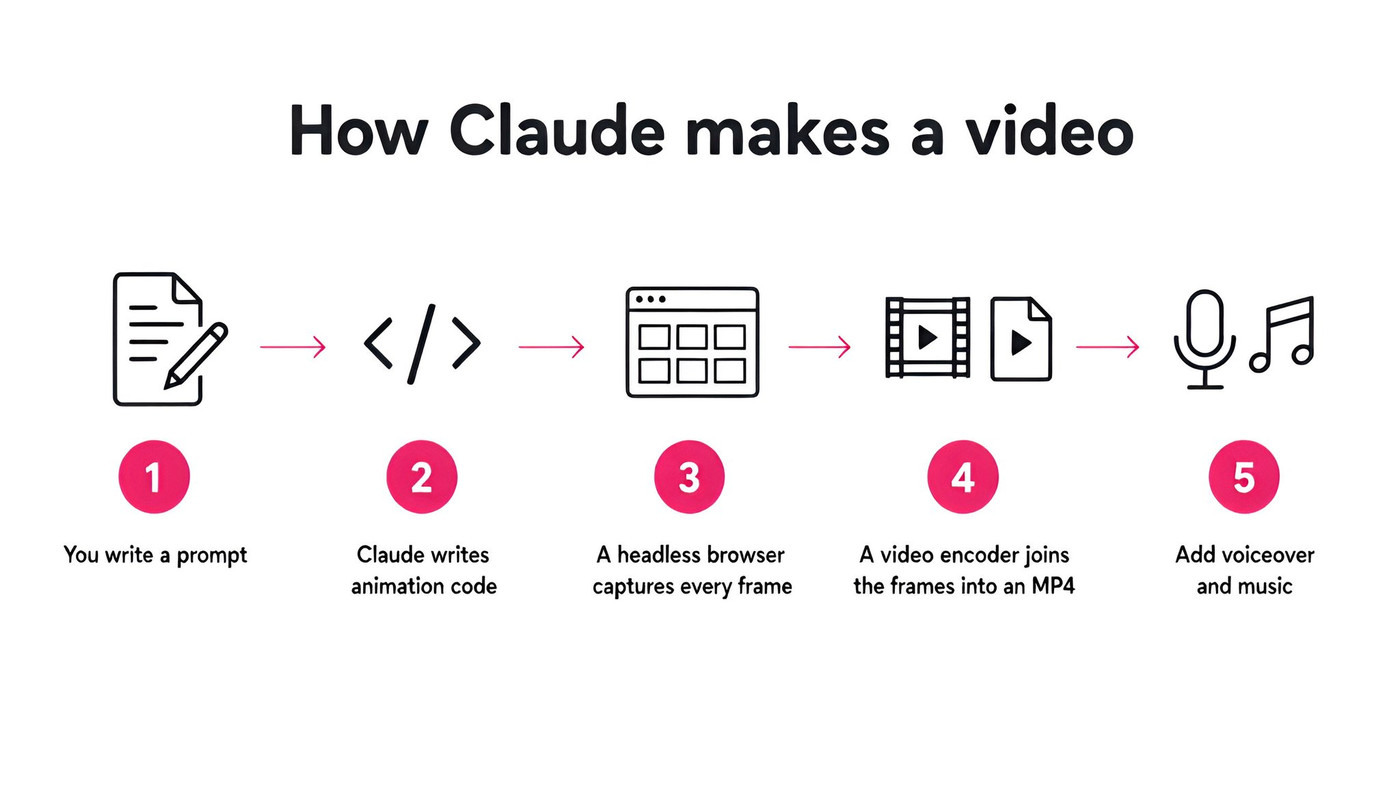
When people say "Claude motion graphics", they mean animations that Claude writes as code and a renderer turns into video. The typical pipeline is HTML, CSS and JavaScript (often with an animation library), or React through a framework such as Remotion. A headless browser jumps to each frame, takes a screenshot, and FFmpeg stitches those frames into an MP4. A creator walkthrough on oakgen describes exactly this flow: Claude writes the front-end code, a headless browser captures frames, and FFmpeg compiles them.
This is different from text-to-video models. A video model invents footage, so it can produce people, places and camera moves, but it also invents glitches and garbled text. Code-driven animation is the opposite: crisp vector type, exact numbers, perfectly editable, and no photoreal people. That is why it suits kinetic typography, charts, logo stings, UI walkthroughs and explainers so well.
Two practical consequences follow. First, every visual property should be a function of time, so the same input renders the same frames every time. Second, you edit by changing code or asking Claude, not by dragging keyframes, which is why precise prompts pay off more than long ones.
Three ways to make Claude animations: Motion, Design and Code
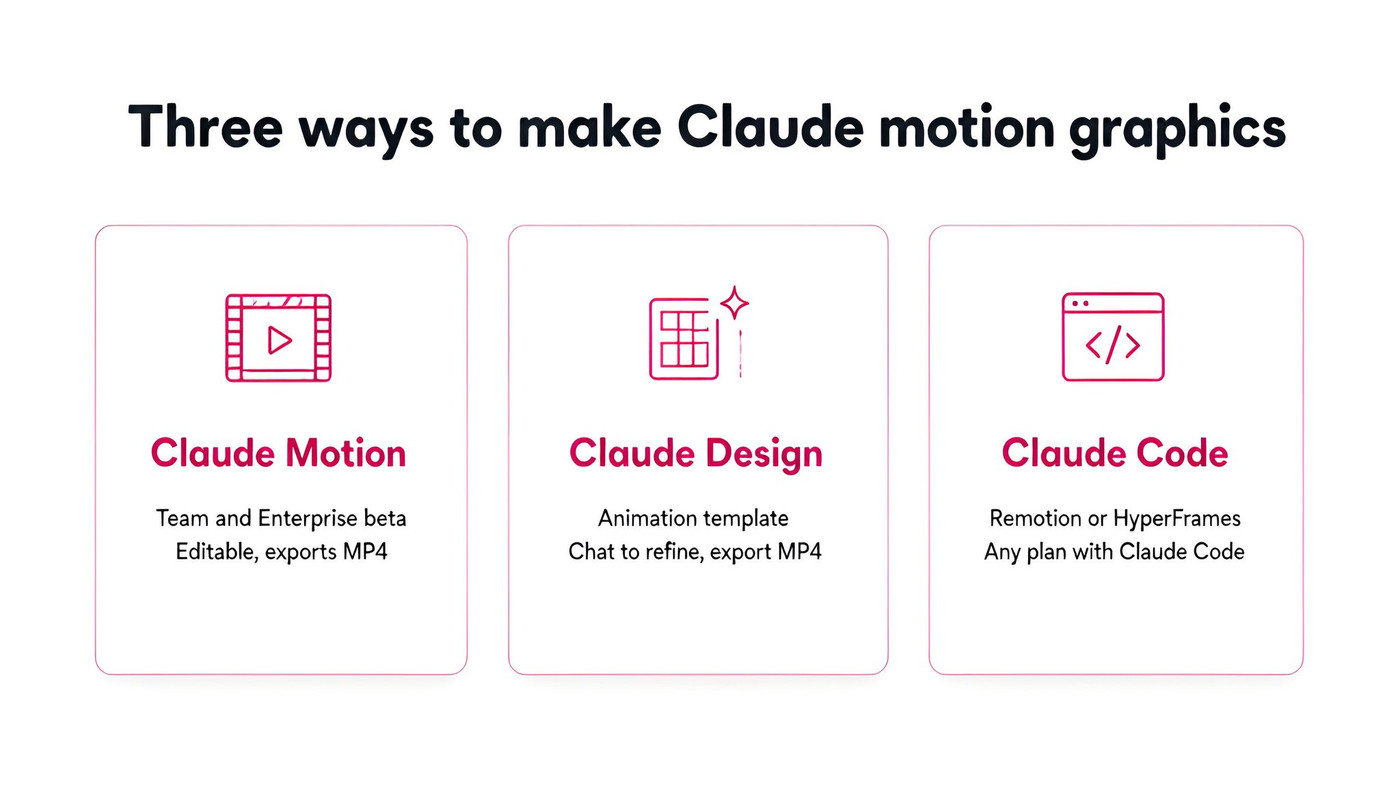
There are now three routes, and the right prompt depends on which one you use.
Route | Best for | Plan and access | Output |
|---|---|---|---|
Claude Motion | 30-second explainers, animated charts, onboarding walkthroughs | Beta on Team and Enterprise; on Enterprise an admin enables it | Editable animation in chat, MP4 download |
Claude Design (animation template) | Branded titles, narration-synced graphics, quick iteration by chat | See the note below; check your own plan | MP4 export |
Claude Code with Remotion or HyperFrames | Full control, long projects, batch rendering, custom pipelines | Any plan that includes Claude Code | Source files plus MP4, GIF, or transparent MOV/WebM |
Claude Motion launched in beta on October 8, 2026, for Team and Enterprise plans. Per Unite.AI's coverage of the announcement, it writes code that animates your own text, charts, shapes and images, does not use a video generation model, and exports MP4. Typing /motion in the message box brings it up.
Claude Design has an animation template. Early tutorials, such as the Kevin Stratvert walkthrough transcript, described it as paid-only. The same October 8 announcement reportedly took Design out of beta on every plan, including Free, and Anthropic's support page lists Free among the plans. Plan access has changed quickly this year, so check your own account before you rely on either.
Claude Code with Remotion or HyperFrames is the route most prompt libraries assume. According to the Roo newsletter test, HyperFrames is an open-source HTML and GSAP renderer from HeyGen that needs Node 22 or newer and FFmpeg, while Remotion is React-based and free for individuals and small teams but needs a licence for larger companies. Verify the licence terms on the Remotion site before using it commercially.
A note on models: the surge of interest in September 2026 followed the release of Claude Opus 5.5 on September 22, which TechCrunch covered. Creators report the strongest results from Opus, though Sonnet-class models also produce workable code animations.
The Claude animation prompt formula: six parts
Vague prompts ("make a cool intro") get default aesthetics. The fix is to brief Claude the way you would brief a motion designer. Teacher's Tech uses a method called FRAME (format, reference, action, message, exact style), and ChatCut's test write-up recommends shot-list prompts with canvas, duration, hex colours, exact text and an ending. Here is the version I use, which covers the same ground in six parts.
Format: aspect ratio, resolution and frame rate, such as "1920x1080, 30 fps" or "1080x1920 vertical".
Length: total seconds, plus any beat timings, such as "8 seconds, hook in the first second".
Exact text and numbers: every word and figure that appears on screen, so Claude does not invent copy or data.
Motion: what moves, in what order, with what easing. "Words rise in one at a time, 4-frame stagger, ease-out" beats "animated text".
Look: hex colours, one typeface, background, and an avoid list ("no gradients, no neon glow, no centred layouts").
Ending: how it resolves, such as "hold the final frame for one second" or "loop seamlessly with a 6-second period".
Add one more habit: ask Claude to review sample frames before the final render. ChatCut's test found that all of its issues were visual and only appeared when rendered frames were inspected, not at compile time. Adding "render frames at the start, middle and end, check for clipped text and overlaps, then fix" to a prompt costs one sentence and saves a re-run.
My test: rendering a Claude-style prompt, breaking it, fixing it
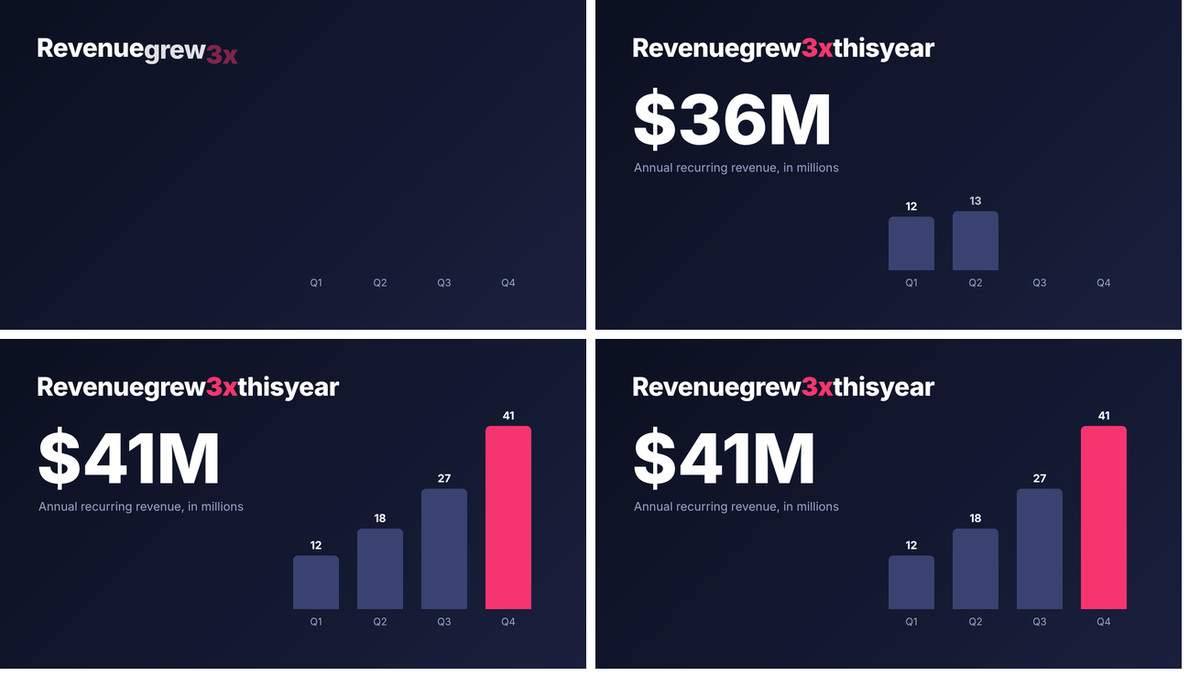
I do not want to hand you 25 prompts without showing the workflow works, so I ran the core loop myself. I wrote a single HTML scene where every element is a function of time, then rendered it with a headless Chromium (Playwright) and encoded the frames with FFmpeg. The brief was the kind you will see in the prompts below: a 6-second, 1280x720, 30 fps animation with a five-word headline, a count-up number, and four bars growing in sequence, the last in pink.
The result: 180 frames rendered in about 10 seconds in a cloud sandbox, and the MP4 came out at roughly 85 KB. That is in line with the Roo newsletter's measurements, where a 6-second 1080p clip took about 17 seconds to render (my clip was 720p, so do not compare the two directly).
It also failed on the first pass, which is the point. The headline words appeared as "Revenuegrew3xthisyear" with no spaces, because each word was its own inline-block element and the trailing space collapsed. Nothing crashed and the file rendered perfectly, which is exactly why you must look at frames.
The fix was a one-line change: give each word a right margin instead of relying on a whitespace character. After the fix, the same four sample frames look right.
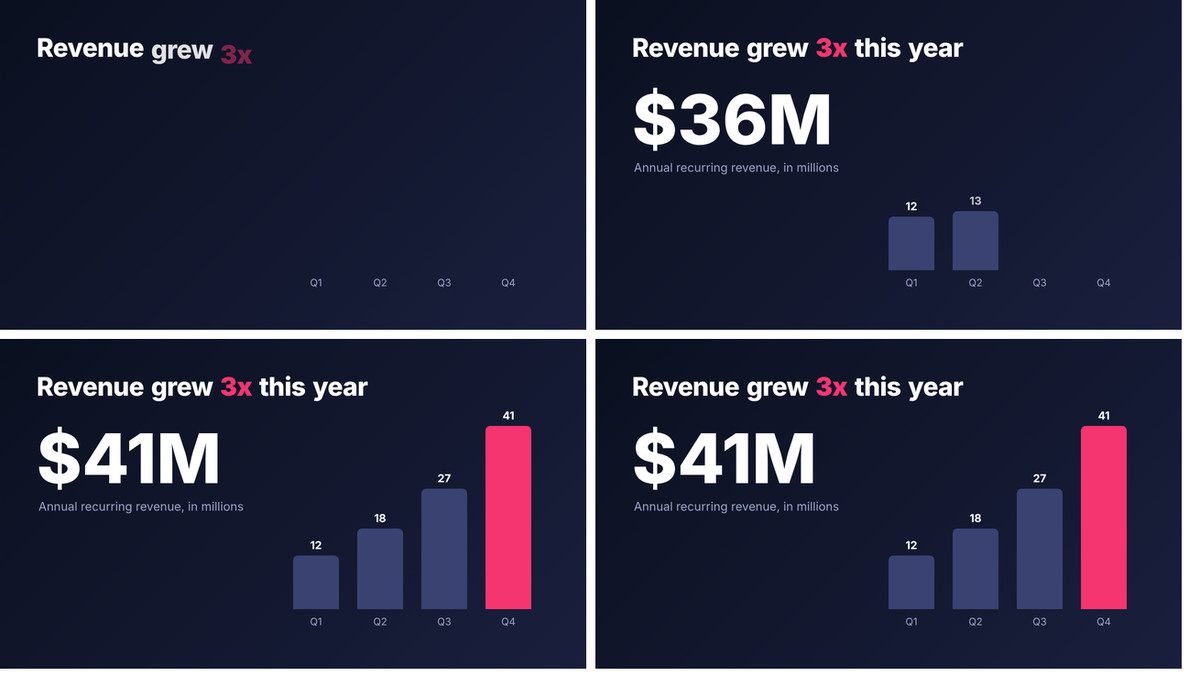
The lesson matches what ChatCut reports from its 16-prompt test: the code is rarely the problem, spacing, overlap and clipping are. So the prompts below build in frame checks, and the fix prompts after them cover the rest.
25 copy-paste Claude animation prompts
Replace anything in [square brackets]. Every prompt is written for a code-based route (Claude Code, Claude Design or Claude Motion), and all of them assume the six-part formula above. I wrote these from scratch using the same six-part structure as the test render above; as with any prompt, expect to iterate once or twice.
Kinetic typography and title cards
1. Headline reveal: Create a 6-second, 1920x1080, 30 fps kinetic typography animation. Headline: "[Your headline in 5-7 words]". Words rise in one at a time with a 4-frame stagger and an ease-out curve. The word "[accent word]" is in [#F5356F] and everything else is white on [#0B1020]. One typeface only, left aligned, no centred layouts. End with a 1-second hold. Before the final render, check sample frames for clipped text and word spacing.
2. Cinematic title card: Make an 8-second 16:9 title card for "[Title]" with the subtitle "[Subtitle]". Slow push-in on a dark gradient background, title letters fade in with 2-frame stagger, a thin accent line draws under the title over 20 frames, subtitle fades in after the line completes. Palette: [two hex colours]. No particles, no lens flares. Hold the last second.
3. Quote highlight: Animate this quote in 1080x1080, 10 seconds: "[Quote]" by [Name]. Show it one line at a time. A highlighter bar sweeps across the key phrase "[key phrase]" and must cover the full height of the letters, including descenders. Off-white paper background, a serif typeface, one yellow highlight. End on the full quote with the attribution fading in.
4. Word-by-word emphasis: Build a 12-second vertical 1080x1920 animation where the sentence "[Sentence]" appears one word at a time, each word scaling from 90% to 100% with a small overshoot. The current word is bold and bright, past words dim to 40% opacity. Keep all text inside the central 80% of the frame. Use fixed pixel gaps between words, not relative units.
5. Chapter title sequence: Create four 3-second chapter title cards at 1920x1080 named "[Chapter 1]" through "[Chapter 4]". Each has a large number on the left and a title on the right. Transitions are horizontal wipes, not fades. Use a Swiss-style 12-column grid, one signal colour per card ([four hex colours]), and one sans-serif font.
Data, stats and counters
6. Revenue count-up with bars: Create an 8-second 1280x720 animation. Left: a big number counting up from 0 to [value] with a "[unit]" label, easing out so it settles on the exact value. Right: [four] bars growing in sequence for [labels], heights proportional to [values], the last bar in [accent colour]. Show each bar's value above it as it grows. Use only the numbers I gave you.
7. Before and after comparison: Animate a two-column comparison, 10 seconds, 16:9. Column A "[Before]" and column B "[After]". Rows: [metric 1] [A value] to [B value], [metric 2] [A value] to [B value], [metric 3] [A value] to [B value]. Rows slide in one at a time, the improved value pulses once and turns green. Labels at least 28 px. No decorative gridlines.
8. Line chart draw-on: Draw a single line chart over 9 seconds with these points: [x1,y1], [x2,y2], [x3,y3], [x4,y4], [x5,y5]. The line draws left to right at constant speed, a dot rides the tip, and a label with the latest value follows it. At the end, circle the highest point and show a short callout reading "[callout text]". Dark background, one accent colour.
9. Three-stat highlight: Show three big stats side by side for 8 seconds: "[stat 1]" with caption "[caption 1]", "[stat 2]" with caption "[caption 2]", "[stat 3]" with caption "[caption 3]". Each counts up in turn with a 10-frame offset. Add a small source line at the bottom: "Source: [source, date]". Do not add any number I did not provide.
10. Ranking countdown: Create a vertical 1080x1920 ranking animation for the top [5] [items]: [list from 5 to 1]. Each entry slides in from the right with its rank number, the number-one entry gets a larger card and a short pulse. 2 seconds per entry plus a 2-second intro with the title "[Title]". Keep text in the safe middle area.
Logo stings and lower thirds
11. Line-draw logo reveal: Animate my logo (SVG pasted below) in a 4-second 1920x1080 sting. The strokes draw on over 40 frames with round caps, then the fill fades in on a downbeat, then the wordmark "[Brand]" slides up. Hide the strokes until draw progress begins so no stray dots appear. Background [hex]. [Paste SVG]
12. Transparent lower third: Build a 5-second lower third on a transparent background. A panel slides in from the left, then "[Name]" and "[Role]" appear, hold for about 3 seconds, then everything exits to the left. Export as WebM with alpha and as MOV with alpha. Test it over a bright background to confirm the edges are clean.
13. Subscribe or follow call to action: Make a 4-second animated call to action for [platform]. A rounded button with the text "[Button text]" pops in with a small overshoot, a cursor moves to it on an eased path and clicks, the button changes state, and a short confirmation line "[Confirmation]" appears. Transparent background, WebM with alpha.
14. Logo end card: Create a 5-second end card at 1920x1080: the logo centred, below it "[URL]" typed on, then a thin line sweeping under it. Quiet, minimal, one accent colour [hex]. Loop-safe: the first and last frames should match so it can sit on top of a clip without a jump.
Product and SaaS motion
15. Product launch teaser: Build a 15-second 16:9 launch teaser for [product]. Shot list: 0-3 s the problem line "[problem]"; 3-8 s three feature callouts "[feature 1]", "[feature 2]", "[feature 3]" each with a simple icon; 8-12 s one giant number "[proof number]"; 12-15 s the name and "[tagline]". Dark tech keynote look: one accent colour [hex], long-tail easing, 30 to 45 frames per move.
16. UI screencast rebuilt in HTML: Rebuild a simplified version of this screen in HTML and CSS (I will paste a description or screenshot) and animate a 12-second walkthrough. An eased cursor moves to each control, pauses 8 frames before each click, and zooms to 1.6x on the active area. One action every 3 to 4 seconds. Do not invent features that are not in my description.
17. Feature zoom loop: Make a seamless 6-second loop that highlights one feature, "[feature]". A card of the interface sits centre, a pink ring pulses on "[element]", a tooltip reads "[tooltip text]". The loop period is exactly 6 seconds and the first frame equals the last. Square 1080x1080.
18. Website to promo film: Here is my site copy: [paste headline, three benefits, CTA]. Turn it into a 20-second promo using only that copy. Use the brand colours [hex colours] and font [font]. Storyboard it in five shots first and wait for my approval, then build and render. Report the two weakest moments when you finish.
Explainers and education
19. Process explainer: Animate a 5-step process for "[process name]": [step 1], [step 2], [step 3], [step 4], [step 5]. Each step gets a numbered circle, a short label, and a simple flat icon, connected by lines that draw on. 2.5 seconds per step plus a 3-second summary. Flat vector style, 4 to 5 colours, springy overshoot that settles within 12 frames.
20. Concept diagram: Create a 30-second animated diagram that explains "[concept]". Start with one shape, then add and connect [number] labelled parts in the order [list]. Camera pans smoothly to keep the active part in the middle third. Label text at least 28 px. Calm, textbook feel, white background, two accent colours.
21. Timeline: Animate a horizontal timeline from [start year] to [end year] with these events: [year: event, year: event, year: event]. The line draws on, each event pops up with its year and a one-line label, and the camera follows. 20 seconds, 16:9. Do not add events I did not list.
22. Code change explainer: Show this code diff as a 15-second animation: [paste before and after]. Highlight removed lines in red and added lines in green, one block at a time, with a monospace font on a dark editor background. A small caption on the right explains each change in one line. No glow, no glitch effects.
Vertical social reels
23. Hook and captions reel: Make a 20-second 1080x1920 reel. First second: the hook "[hook, max 6 words]" in huge type. Then captions for this script, one to four words at a time, popping on the beat with a 6-frame overshoot, one accent word per caption in [hex]. Keep text out of the bottom 15% of the frame. Script: [script].
24. Testimonial carousel: Create a 15-second vertical animation with [three] testimonial cards: "[quote 1]" by [name 1], "[quote 2]" by [name 2], "[quote 3]" by [name 3]. Each card slides in, holds for 3 seconds, and slides out. A star row fills in over each card. Use only these quotes verbatim.
25. Countdown timer: Build a 10-second vertical countdown to "[event]" showing [days] days, [hours] hours and [minutes] minutes with flipping digits. Numbers roll through glyphs for 6 frames on each change. End on a bold "[event] is live" with a small confetti burst of flat shapes. Monospace digits, two colours.
Style vocabulary: words that steer the look
"Make it look good" is not a style. Naming a style and its rules is. Awesome Claude publishes 17 motion styles written as rules (colours, easing, frame counts and an avoid list), and the pattern is worth copying. Here are eight that work well, in my own paraphrase.
Style | What to say in the prompt | What to ban |
|---|---|---|
Swiss grid and kinetic type | 12-column grid, one snap easing curve, wipes instead of fades, one signal colour per shot | Springs, drop shadows, extra typefaces |
Flat vector explainer | 4 to 5 flat colours, springy overshoot that settles in 12 frames, 2 to 4 frame stagger | Gradients, crossfades |
Data story | One chart per screen, bars grow over 20 frames with ease-out, counters stop on exact values | 3D charts, rainbow palettes, invented numbers |
Dark tech keynote | Long-tail easing, one giant number, one accent colour, light sweeps | Lens flares, neon glow, multiple accents |
Living UI screencast | UI rebuilt in HTML, eased cursor path, pause before clicks, 1.6x zoom | Fake features, teleporting cursor |
Paper cut-out collage | Stop-motion at 12 fps, 3 to 6 parallax layers, small hard shadows | Soft shadows, smooth 60 fps motion |
Pixel art | Draw at low resolution and scale up with nearest-neighbour, 16 to 32 colour palette | Blurry scaling, mixed pixel sizes |
Vertical social captions | Middle 80% safe area, 1 to 4 words per caption on the beat, hook in the first second | Long sentences, text in the bottom 15% |
The same site also offers a free Claude Code skill that makes Claude ask once for missing facts, write a shot-by-shot storyboard before any code, review a contact sheet of frames, and report the weakest moments at the end. You can borrow that workflow in any prompt, which is what prompt 18 and the QA lines above do.
Common failures and how to fix them
Across my test, the Roo newsletter's four prompt runs, and ChatCut's 16-prompt test, the same classes of problem show up. None of them are exotic.
What you see | Likely cause | Prompt fix |
|---|---|---|
Words run together or overlap | Whitespace collapsing or relative spacing units | "Use fixed pixel gaps between words, not spaces or em units." |
Element flashes before it animates in | Start state not set before the timeline begins | "Set every element's starting values before frame 0." |
Stutter or jitter | Animating layout properties | "Animate transforms and opacity only." |
Stray dots before a line draws | Round stroke caps visible at zero length | "Hide strokes until draw progress is above zero." |
Highlight clips letter tails | Bar height too short for descenders | "Highlight must cover the full text height including descenders." |
Transparent overlay turns white | Exported as MP4, which has no alpha channel | "Export as WebM or MOV with alpha." |
Render fails on a blocked CDN | Script loaded from the internet in a sandbox | "Install the animation library locally and reference the local file." |
Generic purple-gradient look | No art direction | "Do not use default gradients, centred layouts or system fonts. Use [palette] and [font]." |
Five follow-up prompts cover most of the rest. Paste whichever fits after the first render:
Frame review: Render frames at 0%, 25%, 50%, 75% and 100%, list every clipped, overlapping or tiny element, then fix them and re-check.
Timing pass: Re-time the animation so each beat lasts at least 1 second before the next begins, and add a 1-second hold on the final frame.
Polish pass: Add one anticipation frame before each move and one settle after it. Do not add new effects.
Audio sync: Here is a word-level transcript with timestamps: [paste SRT]. Tie each text reveal to the start of the matching spoken word and report any word that lands more than 3 frames off.
Self-critique: Score this on typography, timing and composition out of 10, name the two weakest moments, then fix those two.
Adding voiceover, captions and music to Claude animations
Claude's output is silent by default, and silent motion graphics feel unfinished. The reliable order of operations, which both the Futurepedia tutorial and the Claude Design tutorials follow, is to record or generate the voiceover first, get word-level timestamps, then hand the transcript to Claude so each reveal lands on a spoken word. In the Futurepedia video summary, the loop is voiceover, then SRT, then paste the SRT into the prompt, then load the audio into the player. In Claude Design you drag the SRT file in directly, as shown in the Stratvert tutorial.
If you would rather not wire that up by hand, Fliki's voiceover and auto captions produce the narration and word timing, and AI music gives you a track to put under it. The Claude animation is the visual layer; Fliki handles the audio layer.
Use the Fliki plugin inside Claude
Fliki has a plugin for Claude Desktop, so you can ask for voiceover, music, images, clips or a full narrated video in the same chat where you are writing prompts. Per the Fliki in Claude tutorial, setup takes about a minute:
Copy the marketplace address: in Fliki, open Automation, then AI apps (MCP), keep the Claude Desktop tab selected and copy the address shown.
Add it in Claude: in Claude Desktop go to Settings, then Plugins, click Add, choose Add marketplace, paste the address and click Sync. Claude shows a warning for non-Anthropic plugins, which is expected.
Install and sign in: install Fliki from the plugin list and approve the one-time sign-in with your Fliki account.
Test it: start a new chat and ask how many Fliki credits you have left.
Per the same page, the plugin needs a Fliki Premium or Enterprise plan, and anything you generate uses your regular Fliki credits with no separate Claude charge. The pricing page does not list this plugin, so confirm the current plan requirement in your own account before you set it up. I generated the cover and diagrams for this article through the same Fliki connection, so the image side of that workflow is something I used first-hand.
Here are three prompts that combine the two tools. The first two work in a plain Claude chat with the plugin; the third assumes Claude Code, where Claude can also run FFmpeg locally.
Voiceover first: Using Fliki, write and generate a 20-second voiceover for this script: "[script]". Use a [warm, confident] voice and tell me the credits it will cost before you generate. Then give me the word-level timing so I can use it for an animation.
Narrated video without code: Using Fliki, make a 30-second 16:9 motion graphics video about [topic] with captions and a calm music bed. Ask me the minimum questions you need, show me the storyboard first, and keep the brand colours [hex colours].
Animation plus audio: Write the animation code for the brief above, render it to MP4, generate the voiceover and a music track with Fliki, download both, and use FFmpeg to mix them under the video at a lower music level. Report the final file path.
One honest note: the third prompt depends on your environment. Fliki returns audio as a downloadable asset, and download links expire after about an hour according to the tutorial, so download soon after generating. Any setup where Claude can download a file and run FFmpeg can combine them.
When to skip the code and let Fliki do the whole thing
Code-driven animation gives you total control, but it also asks you to review frames, fix spacing and manage renders. If what you need is a narrated motion graphics video quickly, Fliki's AI motion graphics generator builds the scenes, voiceover, captions and music from a brief or your website URL, with no code. It also has a kinetic typography generator and an AI animation generator for the same job. And if you want to see real prompts creators have used, the Claude motion graphics gallery collects 83 examples with each creator's exact prompt, which you can copy or remix.
Which route should you use?
Choose based on what you are making and what you already have. If you are on a Team or Enterprise plan and need a short explainer or an animated chart for an internal deck, start with Claude Motion because it needs no setup. If you want branded titles and quick back-and-forth changes in chat, try Claude Design. If you need many videos, transparent overlays, exact timings or a repeatable pipeline, Claude Code with Remotion or HyperFrames is the most flexible. And if the end product is a narrated video for social or YouTube, plan the audio from the start rather than adding it last.
Know the limits too. ChatCut notes that Claude's approach handles type, charts, logos and UI well but not photorealistic people or camera moves. For those, you want a video model or real footage, and you can still use code-driven graphics as overlays. If you are planning scripts, the video script prompts guide pairs well with these, and the animated explainer walkthrough shows the no-code path end to end.
Bottom line
Claude animation prompts work when you brief Claude like a motion designer: canvas, length, exact text, motion, look and ending, plus a frame check before the final render. Start with one of the 25 prompts above, run it, look at the frames, and use the fix table for whatever breaks. Then give your animation a voice. You can try Fliki free for the audio and captions, or connect the plugin and do it all from the same chat.
Written by Shivam Aggarwal, who works on content and marketing at Fliki. I rendered the test animation in this article myself and generated the images through Fliki. Plan access, pricing and tool availability for Claude and Fliki were current as of November 2026; verify them before you rely on them.
FAQs
Yes. Claude does not generate video pixels, it writes animation code (HTML and JavaScript, or React with Remotion) that a headless browser and FFmpeg render into an MP4. It handles kinetic type, charts, logos, UI walkthroughs and explainers well, but not photorealistic people or camera moves.
They are short creative briefs that tell Claude what to animate. The best ones read like a shot list: aspect ratio and frame rate, total length, the exact text and numbers on screen, how things move, the colours and fonts, and how the animation ends.
Not at launch. Claude Motion went into beta on October 8, 2026, for Team and Enterprise plans only, per coverage of Anthropic's announcement. You can get similar results on other plans through Claude Design or Claude Code with Remotion or HyperFrames. Check your plan, because access has been changing quickly.
Creators report the strongest results from Claude Opus 5.5, released on September 22, 2026, but Sonnet-class models also produce workable code animations. The quality of your brief matters more than the model: give exact text, hex colours, timings and an avoid list.
Claude Motion and Claude Design export MP4 from their own interfaces. In Claude Code, Claude writes the project and runs a renderer, typically a headless browser that captures frames plus FFmpeg that encodes them. Use WebM or MOV with alpha if you need a transparent overlay, because MP4 has no alpha channel.
Generate or record the voiceover first, get a word-level SRT, then paste it into your prompt so each reveal lands on a spoken word. You can create the voiceover, captions and music with the Fliki plugin for Claude, then mix them under the rendered video with FFmpeg.