Introduction
You picked a launch date, wrote a tagline, lined up your first comment, and then you hit the one asset that makes founders stall: the video. Most people either skip it, or spend a week and a chunk of budget on something that ends up too long and too polished for the audience it is meant to win over.
Here is the reframe that helps: a Product Hunt launch video is not a Super Bowl ad. It is a 30 to 60 second demo that shows a room full of builders what your product does and why it is worth a click. That is a job an AI Product Hunt launch video maker can now do in under an hour, and this guide walks through exactly how, including the Product Hunt specs that quietly trip people up (you cannot upload an MP4, for one), a reusable script skeleton, and the fastest way to actually make it. I work on content at Fliki and have watched a lot of launches, so let's get you a video that pulls its weight on the day.
Does a launch video actually matter on Product Hunt?
Short answer: it helps, and Product Hunt's own data backs that up without overselling it. According to Product Hunt's official launch guide, about 53% of products that reached Product of the Day since 2021 included a video. That is a correlation, not a guarantee, and Product Hunt is honest that videos "can help depending on what your product is, but aren't always necessary." But the pattern is clear: the top of the leaderboard skews toward launches that showed their product in motion.
The reason is cultural. Product Hunt's audience is makers who want to see the thing work, not read adjectives about it. The launch guide puts it plainly: the most successful launches "tell a compelling story of the product, including showing what the user interface looks and feels like." A short video is the most efficient way to do that in a feed where you are competing with dozens of other launches for a moment of attention. So it is worth making, as long as you make the right kind.
The Product Hunt video rules that trip people up
Before you make anything, know how Product Hunt actually handles video, because a few of its rules surprise people on launch morning.
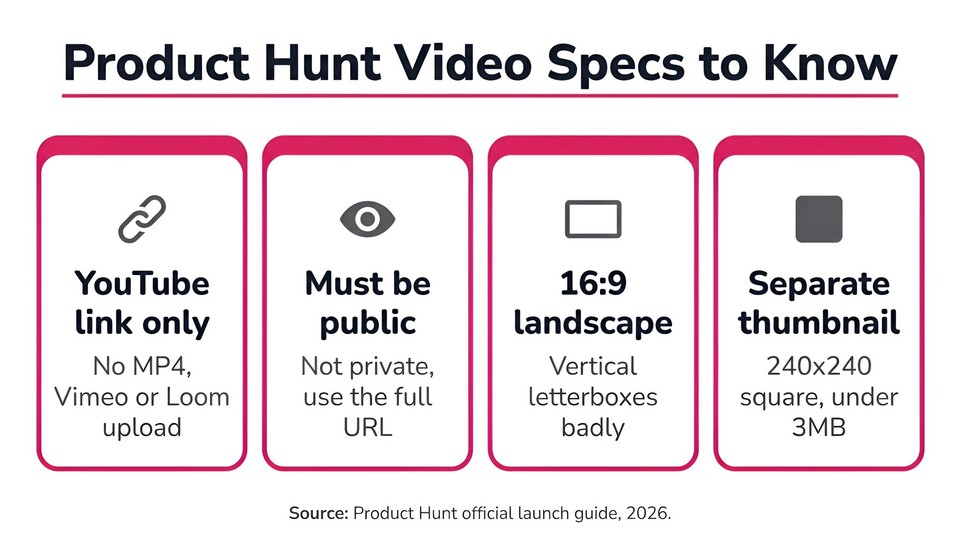
You can only add a YouTube link. This is the big one. Product Hunt does not host video and does not accept a native MP4 upload, a Vimeo link, or a Loom-direct link in the gallery. Per its posting guide, "for videos, only YouTube links are supported." So your finished video has to live on YouTube (public or unlisted, and confirmed not private), and you paste the full URL, since shortened links will not load. Build this into your timeline; do not discover it at 12:01am Pacific.
The gallery video is click to play, not an autoplay social clip. Because it is a standard embedded YouTube player, visitors click to watch it with sound, it does not autoplay muted the way a TikTok in a feed does. That changes your priorities: you still want captions (plenty of people watch at low volume), but you do not need to design the whole thing to work in silence the way you would for a Reels ad.
The thumbnail is a separate square image. People assume the first gallery item becomes the thumbnail. It does not. Product Hunt has a dedicated thumbnail field and recommends a 240x240 square image under 3MB. If you use a GIF there, note that it animates on hover rather than autoplaying, so the first frame has to stand on its own.
Get the gallery specs right too. You need at least two gallery images before the gallery is viewable, and Product Hunt recommends 1270x760 for them. Your video is one item in that gallery alongside those images.
And the one rule that can get you banned: never ask for upvotes or pay for traffic or hunts. Product Hunt's guidelines are explicit that this can get you permanently banned. Your video's call to action should invite people to try the product and leave feedback, never "upvote us."
What makes a great Product Hunt launch video
Get those rules out of the way and the creative brief is refreshingly simple.
Keep it short. Most experienced makers land on 30 to 60 seconds, and almost no one recommends going past 90. Product Hunt itself does not publish a length rule, but its advice to do "a quick demo" points the same direction. You are making a trailer, not a webinar.
Hook in the first three seconds, and skip the logo intro. Nobody on Product Hunt is waiting through an animated logo. Open on the product doing something, or on the pain it removes. The first line should name the outcome or the problem, over footage that is already moving.
Show the product actually working. This is the single biggest thing that separates a launch video that lands on Product Hunt from one that does not. A real screen demo of your interface beats abstract animation almost every time, because it matches exactly what this audience came to see. If you use motion graphics, use them to frame the demo, not replace it.
Sound like a founder, not an ad. Product Hunt culture rewards authenticity and gently punishes marketing-speak. A clear, honest voice explaining what you built and why will outperform a glossy voiceover full of superlatives. Add burned-in captions so the message survives low-volume viewing.
End on a soft, rules-safe CTA. Something like "We're live on Product Hunt today, try it and tell us what you'd build with it." It invites the exact engagement (visits, comments, feedback) that actually helps, without breaking the no-upvote-asking rule.
A reusable 30-60 second script skeleton
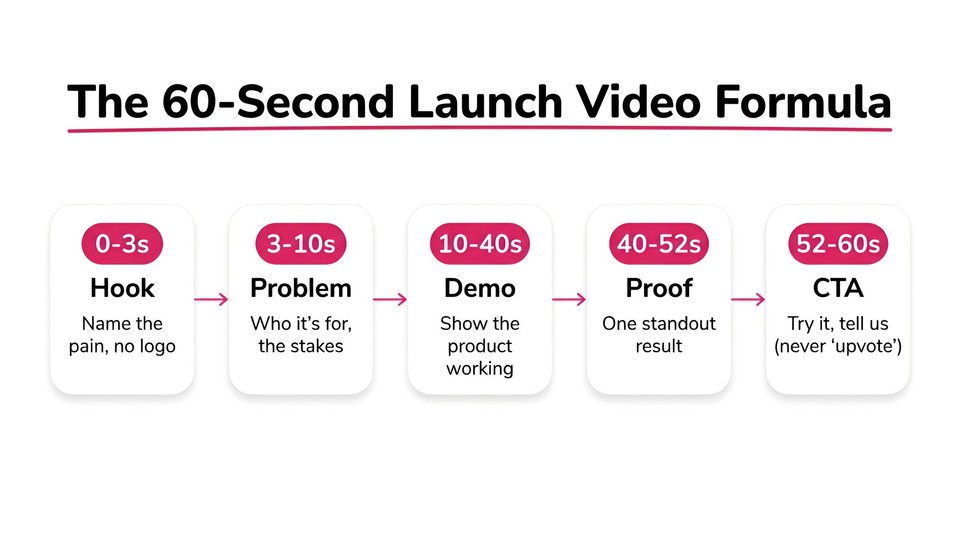
Adapt this to any product (and if you want a deeper framework, our explainer video script template goes further). Keep the whole thing under a minute.
0 to 3 seconds, hook: one line naming the pain or the outcome, over the product already on screen. No logo. Example: "Still building your launch video by hand the night before?"
3 to 10 seconds, problem: one sentence on the stakes and who this is for. "If you're shipping this week, you don't have three days for a video."
10 to 40 seconds, solution and demo: show the product doing its core job on screen, narrating one to three key actions as they happen. "Paste your site, pick a style, and it designs the whole thing." Stick to your single most impressive workflow.
40 to 52 seconds, proof: one differentiator or result. "Sixty seconds, no editing skills, fully on brand."
52 to 60 seconds, CTA: "We're live on Product Hunt today, come try it and tell us what you think."
Captions on throughout, 16:9, and an end card with your product name and "Live on Product Hunt."
Three kinds of launch video, and which fits Product Hunt best
There are really three formats, and they are not equal for this audience.
A screen-recording demo with an AI voiceover is the most on-brand for Product Hunt, because it shows the real UI doing real work, which is exactly what the community wants. A motion-graphics brand explainer is a punchy, polished option that works well when your product is abstract or when you want a teaser to post in the run-up to launch; the strongest versions animate your actual interface rather than generic shapes, which is also the heart of a good SaaS explainer video. A founder talking-head, real or an AI avatar, leans into Product Hunt's authenticity culture and works nicely as an intro or a first-comment companion. For most launches, the winner is a crisp 30 to 60 second demo, optionally topped and tailed with light motion graphics.
How to make your launch video with AI in Fliki
Here is the fast path I would actually use. The Motion graphics explainer workflow in Fliki is built for exactly this: turning a product into a short, brand-styled launch film without a studio. It even ships with a "launch teaser" example, because this is the use case it was made for.
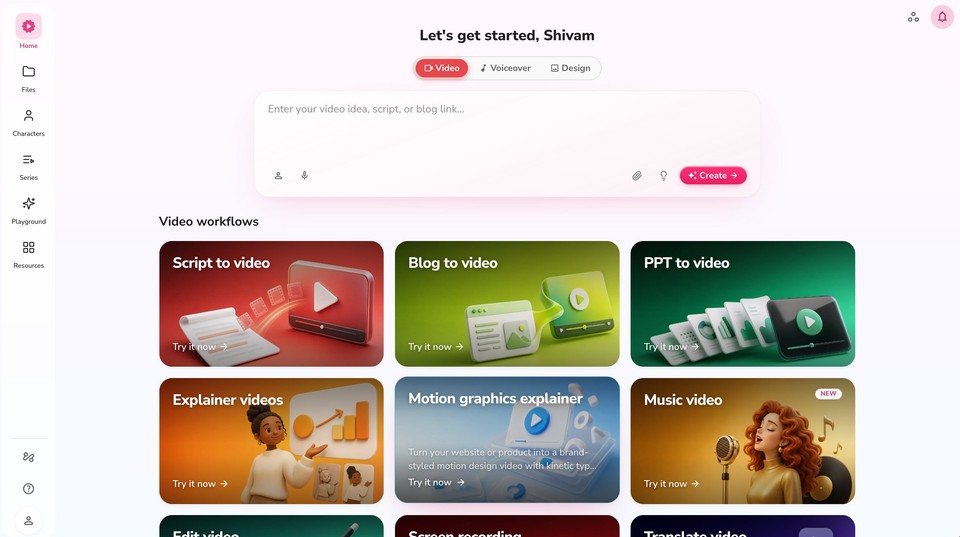
Step 1: Point it at your product. Open the Motion graphics explainer workflow and paste your website URL. Fliki reads your site for its name, colors, fonts, logo, and copy, and designs the video around them. There is an Animate my website option that screenshots your hero and key sections and animates your real UI inside the design, which is how you satisfy Product Hunt's "show the interface" preference without recording anything. Add one optional line about the goal, for example "a 30-second launch teaser for our new analytics dashboard aimed at ops teams."
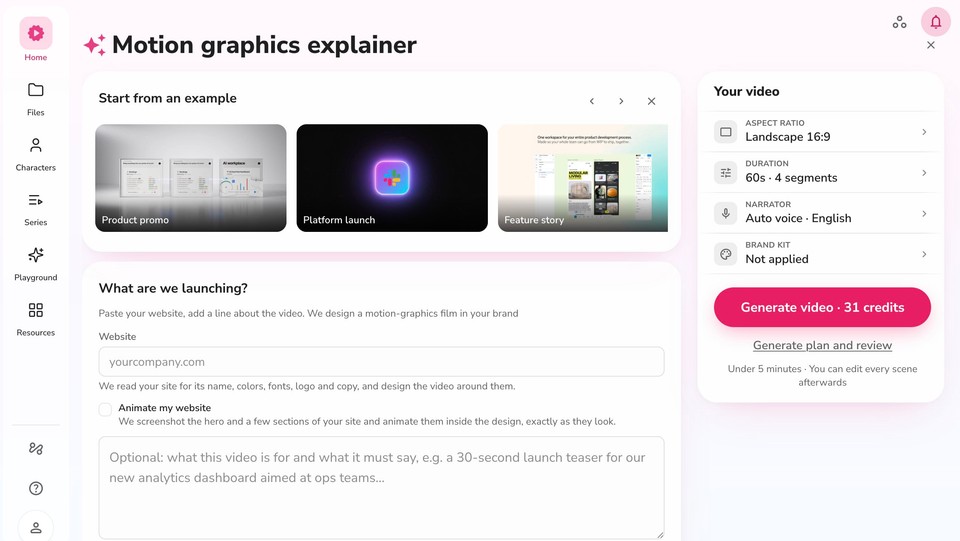
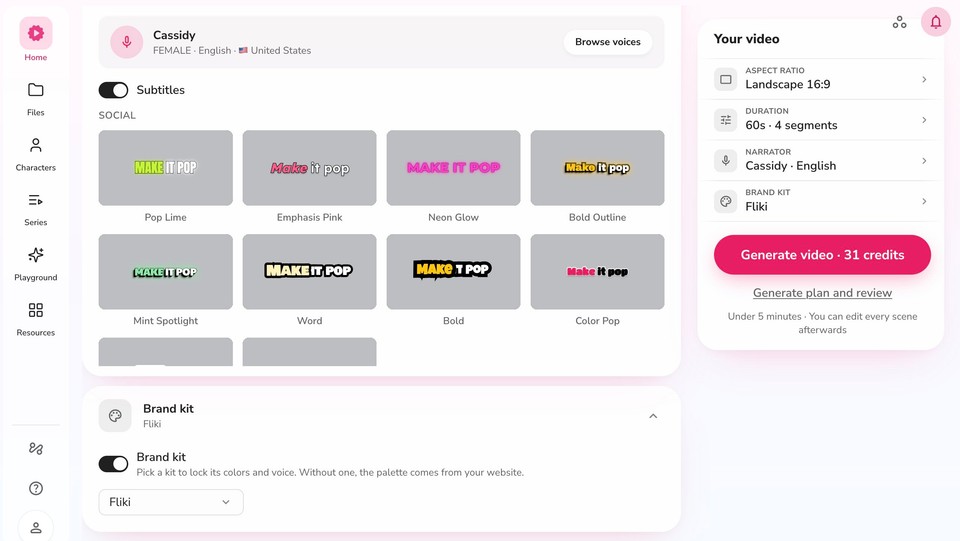
Step 2: Pick a motion style and set it up for Product Hunt. Choose from styles like Gradient bloom, Kinetic type, 2D explainer motion, Corporate flat, and Blush SaaS. Set the duration short (30 to 60 seconds), and importantly set the aspect ratio to 16:9 landscape, since the Product Hunt gallery and its YouTube embed are landscape. Turn subtitles on so the video carries with the sound off.
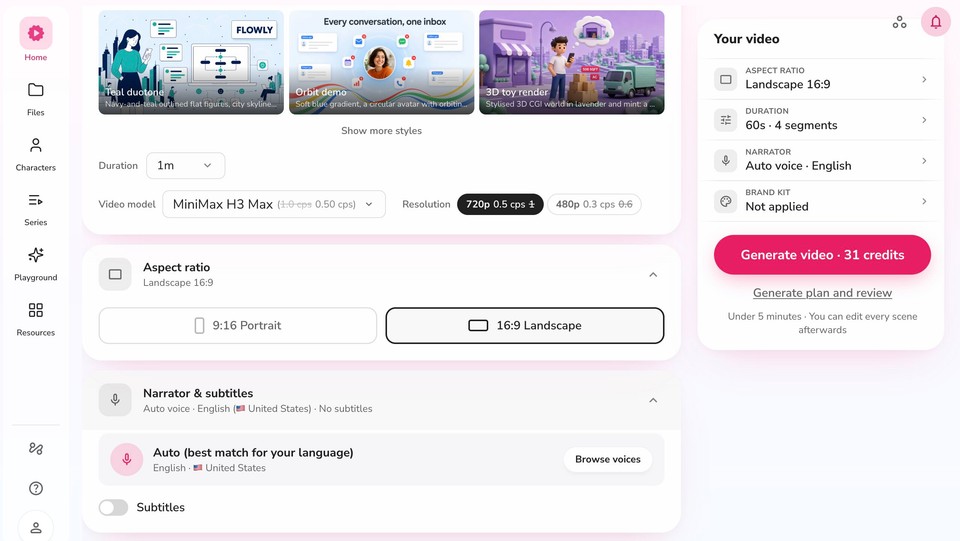
Step 3: Choose a voice and lock your brand. Pick an AI narrator (or your own voiceover), a caption style, and apply your Brand kit so the colors, fonts, and voice stay consistent with the rest of your launch assets.
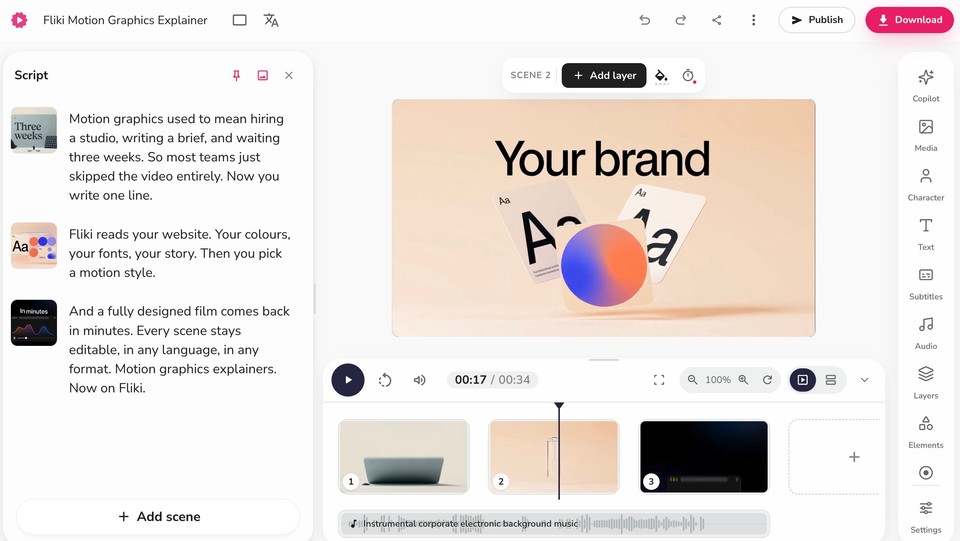
Step 4: Generate, then edit every scene. Fliki writes a scene-by-scene script and builds the film in a few minutes. It opens in an editor where you can rewrite any line, swap a visual, adjust timing, drop in captions, or add background music. This is where you tighten the hook and make sure the demo beat lands.
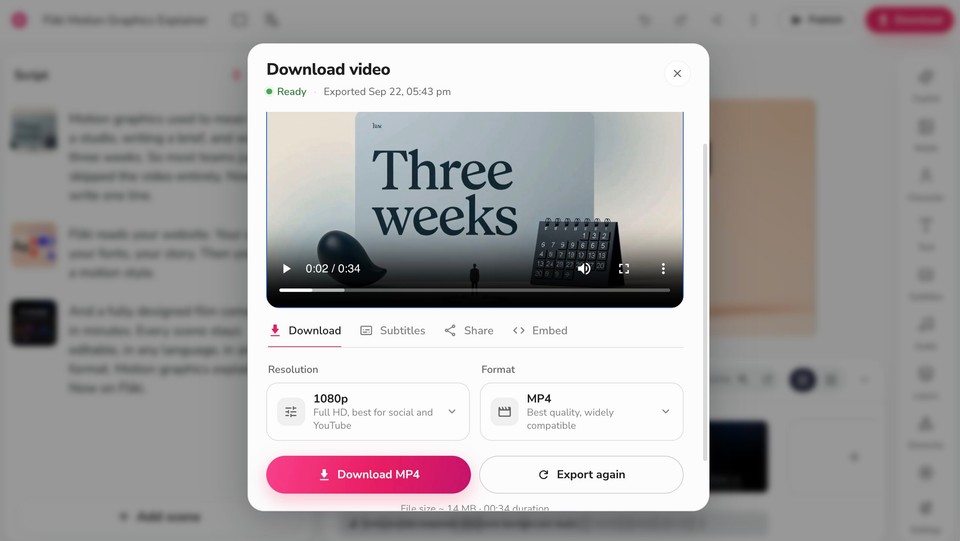
Step 5: Export 16:9 and put it on YouTube. Download the finished video as a 1080p MP4. Then, because Product Hunt only accepts YouTube links, upload it to YouTube (public or unlisted, not private), and paste the full URL into your launch gallery.
That is the whole thing, an hour of work instead of a week. If you would rather show a pure product demo, Fliki also has a screen recorder so you can capture your UI and add an AI voiceover and captions the same way, then export and upload to YouTube exactly as above.
Here’s the example output:
Remember the video is one asset among many
On launch day the video sits alongside your tagline (max 60 characters), your 240x240 thumbnail, your gallery images, and your maker first comment, which matters more than people realize: Product Hunt reports that 70% of products that reached Product of the Day, Week, or Month had a first comment from the maker. So keep the video short and self-contained, and put your energy into the whole package, not just the film.
One high-leverage move: cut a few vertical, captioned versions of the video for X and LinkedIn to drive traffic to your launch on the day. Those feeds do autoplay muted, so captions and a strong first frame matter even more there than they do inside the Product Hunt gallery.
Common mistakes to avoid
The recurring ones are easy to sidestep. Making the video too long, when 30 to 60 seconds is the sweet spot. Wasting the first seconds on a logo animation instead of the product. Going abstract and salesy with no actual demo, which this audience sees through. Skipping captions. And the launch-morning classics: forgetting that Product Hunt only takes a YouTube link, leaving that YouTube video set to private, or building a vertical video that letterboxes badly in a landscape gallery. Fix those and you are ahead of most launches.
The bottom line
A Product Hunt launch video is a small, specific asset: 30 to 60 seconds, a real look at the product, an honest founder voice, captions, and a soft CTA, exported 16:9 and hosted on YouTube because that is all the gallery accepts. You do not need a studio or a week to make one anymore. Point an AI tool at your product, tighten the hook and the demo, and you have a video that earns clicks on the busiest day your product will have.
If you want to build one fast, you can create your launch video in Fliki free, paste your site, pick a style, and export a 16:9 film ready to upload to YouTube and drop into your launch.
FAQs
No, it is not required, but it helps. Product Hunt's own data shows about 53% of Product of the Day winners since 2021 included a video, and the platform recommends showing your interface in action. A short demo is one of the highest-leverage assets you can add.
Only a YouTube link. Product Hunt does not host video or accept direct MP4, Vimeo, or Loom uploads in the gallery. Upload your finished video to YouTube, make sure it is public or unlisted rather than private, and paste the full URL.
Keep it short. Most makers recommend 30 to 60 seconds and rarely more than 90. Product Hunt does not publish an official length, but its guidance to make "a quick demo" points to short and focused.
A fast hook in the first few seconds, a one-line problem, a clear demo of the product actually working, one standout benefit, and a soft call to action inviting people to try it and comment. Add captions and keep it 16:9.
Yes. Tools like Fliki can generate a brand-styled motion explainer from your website, or add an AI voiceover and captions to a screen recording, then export a 16:9 video you upload to YouTube. It takes about an hour rather than a week.
No. Product Hunt prohibits asking for upvotes or paying for traffic, and it can get you banned. Invite viewers to try the product and leave feedback instead, which is the engagement that genuinely helps.