Introduction
If you've scrolled through TikTok or Instagram Reels lately, you've probably seen those mesmerizing drip flip videos where someone seamlessly transitions through multiple outfits in seconds. The effect is hypnotic, the results are viral-worthy, and the perceived effort? Most tutorials will tell you that you need to photograph yourself in every single outfit, maintain perfect positioning, and spend hours editing.
Here's the truth: you don't need any of that.
What if I told you that you could create professional drip flip effect videos without changing clothes once, without taking multiple photos, and without any complex video editing skills? Sound too good to be true? It's not. With Fliki Pro, you can generate stunning drip flip videos entirely through AI, and the process takes minutes, not hours. Just checkout the following result:
The Problem with Traditional Drip Flip Effect Tutorials
Let's be honest about the conventional approach. Most online tutorials for creating drip flip effects follow the same tedious formula:
-
Set up your camera in a fixed position
-
Wear the first outfit and take a photo
-
Change into the second outfit (same pose, same position)
-
Repeat this for every single outfit
-
Import all photos into video editing software
-
Manually align and time the transitions
-
Add effects and export
This method has several glaring problems. First, it's incredibly time-consuming. Second, maintaining the exact same pose and position across multiple outfit changes is nearly impossible. Third, you actually need to own or have access to all those outfits. And finally, the editing process requires software knowledge that many creators simply don't have.
There's a better way.
How to Create Viral Drip Flip Effect Video with AI
Fliki Pro is a next-generation AI video editor that transforms how you create content. Instead of photographing yourself in multiple outfits, you'll use AI to generate the entire drip flip sequence. No wardrobe changes, no perfect pose maintenance, no complicated editing software.
Here's how it works.
Step 1: Creating Your AI Character or Digital Twin
The foundation of your drip flip video is your character. Head over to https://pro.fliki.ai/ and navigate to the Characters library by clicking on the Characters tab. This is where you'll create and store all your AI characters.
You have two powerful options here:
Option A: Custom AI Character
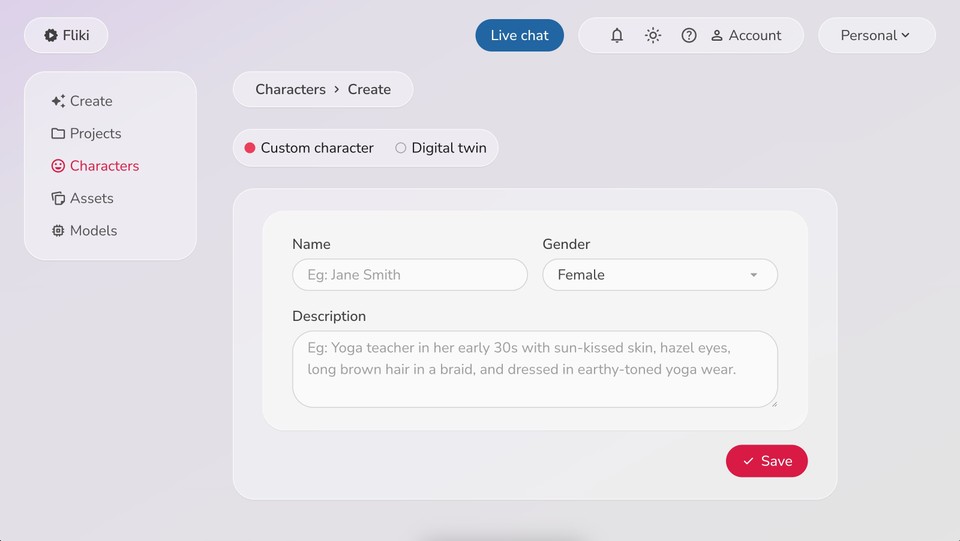
Click "Create Character" and select "Custom Character." This allows you to build an AI character from scratch. Simply provide:
-
Name of your character
-
Gender
-
A detailed description of their appearance and style
That's it. Fliki Pro will generate a consistent AI character based on your specifications.
Option B: Your AI Digital Twin
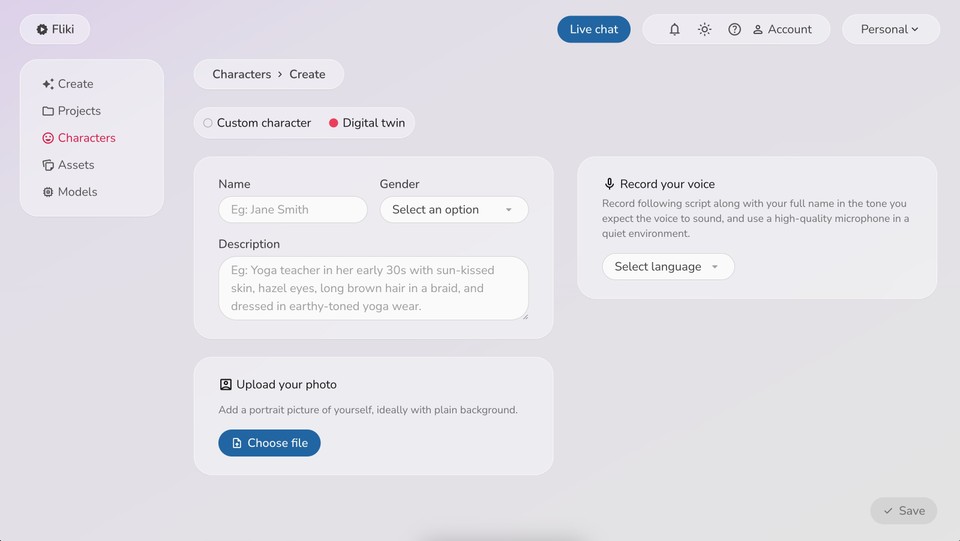
This is where things get really interesting. If you want the drip flip video to feature you (or look like you), select the "Digital Twin" option. Here's what you'll need:
-
Your name
-
Gender selection
-
A description of your appearance
-
A portrait photo of yourself (ideally with a plain background for best results)
-
A voice recording of yourself reading a sample script
The AI twin technology analyzes your photo and voice to create a digital version of you that looks and sounds remarkably similar. This means your drip flip video can feature a virtual you without ever stepping in front of a camera multiple times.
Step 2: Generating Outfit References
Here's where Fliki Pro truly shines. Instead of physically wearing different outfits, you're going to generate outfit references using AI. While you could source outfit images from fashion websites like Uniqlo, why not let AI do all the work?
Return to Fliki Pro home and directly click "Create" to start a new empty project. In the left chat window (your AI copilot), type:
Add character @{your character name}
When you type the @ symbol, you'll see options for Asset and Character. Select Character, and a picker will appear showing your available characters. Choose the character or AI twin you just created.
Now comes the magic. In that same chat window, type a prompt like:
Please create and add four modern female character outfit references. Each outfit should reflect a unique contemporary style, with clear details on clothing pieces, colors, and overall aesthetic.
(Adjust the prompt based on your character's gender and the style you're aiming for)
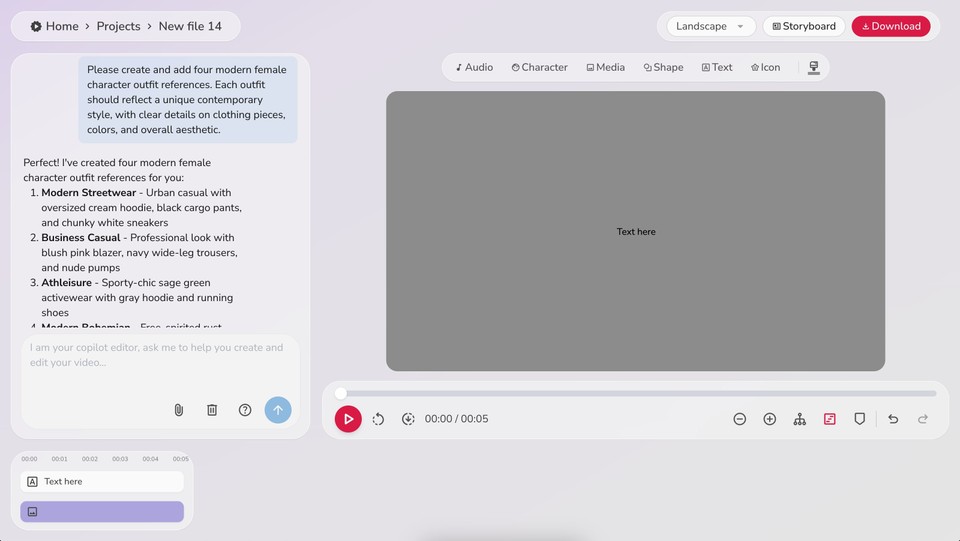
Fliki Pro will generate multiple outfit references tailored to your specifications. Each outfit will be distinct, stylish, and ready to use in your drip flip video. No shopping required, no wardrobe needed.
Step 3: Creating Your Background Reference
Consistency is key in drip flip videos. You want the focus to be on the outfit transitions, not changing backgrounds. Again, let AI handle this for you.
In the copilot chat, type something like:
Generate an image of an empty room with minimal furnishings, clean lighting and add it as a reference.
Fliki Pro will create and add a clean, professional background that will remain consistent throughout your video, giving your drip flip that polished, professional look.
Step 4: Building Your First Video Layer
Now you're ready to construct your drip flip video. Click on media above the preview window to add a media layer, then double-click on it in the timeline to open the media editor.
Here's where you'll set up each outfit transition:
In the References section:
-
Add one outfit reference (start with the first one)
-
Add your background reference
In the Characters section:
-
Add your character or AI twin
For the Image Description prompt:
Ava, wearing the dress POV, symmetrical composition.
(Replace "Ava" with your character's name and adjust as needed)
For the Video Description prompt:
Showing the clothing, fast natural motion.
Model Selection:
Choose your AI video models. Based on testing and performance, I recommend:
-
Reference Image Model:Google Nano Banana Pro - This model excels at maintaining character consistency and outfit details
-
Video Model: Bytedance Seedance Pro or Google Veo 3.1 - Delivers smooth, natural motion for the drip flip effect
Hit submit and let Fliki Pro generate your first outfit segment.
Step 5: Adding Subsequent Outfit Transitions
This is where the true drip flip magic happens. Add another media layer and repeat the process, but with one crucial addition: the continuity feature.
Select a different outfit reference this time, but now check the "Continuity (first and last frame)" option. In the dropdown menus:
-
Set the first frame to reference the previous layer
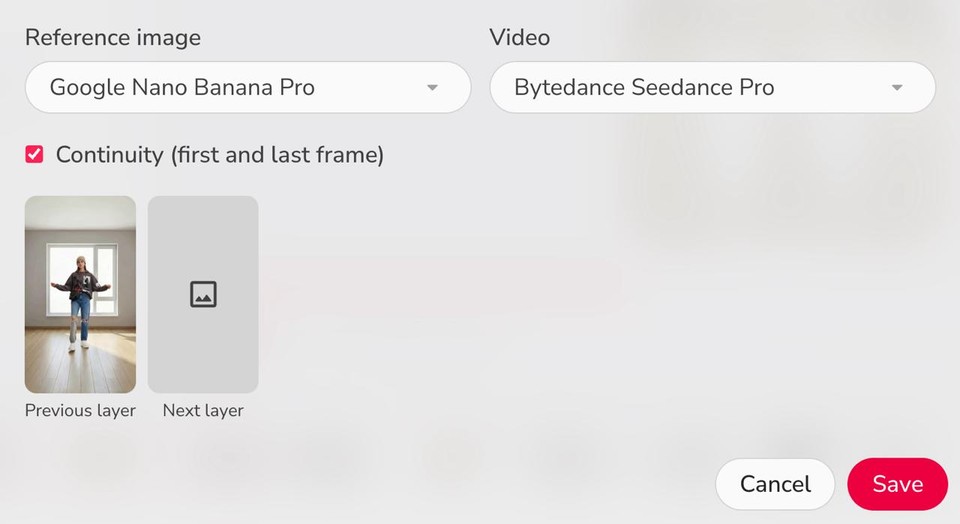
This ensures seamless transitions between outfits. The AI will automatically create smooth morphing between one outfit and the next, eliminating any jarring jumps or awkward cuts.
Repeat this process for each outfit you want to include. Three to five outfit transitions typically work best for viral drip flip videos, maintaining viewer engagement without overstaying your welcome.
Step 6: Enhancing with Background Music
What's a viral video without the right soundtrack? In the copilot chat, simply type:
Add background music to the chapter
Fliki Pro will generate a music track that complements your video. You can also upload your own music if you have a specific track in mind that matches your vibe.
Step 7: Downloading Your Drip Flip Effect Video
Once all your layers are generated and you're satisfied with the preview, click the Download button. Select your preferred resolution (1080p recommended for social media) and format, and Fliki Pro will export your drip flip video.
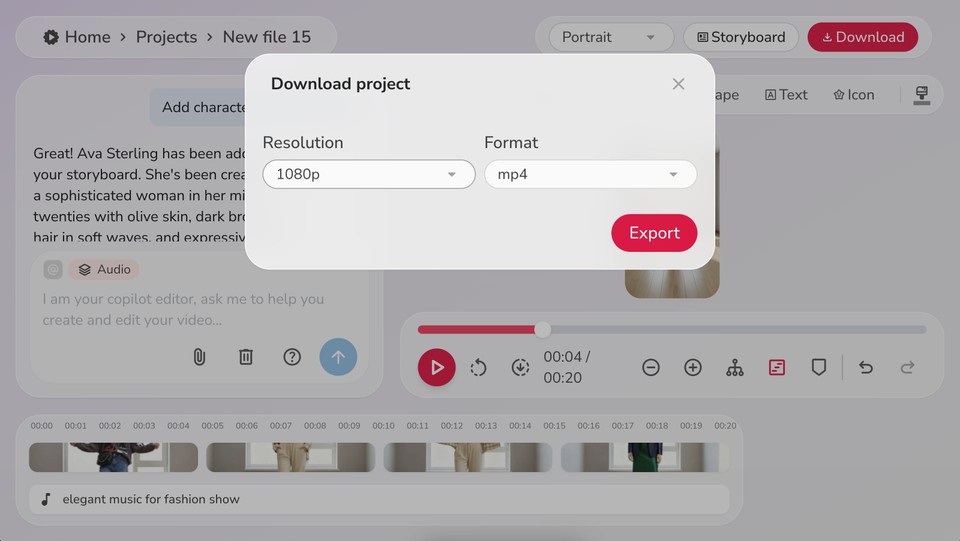
That's it. You've just created a professional-quality drip flip effect video without taking a single photo, without changing clothes, and without spending hours in video editing software.
Why This Method Beats Traditional Approaches
Let's break down the advantages:
-
Time Efficiency: What would take hours of setup, photography, and editing now takes minutes with Fliki Pro's text-to-video technology.
-
No Equipment Required: No camera, no tripod, no perfect lighting setup needed.
-
Infinite Outfit Possibilities: You're not limited by your wardrobe. Generate any outfit style imaginable.
-
Consistent Results: AI ensures perfect positioning and alignment in every frame.
-
Accessibility: No video editing experience required. The copilot guides you through the entire process.
-
Cost-Effective: No need to purchase or rent multiple outfits for a single video.
Tips for Maximum Viral Potential
To optimize your drip flip videos for social media success:
-
Keep it short: 15-30 seconds is the sweet spot for platforms like TikTok and Instagram Reels
-
Choose contrasting outfits: Dramatic transitions between styles (casual to formal, monochrome to colorful) capture more attention
-
Match music to transitions: Time your outfit flips to beat drops or rhythm changes
-
Add text overlays: Consider adding captions or context to increase watch time
-
Experiment with themes: Try seasonal looks, decade transitions, or profession-based outfit changes
The Future of Content Creation
The ability to create video content with AI represents a fundamental shift in how we think about content creation. Tools like Fliki Pro democratize video production, making professional-quality content accessible to everyone, regardless of resources or technical skills.
The drip flip effect is just one application. The same technology powering these transitions can be used for video advertisements, educational content, social media marketing, and countless other creative projects.
As AI video generation continues to evolve - with models like Google Veo 3.1 and Gemini 2.5 Flash pushing boundaries - the possibilities will only expand. What took a production team and expensive equipment yesterday can now be accomplished by a single creator with an internet connection.
Get Started Today
Stop letting complicated tutorials and time-consuming processes prevent you from creating viral content. With Fliki Pro, you're minutes away from generating your first drip flip video.
Head over to Fliki Pro, create your character or AI twin, and start experimenting. The beauty of AI-powered creation is that you can iterate quickly, test different styles, and find what resonates with your audience without any of the traditional barriers.
Your viral drip flip video is waiting. No wardrobe changes required.