
AI can make a lesson video in minutes. It cannot make it teach.
In 2026 you can turn a lesson plan into a narrated, captioned, multilingual video in about the time it takes to read this paragraph. The production problem is basically solved. The learning problem is not. A video can look polished, sound confident, and still leave the viewer remembering nothing.
I have made a lot of educational and explainer content, and the pattern is always the same: the videos people actually learn from are the ones built on how attention and memory work, not the ones with the fanciest avatar. The good news is that we have decades of solid research on exactly what makes an educational video effective, and once you know it, AI becomes an accelerator instead of a way to mass-produce forgettable content.
This guide is for teachers, course creators, and educational YouTubers who want to use AI the right way. We will cover the learning science in plain language, a step-by-step workflow, where AI genuinely helps versus where a human has to stay in the loop, and the accuracy and accessibility issues most guides skip. If your goal is corporate onboarding or compliance rather than teaching an audience, that is a slightly different job, and I wrote a separate guide on how to record training videos for it.
Let us start with what "educational video" even means, because the format you choose changes everything.
The main types of educational video (and where AI helps most)
Not every lesson wants to be the same kind of video. Matching the format to the content is the first real decision.
A lecture or lesson recording puts a teacher on screen. It is good for presence, motivation, and framing a topic, and here AI mostly helps after the fact: cleaning up audio, generating captions, translating, and trimming the dead air. An explainer video introduces a concept quickly, and it is a strong fit for AI scripting, voiceover, and B-roll. An animated concept video is ideal for abstract processes that are hard to film, though AI animation still struggles with precise diagrams. A screencast tutorial teaches software step by step, with a human driving the screen and AI handling narration and captions. Microlearning, a single two-to-three minute idea, is the sweet spot for end-to-end AI generation. And a full online course module benefits from AI for consistent narration and localization at scale, while a human owns the sequencing and the accuracy.
One framing worth keeping in mind, from Cynthia Brame's research below: a pure talking head uses only the verbal channel and adds little on its own. The strongest educational formats pair a spoken explanation with a complementary visual, which is exactly what the science predicts.
The learning science, in plain language
If you take one thing from this article, take this section. It is also what separates a genuinely useful resource from the dozens of "type a prompt and publish" posts out there.
First, two popular myths to clear out, because building on them will actively hurt your videos.
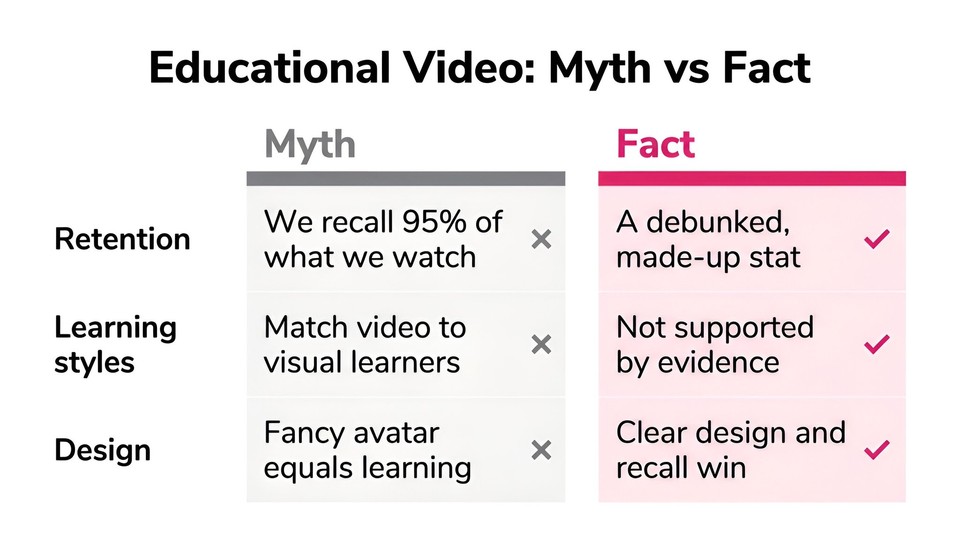
The claim that "people remember 10 percent of what they read but 90 or 95 percent of what they watch" is not real. Those numbers come from a distorted version of Dale's Cone of Experience, and when researchers went looking for the underlying studies, they found the percentages were fabricated and spread through decades of misattribution. The tell is that every number is conveniently divisible by ten. Do not design around it. Similarly, the idea that you should match a video to someone's "learning style," visual versus auditory, is one of the most tested and least supported ideas in education. Adequately designed experiments do not find the effect. Everyone learns better from a well-designed combination of words and visuals, which is the actual finding.
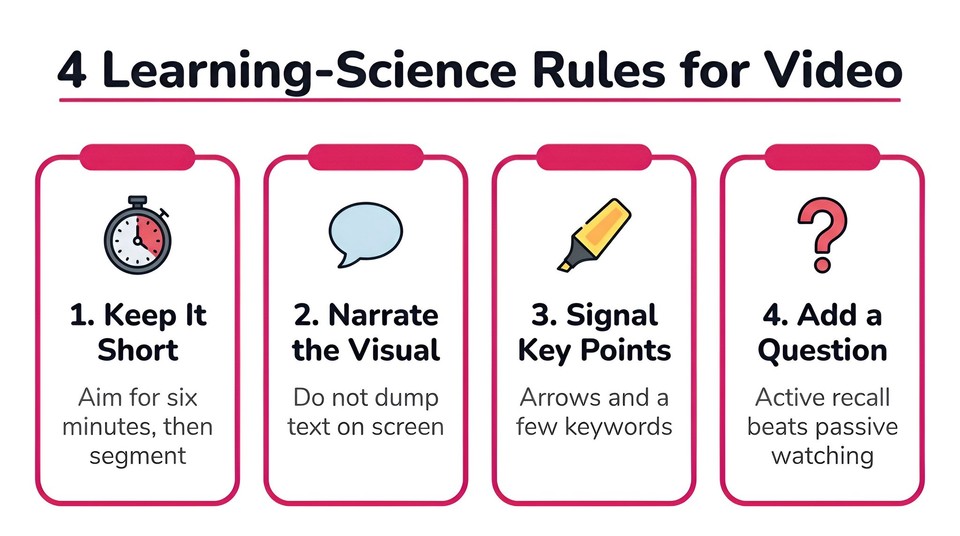
So what does work? The backbone is Richard Mayer's Cognitive Theory of Multimedia Learning, which rests on three ideas: we process words and pictures through separate channels, each channel has limited capacity, and real learning takes active mental effort. From that, a set of practical principles follows, and Cynthia Brame's peer-reviewed synthesis Effective Educational Videos turns them into guidance you can act on. Three levers matter most:
Manage cognitive load. Signal the key points, segment content into chunks, weed out anything extraneous (background music, busy visuals, decorative clip art), and narrate visuals rather than piling text on screen.
Hold attention. Keep videos short, use a conversational and enthusiastic tone, and speak directly to the viewer as "you."
Prompt active learning. Build in questions and moments of recall so the viewer does something with the material instead of passively watching.
That last point has its own well-known framework. Chi and Wylie's ICAP model ranks cognitive engagement from Passive to Active to Constructive to Interactive, and simply watching a video sits at the bottom. Adding a question the viewer has to answer moves them up the ladder, which is why knowledge checks are not a nice-to-have. They are the mechanism that turns watching into learning.
How long should an educational video be?
Short, with a caveat. The most-cited finding comes from Guo, Kim and Rubin, who studied 6.9 million video sessions across four large online courses and found that median engagement peaks at around six minutes and drops steadily after that, regardless of how long the video actually is. Their practical rule became famous: aim for six minutes or less.
The caveat is that this data comes from open online courses, and it does not transfer perfectly to a for-credit class or a hands-on tutorial where a motivated learner will happily stay longer. The deeper principle underneath the six-minute rule is segmenting: break a big topic into short, self-contained pieces with clear beginnings and ends, and give the viewer control over pacing with chapters or pauses. A 24-minute topic taught as five short segments will almost always beat the same content as one unbroken block.
The step-by-step workflow to create an educational video with AI
Here is the process I would hand to any teacher or creator starting out.
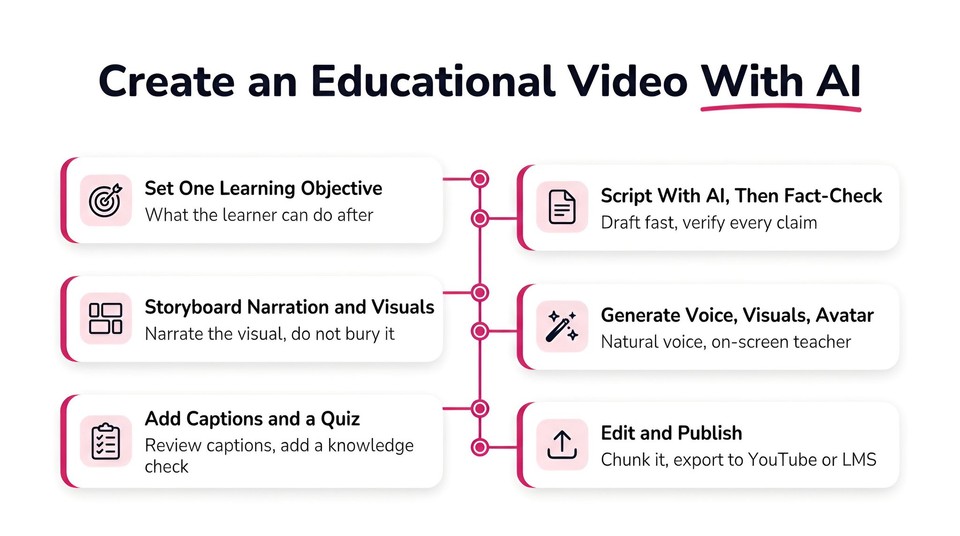
Step 1: Write one measurable learning objective
Before anything else, finish this sentence: "After this video, the learner will be able to ______." Use an action verb from Bloom's taxonomy, like describe, compare, or solve. This single sentence controls your scope, your length, and the knowledge check at the end. One objective per video.
Step 2: Script it with AI, then fact-check every line
This is where AI saves the most time and creates the most risk. Use it to draft a first script, but write for the ear: short sentences, conversational tone, direct address, a little enthusiasm. Then fact-check every claim yourself. AI models confidently state wrong things, and in education the accuracy bar is high because a plausible-sounding error becomes something a student actually memorizes. You can draft in a tool like Fliki's idea to video flow, or paste your own outline, but you are the subject-matter expert of record.
Step 3: Storyboard narration against visuals
Map each line of narration to what appears on screen at that moment. This is where you plan dual-channel design (narrate the diagram, do not bury it under a paragraph), decide your signaling cues, and mark where the knowledge check goes. A simple two-column outline, narration on the left, visual on the right, is enough.
Step 4: Choose the format and generate voice, visuals, and optionally an avatar
Match the format to the objective from the first section. Then generate the pieces. Modern tools can turn a slide deck or script into a narrated video with matched visuals in one pass. Fliki's PPT to video does this from a deck, its AI voiceover offers 2,000-plus voices across 80-plus languages, and you can add an AI avatar as an on-screen teacher or clone your own voice if you want a consistent presence across a course. Use a warm, natural voice, not a flat robotic default, because a friendly human-sounding voice measurably improves learning (Mayer calls this the voice principle).
Step 5: Add captions and on-screen signaling
Turn captions on for every video, then correct them. Auto-captions are fast but stumble on names, technical terms, and equations, which are exactly the words that matter in a lesson. For on-screen text, use signaling, a few key words or a label, not a transcript of your own narration. Duplicating the narration as full on-screen text works against you (the redundancy principle).
Step 6: Add a knowledge check
Insert at least one question. A quick multiple-choice or true-false checkpoint between segments forces active recall, reduces mind-wandering, and improves how much sticks. Tools like Fliki's video quiz maker let you drop checkpoints into the timeline, and if you publish to an LMS the results can feed completion tracking.
Step 7: Edit, then publish where your learners are
Weed the extraneous, tighten the pacing, and chunk anything long. Then export and publish: YouTube with chapters and reviewed captions for open content, or an MP4 plus an SRT caption file for a course platform or LMS like Teachable, Kajabi, Thinkific, Canvas, or Moodle. If you teach a global audience, this is where AI localization earns its keep, letting you translate the whole lesson into dozens of languages without re-recording.
Where AI genuinely helps, and where a human has to stay in the loop
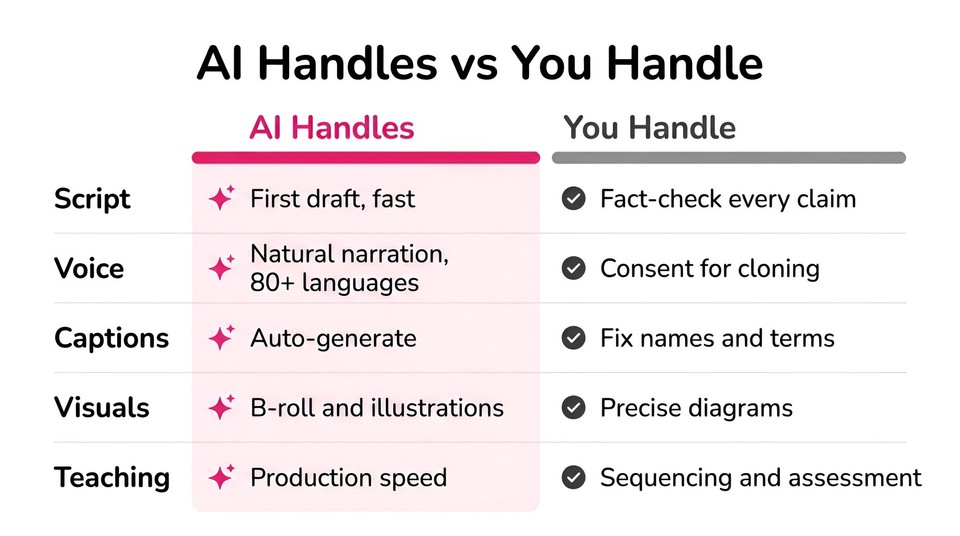
It helps to be honest about both sides, because that judgment is what keeps your content credible.
AI is excellent at the mechanical and multiplying work. Voiceover and voice cloning produce expressive narration in many languages and let you update a line without re-recording. Avatars remove filming and give a course a consistent on-screen teacher. Auto-captions and translation open your content to learners who speak other languages or rely on captions. AI images and B-roll are great for illustrative visuals and faceless explainers.
But several things still need a human. Factual accuracy is non-negotiable, and AI hallucinates, so a subject-matter expert has to verify every claim. Precise diagrams, equations, and data visualizations are where AI image and animation tools are weakest, since they distort text and morph details, so build those manually. Avatars can feel generic or slightly uncanny, and learners who notice an artificial presenter can report lower trust, so use avatars deliberately, pair them with strong visuals, and favor a named, credible persona over a hollow corporate face. And any cloned voice or likeness requires consent. The instructor's judgment about sequencing, emphasis, and what to assess is still the actual teaching.
The part most guides skip: accuracy, disclosure, and accessibility
This is the section that makes a resource trustworthy, and it is exactly what the education audience cares about.
Accuracy and academic integrity
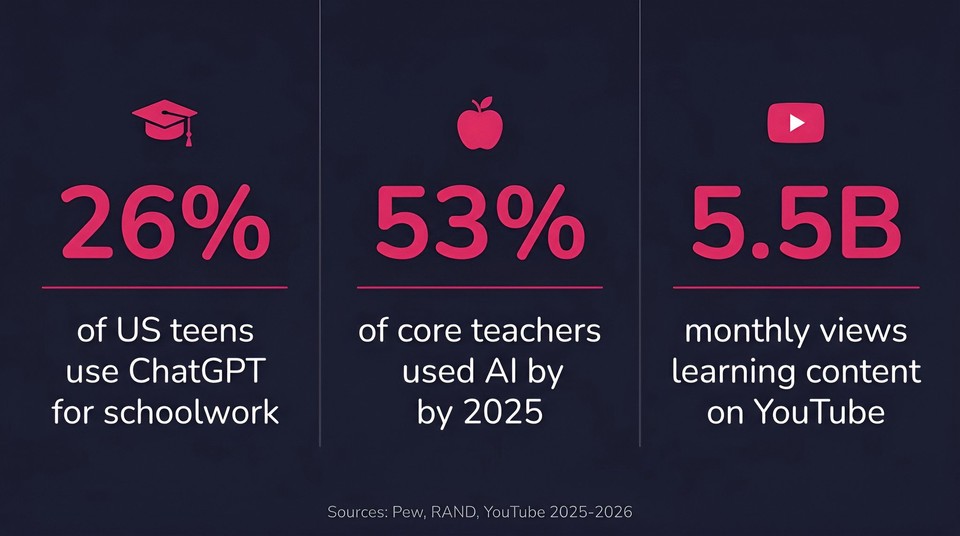
Treat AI drafts as a starting point, not a source. Educational content has a higher accuracy bar than marketing, and a confident error in a lesson is worse than no lesson. It is also worth knowing the climate you are publishing into: a 2024 Pew survey found a quarter of K-12 teachers think AI tools do more harm than good, and RAND research in 2025 found real anxiety among students and parents about AI in the classroom. Being rigorous and transparent is how you earn trust in that environment.
Disclosure
UNESCO's guidance on generative AI in education calls for a human-centered, transparent approach. And the EU AI Act's Article 50 will require AI-generated audio, image, and video to be marked as such, with deepfakes disclosed, applying from August 2026. The practical takeaway is simple: label AI-generated instructional video, and get consent for any real person's voice or likeness.
Accessibility, which is often the law
Captions are not optional for most educational institutions. WCAG 2.1 Level AA is the standard, and its captions criterion requires captions for all prerecorded video. In the United States, the Department of Justice's 2024 ADA Title II rule adopts WCAG 2.1 AA for state and local government, explicitly including public schools, community colleges, and universities, with compliance deadlines arriving in 2026 and 2027. This is not theoretical: the National Association of the Deaf's cases against Harvard and MIT ended in settlements requiring high-quality captioning of university online video. Beyond compliance, captions help everyone, and research on students consistently finds the large majority use captions and transcripts as a learning aid. Given that the WHO estimates over 1.5 billion people live with some hearing loss, this is simply good teaching.
Best AI tools for creating educational videos
There is no single winner, only the right fit for the format you teach. Pricing shifts often, so verify current numbers on each vendor's page.
Tool | Best for | What it does well | Rough pricing (verify) |
|---|---|---|---|
Fliki | Lessons, explainers, and full courses from a script or deck | PPT/idea-to-video, 2,000+ voices in 80+ languages, AI avatar teachers, quiz checkpoints, one-click localization, LMS-ready exports | Free plan; paid from low monthly tiers |
Synthesia | Avatar-led lessons and localization at scale | Realistic avatars, 140+ languages, enterprise features | Free trial minutes; paid from ~$18/mo |
Colossyan | L&D and education with interactivity | Avatars plus branching and quizzes | Limited trial; paid from ~$27/mo |
Canva (Magic Studio) | Lesson slides, infographics, simple explainers | Design-first, free for verified K-12 teachers | Free tier; Pro ~$15/mo |
Powtoon / Vyond | Animated lessons and student projects | Character animation and templates | Free tier; education plans available |
Camtasia | Polished screencast tutorials | Deep screen recording plus editing | ~$180 to $300/yr |
ElevenLabs | Realistic narration and dubbing | Expressive AI voice, cloning, many languages | Free tier; paid from ~$6/mo |
A quick honest read. If your lessons are software walkthroughs, a screen recorder like Camtasia or Loom is your core tool. If they are animated explainers for young learners, Powtoon or Vyond fit the style. If you need realistic avatar-led courses localized across languages, Synthesia and Colossyan are strong.
Where Fliki earns its place, and why it works as an all-in-one option, is the combination in a single workspace: you can turn a lesson plan, slide deck, or one-line idea into a narrated educational video, pick from 2,000-plus voices or clone your own, add an AI avatar teacher, generate visuals for abstract concepts, drop in quiz checkpoints, caption it, and localize the whole thing into 80-plus languages, then export an LMS-ready file. According to Fliki, more than 200,000 educators have used it to make over five million educational videos. If your goal is "make the lesson once and reach every learner," that consolidation is the point. You can compare it against other options on the alternatives page, and there is a broader roundup in our best AI video generators guide.
Common mistakes to avoid
The predictable ones, so you can skip them:
Robotic narration. A flat default voice kills engagement. Use an expressive voice and mark emphasis.
Generic or uncanny avatars. Use them deliberately and pair them with visuals, or use a consented likeness of the real instructor.
Walls of on-screen text that duplicate the narration. Signal with a few words, do not transcribe your voice onto the slide.
Reading slides verbatim. Slides support, the voice explains.
Publishing AI facts without checking. One hallucinated claim becomes something a student learns wrong.
Videos that run too long with no interaction. Segment, and embed a question.
Unreviewed auto-captions. They fail on exactly the technical terms that matter.
Final thoughts
Creating educational videos with AI is not about generating the most content the fastest. It is about using AI to remove the production grind so you can spend your effort where learning actually happens: a clear objective, a tight script you have checked, visuals that support the words, a question that makes the viewer think, and captions that let everyone in. Get that right and a simple AI-made video will teach better than a beautifully produced one that ignores how people learn.
If you want to try it, you can create your first educational video with Fliki for free. Bring a lesson plan or a single idea, add a knowledge check, and see how close to publish-ready one pass gets you.