Introduction
To make an AI micro drama, write a one-minute episode that opens mid-conflict and ends on a cliffhanger, lock your characters and locations as reference sheets, generate the episode in short segments with a video model, then edit and caption it for vertical platforms. Fliki's Short film workflow handles the planning and generation in one place, and I ran it end to end on a real script before writing this guide.
A micro drama is a serialized story built for the phone: vertical video, episodes of about a minute, a hook at the start and a cliffhanger at the end. The expensive part used to be the shoot, with actors, locations and weeks of crew time. AI changes that cost, but it does not remove the craft. Faces drift between shots, voices change, and a weak script still loses viewers by episode three.
In this guide I walk through exactly what I did in Fliki, from script to finished episode, with the real screenshots and frames. I also report what it cost in credits, what went wrong, and the rules on AI labels, copyright and likeness that most tutorials skip.
What is an AI micro drama?
A micro drama (also written microdrama, vertical drama or short drama) is a serialized story shot for the phone in 9:16 video. Episode length varies by source: the Television Academy's Emmy Magazine puts it at 60 to 90 seconds, while Reuters reports 45 seconds to two minutes. A safe working range is one to two minutes. Series run for dozens of episodes, the first few are free, and viewers then pay through coins or a weekly subscription that Reuters prices at roughly $8 to $20 a week.
An AI micro drama is the same format, but the scenes, characters and voices come from AI image, video and voice models instead of a live shoot. A person still writes the story, makes the casting and look decisions, and decides which shots are good enough to keep.
Why creators and studios are paying attention
Three numbers explain the interest. Omdia forecasts about $14 billion in global microdrama revenue in 2026, up from $11 billion in 2025, with roughly $3 billion of 2026 coming from outside China. The same Omdia release cites Sensor Tower data showing ReelShort users in the US spending 35.7 minutes a day in the app in Q4 2025, against 24.8 for Netflix. And China's regulator reported about 430,000 microdramas released between January and August 2026, more than 90% of them made with AI.
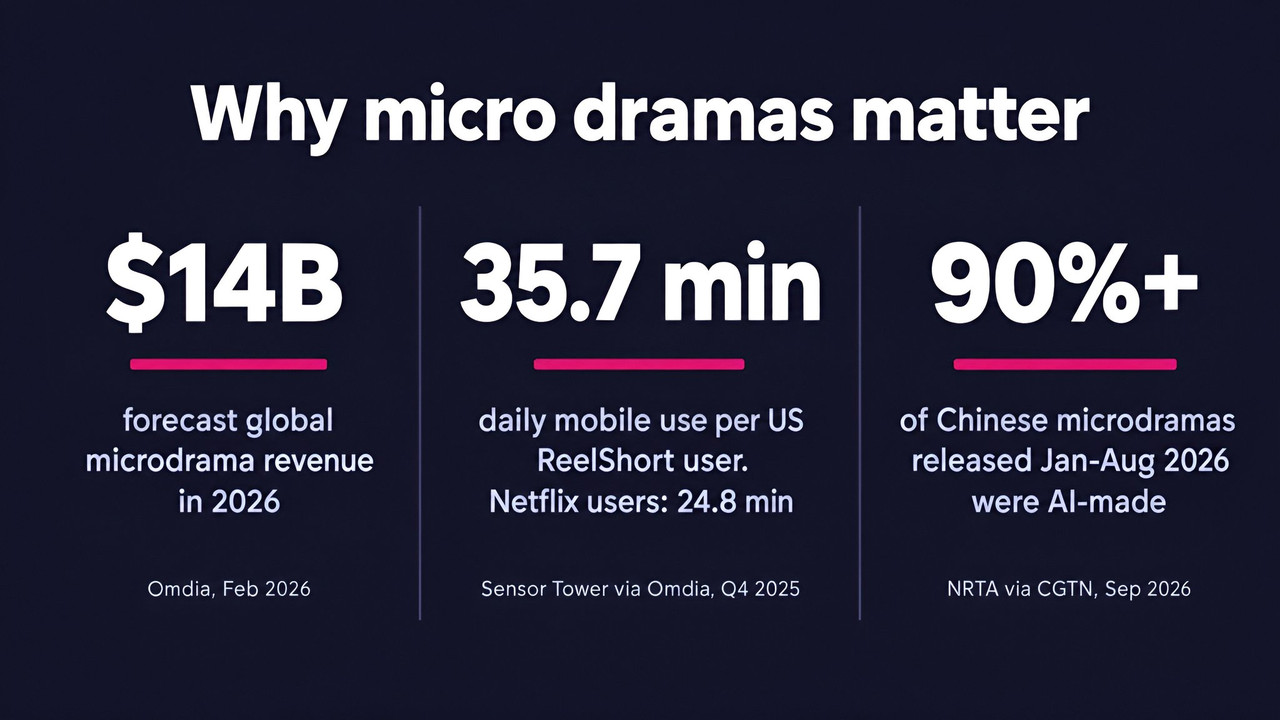
A caution before you quote any of these. Market-size figures use different definitions, so do not stack them. Sensor Tower counted $2.98 billion in 2025 in-app purchases, which covers only App Store and Google Play payments, while Omdia's $11 billion includes subscriptions and other revenue and is dominated by China. The Chinese AI share also counts titles released, not hours watched. Treat the numbers as a sign of direction, not a business case.
What you need before you start
You need three things: a one-page idea for a single episode, a Fliki account with access to the Short film workflow, and enough credits to afford a few retakes. Fliki's AI short drama generator page lists the feature as available on the Basic plan and up, with episodes from 30 seconds to 2 minutes in 9:16 or 16:9. Check current pricing for how many credits each plan includes.
I used a Premium account and made one episode as a test. Everything below comes from that single run, so where I generalize I say so.
How to make an AI micro drama in Fliki, step by step
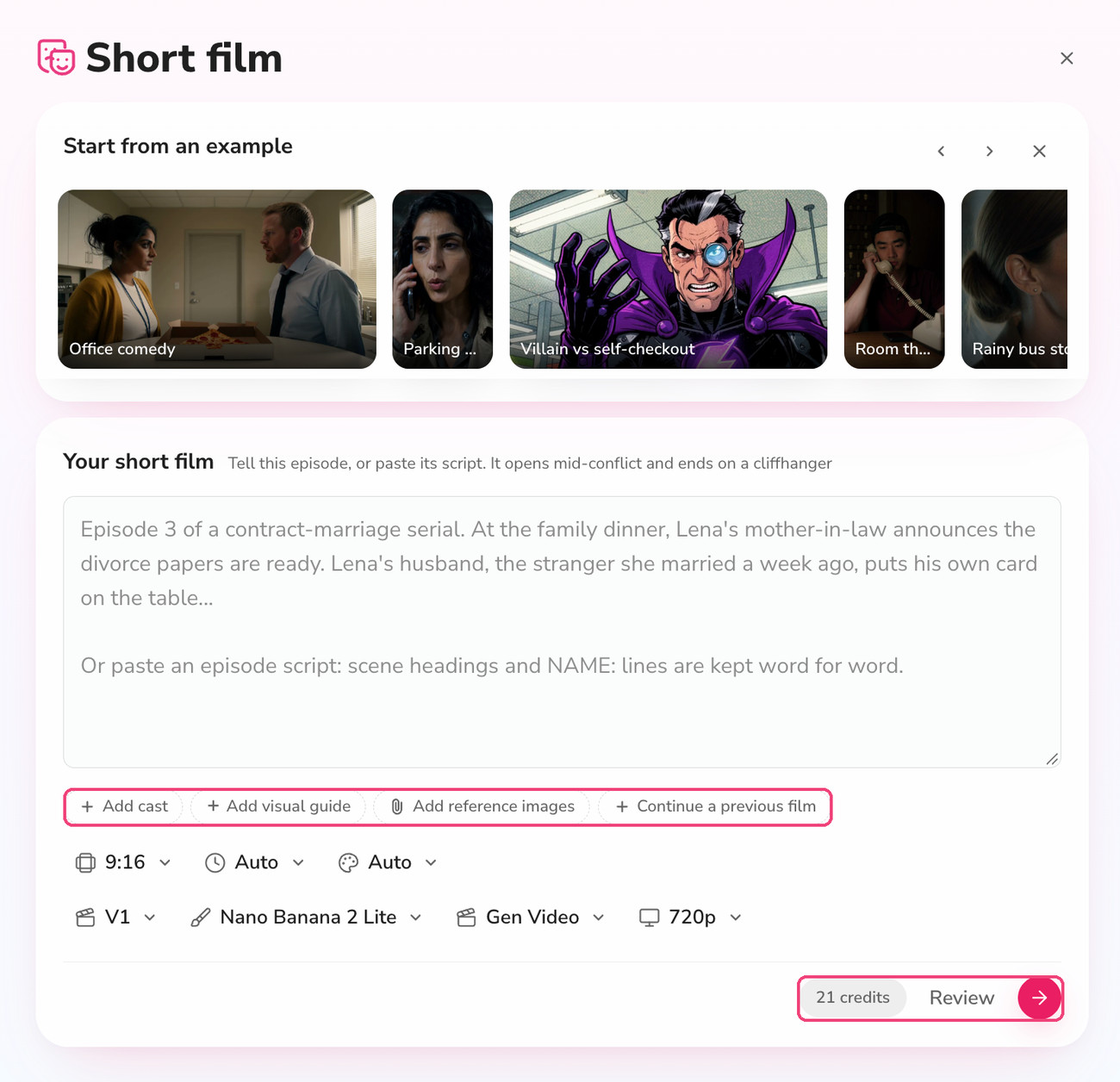
You can open the workflow directly at app.fliki.ai with the microDrama workflow. It is labelled Short film in the interface. Under the title you will see a row of example episodes (Office comedy, Parking garage thriller, Villain vs self-checkout and others) that you can recreate in one click, then a single text box for your episode and a row of settings.
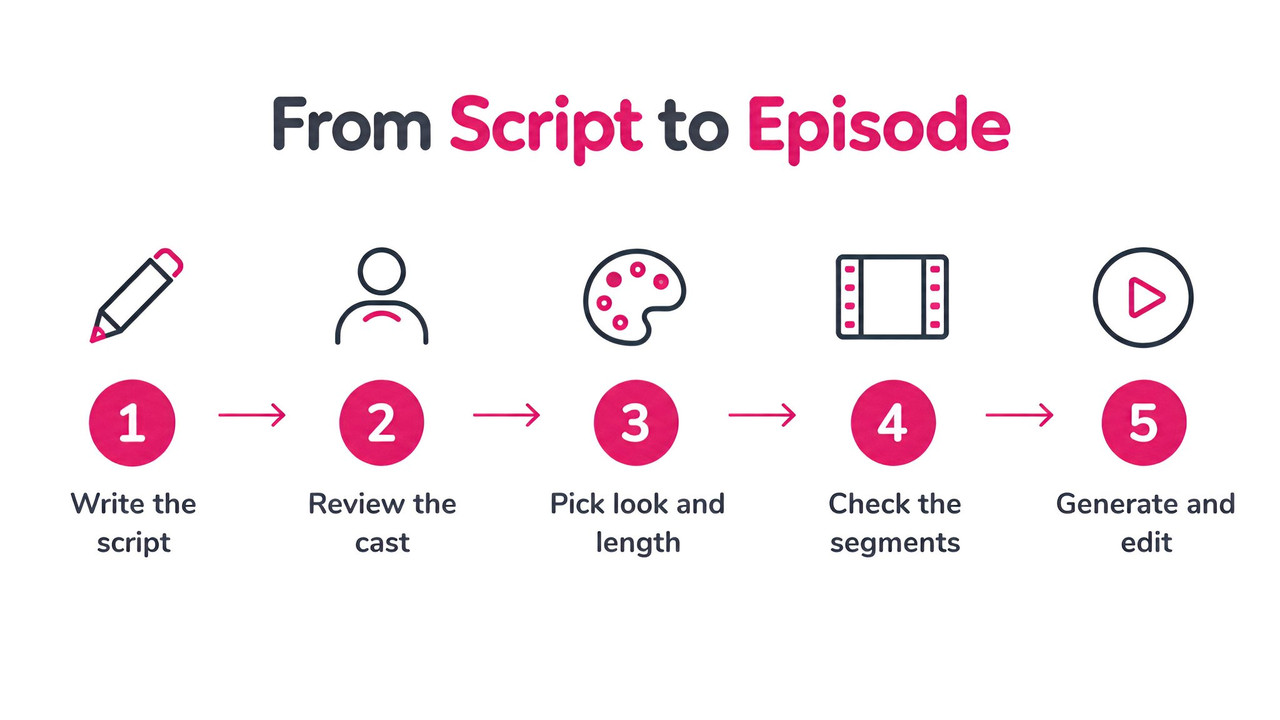
Here is the five-step shape of the process before the detail.
1. Write a script that opens mid-conflict
The box tells you what it wants: describe the episode, or paste its script, and note that it "opens mid-conflict and ends on a cliffhanger." If you paste a script, scene headings and NAME: lines are kept word for word. If you only describe the idea, Fliki writes the dialogue for you.
I wrote my own short script, a night-shift thriller called Before Midnight. A pharmacist named Maya is handed a prescription dated tomorrow, in her own handwriting, by a soaked stranger named Daniel. It ends with a bloodied version of Maya outside the glass door mouthing one word: "Run." It runs to about 120 words with six lines of dialogue. If you want a repeatable format, use a template like this:
Episode template: one line for the setting and who is on screen. Three to six lines of NAME: dialogue, each under ten words. One reveal that changes what the viewer thinks is happening. One closing image that raises a new question. No explanation scenes.
Keep dialogue short because every line has to be performed inside a clip a few seconds long. A line that needs a paragraph of setup will not survive being split across shots.
2. Decide on cast, visual guide and reference images
Under the text box are four optional chips: Add cast, Add visual guide, Add reference images, and Continue a previous film. I left all four empty on my first run and let Fliki invent the cast, which is the fastest way to test a script. For a real series, these chips are where consistency lives. Add cast is where saved characters come in (the cast board later says "Save a character to cast them again"), reference images are for steering faces, wardrobe and sets, and Continue a previous film is how you chain episode two to episode one. I did not test the chain, so I cannot tell you how well it holds a cast across a full season.
3. Set format, length and look
The first row of settings covers aspect ratio (9:16 is the default), length and visual preset. Length offers Auto, 30s, 45s, 1m, 1.5m and 2m. I left it on Auto and Fliki picked a 30 second target for my script. The preset picker is worth a look because it changes the whole feel of the episode.
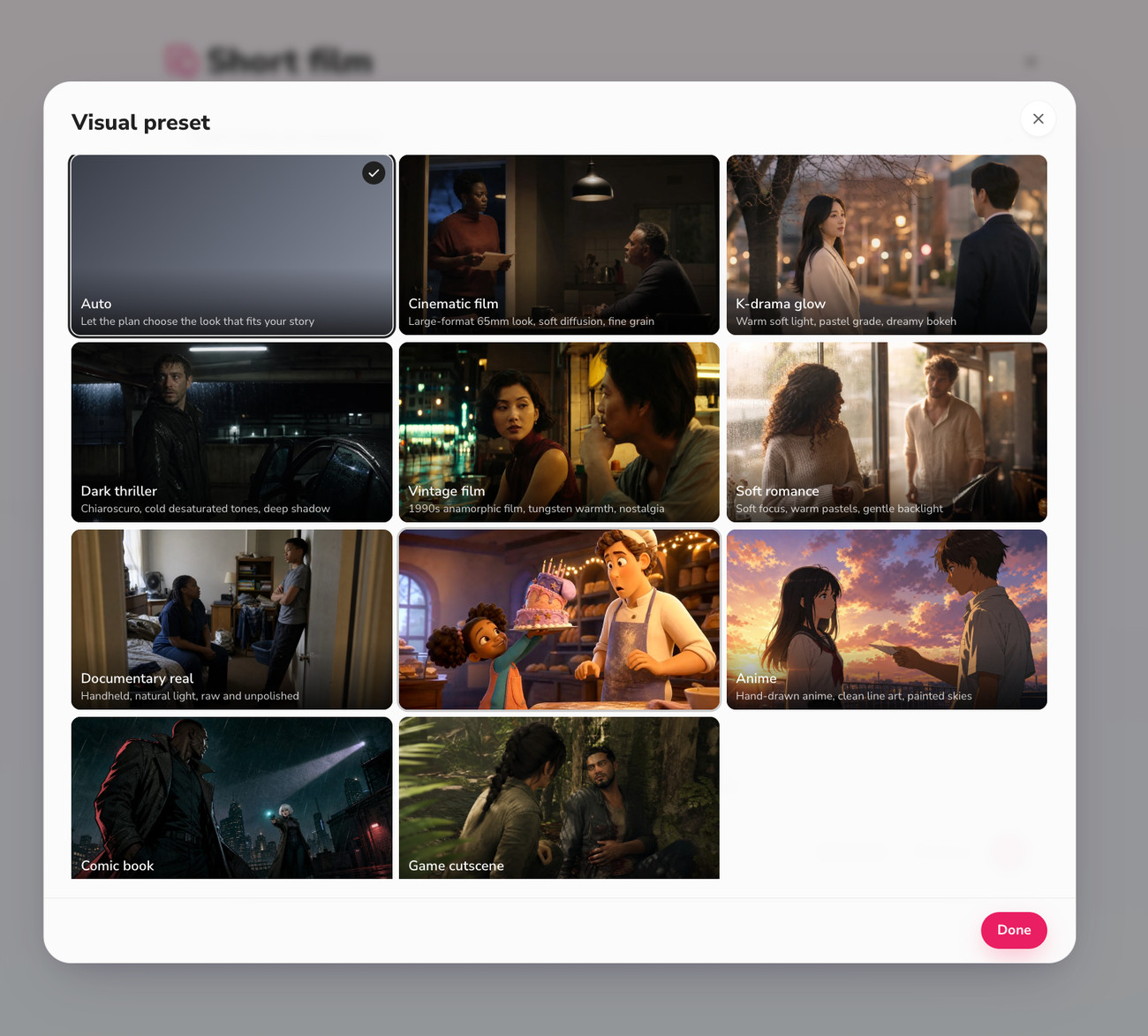
The presets are Auto (the plan chooses a look to fit your story), Cinematic film, K-drama glow, Dark thriller, Vintage film, Soft romance, Documentary real, a 3D animated look, Anime, Comic book and Game cutscene. I stayed on Auto and the plan chose a dark, rain-soaked, cool-toned look that suited the script. If you are building a series, pick a preset on purpose and keep it the same for every episode.
4. Choose the models, and know what they cost
The second row has a version selector (V1 is the default and the one I used), an image model, a video model and a resolution (720p by default). The image model draws the cast and sets, and the video model animates the shots. The dropdowns show the cost of each option, which makes this the step where you decide how much a retake is worth.
Setting | Option | Listed cost |
|---|---|---|
Image model | Nano Banana 2 Lite (default) | 0.75 credits per image |
Image model | Qwen Image 3 | 0.5 credits per image |
Video model | Gen Video (default) | 0.50 per second |
Video model | MiniMax H3 Max | 1.0 per second |
Video model | Wan 3.0 | 2.0 per second |
Video model | Kling 4.0 | 2.0 per second |
The video prices are shown in the dropdown as "cps", which I read as credits per second. That matches how the estimate scales: at the default models and 720p, the estimate on the form was 21 credits for 30 seconds, 39 for one minute and 75 for two minutes. Moving from Gen Video to Wan 3.0 or Kling 4.0 would quadruple the per-second video cost on those listed rates. I used the default for a first draft, which is also what I recommend: prove the script and the cast first, and spend on a pricier model only for the episodes that matter.
5. Press Review and read the plan
This is the step that makes the workflow feel like directing rather than prompting. Pressing Review does not generate the video. It builds a plan you can inspect and change, and in my run it took a few minutes to appear (I did not time it precisely). The plan was titled Before Midnight and had three parts.
First, a cast and places board. Fliki created a character sheet for each person and a reference image for the location. Maya and Daniel each got a three-panel sheet with full-body views and a face close-up, and the pharmacy got a wide establishing image. Each card has icons to save the character for reuse, ask the copilot to change it, or regenerate it.
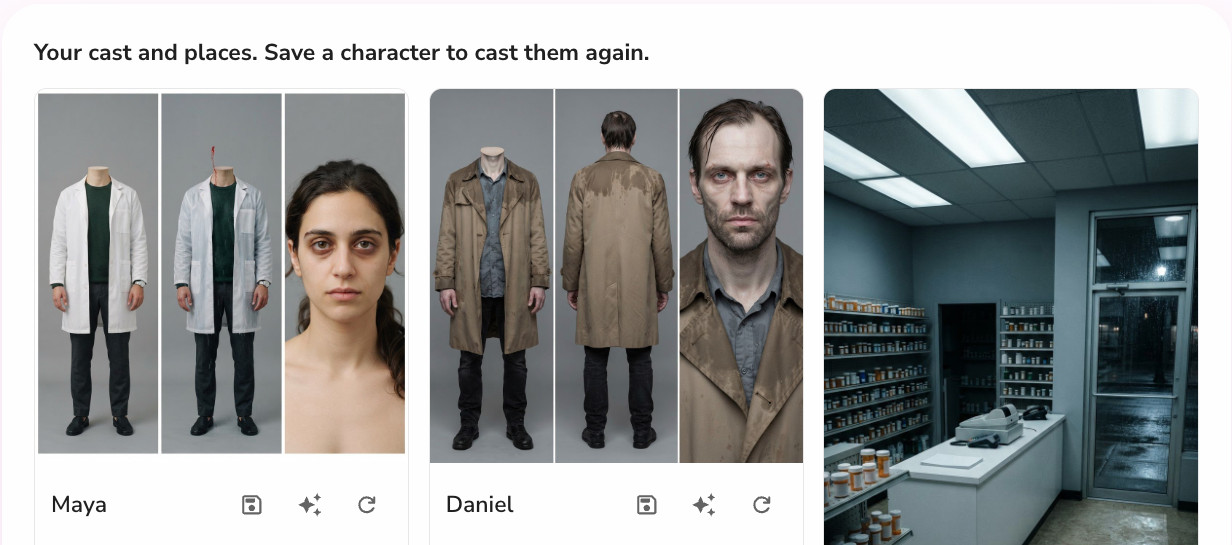
Second, the story and style summary, which in my case read as a tomorrow-dated prescription, a stranger, and an injured double outside in the rain. Third, the script split into segments. My 29 second plan became three segments of 10, 12 and 7 seconds. Open a segment and you can see its script lines and a video prompt "sent to the video model as written," broken into numbered shots of 1.5 to 3 seconds each. Segment 1 had four shots of 3, 3, 2.5 and 1.5 seconds.
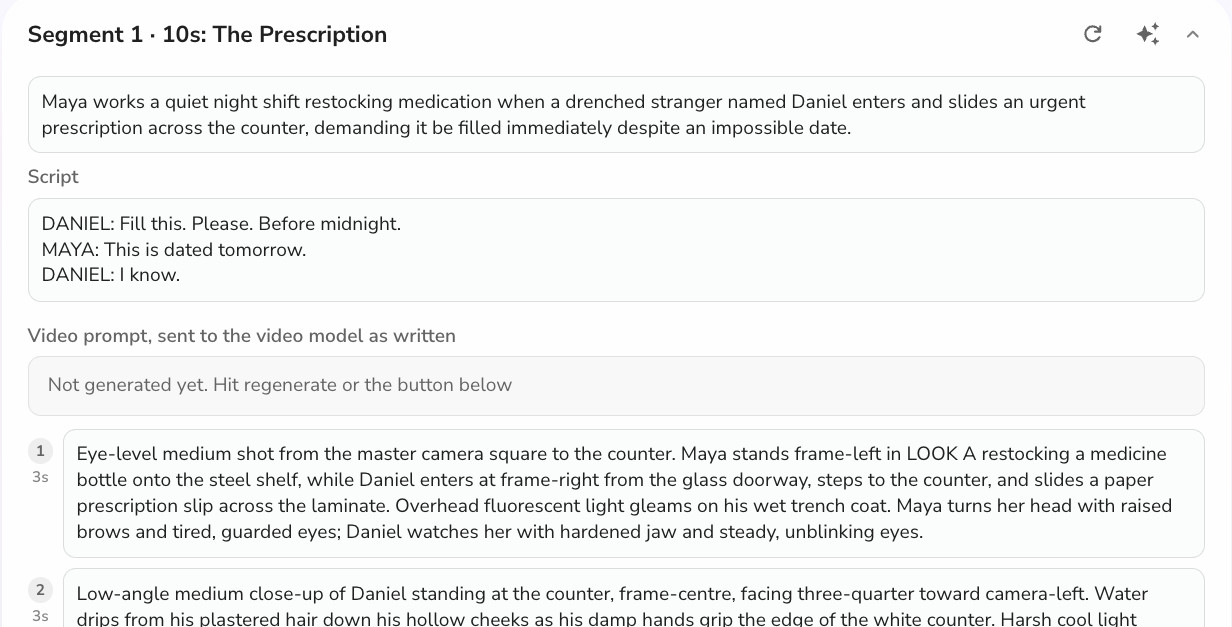
At the bottom is a box that says "Ask the copilot to change anything: script, characters, style, a frame." The credit estimate sits next to the Generate video button, and mine read 20.2 credits. This is the cheapest place to fix problems. A wrong face costs a regenerate on one card here, not a re-render of a whole episode later.
6. Generate, then edit
I pressed Generate video. A progress panel walked through Preparing, Analyzing the script, Building the scenes, Generating the visuals, Adding voice and music, and Finalizing, with a note that you can close the tab and the work continues in the background. The progress bar in my automated browser session sat at 27% for several minutes, but the file was marked ready when I checked its status separately, so do not panic if the bar looks stuck.
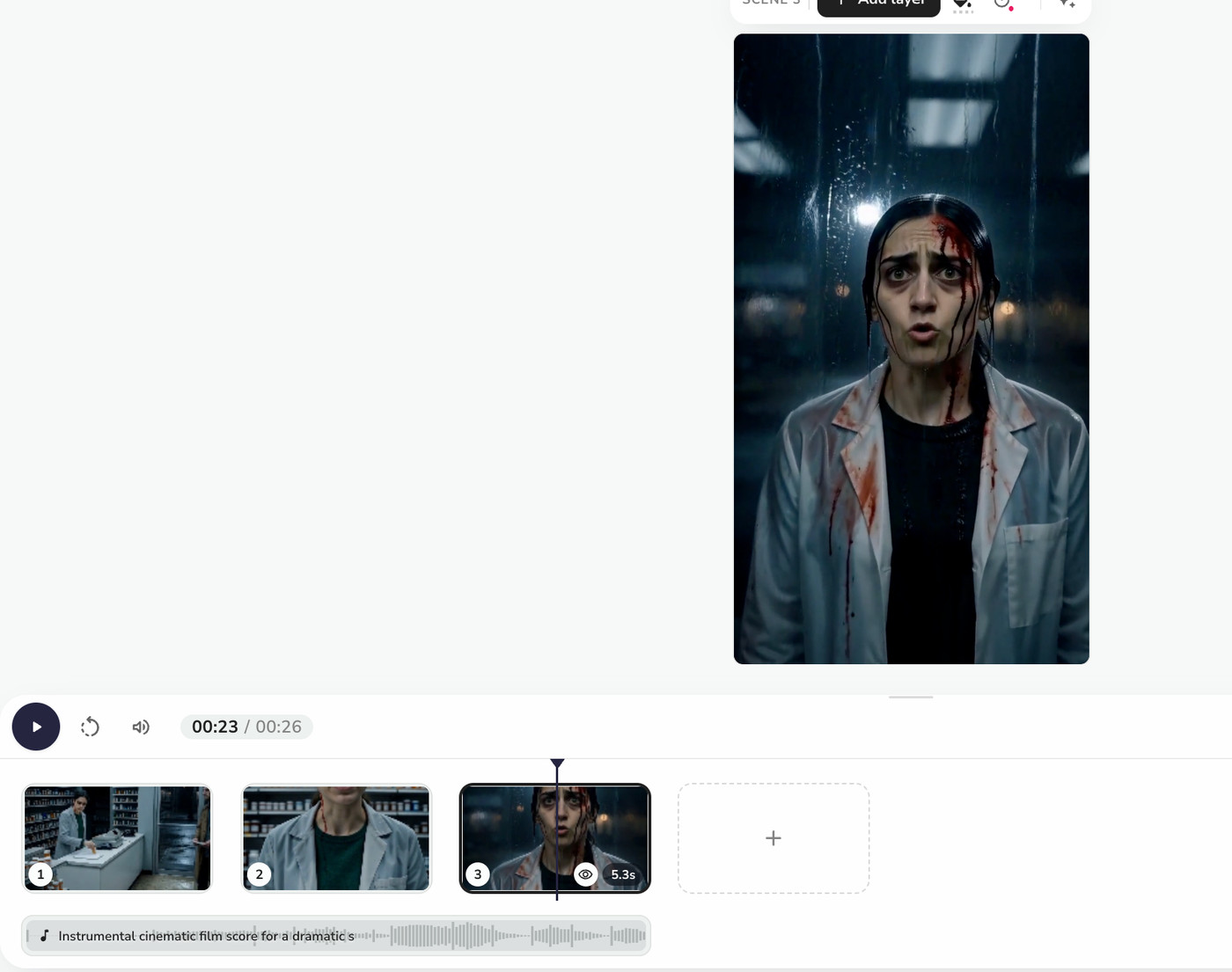
The result opens in the regular Fliki editor as a 26 second vertical video with three scenes, one per segment, and an instrumental cinematic score added automatically. From there you can swap a scene, change the music, add subtitles, and export like any other Fliki video.
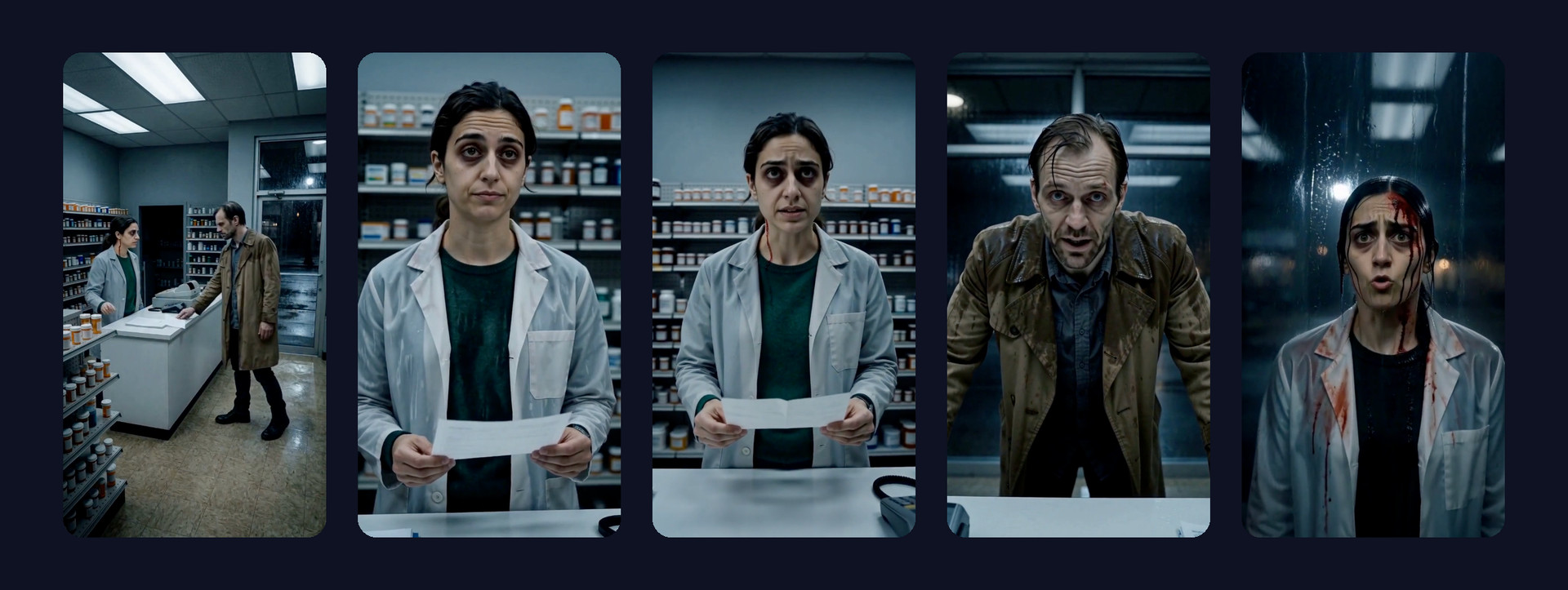
Here are five frames from the finished episode, in order.
What worked and what did not
The cast held together better than I expected. Maya keeps the same face, hair and white lab coat across wide, medium and close shots, and Daniel's trench coat and wet hair stay consistent too. The set also holds: the shelves, the glass door and the rain read as the same pharmacy. The last frame, where the injured Maya appears at the glass, landed the cliffhanger visually.
Three honest caveats. A faint red streak on Maya's neck appears in an early close-up, which I traced to the bloodied variant in her cast sheet leaking into a frame before that reveal. The finished video ran 26.3 seconds against a 29 second plan. And Fliki describes the dialogue as spoken by the characters inside each clip, but I checked the frames, not the audio, so judge voices and lip sync yourself before you publish anything. One run is also a small sample. Treat this as a report from one test, not a benchmark.
If you want a talking-head approach rather than full scenes, Fliki's AI lip sync generator and voiceover tools cover that.
How much does an AI micro drama cost?
There are two costs: what the tool charges and what the whole production costs. Reuters quotes a live-action producer at roughly $100,000 to $300,000 per series and about three months of work, and an AI-focused producer, Ironblood, at $60,000 or less and three to four weeks, with human writers and directors still involved. These are two producers' figures, not an industry average, but they show the order of magnitude.
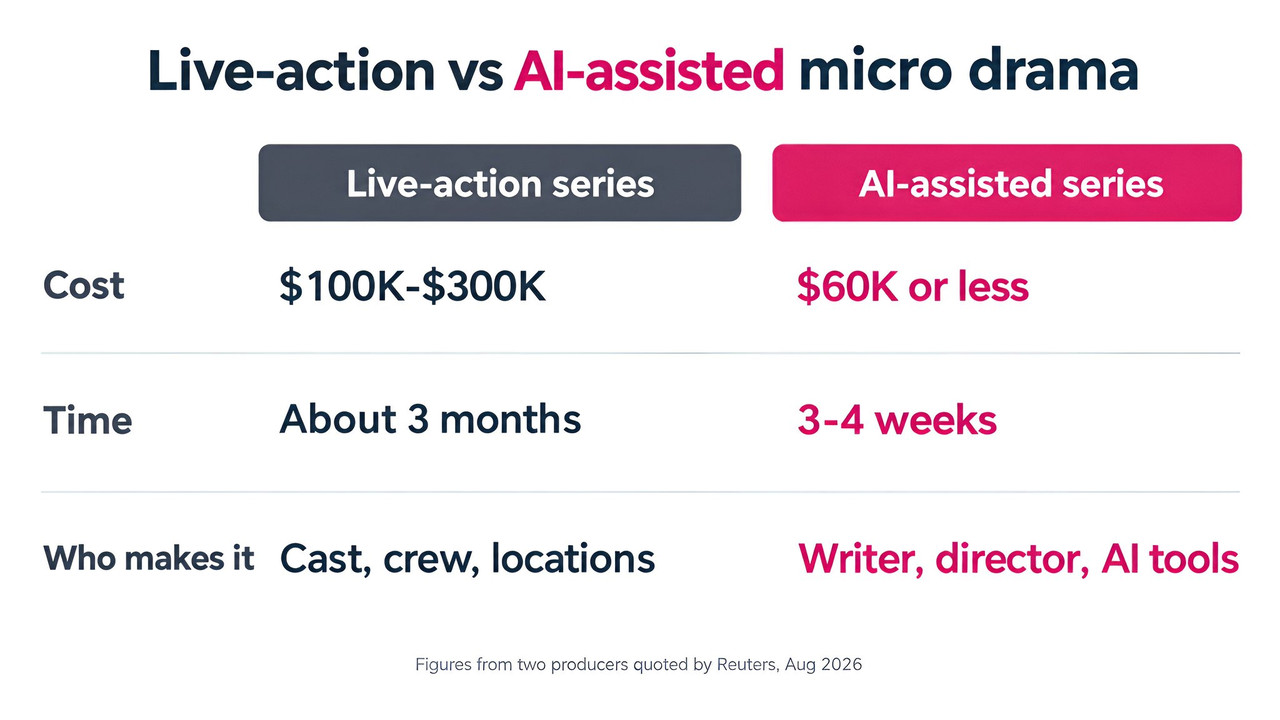
For a solo creator the relevant number is credits. Using the form's own estimates at default settings, a 30 second episode is 21 credits, a one-minute episode is 39 and a two-minute episode is 75. If a 60-episode season of one-minute episodes cost the same as my estimate each time, that is about 2,340 credits, before retakes. That is a back-of-envelope figure, and I would plan for more.
My own balance dropped by about 31.8 credits between the moment I pressed Review and the end of the run. Five of those credits were the article images I generated afterwards, which leaves around 26.8 for the episode itself, higher than the 20.2 shown on the review screen. I cannot see an itemized breakdown, so my advice is to budget roughly a third above the estimate for a first episode.
How to write a micro drama script that holds attention
The tool plans the shots, but the story still decides whether anyone watches the second episode. These are widely repeated conventions in the format rather than hard data, so use them as a starting point and test against your own analytics.
Start in the middle. Fliki's own prompt asks for an episode that opens mid-conflict. Skip introductions and begin with the argument, the secret or the threat.
End every episode on a question. A ReelShort script supervisor told Emmy Magazine that episodes end on suspenseful cliffhangers, and that writing them is closer to a science than it looks.
Give each episode one reversal. A new fact that flips the situation keeps a 60 second story from feeling like a scene fragment.
Use proven setups. Billionaires, hidden identities, contract marriages, forbidden romance and werewolves recur across the format. Familiar premises let the audience skip setup.
Keep dialogue short. Ten words or fewer per line performs better inside a short clip and subtitles more cleanly.
Many guides say the paywall should land around episode 10. That is an industry convention from blogs, not a published statistic, so treat it as a rule of thumb if you are building toward a paid series.
How to keep characters consistent across a season
Consistency is the problem that defines AI series work. The fixes below are the ones vendors and practitioners repeat, and they are consistent with what I saw in the Review step.
Lock the cast before you generate video. Fix faces on the character sheet, where a retake costs a fraction of a video retake. Save characters you will reuse.
Keep the look constant. Choose one visual preset and reuse it for the whole series.
Use reference images for anything specific. A distinctive coat, a scar or a house should come from a reference, not from a text description that can drift.
Watch variants. My neck-streak glitch came from a character variant, so check any variant look, such as injured or disguised, before it appears in a clean scene.
Chain episodes deliberately. Use Continue a previous film for episode two onward, and re-check the cast sheets each time.
Even with locked references, no tool guarantees identical details in every shot. Plot Party, one of the competing tools, says so on its own site. Plan to regenerate the odd shot.
Rules to check before you publish
This is the section competing guides mostly leave out, and it matters because micro dramas often look like real footage.
Platform AI labels
YouTube asks creators to disclose realistic altered or synthetic content, meaning scenes or people that look real but did not happen. Clearly animated or non-realistic content does not need disclosure, but a photorealistic AI drama likely does, which is my inference rather than YouTube's wording. YouTube's monetization rules also target inauthentic, mass-produced content, including templated AI content with no original perspective, so a series with real story and real editing is safer than a feed of near-identical clips. TikTok's AI-generated content rules require labels on realistic AI scenes or people and prohibit likenesses of minors and of private adults without permission. I could not confirm Instagram's current wording, so read Meta's page yourself. For more on the monetization side, see Fliki's guide to YouTube and AI demonetization and our post on whether AI-generated videos monetize.
Copyright
The US Copyright Office's January 2025 report on copyrightability says prompts alone do not give enough control to make AI output protected, while human-authored material, and human selection and arrangement, can be. In practice, your script, your characters as written and your edit are the strongest parts to claim. I am not a lawyer, so check with one if the series is a business.
Likeness and local rules
Do not use a real person's face or voice without consent. In China, an NRTA policy and unified AI label took effect on 1 September 2026, so if you distribute there, the labeling rules apply to you as well.
Where Fliki fits against other AI micro drama tools
Several tools now pitch themselves at this format. Picsart plans whole seasons of 20, 40 or 80 episodes. Runway, invideo and Morphic all emphasize locked character and location references. Those are vendor claims that I did not test.
Where Fliki's workflow is strong is the planning step: you get a reviewable cast board, a segment-by-segment shot plan and a copilot box before any video credits are spent, and the result lands in an editor you already know. Where it asks more of you is series planning. The Short film workflow works one episode at a time, and you chain episodes yourself with Continue a previous film, so if you want an agent to plan an 80-episode season in one go, compare tools. Prices and plans change quickly, so verify before you commit to any of them.
Common mistakes to avoid
Starting with a long, expensive episode. Test the script at 30 seconds first.
Skipping the Review step. Fix faces and shots in the plan, not after a full render.
Writing dialogue like a novel. Long lines break across shots and subtitles.
Changing the look between episodes. Pick the preset once.
Skipping the AI label. A realistic series with no disclosure risks takedowns or penalties on some platforms.
Trusting the estimate to the credit. My run came in above it.
When you are ready to post, vertical cutdowns work well on YouTube Shorts, TikTok and Reels, and Fliki's auto caption generator adds the subtitles that vertical viewers expect.
Bottom line
An AI micro drama is a writing and directing job with a much cheaper production step. In my test, one 30 second script turned into a coherent three-scene episode with a consistent cast for roughly 20 to 27 credits, and the Review step made the process feel controllable. It is not a push-button hit machine: you still need a tight script, a locked cast, an honest read of every frame and a clear plan for labeling. If you want to try it, you can open the Short film workflow and start with a 30 second episode.
Written by Shivam Aggarwal, who works on content and marketing at Fliki and ran the test episode described here on a Fliki Premium account. Statistics and pricing were current as of November 2026. Verify current pricing and platform policies before you rely on them.
FAQs
An AI micro drama is a serialized vertical drama, usually 9:16 with episodes of one to two minutes, whose scenes, characters and voices are generated by AI image, video and voice models instead of being filmed with actors. A human still writes the story, locks the cast and look, and reviews every shot before publishing.
Sources differ slightly. The Television Academy's Emmy Magazine reports 60 to 90 seconds, while Reuters reports 45 seconds to two minutes, and Omdia cites two to three minutes. A practical range for an AI micro drama is one to two minutes, with Fliki's Short film workflow offering lengths from 30 seconds to 2 minutes.
It depends on length and models. In Fliki's Short film workflow at default settings, the form estimated 21 credits for 30 seconds, 39 for one minute and 75 for two minutes. For comparison, Reuters quotes one AI-focused producer at $60,000 or less per series with human writers and directors, against $100,000 to $300,000 for live action.
Most micro drama apps let viewers watch the first few episodes free, then charge through coins, weekly subscriptions or ad unlocks. Reuters puts weekly subscriptions at about $8 to $20. Creators posting on YouTube, TikTok or Reels instead rely on views, platform monetization or traffic to an app, so check each platform's rules on AI content.
Often yes. YouTube asks creators to disclose realistic altered or synthetic content, and TikTok requires labels on realistic AI-generated scenes or people. China's regulator required a unified AI label from 1 September 2026. Rules vary and change, so read each platform's current policy before posting a realistic series.
The US Copyright Office's January 2025 report says prompts alone do not give enough control to make AI output copyrightable, but human-authored material and human selection and arrangement can be protected. Your script and edit are the strongest parts to claim. This is general information, not legal advice, so ask a lawyer if the series is a business.