
The ad that changed how I think about UGC
A few weeks ago I built a UGC-style ad for a Korean skincare cleanser without a camera, a creator, or a shipping label. No product samples mailed to anyone. No two-week wait for a raw folder of clips. I picked an AI avatar named Grace, wrote a hook that sounded like a friend venting about clogged pores, and had a publish-ready nine-to-fifteen second ad in the time it takes to make coffee. This is what I’d created:
That is the promise of creating UGC ads with AI avatars, and if you have landed here you probably already sense it is real. What you likely want is the honest version: does it actually work, how do you do it without producing something that screams "fake," and where does an AI avatar fit versus the quick product clips or the human creators you have used before.
I have run hundreds of AI-generated ad variations across Meta, TikTok, and YouTube over the past two years. This guide is the process I actually use, the parts that trip people up, the compliance stuff most tutorials skip, and an even-handed look at the tools worth your time. If you want the faster product-photo-to-clip method with preset ad styles, I covered that separately in how to make UGC video ads with AI. This piece is about the avatar-led approach: building ads around a consistent, reusable AI creator.
Let us get into it.
What "UGC ads with AI avatars" actually means
A UGC ad is a paid ad designed to look like content a real customer made on their phone. Casual lighting, direct-to-camera delivery, a face talking to you rather than a brand talking at you. The lack of polish is the point. It reads as a recommendation from a peer, which is why user generated content converts where glossy commercials bounce off.
An AI avatar takes that format and swaps the human creator for a synthetic one: a lifelike, AI-generated presenter with a consistent face and voice that you can reuse across scene after scene and campaign after campaign. Think of it as a digital spokesperson you cast once and direct forever.
That reusability is the key distinction, and it is worth being precise here because two related things get lumped together:
-
Product-image or scene-based AI UGC turns a product photo into a short clip, often with a different AI character each time. Great for volume and quick tests. This is the preset-driven workflow.
-
Avatar-led AI UGC builds the ad around a specific avatar you choose deliberately, hold consistent, and give multiple looks and camera angles. This is what you want when you are building a recognizable "face" for a brand, or running a testimonial and explainer style where the same creator appears throughout.
This guide is about the second one. If you have heard the term "AI UGC creator" and pictured a repeatable on-screen personality rather than a one-off clip, that is exactly the avatar approach.
Why use an AI avatar instead of a human creator (or a product clip)
When I first tried AI-generated UGC I assumed the output would look stiff and uncanny. Two years and thousands of clips later, the honest answer is that in the short window that matters for paid social, most viewers cannot reliably tell, and the economics are impossible to ignore.
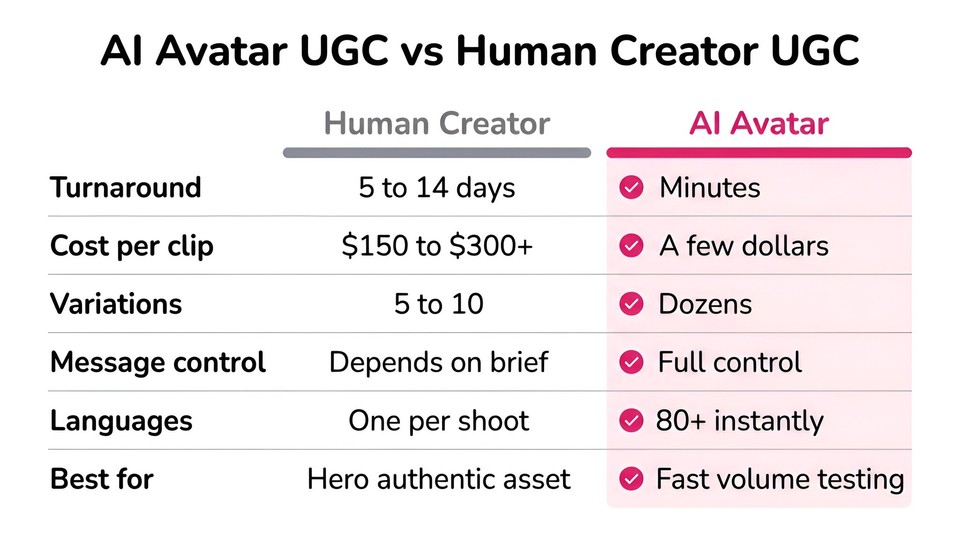
Consider the friction of the traditional path. Human UGC creators typically charge somewhere in the range of 150 to 300 dollars per short video, often with usage-rights fees on top and a five-to-fourteen day turnaround, according to creator-rate roundups like Whop's 2026 UGC statistics. You brief ten people, wait two weeks, get back five usable clips, and three of them missed the brief. An AI avatar renders a comparable clip in minutes, at a fraction of the cost, which means your testing budget stretches dramatically further.
Speed is the real unlock, and practitioners say so plainly. In one widely read r/FacebookAds discussion, a team noted their AI ads "performed very similar to non AI ads. But fast turn arounds are super additive... we just go so much faster." That matches my experience. AI avatars rarely beat a great human creator on a single hero asset. They win by letting you test twenty angles in the time a creator ships one.
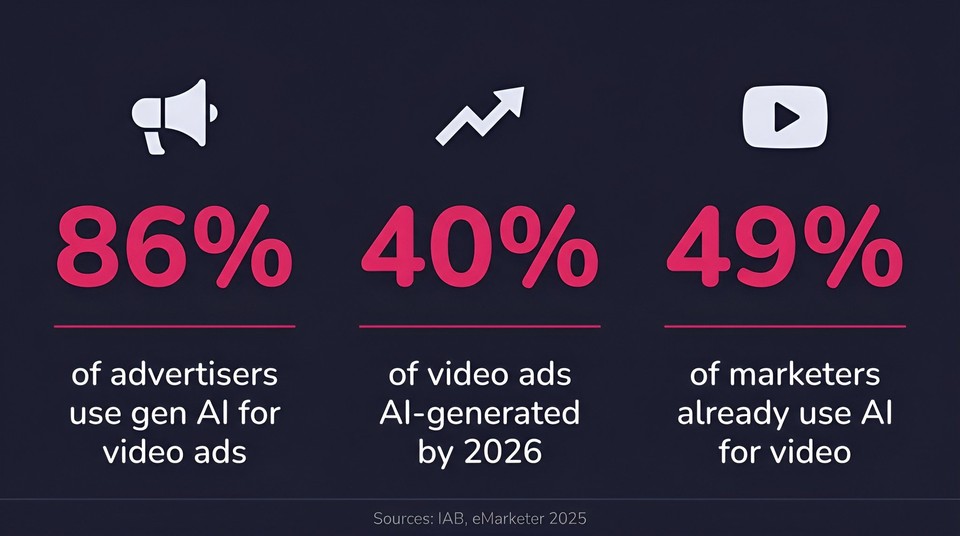
The market has already voted with its budgets. The Interactive Advertising Bureau found that 86 percent of advertisers use or plan to use generative AI to build video ad creative, with buyers projecting AI-generated creative will make up around 40 percent of all video ads by 2026. Roughly half of marketers worldwide already use AI to generate images and video. This is not a fringe tactic anymore.
The avatar advantage over a random product clip comes down to three things:
-
Consistency. The same trusted face across your whole funnel builds familiarity, and familiarity builds conversion.
-
Control. You decide exactly what the "creator" says, how they look, and where they appear, so brand safety and message accuracy stop being a guessing game.
-
Multiple looks from one cast. Modern avatars ship with several looks (front, close-up, three-quarter, seated) so a single character can carry an entire ad without feeling repetitive.
Are AI avatar UGC ads actually any good? The honest take
Here is where I want to be straight with you, because the internet is split and pretending otherwise helps no one.
The optimistic camp is loud. In a much-discussed r/facebook thread one marketer described building "AI people so realistic that customers are sliding into DMs asking for the actress's Instagram. She doesn't exist. And the ads? They're crushing it." Reassuringly, the fear of the "uncanny valley" may be overblown for modern avatars: a 2025 peer-reviewed study in the Journal of Science Communication found that highly realistic AI avatars did not trigger an uncanny-valley effect. The real variable was trust, not creepiness.
The skeptics have a point too, and it is the one to internalize. On r/marketing, practitioners warned that "AI generated UGC is a HUGE risk once people catch on... they notice immediately." The whole reason UGC works is emotional trust, and a viewer who clocks the ad as synthetic can become more skeptical, not less.
The data backs the caution. eMarketer and CivicScience found that only 12 percent of US adults would be more likely to buy from a brand if they knew it used AI in ads, and 37 percent viewed such brands more negatively. Separately, Forbes reported that 55 percent of audiences are uncomfortable with AI in general.
So what is the takeaway? AI avatar UGC is a genuinely strong tool for one job in particular: cheap, fast, high-volume creative testing. It works best for direct-response, educational, and explainer angles, and for digital products. Once a concept proves out, many teams put real-creator budget behind the validated winner. Used that way, an AI avatar is not a replacement for authenticity, it is the fastest way to find out what is worth being authentic about. And the moment you decide to use it, transparency stops being optional, which I will cover in the compliance section below.
How to create a UGC ad with an AI avatar: a step-by-step walkthrough
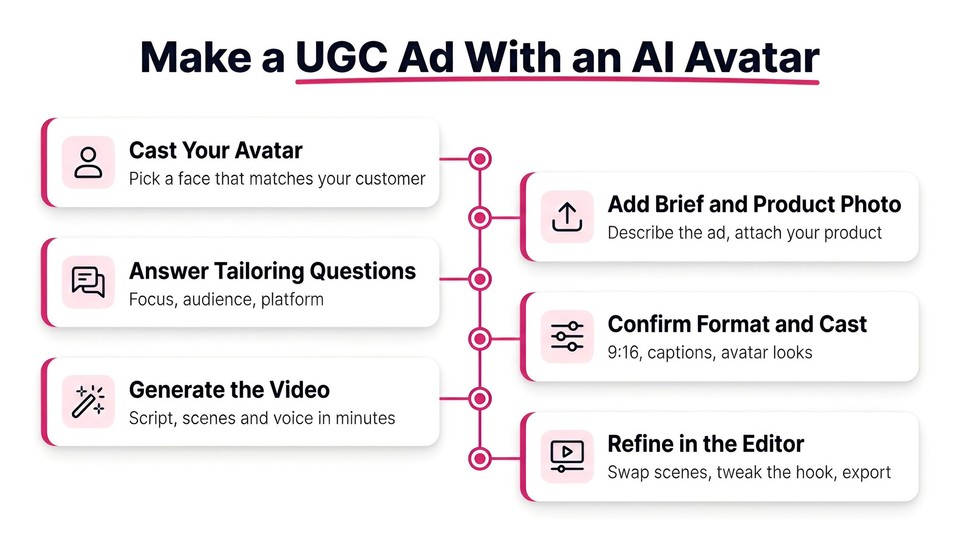
This is the workflow I used for the skincare ad I mentioned, built inside Fliki's avatar-driven video creation flow. The whole thing takes well under ten minutes once you know the moves. I will assume you have a Fliki account. If not, the free plan is enough to follow along.
Step 1: Cast your avatar (and pick the right looks)
From the home screen, open the avatar picker and browse the Characters library. Fliki ships with 70+ AI avatars spanning ages, ethnicities, and styles, plus the option to create a custom digital twin. Filter by All, Male, or Female, and choose a character whose demographics match your target customer. This one decision moves performance more than almost anything else. A Gen Z skincare product needs a young, aesthetically-aligned creator, not a generic corporate face.
Once you pick a character, select the looks you want to feature. A well-built avatar offers several: a Front look for direct-to-camera hooks, a Close-up for intimacy, a Three-quarter for a natural conversational feel, and a Seated look for longer explainer beats. Using two or three looks in one ad keeps it visually alive and stops it feeling like a static headshot, which was a common complaint about older avatar tools.
Step 2: Feed the brief and attach a product reference
Back on the create screen, describe what you want in plain language and attach your product image so the avatar's world can reference the real thing. My prompt for the skincare ad was essentially: create a UGC ad for this cleanser, focused on deep cleansing and pore care, for daily skincare users, for TikTok. Attach a clean, well-lit product photo. The clearer the reference image, the better the product renders in-scene.
Step 3: Answer the tailoring questions (or skip them)
Fliki's Copilot then offers a few optional choices that sharpen the output: what aspect of the product to focus on, who the target audience is, and where the ad will run. For the skincare ad I chose deep cleansing and pore care, daily skincare users, and TikTok in 9:16. Set the duration too. For paid social I keep it short, around 30 to 60 seconds, because UGC lives or dies in the first few seconds regardless of total length.
Step 4: Review the one-page setup
You land on a single setup page with your video "at a glance" on the right rail. This is where you confirm the pieces that matter:
-
Format: 9:16 portrait for TikTok, Reels, Shorts, and Stories. 1:1 for Instagram feed, 16:9 for YouTube.
-
Scene media: choose AI images in a chosen style (I use a cinematic, realistic look for UGC) or stock media, and pull in your own product footage from My library. You can even toggle AI video clips to turn still images into short motion clips.
-
Narrator and captions: auto voice matched to your language, plus a caption style. Turn captions on. Most social video is watched on mute, so burned-in captions are non-negotiable.
-
Cast: confirm your avatar (Grace, in my case) is set to feature in the key scenes, and use "Detect from script" if your script mentions other characters.
Step 5: Set your extras
Under Extras and advanced you can enable a brand kit to apply your colors, logo, and fonts, highlight subtitles, generate sound effects, and add licensed music. There is also a "Review detailed script first" option, which I recommend leaving on when you care about the exact wording, because it adds a step where you can edit every scene, visual, and voiceover line before the video renders.
Step 6: Generate
Hit Generate. Fliki walks through preparing, analyzing the script, building the scenes, generating the visuals, adding voice and music, and finalizing, usually in a minute or two. You do not have to babysit it.
Step 7: Refine in the editor
You land in the editor with the full storyboard: your avatar delivering the hook, product B-roll, supporting scenes, captions, and a music bed already in place. Here you fine-tune. Swap a weak scene, adjust a caption, change a look, tweak the voice, or regenerate a single line rather than starting over. When it is right, hit Download.
That is the entire loop. The magic is not any single render, it is that you can duplicate the project, change only the hook, and have your next variation in minutes.
The part that actually decides performance: the script and hook
You can have a flawless avatar and still flop if the words are wrong. Across every practitioner source I trust, the hook does more heavy lifting than production quality. Here is the structure I use, adapted from direct-response UGC frameworks like the ones Motion documents:
-
Hook (0 to 3 seconds): a pattern interrupt. A bold claim, a relatable frustration, or a "stop scrolling if..." line. Write it the way a person talks, not the way a brand writes. My skincare hook was a blunt "stop washing your face with basic soap that leaves your pores full of gunk."
-
Problem (3 to 8 seconds): name the pain in the viewer's own words. Specific beats generic every time.
-
Solution and demo (8 to 20 seconds): introduce the product and show it. This is where your product footage and B-roll carry the load.
-
Soft CTA (final 3 to 5 seconds): "check it out if you're dealing with the same thing" tends to outperform a hard "buy now" in UGC.
Two tricks that consistently help. First, write the script, read it out loud, and rewrite anything that sounds like an ad into how you would text a friend. Second, mine real customer language from reviews and ad comments, then feed those exact phrases into your hook. Real words beat clever words.
And then iterate on hooks, not full ads. Once a preset, avatar, and script prove out, generate ten variations of just the opening line. Small hook changes routinely produce outsized lifts in click-through rate without touching anything else. This is the single biggest advantage AI avatars give you over a human shoot: the marginal cost of variation number eleven is basically zero.
Best practices for higher-converting AI avatar UGC
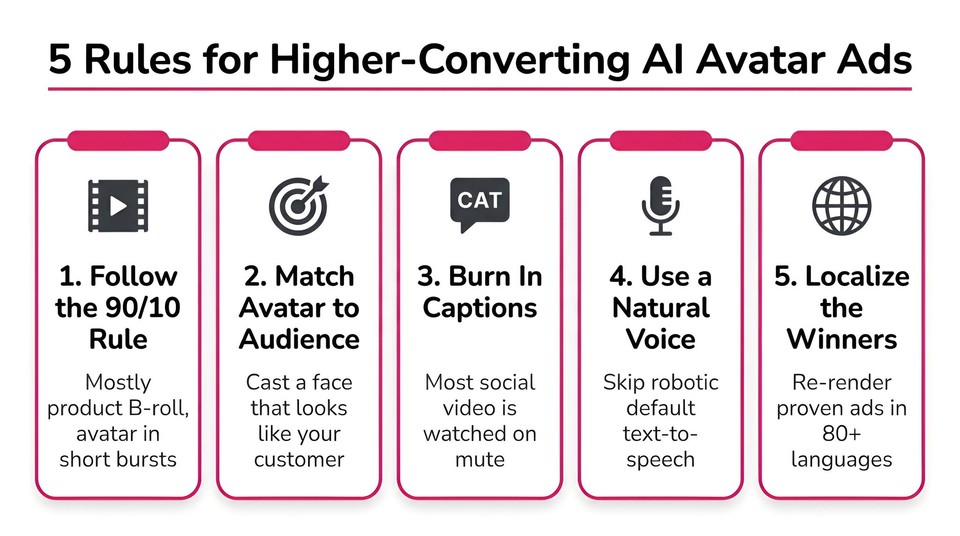
-
Follow a rough 90/10 rule. Let product footage, B-roll, and screen recordings carry most of the runtime, with the talking avatar appearing in bursts. Heavy B-roll masks any residual synthetic feel and keeps the ad feeling native.
-
Match the avatar to the platform and audience. Selfie-style and conversational looks tend to win on TikTok and Reels. A seated, authoritative look suits explainer angles on YouTube and Meta feed.
-
Burn in captions and keep them large. Sound-off viewing is the default. Use Fliki's subtitle generator and a bold, readable style.
-
Use a natural voice, not a robotic default. Flat text-to-speech kills UGC. Fliki offers 1,300+ ultra-realistic voices and voice cloning on higher plans, which matters more than people expect.
-
Localize the winners. Once a concept works, re-render it in 80+ languages with the same avatar. This is where avatars crush human creators, since you cannot reshoot a person in twenty languages by Friday.
-
Keep a swipe file. Every scroll-stopping UGC ad you see is a future prompt. Save them.
The legal part nobody tells you: disclosure and platform rules
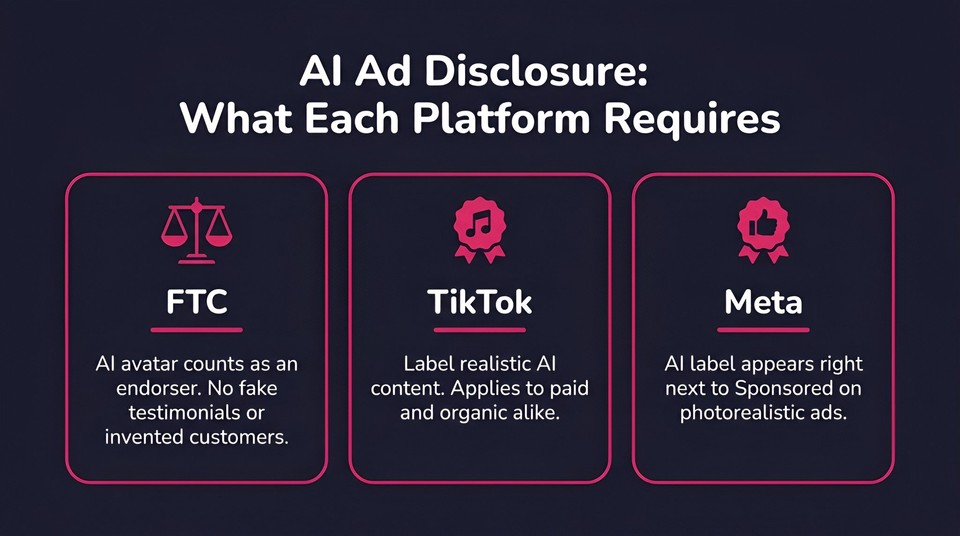
This is the section most tutorials skip, and it is exactly the kind of thing that protects your ad account and your brand. If you take one thing from this article beyond the how-to, take this.
The FTC treats a synthetic endorser like a real one. An AI avatar that appears to be a person giving a testimonial is, in the eyes of the FTC's endorsement guidance, an endorser, and the advertiser remains liable for deceptive claims made by it. On top of that, the FTC's rule banning fake reviews and testimonials, effective since late 2024, prohibits testimonials from people who do not exist or never used the product. The practical read: an AI avatar can present information, opinions, and demonstrations, but do not have it fabricate a personal experience it never had ("I've used this for three years") as if it were a real customer.
TikTok and Meta both require AI labels for realistic synthetic media. TikTok's policy requires labeling AI-generated content that shows realistic scenes, including synthetic faces and voices, and it applies to paid and organic alike. Meta labels ads made or significantly edited with generative AI, and when the AI produces a photorealistic person the label appears right next to "Sponsored." Both platforms adopted C2PA content credentials, so third-party AI is increasingly auto-detected whether you disclose or not.
If you have EU audiences, note Article 50. The EU AI Act's transparency obligations for AI-generated and deepfake media apply from August 2026, with meaningful penalties for non-compliance. Build disclosure into your process now rather than retrofitting it later.
None of this should scare you off. It should shape how you use the tool. Disclose clearly, keep claims truthful, and let the avatar be a presenter rather than a fake friend. Done right, transparency and performance are not in tension. For a related deep dive on platform rules, see our guide on whether AI-generated videos get monetized in 2026.
The best AI avatar tools for UGC ads (an even-handed comparison)
There is no single "best" tool, only the best fit for your job. Here is how the main options stack up as of mid-2026. Pricing changes frequently, so treat these as directional and confirm on each vendor's page.
|
Tool |
Best for |
Avatar library |
Notable strength |
Starting price (verify) |
|---|---|---|---|---|
|
Fliki |
End-to-end UGC ads plus voiceover, captions, and localization in one place |
70+ avatars + custom digital twin |
Full text/script/idea-to-video, 1,300+ voices, 80+ languages, brand kits |
Free plan; avatars on paid tiers |
|
HeyGen |
General-purpose and enterprise avatar video, digital twins, translation |
500+ avatars, 175+ languages |
Polished spokesperson video at scale |
Free tier; paid from low tens/mo |
|
Arcads |
Purpose-built performance UGC ads at volume |
300+ AI actors |
Natural "actor" delivery, batch mode |
Paid only, from ~$110/mo |
|
Creatify |
E-commerce URL-to-video at volume |
700+ avatars |
Turn a product URL into batches of SKU ads |
Free tier; paid tiers available |
|
Synthesia |
Corporate training, L&D, internal comms |
180+ avatars, 160+ languages |
Enterprise governance and dubbing |
Free tier; paid from ~$18/mo |
|
Captions AI |
Mobile-first editing plus AI actors |
AI actors + AI Twin |
Strong captions and one-click ad generator |
Low-cost paid tiers |
A few honest notes. If you specifically searched for a HeyGen alternative or an Arcads alternative, the deciding factor is usually breadth versus specialization. Arcads and Creatify are laser-focused on performance ads. HeyGen and Synthesia lean general and enterprise. Fliki sits at the "all-in-one" end: it is built to take you from a script, idea, blog post, or product image all the way to a finished, captioned, localized video with an AI avatar, without stitching four tools together. For a broader rundown, our alternatives hub compares options side by side.
If you want to try the avatar-led workflow from this guide, Fliki's AI avatar feature is the fastest on-ramp, and you can see exactly where avatars sit across plans on the pricing page.
Common mistakes to avoid
The most expensive mistake is treating AI avatar UGC like a vending machine instead of a testing system. The teams that win generate deliberately, read the data, and refine. The teams that quit after two clips never see what the tool can do.
The second is casting the wrong avatar. If the face on screen does not look like your customer, the ad underperforms before a single word is spoken. Spend real time on this choice.
The third is skipping disclosure and hoping nobody notices. Platforms increasingly detect AI automatically, and a surprise label on a "hidden" AI ad reads worse than an upfront one. Be transparent from the start.
And the fourth is letting the avatar do everything. Silent talking-head for thirty seconds is not UGC, it is a webinar. Layer in product footage, cuts, captions, and pace so it feels like something a person actually filmed.
Final thoughts
The brands that will win paid social over the next two years are not the ones with the biggest production budgets. They are the ones that can test the most creative the fastest, while staying honest with their audience. AI avatars are the fastest path to that first part, and clear disclosure is how you protect the second.
My advice if you are starting today: cast one avatar that genuinely looks like your customer, write one sharp hook, generate one ad, and run it as a small test where your audience actually lives. Then change only the hook and go again. The data will tell you what resonates, and from there you scale.
If you want to build your first one right now, you can start creating with Fliki for free. Pick a character, write a hook, and see how close to camera-ready a single generation gets you.
Written by Shivam Aggarwal, who works on content and marketing at Fliki and has run hundreds of AI-generated ad variations across Meta, TikTok, and YouTube. Statistics and platform policies were current at the time of writing in July 2026. Always verify current tool pricing and platform disclosure rules before you publish.
FAQs
Yes. Both platforms permit AI-generated ads, but require you to label realistic AI-generated content. TikTok and Meta apply the rules to paid and organic content, so disclose and keep your claims truthful.
On a single hero asset, a great human creator often still edges ahead. Where AI avatars win is speed and volume, letting you test many hooks and angles cheaply, then scale the proven ones. Many teams use AI to find winners and human budget to amplify them.
Generally yes, provided you disclose that the content is AI-generated where the platform requires it and you do not fabricate a fake personal experience or testimonial. The FTC holds advertisers responsible for claims a synthetic endorser makes, so treat the avatar as a presenter, not an invented customer.
Far less than a human creator, who typically charges 150 to 300 dollars per clip plus usage fees. AI avatar tools generally run on monthly subscriptions that let you produce many videos, which is why the per-ad cost drops dramatically once you are testing at volume. Fliki has a free plan to start, with AI avatars on its paid tiers.
A natural voice, multiple avatar looks rather than a static headshot, heavy use of real product footage and B-roll, burned-in captions, and a hook written the way people actually talk. Pace and editing matter as much as the avatar itself.
Yes, and you should. A consistent face builds familiarity and trust over time, and you can re-render the same avatar in dozens of languages, which is a core advantage over human creators.