Introduction
Podcasts are not an audio-only medium anymore. The single most popular place people consume podcasts is now YouTube, a video platform, and that has quietly rewritten the rules for anyone starting a show. A podcast without a video version is invisible to most of the audience.
The problem is that filming a real video podcast is a production: cameras, mics, lighting, a guest, a set, and hours of editing. That is exactly the gap AI has started to close. You can now generate a full video podcast, two hosts on camera, having a natural conversation, from a single sentence about your topic, no studio required. This guide covers both routes, filming your own and generating one with AI, features the AI workflow step by step with real screenshots, and is honest about the one thing most articles skip: when and how you must disclose that the hosts are synthetic. I work on content at Fliki, so let's get into it.
Why video podcasts matter now
The shift to video is not a hunch, it is in the numbers, and they are striking. YouTube passed 1 billion monthly active podcast viewers in early 2025, and by its own reporting, people watched over 700 million hours of podcasts on living-room devices in October 2025, up from 400 million a year earlier. In the US, YouTube is the platform podcast listeners say they use most, ahead of Spotify and Apple, according to both Edison Research's Infinite Dial 2025 and Cumulus Media and Signal Hill Insights' Podcast Download report.
Spotify is pushing the same direction: it reported that time spent with video on the platform more than doubled year over year, driven mostly by video podcasts, with hundreds of thousands of video shows now available. And discovery has gone visual too. Signal Hill found that 53% of 18-to-34-year-olds have chosen a podcast based on its thumbnail, and one in three podcast consumers now prefer a show with a video component.
The takeaway is simple: audio-only leaves reach on the table. A video version gets you onto YouTube, gives you a thumbnail to compete with, and produces clips you can post to drive discovery. The only question is how to make one without a film crew.
The two meanings of "podcast video"
Before the how-to, it helps to separate two things people mean by this, because the tools are different.
Route A is filming a real podcast: you and a guest on camera, with mics, lighting, and multiple angles, then edited into an episode. This is the established route and it produces the most authentic result, but it is also the most work and the hardest to start.
Route B is generating a video podcast with AI: you give an AI a topic, it writes a conversation between two hosts, casts synthetic hosts with AI voices, and films talking-head clips into a finished episode. This is a genuinely new capability in 2025 and 2026, and it is what makes a video podcast possible with no camera, no guest, and no studio. It is the focus of this guide, and we will be clear about where it fits and where it does not.
Route A: filming your own video podcast (the short version)
If you want a real, human show, the essentials are straightforward even if the execution takes practice. Invest in audio first, since listeners forgive weak video but abandon bad audio, so a decent dedicated mic matters more than a fancy camera. Shoot more than one angle if you can, a wide shot of both people plus a close single on each, so the edit can cut to whoever is talking. Light the scene softly and keep a consistent set and branding so episodes feel like one show. Then edit, level the audio, add captions, and cut vertical clips for social. Tools like Riverside and Descript handle the remote recording, transcript-based editing, and auto-clipping for this route. It works, it is authentic, and it is the right call when the human connection is the point.
Route B: generate a video podcast with AI in Fliki
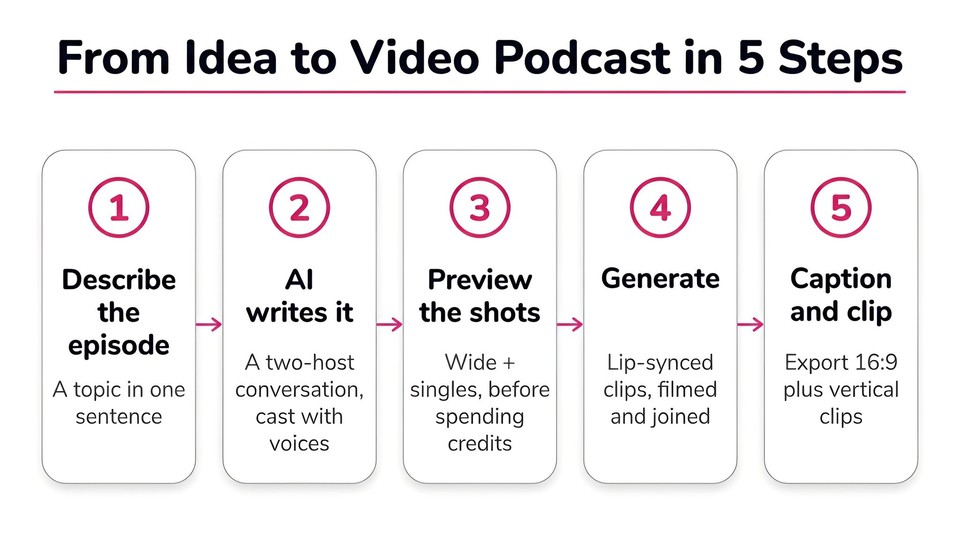
Here is the part that did not exist a couple of years ago. I will walk through the AI video podcast generator in Fliki, because it produces a full video podcast with talking-head hosts end to end, which most "AI podcast" tools do not (more on that below).
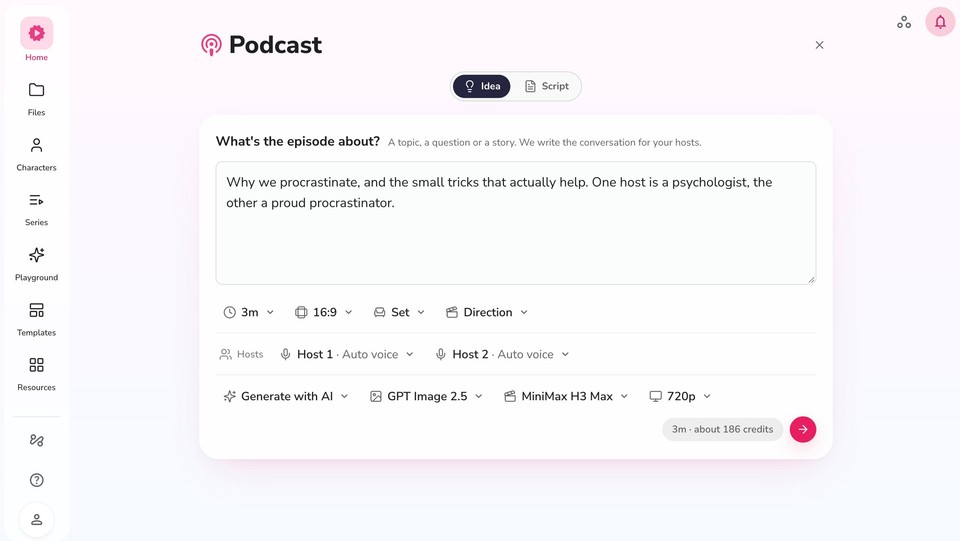
Step 1: Describe the episode. In the Podcast workflow, you choose Idea and write what the episode is about in a sentence, for example "why we procrastinate, and the small tricks that actually help; one host is a psychologist, the other a proud procrastinator." Then set the length (1 to 10 minutes), the aspect ratio, the set, and the two hosts. If you already have a script, switch to the Script tab and paste it instead (and if you need help writing one, our roundup of AI script generators covers the options).
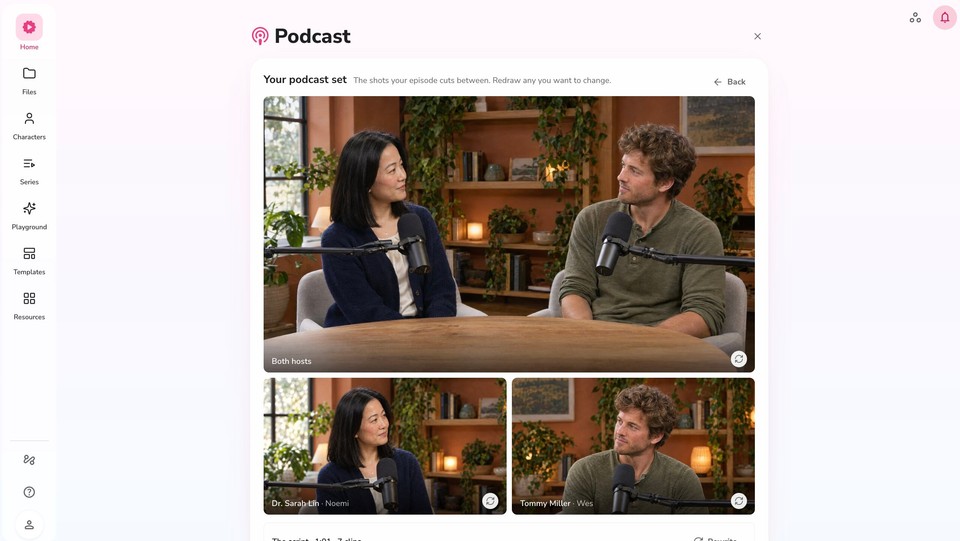
Step 2: Preview the set and shots before spending credits. This is the smart part. Fliki shows you the shots your episode will cut between, a wide shot of both hosts at the table plus a single on each, and lets you redraw any of them before it films anything. Because rendering costs credits, previewing the hosts, the set, and the clip-by-clip script first means you are not paying to generate a version you do not like.
Step 3: Let it write the conversation and cast the hosts. Fliki writes a natural back-and-forth between two named hosts, not a monologue, and casts each with an AI voice and a consistent on-camera look on your chosen set. You get real characters (in my test, Dr. Sarah Lin and Tommy Miller), and you can reuse the same hosts across future episodes so your show has a recognizable cast.
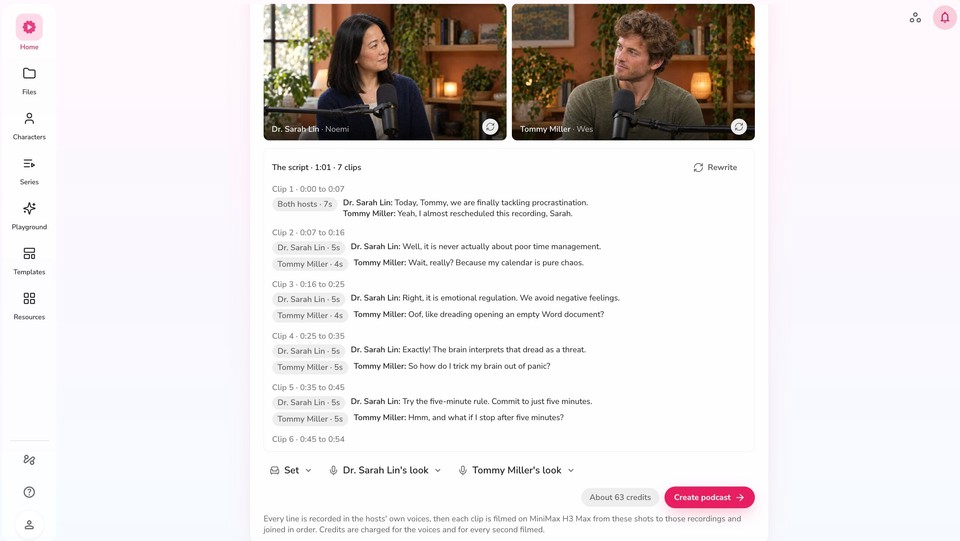
Step 4: Generate the episode. Hit create and Fliki records every line in the hosts' voices, films each clip as lip-synced talking-head video, and joins them in order, with an AI "director" cutting between the wide shot and the singles so it feels like a real multi-cam show rather than two static heads.
Step 5: Edit, caption, and export. The episode opens in a full editor where you can rewrite any line, swap a shot, add captions and background music, and adjust the pacing. Then export your 16:9 master, and cut vertical clips for Shorts, Reels, and TikTok from the same project.
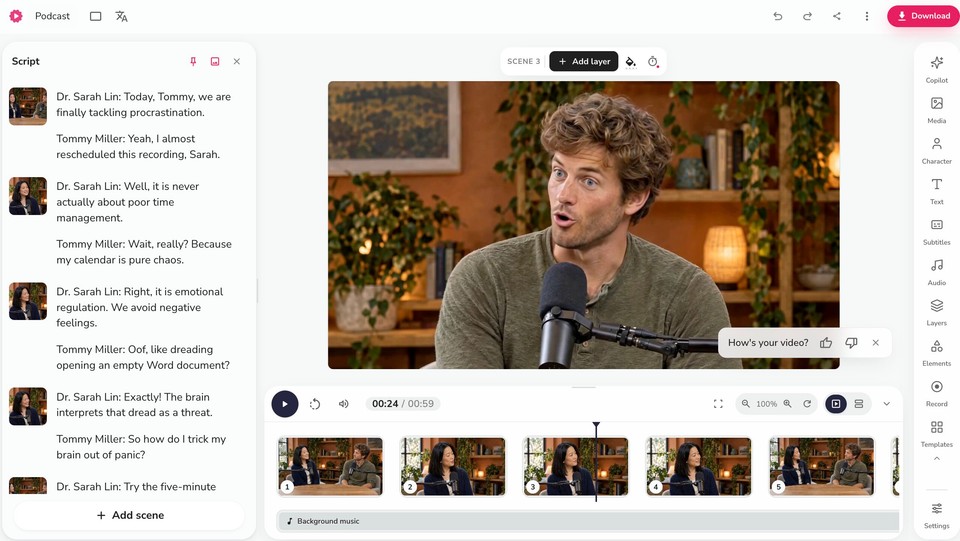
The reason this route is compelling is not that it replaces a real show, it is that it makes a video podcast possible at all when you do not have a studio, a co-host, or an editing workflow, which is most people starting out.
The wider AI podcast tool landscape (and an honest distinction)
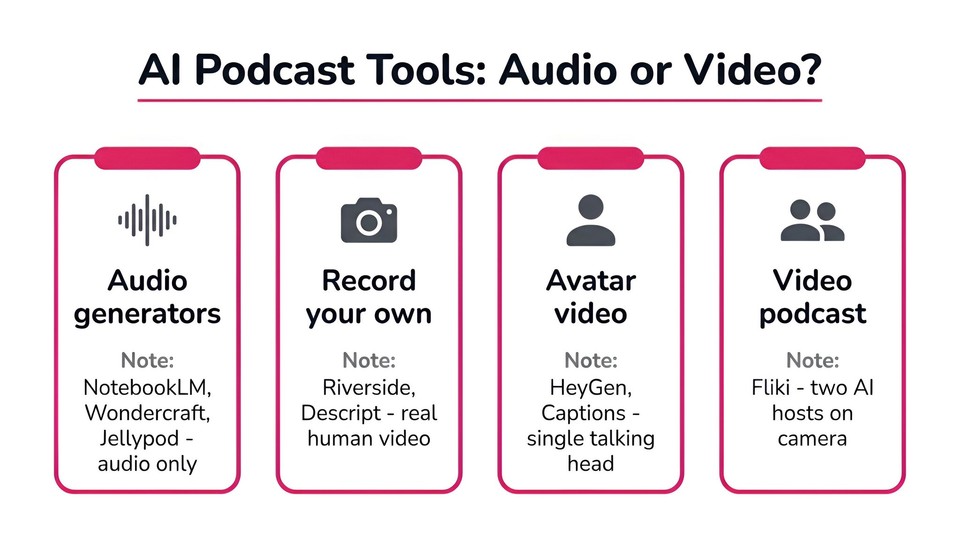
"AI podcast tool" covers several very different things, and the distinction matters when you choose one.
Most AI podcast generators make audio only. Google's NotebookLM Audio Overviews turns your uploaded sources into a two-AI-host audio conversation, and its newer Video Overviews produce a narrated visual slideshow, not talking-head hosts. Wondercraft and Jellypod similarly generate AI audio podcasts with synthetic hosts. These are excellent for an audio show or a "podcast from my documents," but they do not give you a face on camera.
A second group helps you record and edit a real video podcast: Riverside for remote studio-quality recording plus auto-generated clips, and Descript for transcript-based editing, eye-contact correction, and clip suggestions. A third group generates AI avatar talking-head video from a script, like HeyGen and Captions, which is closer to a single presenter than a two-host show. And tools like Opus Clip exist purely to chop a long episode into vertical clips.
Where Fliki sits, and the reason it is worth knowing about, is that it generates a full video podcast with two talking-head hosts end to end, bridging the gap between the audio-only generators and the record-your-own-face tools. Pick the category that matches your goal: audio generators for a sources-based audio show, recording tools for a real human show, and a video-podcast generator when you want synthetic hosts on camera.
Cut clips, because that is where the audience finds you
Whichever route you take, the episode is only half the job. Short vertical clips are how most new listeners discover a show now, so pull the three or four best moments from each episode, caption them, and post them to Shorts, Reels, and TikTok. A single 45-second clip of your most surprising exchange will reach more new people than the full episode ever will. Generating your podcast as video from the start means these clips are a crop-and-export away rather than a reshoot.
Best practices for a podcast video that works
A few things separate a video podcast people watch from one they scroll past. Add captions, always, since most social video is watched on mute; in one Verizon Media and Publicis Media study, 69% of people said they watch video with the sound off in public, and captions make your show accessible on top of that. Keep episodes tight and focused rather than padding to an arbitrary length. Show both speakers, cutting to whoever is talking, so it reads as a conversation. Keep a consistent set, hosts, and branding so your episodes feel like one show. And protect audio quality above all, because a crisp voice with simple visuals beats a beautiful shot with muddy sound every time.
The honest part: disclose that your hosts are AI
This is the section most guides leave out, and it is the one that protects you. If your podcast's hosts and voices are AI-generated, say so. It is both the ethical call and increasingly the safe one.
Two things to keep in mind. First, platform policy: YouTube's July 2025 update sharpened its rules on inauthentic and mass-produced content. AI-generated podcasts are completely fine when they add real value, an explainer, an educational breakdown, a genuine synthesis of a topic, but mass-producing dozens of near-identical AI episodes to game the algorithm risks being flagged as spam and demonetized. Build a show worth watching, not a content farm. Second, honesty with your audience and the law: the FTC's rules on reviews and endorsements make clear that synthetic or AI-generated content presented as genuine human testimony can cross a line, and cloning a real person's face or voice without consent is a hard no. The safe and honest framing is to treat an AI video podcast as what it is, a synthetic explainer or educational show, clearly labeled, rather than passing it off as a real human program. Used that way, it is a powerful, legitimate format.
Common mistakes to avoid
The recurring ones: staying audio-only when video is where the audience and discovery now live; skipping captions; never cutting short clips; letting audio quality slide; rambling episodes with no focus; AI voices left on a robotic default instead of natural-sounding hosts; an inconsistent look with no recurring cast or set; and, the big one, failing to disclose that the show is AI-generated. Every one of these is easy to avoid once you know to look.
The bottom line
Video is no longer optional for a podcast, it is where the audience and the discovery are. You can film a real show if you have the setup for it, but you no longer need one to start: AI can generate a full video podcast, two hosts, a set, a real conversation, from a single sentence, and give you the clips to promote it. Do it well, caption everything, keep it tight, cut clips, and be upfront that the hosts are AI, and you have a modern, discoverable show without a studio.
If you want to see how fast it goes from an idea to a finished episode, you can create a video podcast in Fliki and have your first one in minutes.
FAQs
Yes. Tools like Fliki write a two-host conversation from your topic, cast AI hosts with voices and a consistent look, and film lip-synced talking-head clips into a finished episode. Most other "AI podcast" tools, like NotebookLM, Wondercraft, and Jellypod, generate audio only, so check whether a tool produces video before you commit.
Describe the episode topic, choose the length and two hosts, let the AI write the conversation and cast the hosts, preview the set and shots, then generate. After it films the episode, edit any lines, add captions and music, export a 16:9 master, and cut vertical clips for social.
Using fully synthetic hosts you created is fine, and you should disclose that they are AI. What you cannot do is clone a real person's face or voice without their consent. Keep AI shows to original, clearly labeled, value-adding content to stay within platform rules like YouTube's inauthentic-content policy.
They reach more people, because the biggest podcast platform is now YouTube and discovery increasingly runs through thumbnails and short clips. Audio still matters, but a video version expands where your show can be found. Always add captions, since much of that viewing happens on mute.
It depends on your goal. For a synthetic two-host video podcast, Fliki generates the whole thing end to end. For an audio show from your own documents, NotebookLM is strong. To record a real human video podcast, Riverside or Descript are built for that.
Pull the best 30-to-60-second moments, add captions, and export them vertically for Shorts, Reels, and TikTok. If you generated the podcast as video, you can crop and export clips from the same project; for recorded shows, tools like Opus Clip find and cut the highlights automatically.